Танилцуулга
Худалдан авалт хийсэнд баярлалааasing the Bytech True Wireless Bluetooth Boost Link True Speaker. This manual provides essential information for setting up, operating, and maintaining your new speakers. Please read this manual thoroughly before use to ensure proper operation and to maximize your listening experience. These speakers feature True Wireless Stereo (TWS) functionality, Bluetooth connectivity, FM Radio, and Bass Boost for rich audio.
Аюулгүй байдлын мэдээлэл
- Чанга яригчийг хэт өндөр температур, чийгшил эсвэл нарны шууд тусгалд бүү гарга.
- Чанга яригчийг унагах эсвэл хүчтэй цохилтонд оруулахаас зайлсхий.
- Do not disassemble, repair, or modify the speakers yourself. Refer all servicing to qualified personnel.
- Keep the speakers away from water and other liquids.
- Зөвхөн заасан цэнэглэгч кабель болон тэжээлийн адаптерийг ашиглана уу.
- Clean the speakers with a soft, dry cloth. Do not use abrasive cleaners or solvents.
- Listen at moderate volume levels to avoid hearing damage.
Багцын агуулга

Image: The Bytech Boost Link True Wireless Speakers shown in their retail packaging, highlighting the two speakers and the Bluetooth connectivity feature.
Бүх зүйл байгаа, сайн нөхцөлд байгаа эсэхийг шалгана уу:
- 2 x Bytech Boost Link True Wireless Speakers
- 1 x цэнэглэх кабель (USB)
- 1 х хэрэглэгчийн гарын авлага (энэ баримт бичиг)
Бүтээгдэхүүн дууссанview

Зураг: Ойрын нүүр view of the two Bytech Boost Link True Wireless Speakers, showing the speaker grilles and control buttons at the bottom.
Чанга яригчийн бүрэлдэхүүн хэсэг болон удирдлагатай танилцана уу:
- Чанга яригч: Чанга яригчийн драйверыг хамгаалдаг.
- Хяналтын товчлуурууд:
- Цахилгаан товч: Power On/Off, Play/Pause.
- Горимын товчлуур: Switch between Bluetooth, FM Radio, etc.
- Өмнөх дуу/дууг бууруулах товчлуур: Өмнөх дууг богино хугацаанд дарж дууг багасгах бол удаан дарна уу.
- Дараагийн дуу/дууг нэмэгдүүлэх товчлуур: Дараагийн дууг оруулахын тулд богино дарж, дууны хэмжээг нэмэгдүүлэхийн тулд удаан дарна уу.
- Цэнэглэх порт: USB цэнэглэгч кабелийг холбоход зориулагдсан.
- LED үзүүлэлт: Shows power status, charging status, and pairing status.
Тохиргоо
Чанга яригчийг цэнэглэж байна
Before first use, fully charge both speakers. Connect the supplied USB charging cable to the charging port on each speaker and plug the other end into a USB power adapter (not included) or a computer's USB port. The LED indicator will show charging status and turn off or change color when fully charged.
Асаах/унтраах
- Асаахын тулд: Press and hold the Power button on each speaker until the LED indicator lights up and you hear a power-on prompt.
- Унтраахын тулд: Press and hold the Power button on each speaker until the LED indicator turns off and you hear a power-off prompt.
Ашиглалтын заавар
Bluetooth холболт (Дан чанга яригчийн горим)
- Чанга яригч асаалттай бөгөөд Bluetooth холболтын горимд байгаа эсэхийг шалгаарай (LED индикатор анивчина).
- Төхөөрөмж дээрээ (ухаалаг утас, таблет, зөөврийн компьютер) Bluetooth-г идэвхжүүлж, боломжтой төхөөрөмжүүдийг хайж олоорой.
- Select "BYTECH BOOST LINK" (or similar name) from the list.
- Once paired, the LED indicator will stop flashing and remain solid, and you will hear a confirmation sound.
True Wireless Stereo (TWS) Pairing (Two Speakers)
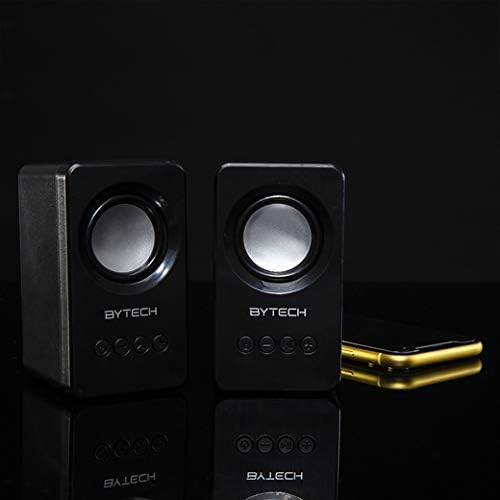
Image: The two Bytech Boost Link True Wireless Speakers positioned next to a smartphone, symbolizing their ability to connect wirelessly to each other and a device for stereo sound.
For a true stereo sound experience, you can pair both speakers together:
- Power on both Bytech Boost Link speakers. Do not connect them to your Bluetooth device yet.
- The speakers will automatically attempt to pair with each other. You will hear a confirmation sound when they are successfully linked for TWS. One speaker will become the master (left channel) and the other the slave (right channel).
- Once TWS paired, the master speaker will enter Bluetooth pairing mode (LED flashing).
- On your device, enable Bluetooth and search for "BYTECH BOOST LINK". Connect to this single entry.
- Одоо хоёр чанга яригч хоёулаа аудиог стерео хэлбэрээр тоглуулна.
- Жич: If the speakers do not automatically pair, try double-pressing the Mode button on one of the speakers to initiate TWS pairing.
FM радиогийн үйл ажиллагаа
- Power on the speaker(s).
- дээр дарна уу Горим button repeatedly until you hear the FM radio prompt.
- Станцуудыг автоматаар хайх, хадгалахын тулд товчлуурыг удаан дар Тоглуулах/түр зогсоох button. The speaker will scan and store available FM stations.
- -г ашиглана уу Өмнөх зам болон Дараагийн дуу Хадгалсан станцуудын хооронд шилжих товчлуурууд.
Аудио тоглуулах болон дууны хяналт
- Тоглуулах/түр зогсоох: Power товчийг богино хугацаанд дарна уу.
- Дараагийн дуу: Short press the Next Track/Volume Up button.
- Өмнөх бичлэг: Short press the Previous Track/Volume Down button.
- Дууг нэмэгдүүлэх: Long press the Next Track/Volume Up button.
- Дууг багасгах: Long press the Previous Track/Volume Down button.
Засвар үйлчилгээ
- Цэвэрлэгээ: Use a soft, dry, lint-free cloth to clean the surface of the speakers. Do not use liquid cleaners, aerosols, or solvents.
- Хадгалах: Удаан хугацаагаар ашиглаагүй тохиолдолд чанга яригчийг нарны шууд тусгал, хэт температураас хол, сэрүүн, хуурай газар хадгална.
- Батерейны арчилгаа: To prolong battery life, avoid fully discharging the battery frequently. Charge the speakers regularly, even if not in use.
Алдааг олж засварлах
| Асуудал | Боломжит шалтгаан | Шийдэл |
|---|---|---|
| Чанга яригч асахгүй байна. | Батерей бага. | Чанга яригчийг бүрэн цэнэглэ. |
| Bluetooth-ээр холбох боломжгүй. | Чанга яригч хослуулах горимд байхгүй байна; Төхөөрөмжийн Bluetooth унтраалттай байна; Төхөөрөмжөөс хэт хол байна. | Ensure speaker LED is flashing; Turn on Bluetooth on your device; Move speaker closer to device (within 10 meters). |
| Дуу алга. | Volume too low; Speaker not connected; Incorrect mode. | Increase volume on speaker and device; Re-pair Bluetooth; Ensure correct mode (Bluetooth/FM). |
| TWS холболт амжилтгүй боллоо. | Чанга яригч төхөөрөмжид аль хэдийн холбогдсон байна; Чанга яригчид бие биенээсээ хэт хол байна. | Disconnect speakers from any device; Power off and on both speakers, then try TWS pairing again; Ensure speakers are close to each other. |
| FM радио хүлээн авах чадвар муу. | Сул дохио; Хөндлөнгийн оролцоо. | Relocate the speaker to an area with better reception; Extend the charging cable (can act as an antenna). |
Үзүүлэлтүүд
- Загвар: BY-AU-BS-152-BK
- Брэнд: Bytech
- Холболтын технологи: Утасгүй (Bluetooth)
- Аудио гаралтын горим: Хүрээлэн
- Чанга яригчийн төрөл: Хүрээлэн буй орчны дуу чимээ
- Онцлог шинж чанарууд: Wireless Bluetooth, Bass Boost, FM Radio, True Wireless Stereo (TWS)
- Зөвлөмж болгож буй хэрэглээ: Хөгжим тоглуулагчдад зориулсан
- Тохиромжтой төхөөрөмжүүд: Зөөврийн компьютер, таблет, ухаалаг утас
- Хянагчийн төрөл: On-device buttons
- Багцын хэмжээ: 20.7 x 16 x 9 см
- Жин: 560 гр
Баталгаат болон дэмжлэг
Bytech products are designed and manufactured to the highest quality standards. For information regarding warranty coverage, technical support, or service inquiries, please refer to the warranty card included with your purchase or visit the official Bytech webсайт. Баталгаат заргад зориулж худалдан авалтаа нотлох баримтаа үлдээнэ үү.
For further assistance, please contact Bytech customer support.


