Танилцуулга
Thank you for choosing the NEXT 8000 Full HD Satellite Receiver. This manual provides detailed instructions for the proper installation, operation, and maintenance of your device. Please read this manual thoroughly before using the receiver to ensure optimal performance and safety.
The NEXT 8000 is designed to deliver a high-quality viewing experience with its Full HD capabilities, multi-satellite search, and media playback features. It supports various languages and offers convenient software upgrades via USB.
Багцын агуулга
Бүх зүйл багцад байгаа эсэхийг шалгана уу:
- NEXT 8000 Satellite Receiver Unit
- Алсын удирдлага
- HDMI кабель
- USB кабель
- Эрчим хүчний адаптер

Image: The NEXT 8000 Full HD Satellite Receiver unit shown alongside its remote control.
Тохируулах гарын авлага
1. Хүлээн авагчийг холбох
Follow these steps to connect your satellite receiver to your television and satellite dish:
- Хиймэл дагуулын IN: Connect the coaxial cable from your satellite dish to the 'LNB IN' port on the back of the receiver.
- HDMI холболт: Use the provided HDMI cable to connect the 'HD OUT' port on the receiver to an available HDMI input on your television. Note the HDMI input number on your TV (e.g., HDMI 1, HDMI 2).
- AV Connection (Optional): If your TV does not have an HDMI input, use an AV cable (not included) to connect the 'AV' port on the receiver to the corresponding AV inputs on your television.
- Эрчим хүчний холболт: Connect the power adapter to the 'DC 12V' input on the receiver, then plug the adapter into a power outlet.
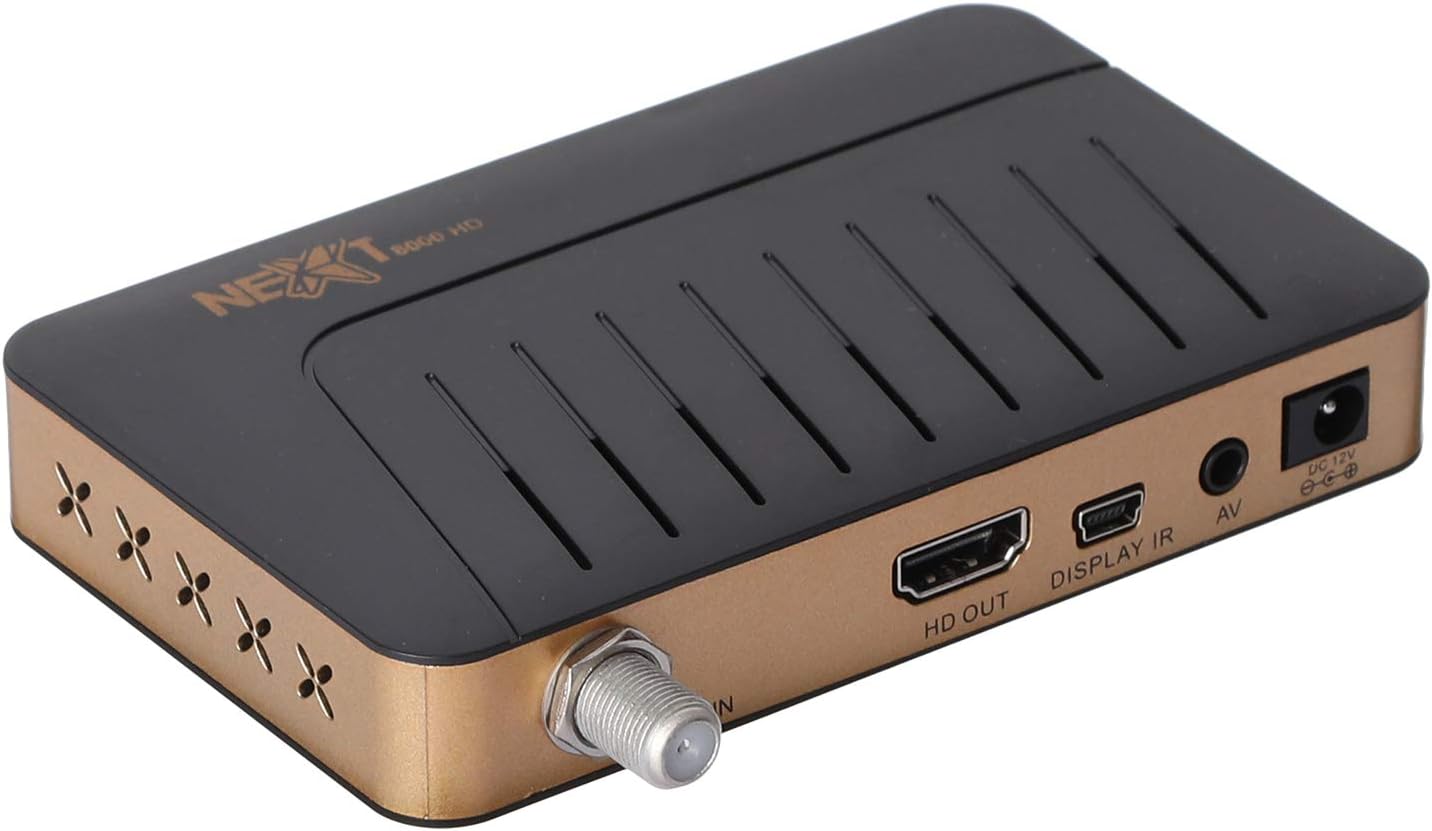
Зураг: Ар талд view of the NEXT 8000 receiver, highlighting the LNB IN, HD OUT (HDMI), AV, and DC 12V power input ports.
2. Анхдагч асаалт ба тохиргоо
Бүх кабелийг холбосны дараа:
- Turn on your television and select the correct HDMI or AV input source.
- The receiver will power on automatically. The initial setup wizard should appear on your screen.
- Follow the on-screen instructions to select your preferred language, time zone, and perform a channel scan. Refer to the 'Operating Instructions' section for details on channel scanning.
3. Алсын удирдлагатайview
Алсын удирдлагын функцуудтай танилцана уу:

Image: The remote control for the NEXT 8000 satellite receiver, showing various buttons for power, navigation, volume, channel, and special functions.
- Цахилгаан товч: Turns the receiver on/off or to standby mode.
- Цэс: Accesses the main menu for settings and features.
- БОЛЖ БАЙНА УУ: Confirms selections or displays channel list.
- Сумтай товчлуурууд (дээш/доошоо/зүүн/баруун): Цэс болон сонголтуудын дундуур шилжинэ.
- ГАРАХ: Өмнөх дэлгэц рүү буцах эсвэл цэснээс гарна.
- VOL +/-: Дууг тохируулна.
- CH +/-: Сувагуудыг өөрчилдөг.
- EPG: Цахим програмын гарын авлагыг харуулна.
- SAT: Selects satellite.
- USB: Accesses USB media playback.
- Цаг хугацааны өөрчлөлт: Activates the Timeshift function (requires USB storage).
Ашиглалтын заавар
1. Channel Search and Management
To find and organize channels:
- дээр дарна уу Цэс алсын удирдлага дээрх товчлуур.
- Navigate to 'Installation' or 'Channel Search' using the arrow buttons and press OK.
- Select 'Multi-satellite search' or 'Network search' based on your setup.
- Follow the on-screen prompts to initiate the scan. The receiver will automatically detect available channels.
- After the scan, you can access options to 'Program lock', 'Delete', 'Move', or 'Rename' channels within the channel management menu.
2. Media Playback via USB
The receiver supports media playback from a USB flash drive.
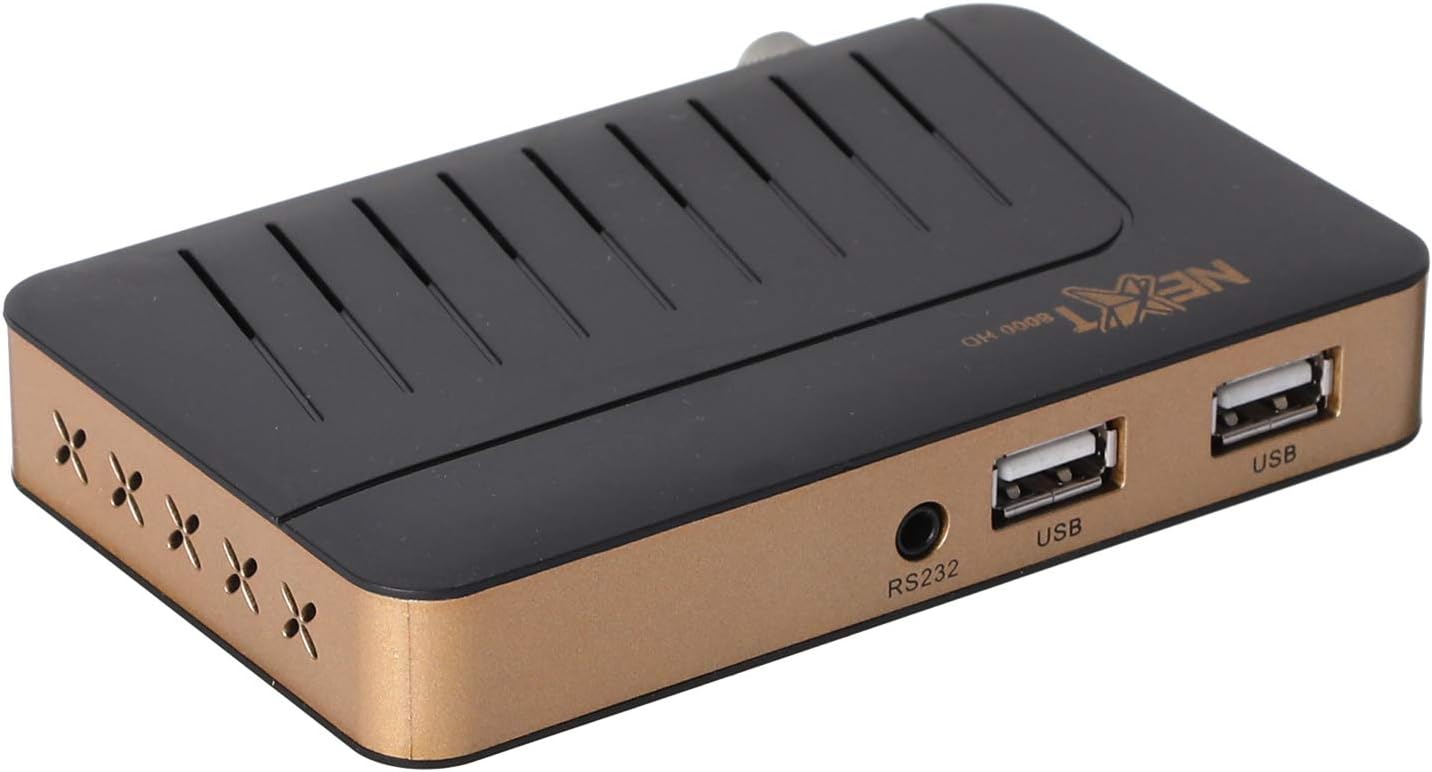
Зураг: Урд view of the NEXT 8000 receiver, showing the two USB ports available for connecting external storage devices.
- Insert a USB flash drive into one of the USB ports on the receiver.
- дээр дарна уу USB button on the remote control or navigate to the 'Media' menu.
- Select the type of media you wish to play (e.g., Video, Music, Photo).
- Browse your USB drive content and select the desired file. The receiver supports AVI, MKV, TS, TP, TRP, MPG, and MP4 files.
3. Бичлэг хийх, цаг шилжүүлэх
To record programs or use the Timeshift function, a USB storage device must be connected.
- Бичлэг: Нэвтрүүлэг үзэж байхдаа товчийг дарна уу Бичлэг button (usually a red circle) on the remote control to start recording. Press it again to stop. Recorded content will be saved to the connected USB drive.
- Цаг хугацааны өөрчлөлт: дээр дарна уу Цагийн шилжилт button on the remote control to pause live TV. You can then fast-forward or rewind within the buffered content.
4. Цахим хөтөлбөрийн гарын авлага (EPG)
дээр дарна уу EPG алсын удирдлага дээрх товчлуурыг дарна уу view the 7-day electronic program guide. This allows you to see upcoming programs and set reminders or recordings.
5. Parental Lock
To restrict access to certain channels or menus, navigate to the 'System Settings' or 'Parental Control' menu. You can set a password to lock programs or specific functions.
Засвар үйлчилгээ
1. Software Upgrade via USB
To ensure your receiver has the latest features and bug fixes, you can upgrade its software:
- Хамгийн сүүлийн үеийн програм хангамжийг татаж авах file from the official NEXT website to a USB flash drive. Ensure the file is placed in the root directory of the USB drive.
- Insert the USB flash drive into the receiver's USB port.
- руу оч Цэс > 'System Settings' > 'Software Upgrade' (or similar option).
- Select 'Upgrade by USB' and choose the software file.
- Confirm the upgrade. The receiver will restart automatically after the upgrade is complete. Do not power off the receiver during the upgrade process.
2. Цэвэрлэгээ
To clean the receiver, disconnect it from the power supply. Use a soft, dry cloth to wipe the exterior surfaces. Do not use liquid cleaners or abrasive materials.
Алдааг олж засварлах
If you encounter issues with your NEXT 8000 receiver, refer to the following table:
| Асуудал | Боломжит шалтгаан | Шийдэл |
|---|---|---|
| Зураг, дуу байхгүй | Incorrect TV input selected; Loose HDMI/AV cable; Receiver not powered on. | Select correct TV input; Check all cable connections; Ensure receiver is powered on. |
| Суваг олдсонгүй | Satellite dish not aligned; Incorrect LNB settings; Channel scan not performed. | Check satellite dish alignment; Verify LNB settings in menu; Perform a channel scan. |
| Алсын удирдлага ажиллахгүй байна | Dead batteries; Obstruction between remote and receiver; Remote sensor blocked. | Replace batteries; Remove obstructions; Ensure receiver's IR sensor is clear. |
| USB медиа тоглогдохгүй байна | Дэмжигдээгүй file format; USB drive not properly inserted; Corrupted file. | Шалгах file format compatibility; Re-insert USB drive; Try a different USB drive or file. |
Хэрэв эдгээр шийдлүүдийг туршиж үзсэний дараа асуудал хэвээр байвал хэрэглэгчийн дэмжлэгтэй холбогдоно уу.
Үзүүлэлтүүд
Key technical specifications for the NEXT 8000 Full HD Satellite Receiver:
- Загвар: 8000
- Видео гаралтын нарийвчлал: 576i, 576p, 720p, 1080i, 1080p (50/60 Hz)
- Холболт: HDMI, USB (2 ports), RS232, AV
- Дэмжигдсэн аудио форматууд: Dolby Digital, DTS, AAC, PCM
- Supported Video/Media Formats: AVI, MKV, TS, TP, TRP, MPG, MP4
- Хадгалах санах ой: 100 satellites, 4000 frequencies, 8000 channels
- Процессор: Sunplus
- Онцлогууд: Recording by USB flash, Screen enlargement, Multi-satellite search, Network search, Media playback, 7-day Electronic Program Guide (EPG), Teletex, Timeshift, Parental lock.
- Хэмжээ: 19.6 x 17.4 x 6.6 см
- Жин: 396 гр
Баталгаат болон дэмжлэг
For warranty information and technical support, please refer to the documentation provided with your purchase or visit the official NEXT product support webсайт. Худалдан авалтын баримтаа баталгаат нэхэмжлэлд зориулж худалдан авалтын баталгаа болгон хадгална уу.


