1. Танилцуулга
Худалдан авалт хийсэнд баярлалааasing the ONIKUMA K1 RGB Gaming Headset. This manual provides detailed instructions for setup, operation, maintenance, and troubleshooting to ensure optimal performance and longevity of your headset. Please read this manual carefully before use and retain it for future reference.
2. Бүтээгдэхүүн дууссанview
The ONIKUMA K1 is a wired gaming headset designed for multi-platform compatibility, featuring vibrant RGB lighting, 7.1 surround sound, and a noise-cancelling microphone. It is built for comfort during extended gaming sessions.
Гол онцлогууд:
- 7.1 Хүрээлэн буй орчны дуу чимээ: Provides immersive audio for an enhanced gaming experience.
- Дуу чимээ намсгагч микрофон: Арын чимээг багасгах замаар тодорхой харилцаа холбоог баталгаажуулдаг.
- RGB гэрэлтүүлэг: Dynamic lighting effects for an aesthetic appeal.
- Олон платформын нийцтэй байдал: Works with PC, PlayStation (PS3, PS4), Mobile devices, and Xbox (Xbox One requires an adapter, not included).
- Тав тухтай дизайн: Features soft protein earpads, an adjustable headband, and cozy head cushions.
- In-line Controls: Easy access to volume adjustment and microphone mute.
Бүрэлдэхүүн хэсгүүд:
The headset includes the main unit with integrated microphone and a wired connection featuring a 3.5mm audio jack and a USB connector for RGB lighting.

Figure 1: Headset with in-line volume and microphone mute control, USB connector for RGB lighting, and 3.5mm audio jack.

Figure 2: Flexible microphone with 160-degree adjustment and 360-degree voice pick-up for clear communication.

Figure 3: Soft protein earpads, adjustable headband, and cozy head cushions designed for supreme comfort.
3. Тохируулах заавар
Follow these steps to connect your ONIKUMA K1 headset to your device.
Олон платформын нийцтэй байдал:
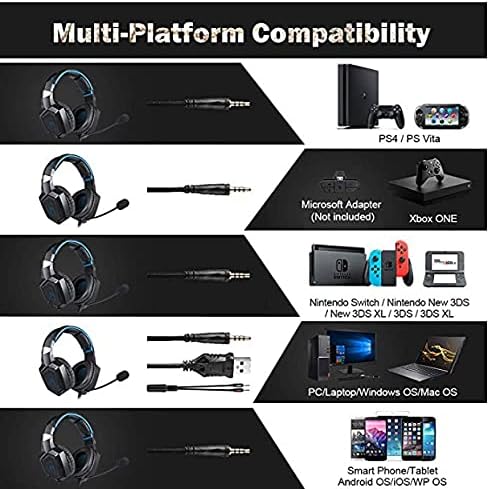
Зураг 4: Тохиромжтой байдал дууссанview for PC, PlayStation, Xbox, Nintendo Switch, and mobile devices.
- For PC/Laptop (Windows OS/Mac OS):
Connect the 3.5mm audio jack to your computer's audio output/input port. Connect the USB cable to a USB port for RGB lighting. Ensure your sound settings are configured to use the headset. - For PlayStation (PS4/PS Vita/PS3):
Connect the 3.5mm audio jack to the controller or console's audio port. For PS4, go to Settings > Devices > Audio Devices > Output to Headphones > All Audio. Connect the USB for RGB lighting if a USB port is available. - For Xbox ONE:
An additional Microsoft Adapter (not included) is required for older Xbox One controllers. Connect the 3.5mm audio jack to the adapter, then connect the adapter to your controller. Newer Xbox One controllers have a built-in 3.5mm jack. Connect the USB for RGB lighting if a USB port is available on the console. - For Nintendo Switch/New 3DS XL/3DS/3DS XL:
Connect the 3.5mm audio jack directly to the console's audio port. - For Smart Phone/Tablet (Android OS/iOS/WP OS):
Connect the 3.5mm audio jack directly to your mobile device's headphone jack.
4. Ашиглалтын заавар
Once connected, you can begin using your headset. Here are the basic operating functions:
- Дууны хяналт: Use the in-line volume roller to adjust the audio output level. Roll up to increase volume, roll down to decrease.
- Микрофоны дууг хаах: Use the in-line switch to mute or unmute the microphone. Slide the switch to the 'OFF' position to mute and 'ON' to unmute.
- Микрофоны тохируулга: The microphone is flexible. Adjust its position closer to your mouth for optimal voice pickup or away when not in use.
- RGB гэрэлтүүлэг: The RGB lighting is powered via the USB connection. Once the USB is plugged in, the lighting will activate automatically. There are no user-adjustable controls for the RGB lighting patterns on the headset itself.
- Чихэвч таарах: Adjust the headband to ensure a comfortable and secure fit over your ears. The earpads should fully cover your ears for optimal sound isolation and comfort.
5. Засвар үйлчилгээ
Proper care will extend the life of your headset.
- Цэвэрлэгээ: Чихэвчийг цэвэрлэхдээ зөөлөн, хуурай даавуу ашиглаарай. Шингэн цэвэрлэгч эсвэл зүлгүүрийн материал бүү ашиглаарай.
- Хадгалах: Чихэвчийг нарны шууд тусгал, хэт температураас хол, сэрүүн, хуурай газар хадгална.
- Кабель арчилгаа: Avoid sharp bends or excessive pulling on the cables to prevent damage. The cable is designed to be tangle-free.
- Чийгнээс зайлсхийх: The headset is not water-resistant. Keep it away from liquids.
6. Алдаа засах
Хэрэв та чихэвчтэй холбоотой асуудалтай тулгарвал дараах нийтлэг шийдлүүдийг үзнэ үү.
| Асуудал | Боломжит шийдэл |
|---|---|
| Дуугүй эсвэл дуу багатай |
|
| Микрофон ажиллахгүй байна |
|
| RGB гэрэлтүүлэг ажиллахгүй байна |
|
| Sound quality issues (e.g., no 7.1 surround sound) |
|
7. Техникийн үзүүлэлтүүд
| Онцлог | Дэлгэрэнгүй |
|---|---|
| Загварын нэр | K1-B-Black RGB |
| Холболтын технологи | Утастай |
| Чихэвчний залгуур | 3.5 мм Жак |
| Мэдрэмж | 104 дБ |
| Давтамжийн хариу үйлдэл | Not specified (Original data: 3045 Unknown Rate) |
| Дуу чимээний хяналт | Идэвхтэй дуу чимээг арилгах |
| Чихэвчний хэлбэр хүчин зүйл | Чихний дээгүүр |
| Чихний байрлал | Чихний дээгүүр |
| Өнгө | Хар |
| Брэнд нэр | ОНИКУМА |
| Бүтээгдэхүүний хэмжээс | 22.5 x 19.5 x 10.5 см |
| Зүйлийн жин | 394 грамм |
| Кабелийн онцлог | Ороомоггүй |
| Хяналтын төрөл | Дууны хяналт |
| Тохиромжтой төхөөрөмжүүд | Олон платформ |
| Зөвлөмж болгож буй хэрэглээ | Gaming, Making Calls |
| Бүтээгдэхүүний тусгай хэрэглээ | Тоглоомын чихэвч |
| Материал | Plastic, Polycarbonate Leather (PC) |
| Насны хүрээний тодорхойлолт | Насанд хүрсэн |
| Усны эсэргүүцлийн түвшин | Усанд тэсвэртэй биш |
8. Баталгаат хугацаа ба дэмжлэг
For warranty information or technical support, please refer to the documentation included with your purchase or contact the seller directly. Keep your proof of purchase for any warranty claims.


