1. Танилцуулга
This user manual provides essential information for the safe and effective operation of your ITECH IT6952A Programmable DC Power Supply. Please read this manual thoroughly before using the device to ensure proper functionality and to prevent damage or injury. The IT6952A is a high-performance, programmable DC power supply designed for laboratory and industrial applications, offering precise control over voltage ба одоогийн гаралт.
2. Аюулгүй байдлын мэдээлэл
Always observe the following safety precautions to prevent electric shock, injury, or damage to the instrument:
- Ensure the power supply is connected to a grounded AC outlet.
- Төхөөрөмжийг нойтон газар ажиллуулж болохгүй damp нөхцөл.
- c-г нээж болохгүйasing; дотор нь хэрэглэгчийн засварлах боломжтой эд анги байхгүй. Бүх засвар үйлчилгээг мэргэшсэн ажилтнуудад даатга.
- Оруулсан боть байгаа эсэхийг шалгана ууtage matches the power supply's rating before connecting to the mains.
- Avoid short-circuiting the output terminals, especially at high power settings.
- Хэт халалтаас урьдчилан сэргийлэхийн тулд төхөөрөмжийн эргэн тойронд агааржуулалтыг сайтар хангана.
3. Бүтээгдэхүүн дууссанview
The ITECH IT6952A features a clear VFD display and intuitive controls for easy operation.
3.1 Урд самбарын зохион байгуулалт

Figure 3.1: Front Panel of IT6952A
The front panel includes the VFD display for voltage and current readings, a rotary knob for precise adjustments, number keys (0-9) and ESC for direct input, function keys (V-SET, I-SET, Save, Recall, Meter, Trigger, Enter, On/Off) for various operations, navigation keys (UP/DOWN/LEFT/RIGHT) for cursor movement, and output terminals for connecting loads. The 'Shift' and 'Local' keys provide additional control options, and the main power switch is integrated.
3.2 Арын самбарын зохион байгуулалт
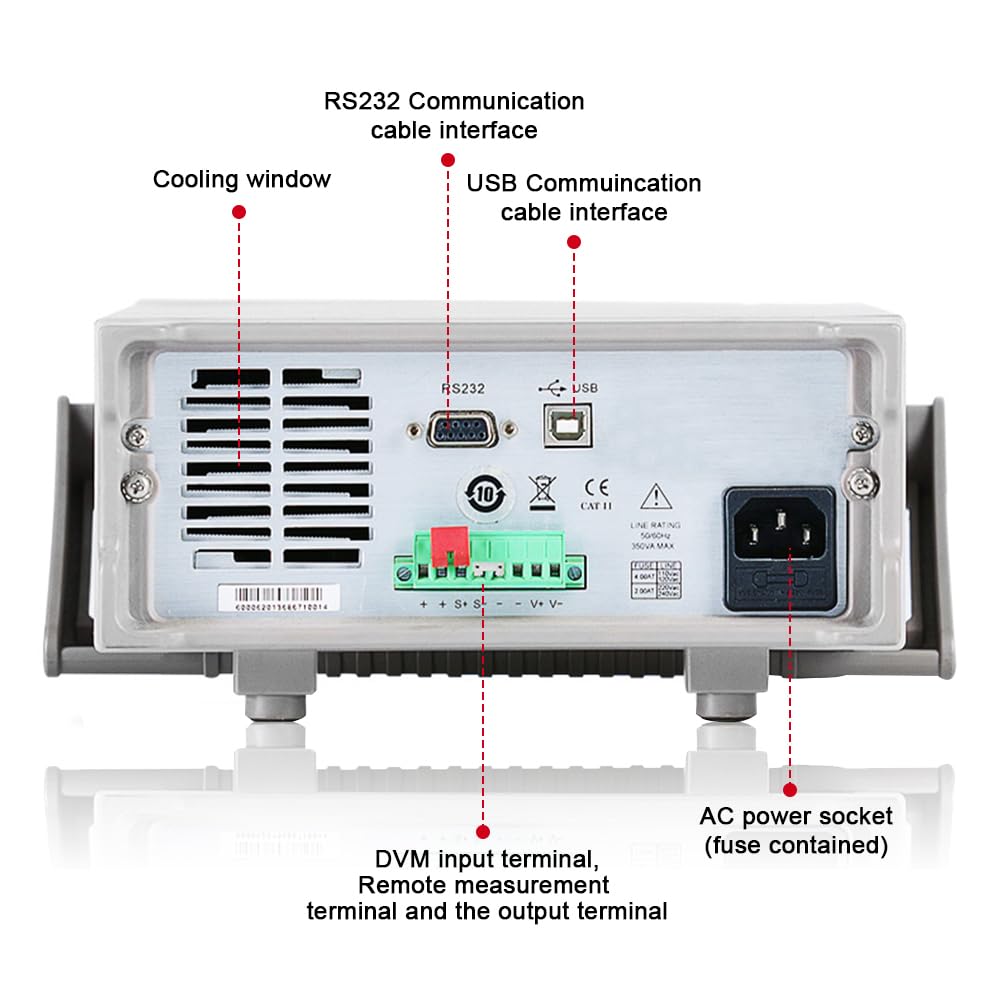
Figure 3.2: Rear Panel of IT6952A
The rear panel features the AC power socket (with integrated fuse), cooling windows for heat dissipation, an RS232 communication cable interface, a USB communication cable interface, and DVM input terminals along with remote measurement terminals and additional output terminals for specific applications.
4. Тохиргоо
Эхний тохиргоог хийхийн тулд дараах алхмуудыг дагана уу:
- Савлах: Цахилгаан тэжээлийг савлагаанаас нь болгоомжтой салга. Тээвэрлэлтийн явцад эвдрэлийн шинж тэмдэг байгаа эсэхийг шалгана уу.
- Байршил: Place the unit on a stable, level surface with adequate ventilation around all sides. Do not block the cooling vents on the sides and rear.
- Эрчим хүчний холболт: Connect the provided AC power cord to the AC power socket on the rear panel of the IT6952A. Plug the other end into a grounded electrical outlet.
- Асаах: Press the main power switch on the front panel to turn on the unit. The VFD display should illuminate.
- Гаралтын холболт: Connect your load to the output terminals on the front panel using appropriate test leads. Ensure correct polarity (positive to positive, negative to negative).
5. Ашиглалтын заавар
This section covers basic operation of the IT6952A.
5.1 Тохиргоо ботьtage ба одоогийн
- Set Voltage: дээр дарна уу V-SET товч. Ботьtage display will become active. Use the rotary knob to adjust the voltage, or use the number keys for direct input followed by Оруулна уу.
- Одоогийн тохируулах: дээр дарна уу I-SET button. The current display will become active. Use the rotary knob to adjust the current limit, or use the number keys for direct input followed by Оруулна уу.
- Гаралтыг идэвхжүүлэх: Хүссэн хэмжээг тохируулсны дарааtage ба гүйдэлтэй бол дээр дарна уу Асаах/унтраах button to enable the output. The output indicator will illuminate.
- Гаралтыг идэвхгүй болгох: Гаралтыг идэвхгүй болгохын тулд товчийг дарна уу Асаах/унтраах дахин товчлуур.
5.2 Using Memory Functions (Save/Recall)
The IT6952A allows you to save and recall frequently used voltage болон одоогийн тохиргоо.
- Тохиргоог хадгалах: Хүссэн хэмжээгээ тохируулна ууtage and current. Press the Хадгалах button. Use the navigation keys or number keys to select a memory location (e.g., 0-9) and press Оруулна уу to store the settings.
- Recall Setting: дээр дарна уу Санах button. Use the navigation keys or number keys to select the desired memory location and press Оруулна уу to load the stored settings.
6. Засвар үйлчилгээ
Proper maintenance ensures the longevity and reliability of your power supply.
- Цэвэрлэгээ: Disconnect the power supply from the mains before cleaning. Use a soft, dry cloth to wipe the exterior. For stubborn dirt, a slightly damp cloth with mild detergent can be used, ensuring no liquid enters the unit.
- Агааржуулалт: Regularly check that the cooling vents are free from dust and obstructions. Use compressed air to clear dust if necessary.
- Хадгалах: When not in use for extended periods, store the power supply in a cool, dry, and dust-free environment.
7. Алдаа засах
If you encounter issues with your IT6952A, refer to the following common problems and solutions:
| Асуудал | Боломжит шалтгаан | Шийдэл |
|---|---|---|
| Асаалттай үед цахилгаан байхгүй | Power cord not connected; Blown fuse; No power from outlet | Check power cord connection; Replace fuse (refer to specifications for type); Test outlet with another device |
| Гаралтын эзлэхүүн байхгүйtagд/одоогийн | Output disabled; Overload protection activated; Incorrect settings | дарна уу Асаах/унтраах to enable output; Reduce load or increase current limit; Verify voltage/одоогийн тохиргоо |
| Display shows 'Error' | Internal fault; Over-temperature | Turn off unit, wait 5 minutes, restart; Ensure proper ventilation, allow unit to cool down. If error persists, contact support. |
| Буруу уншилтууд | Poor connection; Calibration needed | Check all connections; Contact ITECH support for calibration information. |
8. Техникийн үзүүлэлтүүд
Key technical specifications for the ITECH IT6952A Programmable DC Power Supply:
| Тодорхойлолт | Үнэ цэнэ |
|---|---|
| Брэнд | ITECH |
| Загвар | IT6952A |
| Гаралтын ботьtage | 60 вольт |
| Ampарилгах | 25 Amps |
| Гаралтын ватtage | 600 ватт |
| Form Factor | Вандан |
| Холбогч төрөл | USB |
| Материал | Металл |
| Өнгө | Улаан, хар |
9. Баталгаат хугацаа ба дэмжлэг
ITECH products are designed for reliability and performance. For warranty information, technical support, or service inquiries, please refer to the warranty card included with your product or visit the official ITECH webсайт. Худалдан авалтын баримтаа баталгаат нэхэмжлэлд зориулж худалдан авалтын баталгаа болгон хадгална уу.
For further assistance, you may contact ITECH customer service through their official channels. Always provide your product model (IT6952A) and serial number when seeking support.


