Танилцуулга
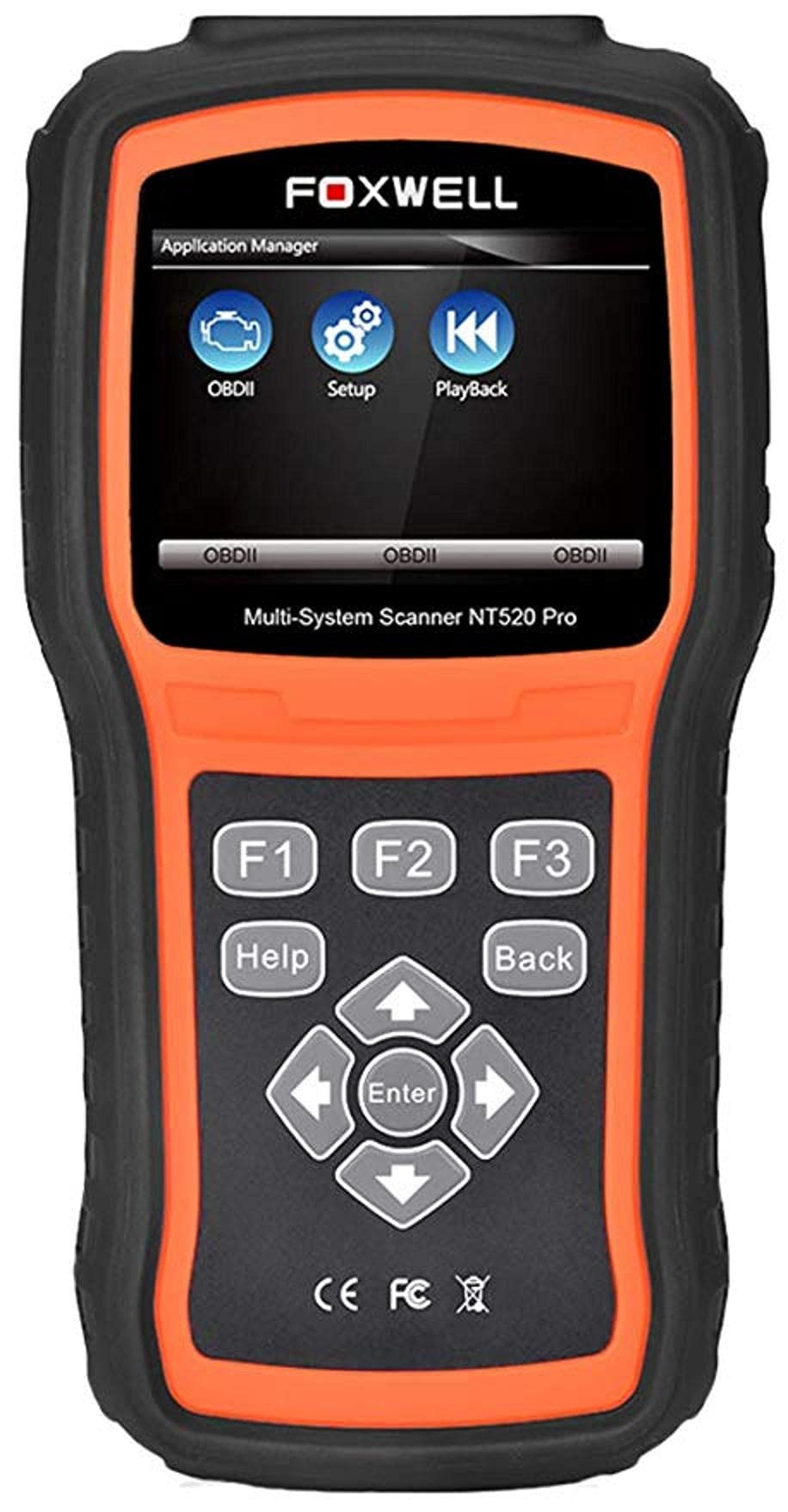
The Foxwell NT520 PRO is a professional-grade car fault diagnostic tool designed to help users identify and resolve issues in various vehicle systems. This device offers comprehensive diagnostic functions, including reading and clearing fault codes, viewing live data streams, and performing specialized tests and coding functions. It supports a wide range of car makes and models equipped with an OBD II - 16 pin connector.
1. Тохиргоо
1.1 Багцын агуулга
- Foxwell NT520 PRO Diagnostic Tool
- OBD II оношлогооны кабель
- USB Cable (for updates and data transfer)
- Хэрэглэгчийн гарын авлага (энэ баримт бичиг)
1.2 Initial Device Power-Up
- Connect the OBD II diagnostic cable to the NT520 PRO device.
- Locate the vehicle's OBD II port, typically found under the dashboard on the driver's side.
- Plug the diagnostic cable into the vehicle's OBD II port. The device should power on automatically. If not, ensure the vehicle's ignition is in the ON position.
1.3 Програм хангамжийн шинэчлэлтүүд
The NT520 PRO offers free updates for one selected car brand. Additional brands (up to five) can be added via internet for a fee. Regular software updates ensure compatibility with newer vehicle models and provide access to the latest diagnostic features.
- Өгөгдсөн USB кабелийг ашиглан төхөөрөмжийг компьютерт холбоно уу.
- Install the Foxwell update client software on your computer (refer to the official Foxwell website for download).
- Follow the on-screen instructions in the update client to register your device and perform software updates.
2. Ашиглалтын заавар
The NT520 PRO features a color screen for easy navigation and data display.
2.1 Үндсэн навигаци
- Use the arrow keys to navigate through menus.
- Press the 'Enter' or 'OK' button to select an option.
- Press the 'Back' or 'Exit' button to return to the previous screen.
2.2 Оношлогооны функцууд
The device supports diagnostics for most available control units in a vehicle, including:
- Хөдөлгүүрийн хяналтын модуль (ECM)
- Дамжуулах хяналтын модуль (TCM)
- Түгжихээс хамгаалах тоормосны систем (ABS)
- Агаарын дэрний систем
- Биеийн хяналтын модуль (BCM)
2.2.1 Алдааны кодыг унших ба арилгах
- From the main menu, select 'Diagnostics' or 'Scan'.
- Choose the vehicle make and model.
- Select the desired control unit (e.g., Engine, ABS).
- 'Код унших'-г сонгоно уу view current and stored Diagnostic Trouble Codes (DTCs).
- Select 'Clear Codes' to erase the detected fault codes. This will also turn off the Malfunction Indicator Lamp Хэрэв алдаа байхгүй болсон бол (MIL).
2.2.2 Шууд өгөгдлийн урсгал
View real-time data from various sensors and components.
- After selecting the control unit, choose 'Live Data'.
- Select the parameters you wish to monitor.
- Өгөгдлийг тоон эсвэл график хэлбэрээр харуулах болно.
2.2.3 ECU мэдээлэл
Access information about the Electronic Control Unit.
- After selecting the control unit, choose 'ECU Information'.
- View details such as VIN, calibration ID, and software version.
2.2.4 Component Testing and Coding
The device can perform tests on various car parts and supports programming and coding for different components.
- Component Tests: Select 'Active Test' or 'Component Test' from the menu to activate specific components and check their functionality.
- Programming and Coding: This function allows for programming and coding of various parts. Use with caution and only if you are familiar with the specific vehicle's requirements.
- Key Coding: For certain models, the device supports key coding functionality. Refer to your vehicle's service manual for specific procedures.
3. Засвар үйлчилгээ
3.1 Төхөөрөмжийн арчилгаа
- Төхөөрөмжийг цэвэр, тоос, чийгээс хол байлга.
- Төхөөрөмжийг ашиглаагүй үед сэрүүн, хуурай газар хадгална.
- Төхөөрөмжийг унагах эсвэл хүчтэй цохилтод оруулахаас зайлсхий.
- Do not use harsh chemicals for cleaning; a soft, damp даавуу хангалттай.
3.2 Програм хангамжийн засвар үйлчилгээ
Regularly check for and install software updates to ensure optimal performance and compatibility with the latest vehicle models. Refer to section 1.3 for update instructions.
4. Алдаа засах
4.1 Төхөөрөмж асахгүй байна
- Ensure the OBD II cable is securely connected to both the device and the vehicle's OBD II port.
- Verify that the vehicle's ignition is in the ON position.
- Check the vehicle's fuse for the OBD II port (consult your vehicle's owner's manual).
4.2 Харилцааны алдаа
- Confirm the vehicle supports the OBD II protocol (most vehicles manufactured after 1996 do).
- Оношлогооны кабель гэмтээгүй эсэхийг шалгаарай.
- Тээврийн хэрэгсэлд хамаарах асуудлыг арилгахын тулд өөр тээврийн хэрэгсэлд холбогдож үзээрэй.
- Update the device software to the latest version.
4.3 Гэмтлийн заагч Lamp (MIL) Remains On
After clearing fault codes, if the MIL (Check Engine Light) remains illuminated, it indicates that the underlying fault has not been resolved or a new fault has occurred. Address the root cause of the fault before attempting to clear codes again.
5. Техникийн үзүүлэлтүүд
| Онцлог | Дэлгэрэнгүй |
|---|---|
| Үйлдвэрлэгч | Фоксвелл |
| Брэнд | Фоксвелл |
| Загварын дугаар | 111111111111 |
| Үйлдвэрлэгчийн хэсгийн дугаар | 111111111111 |
| Эрчим хүчний эх үүсвэр | Утастай цахилгаан |
| Зүйлийн жин | 818 гр |
| Хүргэлтийн хэмжээ | 21.2 x 17.8 x 8.2 см |
| ASIN | B092326PXZ |
| Эхний боломжтой огноо | 8 оны дөрөвдүгээр сарын 2021 |
6. Баталгаат хугацаа ба дэмжлэг
6.1 Бүтээгдэхүүний баталгаа
Please refer to the warranty card included with your product or visit the official Foxwell website for detailed warranty information. Warranty terms typically cover manufacturing defects for a specified period from the date of purchase.
6.2 Техникийн дэмжлэг
For technical assistance, software updates, or troubleshooting not covered in this manual, please contact Foxwell customer support through their official website or authorized service centers. Have your product model and serial number ready when contacting support.


