1. Танилцуулга
Thank you for choosing the Hoco W27 Cat Ear Bluetooth Headphones. These headphones combine advanced Bluetooth 5.0 technology with a unique glowing cat ear design, offering a versatile audio experience. They support Bluetooth, TF card, and AUX playback modes, making them compatible with a wide range of mobile phones and tablets. This manual provides detailed instructions for setup, operation, maintenance, and troubleshooting to ensure you get the most out of your device.
2. Бүтээгдэхүүн дууссанview
Familiarize yourself with the components of your Hoco W27 headphones.
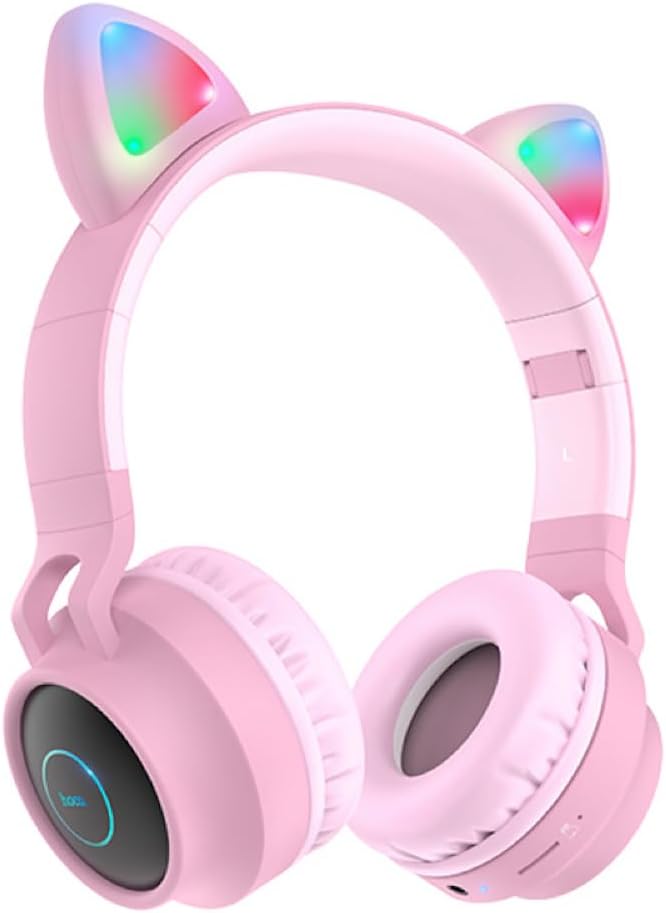
Зураг 2.1: Урд view of the Hoco W27 Cat Ear Bluetooth Headphones in pink, showcasing the glowing cat ears and over-ear design.

Зураг 2.2: Хажуу тал view of the Hoco W27 headphones, highlighting the control buttons on the left earcup, including volume, track control, and mode switch.

Зураг 2.3: Дээрээс доош view of the Hoco W27 headphones, showing the adjustable headband and the placement of the control panel on the earcup.
3. Тохиргоо
3.1 Чихэвчийг цэнэглэх
Before first use, fully charge the headphones. The built-in 300mAh battery requires approximately 2 hours for a full charge.
- Connect the charging cable (usually USB-C or Micro-USB, depending on model) to the charging port on the headphones.
- Кабелийн нөгөө үзүүрийг USB тэжээлийн эх үүсвэрт холбоно уу (жишээлбэл, компьютерийн USB порт, ханын адаптер).
- The indicator light will show charging status (e.g., red light while charging, off or blue when fully charged).
3.2 Bluetooth холболт
The Hoco W27 headphones feature Bluetooth 5.0 for stable and efficient wireless connection.
- Чихэвч унтарсан эсэхийг шалгаарай.
- Press and hold the Power button until the indicator light flashes blue and red alternately, indicating pairing mode.
- Төхөөрөмж дээрээ (ухаалаг утас, таблет, компьютер) Bluetooth-г идэвхжүүлж, боломжтой төхөөрөмжүүдийг хайж олоорой.
- Select "Hoco W27" or a similar name from the list of found devices.
- Once connected, the indicator light will typically flash blue slowly or turn off, and you will hear a confirmation tone.
3.3 TF картын горим
The headphones support TF (MicroSD) card playback.
- Insert a TF card with your desired audio files into the TF card slot on the headphones.
- The headphones should automatically switch to TF card playback mode. If not, press the Mode button to cycle through modes until TF card mode is active.
3.4 AUX горим
For wired connection, use the AUX mode.
- Connect one end of a 3.5mm audio cable (not always included) to the AUX port on the headphones.
- Нөгөө үзүүрийг нь төхөөрөмжийн аудио гаралтын үүрэнд холбоно уу.
- The headphones will automatically switch to AUX mode. Note that controls on the headphones may be limited in this mode, and playback is controlled by the connected device.
4. Ашиглалтын заавар
4.1 Асаах/унтраах
- Асаах: Press and hold the Power button for approximately 3 seconds until the indicator light turns on and you hear a power-on prompt.
- Унтраах: Press and hold the Power button for approximately 3-5 seconds until the indicator light turns off and you hear a power-off prompt.
4.2 Хөгжим тоглуулах
- Тоглуулах/түр зогсоох: Press the Multi-function button (often the Power button or a dedicated Play/Pause button) once.
- Дараагийн дуу: Press and hold the Volume Up (+) button or a dedicated Next Track button.
- Өмнөх бичлэг: Press and hold the Volume Down (-) button or a dedicated Previous Track button.
- Дууг нэмэгдүүлэх: Дууг нэмэгдүүлэх (+) товчийг богино хугацаанд дарна уу.
- Дууг багасгах: Дууг багасгах (-) товчийг богино хугацаанд дарна уу.
The headphones offer up to 5 hours of continuous music playback on a full charge.
4.3 Дуудлагын функцууд
- Дуудлагад хариулах/дуусах: Ирж буй дуудлагын үеэр Олон үйлдэлт товчлуурыг нэг удаа дарна уу.
- Дуудлагаас татгалзах: Press and hold the Multi-function button for approximately 2 seconds during an incoming call.
- Сүүлийн дугаарыг дахин залгах: Double-press the Multi-function button when not on a call.
4.4 Горим солих
Press the 'M' (Mode) button to cycle between Bluetooth, TF Card, and AUX playback modes.
4.5 Cat Ear Lights
The glowing cat ear design adds a unique aesthetic. The lights typically activate automatically when the headphones are powered on. Refer to the product packaging or specific model features for details on controlling the lights, if a dedicated button exists.
4.6 Voice Prompt Switch
To switch the voice prompt language or disable prompts:
- When the headphones are холбогдоогүй байна to a device, double-click the 'M' (Mode) button. You will hear a beep, indicating a change in the voice prompt setting.
5. Засвар үйлчилгээ
Зөв арчилгаа нь таны чихэвчийг удаан эдэлгээтэй болгодог.
- Цэвэрлэгээ: Use a soft, dry, lint-free cloth to clean the surfaces of the headphones. Do not use abrasive cleaners, solvents, or spray directly onto the headphones.
- Хадгалах: Store the headphones in a cool, dry place away from direct sunlight and extreme temperatures. If storing for an extended period, ensure they are partially charged.
- Батерейны арчилгаа: To preserve battery life, avoid fully discharging the headphones frequently. Charge them regularly, even if not in use for a long time.
- Чийгнээс зайлсхийх: Чихэвчийг ус эсвэл хэт их чийгэнд бүү тавь.
6. Алдаа засах
If you encounter issues with your Hoco W27 headphones, try the following solutions:
| Асуудал | Боломжит шалтгаан | Шийдэл |
|---|---|---|
| Чихэвч асахгүй байна. | Батерей бага. | Чихэвчээ дор хаяж 30 минут цэнэглээрэй. |
| Bluetooth-ээр холбох боломжгүй. | Чихэвчийг холбох горимд оруулаагүй; төхөөрөмжийн Bluetooth унтраалттай; төхөөрөмжөөс хэт хол. | Ensure headphones are in pairing mode (flashing red/blue). Turn device Bluetooth off and on. Move headphones closer to device. |
| Чихэвчнээс дуу гарахгүй. | Volume too low; incorrect mode; loose AUX cable; corrupted TF card files. | Increase volume on headphones and device. Ensure correct mode (Bluetooth, TF, AUX). Re-insert AUX cable. Check TF card files. |
| Дууны чанар муу. | Хөндлөнгийн оролцоо; батерей бага; төхөөрөмжөөс хол зай. | Move away from sources of interference. Charge headphones. Reduce distance between headphones and device. |
| Cat ear lights not working. | Headphones off; specific light control setting. | Ensure headphones are powered on. Check if there's a dedicated button for lights (refer to product specifics). |
7. Техникийн үзүүлэлтүүд
Key technical specifications for the Hoco W27 Cat Ear Bluetooth Headphones:
| Онцлог | Тодорхойлолт |
|---|---|
| Bluetooth хувилбар | 5.0 (JL AC6925F chip) |
| Зайны багтаамж | 300 мАч |
| Цэнэглэх хугацаа | Ойролцоогоор 2 цаг |
| Call / Music Time | 5 цаг хүртэл |
| Зогсоолын цаг | 200 цаг хүртэл |
| Чанга яригчийн диаметр | 40 мм |
| Хэмжээ (L*W*H) | 203 x 175 x 80 мм (8 x 6.9 x 3.1 инч) |
| Жин | 182 гр (6.4 унц) |
| Дэмжигдсэн горимууд | Bluetooth, TF карт, AUX |
| Дизайн онцлог | Glowing cat ear shape |
| Чихний байрлал | Чихний дээгүүр |
| Дуу чимээний хяналт | Байхгүй |
8. Аюулгүй байдлын мэдээлэл
Аюулгүй ажиллагааны хувьд дараах аюулгүй ажиллагааны зааврыг уншиж, дагаж мөрдөнө үү.
- Бүтээгдэхүүнийг задлах, засварлах, өөрчлөхийг хориглоно. Энэ нь гал түймэр, цахилгаан цочрол эсвэл бүтээгдэхүүнийг бүрэн гэмтээх аюултай.
- Keep the headphones away from extreme temperatures, direct sunlight, and high humidity.
- Avoid exposing the headphones to water or other liquids.
- Do not use the headphones at excessively high volumes for prolonged periods, as this may cause hearing damage.
- Хүүхдийн гар хүрэхгүй газар хадгална.
9. Баталгаат хугацаа ба дэмжлэг
For warranty information and customer support, please refer to the documentation provided with your purchase or contact the retailer where you purchased the Hoco W27 headphones. Keep your proof of purchase for any warranty claims.


