1. Танилцуулга
The VTech VM818HD Video Baby Monitor provides a secure and reliable way to monitor your baby. It features a 5-inch 720p High Definition parent unit, a baby unit with a night light, and various functions to ensure your infant's comfort and safety. This manual will guide you through the setup, operation, and maintenance of your VM818HD monitor.

Figure 1: VTech VM818HD Baby Monitor, showing the parent unit with a 5-inch HD screen and the baby unit with an integrated night light.
2. Хайрцагт юу байна
Тохиргоог эхлүүлэхийн өмнө бүх бүрэлдэхүүн хэсгүүд байгаа эсэхийг шалгаарай:
- 1 эцэг эхийн нэгж
- 1 Хүүхдийн нэгж
- 2 хувьсах гүйдлийн адаптер
- Хананд холбох хаалт
- 2 шураг
- 2 ханын зангуу
- Түргэн эхлүүлэх гарын авлага
3. Үндсэн шинж чанарууд
The VTech VM818HD Baby Monitor is equipped with the following key features:
- 720p HD Display: Тодорхой viewing on a 5-inch screen.
- Secure Transmission: Operates on a secured 2.4GHz FHSS channel, no Wi-Fi or app pairing required.
- Шөнийн гэрэл ба бүүвэйн дуу: Integrated night light and soothing sounds from the baby unit.
- Хоёр талын яриа: Allows communication between parent and baby units.
- Урт хугацаанд: Up to 1,000 feet of crystal clear reception.
- Температур мэдрэгч: Monitors nursery temperature with alerts.
- Sound Activation Mode: Screen automatically turns on when noises are detected.
- Дижитал томруулах: 4x digital zoom for closer views.
- HD шөнийн хараа: Тодорхой view of the crib in low light conditions.

Figure 2: Visual representation of the monitor's core functionalities, including HD screen, temperature sensor, wide-angle viewing, 4x zoom, night vision, lullabies, two-way talk, sound indicator, and secure transmission.
4. Тохиргоо
4.1 Асаах
- Connect the small plug of the AC adapter to the power jack on the baby unit.
- Connect the large plug of the AC adapter to a wall outlet.
- Connect the small plug of the AC adapter to the power jack on the parent unit.
- Connect the large plug of the AC adapter to a wall outlet.
- -г удаан дар ХҮЧ button on the parent unit to turn it on.
4.2 Байршил
Хүүхдийн төхөөрөмжийг цэвэр агаартай газар байрлуулна уу view of your baby's crib or play area. Ensure it is out of reach of children. The monitor offers a 110-degree wide-angle view to cover a large area of the nursery.

Figure 3: The VTech VM818HD offers a 110-degree wide-angle view with 720p resolution, providing a significantly broader and clearer perspective compared to standard monitors.
For optimal signal strength, avoid placing the baby unit near other electronic devices that may cause interference. The monitor has a range of up to 1,000 feet, allowing you to monitor from various locations within your home.

Figure 4: The monitor's long-range capability allows for clear reception throughout a typical home, enabling monitoring from different rooms or even the backyard.
5. Ашиглалтын заавар
5.1 Дэлгэц ба удирдлага
The parent unit features a 5-inch 720p HD screen for clear video monitoring. Use the directional buttons and ЦЭС/СОНГОХ button to navigate through the menu options. Volume controls are located on the side of the parent unit.
5.2 Шөнийн хараа
The baby unit automatically activates its HD night vision in low-light conditions, providing a clear, no-glare view of your baby without disturbing their sleep.

Figure 5: The monitor's 720p HD night vision provides superior clarity, allowing you to see your baby clearly even in complete darkness.
5.3 Night Light and Lullabies
The baby unit includes a built-in night light and can play five peaceful melodies and four calming ambient sounds. These features can be controlled directly from the parent unit to soothe your baby.

Figure 6: The baby unit features a soft night light and the ability to play soothing lullabies, controllable from the parent unit.
5.4 Хоёр талын яриа
Use the two-way talk-back intercom feature to communicate with your baby from another room. Press and hold the ЯРИА button on the parent unit to speak, and release it to listen.

Figure 7: The two-way talk-back intercom allows parents to comfort their baby remotely by speaking through the parent unit.
5.5 Температурын хяналт
The baby unit has a built-in temperature sensor that displays the nursery temperature on the parent unit's LCD screen. You can set alerts for when the temperature goes outside a desired range.

Figure 8: The parent unit displays the nursery temperature, allowing you to ensure a comfortable environment for your baby.
5.6 Sound Activation Mode
To conserve battery, the parent unit's display screen can automatically turn off. When noises are detected near the baby unit, the screen will automatically turn back on, alerting you to your baby's activity.
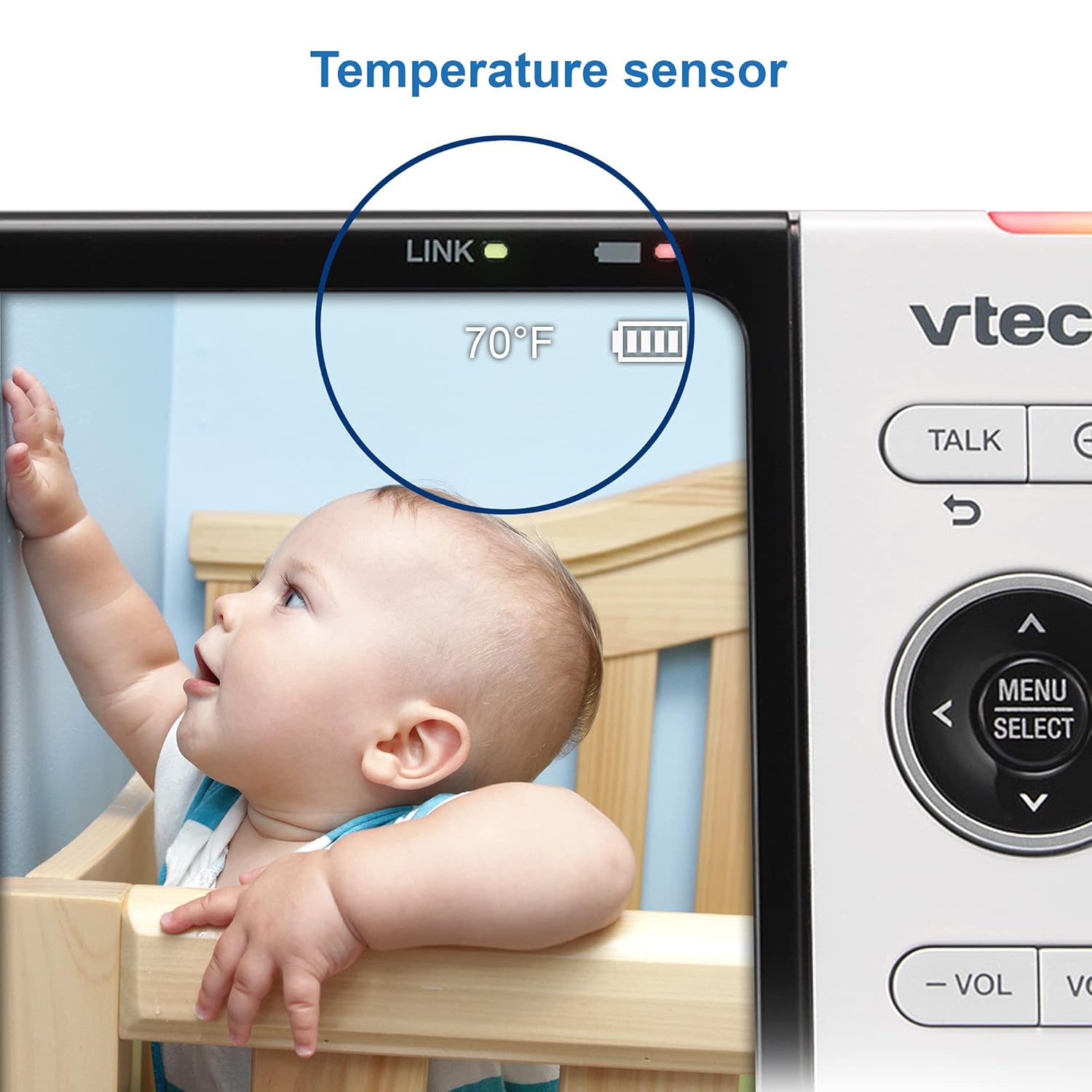
Figure 9: The auto-on screen with Sound Activation Mode helps save battery by turning off the display when quiet, and reactivating it upon detecting sounds.
5.7 Дижитал томруулалт
The parent unit allows you to digitally zoom in on the video feed for a closer look at your baby. Use the zoom controls on the parent unit to adjust the magnification.

Figure 10: The 4x digital zoom feature allows you to magnify the image on the parent unit for a more detailed view таны хүүхдийн.
5.8 Нууцлал ба аюулгүй байдал
The VTech VM818HD monitor ensures privacy through its secure 2.4GHz FHSS transmission, eliminating the need for Wi-Fi or app pairing. This direct connection between the parent and baby units provides a private and secure monitoring experience.

Figure 11: The monitor's design prioritizes privacy and security by operating without Wi-Fi or external app connections.
6. Засвар үйлчилгээ
To ensure optimal performance and longevity of your VTech VM818HD Baby Monitor:
- Clean the units regularly with a soft, dry cloth. Do not use cleaning sprays or liquid cleaners.
- Keep the units away from direct sunlight, heat sources, and moisture.
- Avoid dropping the units or subjecting them to strong impacts.
- Ensure the AC adapters are not damaged and are properly connected.
7. Алдаа засах
If you experience issues with your VTech VM818HD Baby Monitor, refer to the table below for common problems and solutions:
| Асуудал | Боломжит шалтгаан | Шийдэл |
|---|---|---|
| No picture/sound on parent unit | Төхөөрөмжүүд ажиллах хүрээнээс гарсан эсвэл цахилгаангүй байна. | Move parent unit closer to baby unit. Ensure both units are plugged in and turned on. |
| Weak signal/Interference | Obstacles between units or other electronic devices. | Reduce distance between units. Avoid placing near Wi-Fi routers, microwaves, or cordless phones. |
| Эцэг эхийн төхөөрөмжийн батерей хурдан дуусдаг | High brightness setting or continuous use. | Reduce screen brightness. Enable Sound Activation Mode. Keep parent unit plugged in when not mobile. |
| Шөнийн гэрэл ажиллахгүй байна | Feature is turned off in settings. | Check the night light setting in the parent unit menu and ensure it is enabled. |
8. Техникийн үзүүлэлтүүд
| Тодорхойлолт | Дэлгэрэнгүй |
|---|---|
| Загварын дугаар | VM818HD |
| Дэлгэцийн хэмжээ | 5 инч |
| Видео бичлэгийн нягтрал | 720p |
| Холболтын технологи | Wireless (2.4 GHz FHSS) |
| Макс муж | 1,000 фут хүртэл |
| Viewing өнцөг | 110 градус |
| Эрчим хүчний эх үүсвэр | Утастай цахилгаан |
| Материал | Хуванцар |
| Зүйлийн жин | 1.63 фунт |
| Хэмжээ (L x W x H) | 6.18 x 0.75 x 2.99 инч |
| Батерей шаардлагатай | Yes (1 Lithium Ion included) |
| IP үнэлгээ | IP65 |
9. Баталгаат хугацаа ба дэмжлэг
For warranty information, technical support, or to purchase accessories, please visit the official VTech Baby Monitors store or contact VTech customer service. Keep your purchase receipt for warranty claims.
Visit the VTech Store: VTech Baby Monitors


