1. Танилцуулга
Thank you for choosing the IROAD X5 Dash Cam. This device is designed to record your driving journey in Full HD, providing crucial evidence in case of an incident. It features front and rear cameras, Wi-Fi connectivity for smartphone access, a G-Sensor for impact detection, and advanced driver assistance systems (ADAS). Please read this manual carefully before installation and operation to ensure proper use and optimal performance.

Figure 1: IROAD X5 Dash Cam (Front and Rear Units)
2. Бүтээгдэхүүн дууссанview
2.1 Багцын агуулга
- Main Unit (Front Camera)
- Арын камер
- Wi-Fi Dongle
- IROAD Genuine 16GB MicroSD Card
- Хаалт суурилуулах
- Constant Power Cable (3m)
- Rear Camera Connection Cable (6m)
- Хэрэглэх заавар (энэ баримт бичиг)
- Spare Double-sided Tape
2.2 Гол онцлогууд
- Dual Full HD Recording: Front and rear cameras record in 1920x1080P at 30fps.
- Өргөн Viewөнцөг 140 ° талбайн view for both front and rear cameras.
- G-мэдрэгч: 3-axis acceleration sensor for automatic impact detection and event recording.
- Wi-Fi холболт: Connect to your smartphone via Wi-Fi for live view, тоглуулах болон тохиргооны тохируулга.
- ADAS (Advanced Driver Assistance System): Includes Lane Departure Warning, Front Vehicle Departure Warning, and Forward Collision Warning.
- Various Recording Modes: Continuous, Impact, Parking, and Motion Detection recording.
- Шөнийн хараа: Enhanced recording quality in low-light conditions.
- Аудио бичлэг: On/Off selectable.
3. Тохиргоо
3.1 MicroSD карт оруулах
- Хяналтын камер унтарсан эсэхийг шалгаарай.
- Locate the MicroSD card slot on the main unit.
- Өгөгдсөн 16GB MicroSD картыг байрандаа товших чимээ гартал үүрэнд нь хийнэ үү. Зөв байрлалд байгаа эсэхийг шалгаарай.
3.2 Урд камер суурилуулах
- Камер суурилуулах гэж буй салхины шилний хэсгийг цэвэрлэ.
- Attach the mounting bracket to the front camera.
- Peel off the protective film from the double-sided tape on the bracket.
- Mount the front camera on the windshield, ideally behind the rearview толь, тод байдлыг хангах view of the road. Press firmly for secure adhesion.

Figure 2: IROAD X5 Front Camera
3.3 Арын камер суурилуулах
- Clean the rear window area.
- Attach the rear camera to the rear window using the double-sided tape, ensuring a clear view.
- Connect the rear camera to the main unit using the provided 6m rear camera connection cable. Route the cable neatly along the vehicle's interior trim.
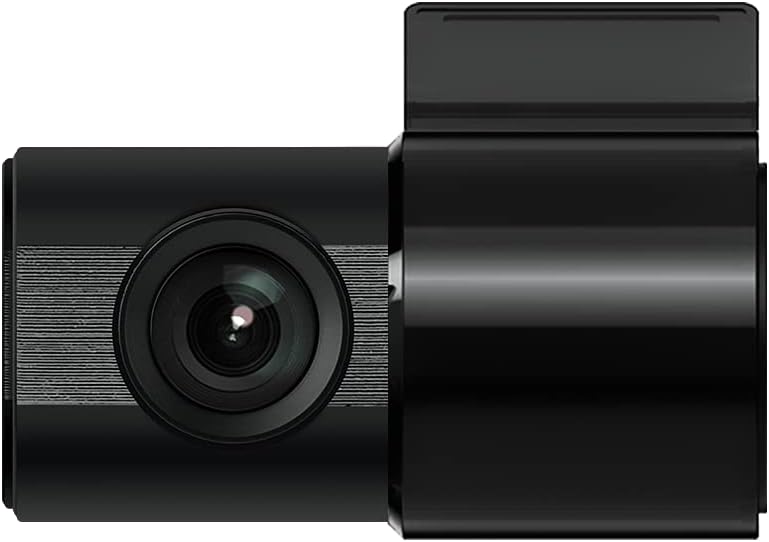
Figure 3: IROAD X5 Rear Camera
3.4 Эрчим хүчний холболт
- Connect the constant power cable to the main unit's power input port.
- Connect the other end of the power cable to your vehicle's power source (e.g., OBDII port for general and hybrid vehicles, if using the optional OBDII power cable, or fuse box for constant power). Consult a professional for hardwiring if unsure.
3.5 Wi-Fi Dongle Connection (Optional)
If your model requires an external Wi-Fi dongle, insert it into the designated USB port on the main unit. This enables Wi-Fi connectivity for smartphone app control.
4. Ашиглалтын заавар
4.1 Automatic Power On/Off
The IROAD X5 Dash Cam will automatically power on and begin recording when your vehicle's ignition is turned on. It will power off automatically when the ignition is turned off.
4.2 Бичлэг хийх горимууд
- Үргэлжлүүлэн бичлэг хийх: The dash cam continuously records while driving. Older files are overwritten by new ones when the MicroSD card is full.
- Нөлөөллийн бичлэг: When the G-Sensor detects a sudden impact or collision, the dash cam automatically saves the current recording segment as an event file, үүнийг дарж бичихээс сэргийлж байна.
- Зогсоолын бичлэг: When the vehicle is parked and the ignition is off, the dash cam enters parking mode. It records events triggered by motion detection or impacts.
- Хөдөлгөөн илрүүлэх бичлэг: In parking mode, the camera records when motion is detected in its field of view.
4.3 ADAS Functions
The IROAD X5 includes Advanced Driver Assistance Systems to enhance driving safety:
- Lane Departure Warning (LDWS): Таны тээврийн хэрэгсэл эгнээнээс гарсан тохиолдолд танд мэдэгдэнэ.
- Урд талын тээврийн хэрэгслийн хөдлөх анхааруулга (FVDW): Notifies you when the vehicle in front starts moving from a stop.
- Forward Collision Warning (FCWS): Warns you of a potential collision with a vehicle ahead.
These features can be configured via the IROAD smartphone application.
4.4 Аудио бичлэг
Audio recording is enabled by default. You can toggle this feature on or off through the IROAD smartphone application settings.
4.5 Using the IROAD App (Wi-Fi)
- Download the "IROAD" app from your smartphone's app store.
- Зураасны камерыг асаана уу.
- On your smartphone, go to Wi-Fi settings and connect to the IROAD dash cam's Wi-Fi network (SSID and password can be found in the app or on the device label).
- Open the IROAD app to access live view, recorded videos, and adjust settings.
5. Засвар үйлчилгээ
5.1 MicroSD картын удирдлага
It is recommended to format the MicroSD card regularly (e.g., once a month) to maintain optimal recording performance and prevent data corruption. This can be done through the IROAD smartphone app or by removing the card and formatting it on a computer.
5.2 Линзийг цэвэрлэх
Periodically clean the front and rear camera lenses with a soft, dry cloth to ensure clear video quality. Avoid using abrasive cleaners.
5.3 Програм хангамжийн шинэчлэлтүүд
Check the official IROAD website or the IROAD app for available firmware updates. Keeping your dash cam's firmware up-to-date ensures the latest features and bug fixes.
6. Алдаа засах
| Асуудал | Боломжит шалтгаан / шийдэл |
|---|---|
| Зураасан камер асахгүй байна. | Check power cable connection. Ensure vehicle ignition is on. Verify fuse in power cable or vehicle's fuse box. |
| No recording or recording stops. | MicroSD card may be full or corrupted. Format the MicroSD card. Ensure the card is inserted correctly. |
| Wi-Fi холболтын асуудал. | Ensure Wi-Fi dongle is properly connected (if applicable). Restart the dash cam and your smartphone. Check Wi-Fi settings on your phone. |
| Видео чанар муу. | Clean camera lenses. Ensure protective film is removed from lenses. Check recording resolution settings in the app. |
| ADAS warnings are inaccurate. | Ensure the camera is properly calibrated and mounted centrally. Environmental factors (heavy rain, fog) can affect performance. |
7. Техникийн үзүүлэлтүүд
| Онцлог | Тодорхойлолт |
|---|---|
| -ийн талбар View (Урд/Арын) | 140° |
| Resolution (Front/Rear) | Full HD 1920x1080P |
| Frame Rate (Front/Rear) | 30 кадр/сек |
| Бичлэгийн горимууд | Continuous, Impact, Parking, Motion Detection |
| ADAS Features | Lane Departure Warning, Front Vehicle Departure Warning, Forward Collision Warning |
| G-мэдрэгч | 3 тэнхлэгт хурдатгал мэдрэгч |
| Аудио бичлэг | On/Off selectable |
| Эрчим хүчний хэрэглээ | 2.6 Вт |
| Ашиглалтын температур | -30 хэмээс 75 хэм хүртэл |
| Бичлэгийн медиа | MicroSD карт (16GB багтсан) |
| Үндсэн нэгжийн хэмжээсүүд | 90 x 40 x 30 мм |
| Үндсэн нэгжийн жин | 60 гр |
| Холболт | Wi-Fi |
| Дэлгэцийн төрөл | LCD (4 inch, if applicable, though product description implies no screen on main unit) |
| Суулгах арга | Цавуу |
8. Баталгаат хугацаа ба дэмжлэг
For warranty information, technical support, or service inquiries, please refer to the warranty card included with your product or visit the official IROAD webсайт. Худалдан авалтын баримтаа баталгаат нэхэмжлэлд зориулж худалдан авалтын баталгаа болгон хадгална уу.


