1. Танилцуулга
Thank you for choosing the PROXTEND X502 Full HD Webcam. This manual provides detailed instructions to help you set up, operate, and maintain your webcam for optimal performance. The X502 is designed to deliver clear 1080p video at 30 frames per second, featuring an omni-directional microphone and automatic low light correction for various lighting conditions.
2. Багцын агуулга
Таны багцад бүх зүйл байгаа эсэхийг шалгана уу:
- PROXTEND X502 Full HD Webcam (PX-CAM007)
- Integrated Universal Mounting Clip
- Хэрэглэгчийн гарын авлага (энэ баримт бичиг)
3. Тохиргоо
Follow these steps to set up your PROXTEND X502 Webкамер:
- суурилуулах Webкамер:
The webcam features an integrated universal mounting clip. You can place the webкамерыг компьютерын дэлгэц, зөөврийн компьютерын дэлгэц эсвэл хавтгай гадаргуу дээр байрлуул. Хавчаарыг найдвартай барихын тулд тохируулна уу webcam in position. The webcam also supports mini tripod mounting (tripod not included).
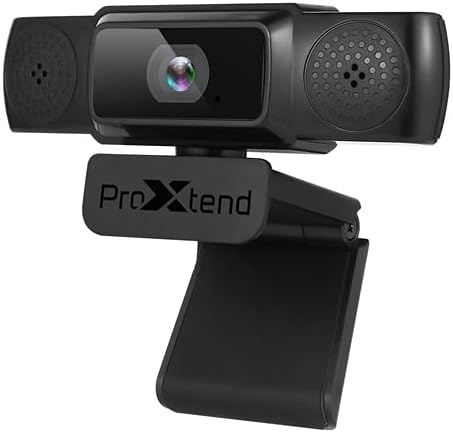
Image: The PROXTEND X502 Full HD Webcam shown with its universal mounting clip, suitable for monitors or flat surfaces.
- Таны компьютерт холбогдох:
-аас USB кабелийг залгаарай webкомпьютер дээрх боломжтой USB порт руу камер залгаарай. webcam is plug-and-play, meaning your operating system should automatically detect and install the necessary drivers. No additional software installation is typically required.
- Driver Installation Verification:
After connecting, allow a few moments for your computer to recognize the device. You can verify successful installation in your operating system's Device Manager (Windows) or System Information (macOS) under 'Cameras' or 'Imaging Devices'.
4. Ашиглалтын заавар
Нэг удаа webcam is set up, you can begin using it with various applications:
- -ийг сонгож байна Webкамер:
Open your preferred video conferencing, streaming, or recording application (e.g., Zoom, Microsoft Teams, Skype, OBS Studio). Navigate to the application's video and audio settings. Select "PROXTEND X502" as your camera and microphone input device.

Зураг: Урд view of the PROXTEND X502 Full HD Webcam, highlighting the lens and integrated microphones.
- Видео чанар:
The webcam automatically adjusts for optimal image quality, including auto-focus and auto low light correction. Ensure adequate lighting for the best video performance. The 1920x1080p resolution at 30fps provides clear and smooth video.
- Аудио чанар:
The integrated omni-directional microphone captures sound from all directions. Position yourself appropriately to ensure your voice is clearly picked up. Most applications allow you to adjust microphone input levels in their audio settings.
5. Онцлогууд
Key features of the PROXTEND X502 Full HD Webcam include:
- 1 / 2.7 ”CMOS дүрс мэдрэгч
- 2 мегапиксел
- Resolution: 1920x1080 at 30 frames per second
- Бүх чиглэлд чиглэсэн микрофон
- Бүх нийтийн холбох хавчаар
- Mini Tripod Support
- Бага гэрлийн автомат залруулга
6. Техникийн үзүүлэлтүүд
Detailed technical specifications for the PROXTEND X502 Full HD Webкамер:

Image: A visual representation of the PROXTEND X502 Full HD Webcam's key features and technical specifications.
| Онцлог | Тодорхойлолт |
|---|---|
| Зургийн мэдрэгч | 1/2.7" CMOS Image Sensor |
| Мегапиксел | 2 МП |
| Макс тогтоол | 1920х1080 |
| Видеоны нягтрал | 1920х1080 |
| Макс FPS | 30 fps |
| Видео декодчилох формат | H.264/MJPG |
| Гэрлийн горим | Автомат |
| Цагаан баланс | Автомат |
| Олз | Автомат |
| Бага гэрлийн нөхөн олговор | Автомат |
| Viewing өнцөг | 77° |
| Фокусын зай | 10 см хүртэл хязгааргүй |
| Фокусын төрөл | Автомат |
| Микрофон | Omni-чиглэлтэй |
| Аудио С.ampling Rate | 1 суваг 16bit 16K 32K 44.1K 48K |
| Аудио формат | PCM, нийцтэй UAC 1.0 |
| Интерфэйс | USB 2.0 |
| Кабелийн урт | 1.5 м |
| Тохиромжтой үйлдлийн систем | Windows XP, Windows 7 (32bit/64bit), Windows 8, Windows 10, Android V5.0 or higher OS, MAC OS 10.6 or higher |
| Бүтээгдэхүүний хэмжээс | 12.7 x 7.62 x 5.08 см |
| Бүтээгдэхүүний жин | 453.59 гр |
7. Алдаа засах
If you encounter issues with your PROXTEND X502 Webкамер, дараах шийдлүүдийг туршаад үзээрэй:
- Зураг/Видео байхгүй:
- USB кабель хоёуланд нь найдвартай холбогдсон эсэхийг шалгаарай webкамер болон таны компьютер.
- Компьютер дээрээ өөр USB порт ашиглаж үзнэ үү.
- Компьютерээ дахин эхлүүлнэ үү.
- Check your application's settings to ensure the PROXTEND X502 is selected as the video input.
- Verify that no other application is currently using the webкамер.
- Аудио байхгүй/Микрофон ажиллахгүй байна:
- Ensure the PROXTEND X502 is selected as the microphone input in your application's audio settings.
- Микрофоныг идэвхжүүлж, дууг хаагаагүй эсэхийг шалгахын тулд компьютерийнхээ дууны тохиргоог шалгана уу.
- Adjust the microphone input level in your system or application settings.
- Видео чанар муу:
- Ensure sufficient lighting in your environment.
- -ийг цэвэрлэ webкамерын линзийг зөөлөн, хөвөнгүй даавуугаар зөөлөн болго.
- Check your internet connection speed if streaming, as bandwidth can affect video quality.
8. Засвар үйлчилгээ
Таны урт наслалт, оновчтой гүйцэтгэлийг хангахын тулд webкамер:
- Цэвэрлэгээ: зөөлөн арчина webcam lens with a soft, dry, lint-free cloth. Avoid using harsh chemicals or abrasive materials.
- Хадгалах: Ашиглагдаагүй үед хадгална уу webхэт температур, нарны шууд тусгалаас хол цэвэр, хуурай газар байрлуулна.
- Харьцуулах: The унахаас зайлсхийх хэрэгтэй webкамер эсвэл хүчтэй нөлөөнд оруулах.
9. Баталгаат хугацаа ба дэмжлэг
The PROXTEND X502 Full HD Webкамер нь хамт ирдэг 7 жилийн баталгаат хугацаа, ensuring peace of mind regarding your purchase. For warranty claims, technical support, or any inquiries not covered in this manual, please refer to the contact information provided with your product packaging or visit the official PROXTEND webсайт.
10. Нийцлийн мэдээлэл
This device complies with relevant regulatory standards for electronic equipment. For detailed compliance information, please refer to the product packaging or the official PROXTEND webсайт.


