Танилцуулга
Thank you for choosing the PILOT 720p Vehicle Dash Cam. This manual provides detailed instructions for the proper installation, operation, and maintenance of your new dash camera. Please read this manual thoroughly before use to ensure optimal performance and longevity of the device.
This dash cam is designed to record video footage while driving, offering features such as 720p HD resolution, a wide viewing angle, motion detection, and loop recording. It comes with an 8GB Micro SD card and a universal window mount for convenient setup.
Багцын агуулга
Доор жагсаасан бүх зүйл таны багцад байгаа эсэхийг шалгана уу.
- Хяналтын камерын нэгж
- 8 ГБ Micro SD карт
- Сорох цомын уул
- USB машины цэнэглэгч
- USB Charger and Sync Cable
- Хэрэглэгчийн гарын авлага (энэ баримт бичиг)
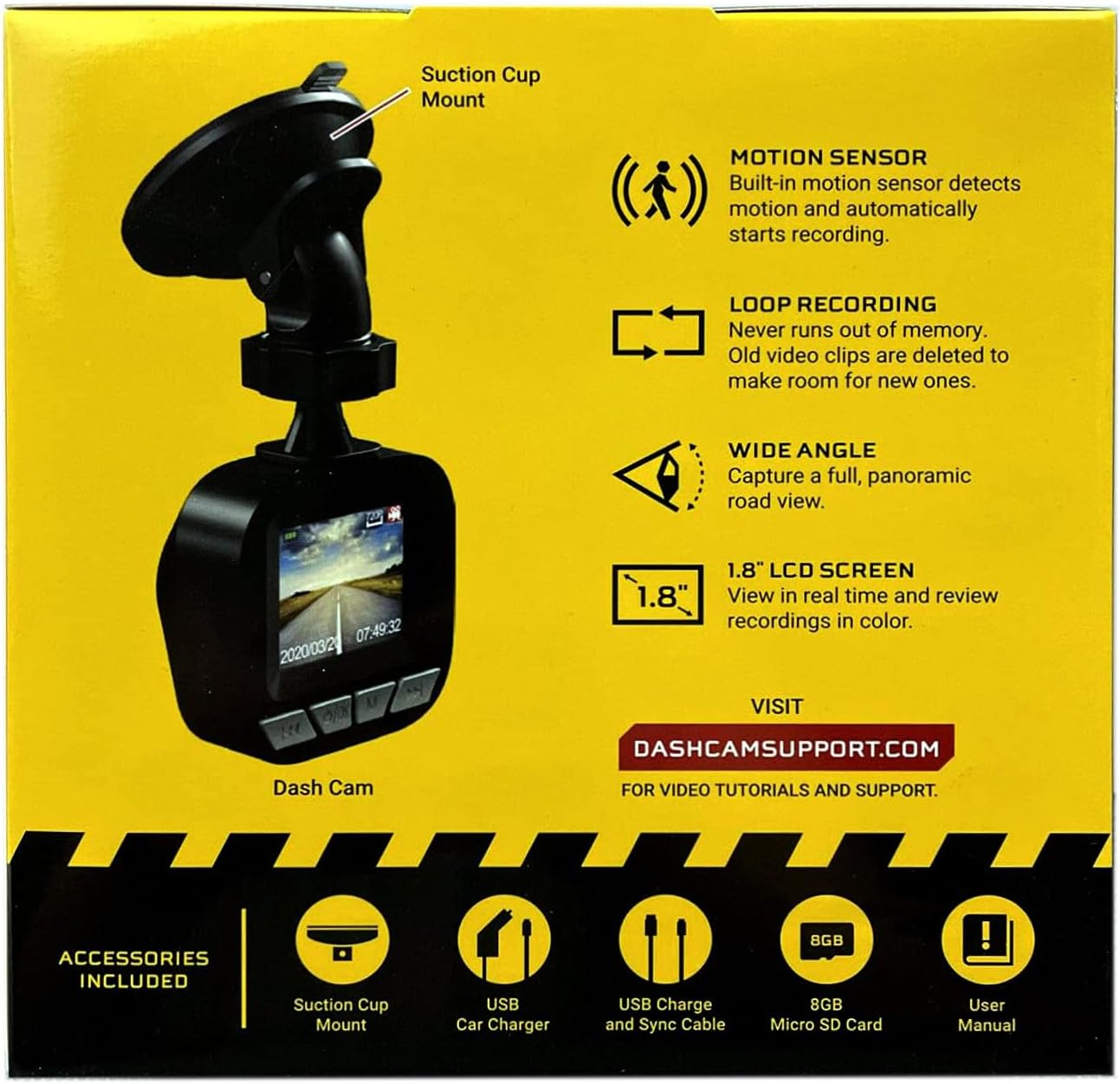
Image: The dash cam unit, suction cup mount, USB car charger, USB charge and sync cable, 8GB Micro SD card, and user manual are shown, along with a summary of key features like motion sensor, loop recording, wide angle, and 1.8" LCD screen.
Бүтээгдэхүүний онцлог
- Шийдвэр: 720p HD видео бичлэг хийх.
- Дэлгэцийн хэмжээ: 1.8-inch LCD display for real-time viewing болон тоглуулах.
- Viewөнцөг Wide-angle lens to capture a broad road view.
- Хөдөлгөөн мэдрэгч: Built-in sensor detects motion and automatically initiates recording.
- Давталтын бичлэг: Automatically overwrites older video clips when the memory card is full, ensuring continuous recording.
- Микрофон: Аудио бичлэг хийхэд зориулагдсан.
- Хадгалах: Supports Micro SD cards up to 32GB (8GB card included).
- Эрчим хүч: Built-in rechargeable Lithium-ion battery and USB 2.0 port for charging.
Тохируулах гарын авлага
1. Micro SD картыг оруулж байна
Locate the Micro SD card slot on the side or bottom of the dash cam. Gently insert the included 8GB Micro SD card into the slot until it clicks into place. Ensure the card is inserted correctly to avoid damage. The dash cam supports cards up to 32GB.
2. Зураасны камерыг суурилуулах
- Clean the desired area on your vehicle's windshield where you intend to mount the dash cam. Ensure the surface is dry and free of dust.
- Сорох аяганы бэхэлгээг хяналтын самбарын хэсэгт бэхлэнэ.
- Press the suction cup firmly against the windshield and flip the lever to secure it in place.
- Ил тод байхын тулд камерын өнцгийг тохируулна уу view of the road ahead, avoiding any obstructions.

Зураг: Ойрын зураг view of the front of the PILOT dash cam, showing the camera lens and the "PILOT" brand logo. This illustrates the main unit for mounting.
3. Цахилгааныг холбох
Connect the USB car charger to your vehicle's 12V power outlet (cigarette lighter socket). Then, connect the USB charger and sync cable from the car charger to the USB port on the dash cam. The dash cam will typically power on automatically when the vehicle starts and power is supplied.
Ашиглалтын заавар
Асаах/унтраах
- Автомат: The dash cam will power on and begin recording automatically when connected to a power source and the vehicle ignition is turned on. It will power off automatically when the vehicle is turned off and power is disconnected.
- Гарын авлага: To manually power on or off, press and hold the power button (usually located on the side or bottom of the unit) for a few seconds.
Бичлэгийн горимууд
- Тасралтгүй давталтын бичлэг: The dash cam records video in continuous loops (e.g., 1, 3, or 5-minute segments). When the Micro SD card is full, the oldest unlocked files will be overwritten by new recordings. This ensures you always have the most recent footage.
- Хөдөлгөөн илрүүлэх бичлэг: When enabled in the settings, the dash cam will automatically start recording if it detects motion in front of the camera while the vehicle is parked and the dash cam is powered on. This feature is useful for monitoring your vehicle when stationary.
ViewБичлэг хийх
1.8 инчийн LCD дэлгэц нь танд дараах боломжийг олгоно view амьд footage ба дахинview recorded videos directly on the device. Use the navigation buttons (typically labeled 'Menu', 'Up', 'Down', 'OK') to browse through the menu options and playback recorded files. Refer to the on-screen interface for specific navigation prompts.
Огноо, цаг Stamp
Ensure the date and time are set correctly in the dash cam's settings menu. This is crucial for accurate record-keeping of video footage.
Засвар үйлчилгээ
- Линз цэвэрлэх: Regularly clean the camera lens with a soft, lint-free cloth to ensure clear video quality. Avoid abrasive materials or harsh chemicals.
- SD картын менежмент: It is recommended to format the Micro SD card periodically (e.g., once a month) within the dash cam's settings menu. This helps maintain card performance and prevents data corruption. Back up any important footage форматлахын өмнө.
- Батерейны арчилгаа: The built-in Lithium-ion battery is primarily for emergency recording and saving settings. For continuous operation, keep the dash cam connected to the vehicle's power supply. Avoid exposing the device to extreme temperatures for extended periods.
- Програм хангамжийн шинэчлэлтүүд: Check the manufacturer's support webсайт (DASHCAMSUPPORT.COM) periodically for any available firmware updates to improve performance and add new features.
Алдааг олж засварлах
| Асуудал | Боломжит шийдэл |
|---|---|
| Зураасан камер асахгүй байна. |
|
| Dash cam turns off frequently during driving. |
|
| Видео footage нь бүдэг эсвэл тодорхойгүй байна. |
|
| Хяналтын камер бичлэг хийхгүй байна. |
|
Үзүүлэлтүүд
| Онцлог | Дэлгэрэнгүй |
|---|---|
| Шийдвэр | 720p HD |
| Дэлгэцийн хэмжээ | 1.8 инч |
| Viewing өнцөг | Wide Angle (135 Degrees Field Of View) |
| Хөдөлгөөн мэдрэгч | Баригдсан |
| Давталтын бичлэг | Баригдсан |
| Микрофон | Баригдсан |
| USB порт | USB 2.0 |
| Батерей | Баригдсан цэнэглэдэг литий-ион |
| Санах ойн картны дэмжлэг | Micro SD up to 32GB (8GB included) |
| Зүйлийн жин | 8 унц |
| Холболтын технологи | USB |
| Суурилуулах төрөл | Цонхны бэхэлгээ |
Дэмжлэг
For additional assistance, video tutorials, or further support, please visit the official support webсайт:
Please have your product model information ready when contacting support.


