1. Танилцуулга
This manual provides comprehensive instructions for the safe and effective use of the C-LOGIC 580 Smart Digital Multimeter. Please read this manual thoroughly before operation and retain it for future reference.
The C-LOGIC 580 is a smart digital multimeter designed for accurate and efficient electrical measurements. Its smart technology allows for automatic recognition of measurement parameters, reducing potential errors for amateur users and saving time for professionals.
2. Аюулгүй байдлын мэдээлэл
Цахилгаан туршилтын төхөөрөмжийг ашиглахдаа аюулгүй байдлын урьдчилан сэргийлэх арга хэмжээг үргэлж дагаж мөрдөөрэй. Үүнийг дагаж мөрдөөгүй тохиолдолд гэмтэл бэртэл авах эсвэл төхөөрөмжид эвдрэл учруулж болзошгүй.
- Функц бүрийн хувьд заасан хамгийн их оролтын утгыг хэтрүүлж болохгүй.
- Ensure the test leads are properly connected and the function switch is in the correct position before making any measurements.
- Амьд хэлхээтэй ажиллахдаа маш болгоомжтой байх хэрэгтэй.
- Do not use the multimeter if it appears damaged or if the test leads are compromised.
- Refer to the CAT III 600V and MAX 600V markings on the device for voltage хязгаар.
3. Бүтээгдэхүүний онцлог
- Ухаалаг технологи: Automatic recognition of measurement parameters.
- Error Reduction: Designed to minimize errors for amateur users.
- Цаг хэмнэх: Streamlines measurement processes for professional users.
- Дижитал дэлгэц: Clear and easy-to-read digital readout.
- Олон функцууд: Capable of measuring various electrical parameters.
4. Багцын агуулга
Багцыг нээхдээ бүх зүйл байгаа бөгөөд гэмтэлгүй эсэхийг шалгаарай.
- C-LOGIC 580 Smart Digital Multimeter
- Туршилтын утас (Улаан ба хар)
- Хэрэглэгчийн гарын авлага
5. Тохиргоо
5.1 Батерей суурилуулах
The C-LOGIC 580 is battery powered. Ensure batteries are correctly installed before first use.
- Мультиметрийн арын хэсэгт зайны тасалгааны тагийг олоорой.
- Зайны тасалгааг нээхийн тулд халив ашиглана уу.
- Insert the required batteries, observing the correct polarity (+ and -).
- Зайны тасалгааны тагийг сольж, бэхлэнэ.
5.2 Туршилтын утсыг холбох
Туршилтын утсыг зөв холбох нь хэмжилтийг нарийвчлалтай, аюулгүй хийхэд чухал үүрэгтэй.
- Хар туршилтын утсыг "COM" (Нийтлэг) оролтын залгуурт оруулна уу.
- Insert the red test lead into the "VHz%" input jack for voltage, frequency, and duty cycle measurements.
- Холболтууд бат бөх, найдвартай байгаа эсэхийг шалгаарай.
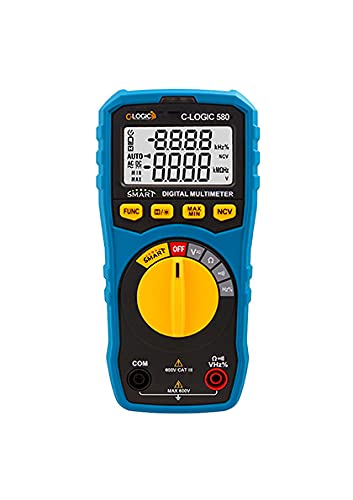
Зураг 1: Урд view of the C-LOGIC 580 Smart Digital Multimeter, showing the display, rotary switch, function buttons, and input jacks (COM and VHz%). The display shows "-8.8.8.8" and "0.0.0.0" with indicators for AUTO, AC/DC, kHz%, NCV, MAX, MIN, and V. The rotary switch is set to OFF. The input jacks are labeled "COM" and "VHz%".
6. Ашиглалтын заавар
6.1 Асаах/унтраах
To power on the multimeter, rotate the central yellow dial from the "OFF" position to any desired measurement function. To power off, rotate the dial back to "OFF".
6.2 Smart Measurement Mode
The C-LOGIC 580 features a smart mode that automatically identifies the type of measurement (e.g., AC voltage, DC ботьtage, resistance) when the leads are connected to a circuit. This simplifies operation by eliminating the need to manually select the measurement type.
6.3 функцын товчлуурууд
The multimeter includes several function buttons below the display:
- ФУНК: Used to cycle through different measurement modes within a single rotary switch setting (e.g., AC/DC voltage, resistance/continuity).
- (Diode/Continuity): Activates diode test or continuity check.
- MAX / MIN: Toggles between maximum and minimum value hold during a measurement.
- NCV: Холбоо барихгүй боть-г идэвхжүүлнэtage илрүүлэх.
6.4 Үндсэн хэмжилтүүд
Ботьtage Хэмжилт (AC/DC):
- Set the rotary switch to the 'V' position.
- Connect the black test lead to the 'COM' jack and the red test lead to the 'VHz%' jack.
- Туршилтын утсыг хэмжих хэлхээ эсвэл эд ангитай зэрэгцээ холбоно уу.
- The multimeter will automatically detect AC or DC voltage. Use the FUNC button if manual selection is needed.
Эсэргүүцлийн хэмжилт:
- Set the rotary switch to the 'Ω' position.
- Connect the black test lead to the 'COM' jack and the red test lead to the 'VHz%' jack.
- Эсэргүүцлийг хэмжихээс өмнө хэлхээг хүчдэлгүй болгосон эсэхийг шалгаарай.
- Туршилтын утсыг хэмжих бүрэлдэхүүн хэсэгт холбоно.
Тасралтгүй байдлын тест:
- Set the rotary switch to the 'Ω' position.
- дээр дарна уу (Diode/Continuity) button to select continuity mode.
- Connect the test leads across the circuit or component. A beep indicates continuity.
Холбоо барихгүй ботьtage (NCV) илрүүлэх:
- Set the rotary switch to the 'NCV' position.
- Move the top part of the multimeter near a live conductor. The device will indicate the presence of AC voltage шууд холбоогүй.
7. Засвар үйлчилгээ
7.1 Цэвэрлэгээ
Мультиметрийг арчина уу casing зартайamp даавуу болон зөөлөн угаалгын нунтаг. Зүлгүүрийн бодис эсвэл уусгагч хэрэглэж болохгүй. Хадгалах эсвэл ашиглахаасаа өмнө төхөөрөмжийг хуурай байгаа эсэхийг шалгаарай.
7.2 Батерейг солих
When the low battery indicator appears on the display, replace the batteries promptly to ensure accurate readings. Follow the battery installation steps in Section 5.1.
7.3 Хадгалалт
Мультиметрийг сэрүүн, хуурай газар, нарны шууд тусгал болон хэт өндөр температураас хол хадгална уу. Удаан хугацаагаар хадгалах бол гоожихоос сэргийлж батерейг нь салгаж авна уу.
8. Алдаа засах
| Асуудал | Боломжит шалтгаан | Шийдэл |
|---|---|---|
| Мультиметр асахгүй байна. | Дууссан эсвэл буруу суурилуулсан батерей. | Зайны туйлшралыг шалгах эсвэл батерейг солих. |
| Буруу уншилтууд. | Incorrect function selected; poor test lead connection; low battery. | Ensure correct function is selected (if not in smart mode); check test lead connections; replace batteries. |
| Тасралтгүй дохио байхгүй. | Circuit is open; continuity mode not selected. | Verify circuit integrity; press FUNC button to select continuity mode. |
9. Техникийн үзүүлэлтүүд
| Параметр | Дэлгэрэнгүй |
|---|---|
| Брэнд | C-LOGIC |
| Загвар | 580 |
| Эрчим хүчний эх үүсвэр | Батерейгаар ажилладаг |
| Хэмжилтийн төрөл | Мультиметр |
| Үйлдвэрлэгч | C-LOGIC |
| ASIN | B0967VMK1W |
| UPC | 810053671603 |
| Эхний боломжтой огноо | 31 оны тавдугаар сарын 2021 |
10. Баталгаат хугацаа ба дэмжлэг
For warranty information or technical support regarding your C-LOGIC 580 Smart Digital Multimeter, please contact C-LOGIC customer service. Refer to the product packaging or the official C-LOGIC webхолбоо барих мэдээллийг авах сайт.
Тэмдэглэл: Баталгаат хугацааны тодорхой нөхцөл нь бүс нутаг болон жижиглэн худалдаа эрхлэгчээс хамаарч өөр өөр байж болно. Худалдан авалтын баримтаа хадгална уу.


