Танилцуулга
The Steca Solarix PLI is a comprehensive hybrid inverter solution designed for photovoltaic island systems. It integrates an MPPT solar charge controller, a 230V pure sine wave inverter, and an integrated battery charger into a single unit. This device enables the creation of an independent 230V power grid using a solar generator and battery bank. It also supports recharging batteries via generator or grid connection.
The Solarix PLI functions as a grid-guided UPS hybrid inverter with zero export capability and blackout protection. In grid-connected operation, solar power helps reduce electricity costs. In the event of a power outage, the battery seamlessly takes over power supply within 10 milliseconds, ensuring continuous operation of essential loads.
Аюулгүй ажиллагааны зааварчилгаа
Суурилуулах болон ажиллуулахын өмнө бүх аюулгүй байдлын зааврыг анхааралтай уншина уу. Эдгээр зааврыг дагаж мөрдөөгүй тохиолдолд цахилгаанд цохиулах, гал түймэр гарах эсвэл ноцтой гэмтэл бэртэлд хүргэж болзошгүй.
- Суурилуулалтыг зөвхөн мэргэшсэн ажилтан хийх ёстой.
- Ensure all power sources are disconnected before performing any wiring or maintenance.
- Инвертерийг бороо, цас, шүршигч болон бусад шингэнд бүү гарга.
- Do not disassemble the unit. There are no user-serviceable parts inside. Refer all servicing to qualified service personnel.
- Хэт халалтаас урьдчилан сэргийлэхийн тулд инвертерийн эргэн тойронд зохих агааржуулалтыг хангана.
- Connect the inverter only to battery systems with the correct voltage (24V for this model).
- Always use appropriate overcurrent protection devices (fuses/breakers) for all circuits connected to the inverter.
- Хүүхдийг инвертер болон түүний холболтуудаас хол байлга.
Бүтээгдэхүүн дууссанview
The Steca Solarix PLI unit features a robust design with a clear display and intuitive controls for monitoring and configuration.
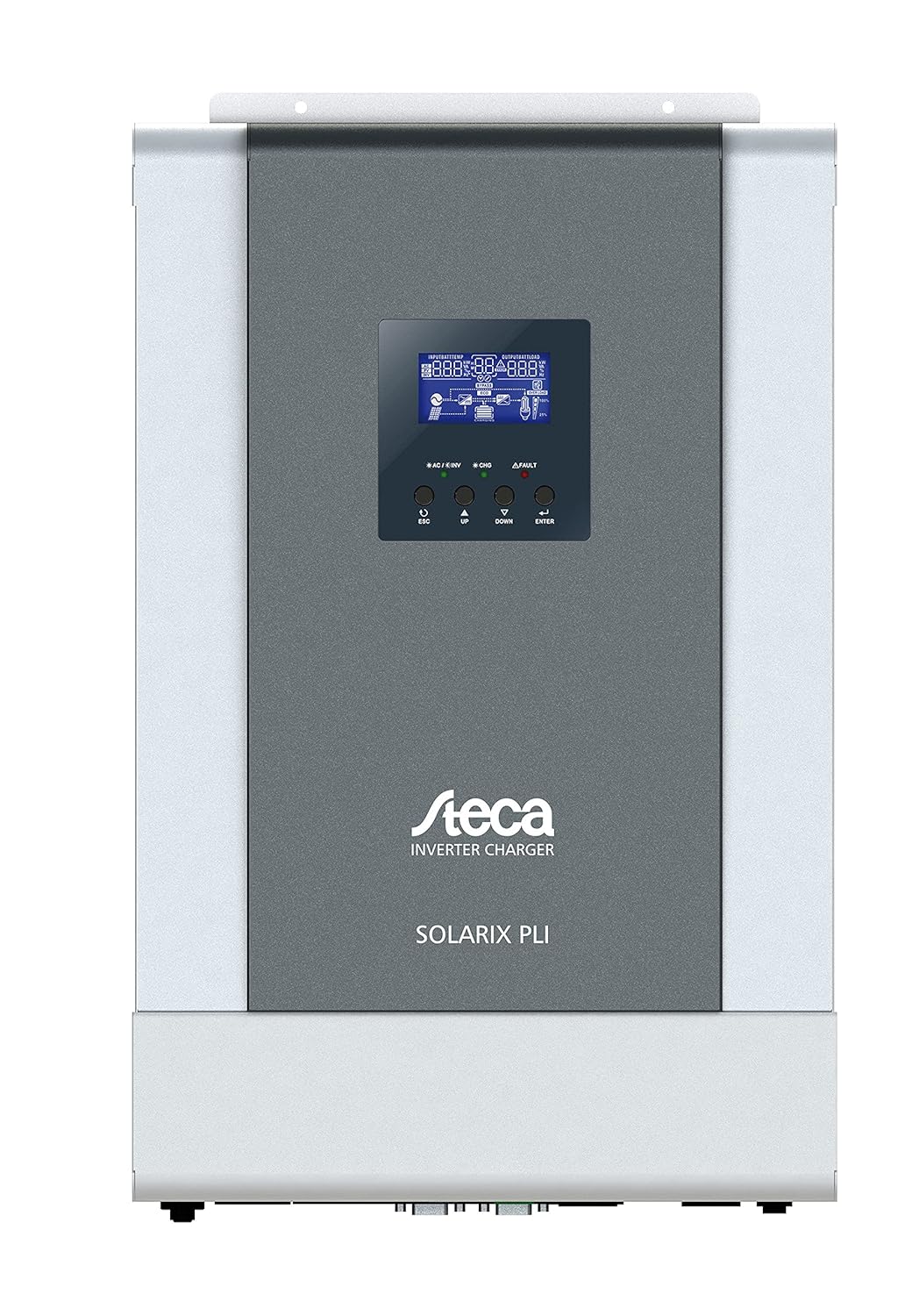
Зураг 1: Урд view of the Steca Solarix PLI 2400-24V Hybrid Inverter. The central display shows operational status, while buttons below allow navigation and setting adjustments.
Гол бүрэлдэхүүн хэсгүүдэд:
- LCD дэлгэц: Shows real-time system data, operating status, and error codes.
- Хяналтын товчлуурууд: Used for navigating menus and adjusting settings (ESC, UP, DOWN, ENTER).
- AC Input/Output Terminals: For connecting to the grid and supplying AC loads.
- Зайны терминалууд: For connecting to the battery bank.
- PV Input Terminals: For connecting to the solar panel array.
- Харилцаа холбооны портууд: For external monitoring and control (e.g., USB, RS232).

Figure 2: Dimensional drawing of the Steca Solarix PLI, indicating its physical size and mounting points. Dimensions are provided in millimeters.
Тохиргоо
Proper installation is crucial for the safe and efficient operation of your Solarix PLI inverter. Follow these general steps:
- Суурилуулалт: Select a suitable location for mounting the inverter. It should be indoors, dry, well-ventilated, and away from direct sunlight or heat sources. Ensure the mounting surface can support the inverter's weight (approx. 9.01 kg).
- Зайны холболт: Connect the battery bank to the inverter's battery terminals. Ensure correct polarity (+ to + and - to -). Use appropriately sized cables and fuses. This model is designed for 24V battery systems.
- Фото зургийн массивын холболт: Нарны хавтангийн массивыг фотоэлектрик оролтын терминалуудтай холбоно уу. Зөв туйлшралыг ажиглаж, фотоэлектрик массивын эзэлхүүнийг шалгана уу.tage болон гүйдэл нь инвертерийн техникийн үзүүлэлтүүдийн хүрээнд байна.
- AC Input Connection (Grid/Generator): If connecting to the utility grid or a generator, connect the AC input cable to the designated terminals. Ensure proper grounding.
- AC Output Connection (Loads): Connect your AC loads (appliances, circuits) to the AC output terminals of the inverter.
- Анхдагч асаалт: Once all connections are secure and verified, switch on the battery breaker, then the PV array breaker (if applicable), and finally the AC input breaker. The inverter display should power on.
- Тохиргоо: Use the control buttons and LCD display to configure operating parameters such as battery type, charging current, output voltage, and operating modes according to your system requirements.
Refer to the detailed wiring diagrams and specific instructions in the full user manual for precise connection procedures and safety precautions.
Ажиллаж байна
The Steca Solarix PLI offers various operating modes to optimize energy flow. The LCD display provides real-time information on input voltage, гаралтын ботьtage, battery status, charging current, and load power.
Дэлгэц ба навигаци
The LCD display shows various screens cycling through system parameters. Use the UP and DOWN buttons to manually cycle through screens or adjust values in settings. The ENTER button confirms selections, and ESC returns to the previous menu or screen.
Үйлдлийн горимууд
- Utility Priority (UPS Mode): The inverter primarily uses grid power to supply loads and charge batteries. Solar power is used when available to supplement or reduce grid consumption. In case of grid failure, it switches to battery power.
- Нарны эрчим хүчний тэргүүлэх чиглэл: Solar power is prioritized for loads and battery charging. Grid power is only used when solar power is insufficient or batteries are low.
- Battery Priority: Loads are primarily supplied by battery power. Solar charges the battery. Grid power is used as a last resort when battery voltage нь тогтоосон босгоос доош унадаг.
Standby Functionality
The inverter features a standby mode to conserve energy. It typically enters standby when the load is below a certain threshold (e.g., <40W) and reactivates when the load increases (e.g., >100W). This threshold may be configurable in advanced settings.
Засвар үйлчилгээ
Regular maintenance ensures the longevity and optimal performance of your Steca Solarix PLI inverter.
- Цэвэрлэгээ: Инвертерийн гадна талыг хуурай, зөөлөн даавуугаар үе үе цэвэрлэж байгаарай. Шингэн цэвэрлэгч эсвэл уусгагч бүү хэрэглээрэй. Агааржуулалтын нүхнүүд нь тоос шороо, хог хаягдлаас цэвэрлэгдсэн эсэхийг шалгаарай.
- Холболтын шалгалт: Annually inspect all electrical connections (battery, PV, AC input/output) for tightness and signs of corrosion. Loose connections can cause overheating and damage.
- Агааржуулалт: Ensure the area around the inverter remains clear to allow for proper airflow and heat dissipation.
- Батерейны эрүүл мэнд: Monitor your battery bank's health according to the battery manufacturer's recommendations. Ensure proper charging and discharge cycles.
Always disconnect all power sources before performing any maintenance or inspection.
Алдааг олж засварлах
This section addresses common issues you might encounter with your Steca Solarix PLI inverter.
| Асуудал | Боломжит шалтгаан | Шийдэл |
|---|---|---|
| No 230V output / Error Code 09 (Soft Start Failure) | Internal main board defect. | This often indicates a hardware failure that cannot be user-repaired. Contact Steca customer support or a qualified service technician. |
| Inverter does not activate from standby with low loads. | Load is below the inverter's standby activation threshold (e.g., <100W). | Increase the load connected to the inverter above the activation threshold. Check if the standby threshold is configurable in the settings. |
| Persistent warning tone. | Indicates a system warning (e.g., low battery, overload, high temperature). | Check the LCD display for specific error codes or warning messages. Address the underlying issue (e.g., reduce load, check ventilation, charge batteries). While the tone can be disabled, it's recommended to address the cause. |
| Display/Menu navigation buttons (UP/DOWN) seem reversed. | Minor firmware quirk or design choice. | Adapt to the button behavior. It does not affect functionality. |
| Inverter not charging batteries from PV. | Insufficient solar input, PV connection issue, or charge controller settings. | Check PV array connections and ensure sufficient sunlight. Verify PV input voltage on the display. Check charge controller settings (e.g., battery type, charging current). |
For issues not listed here or if solutions do not resolve the problem, please contact Steca customer support.
Үзүүлэлтүүд
| Атрибут | Үнэ цэнэ |
|---|---|
| Брэнд | STECA |
| Загварын дугаар | 4250852802154 |
| Зүйлийн жин | 9.01 кг |
| Бүтээгдэхүүний хэмжээс | 49.6 x 47.79 x 23 см (Сав баглаа боодол) |
| Өнгө | Хар |
| Бүтээгдэхүүний зузаан | 130 миллиметр |
| Драйвын төрөл | Battery, Solar |
| Ботьtage | 230 вольт |
| Ватtage | 5700 Watt (Max. PV Generator) |
| Оруулсан бүрэлдэхүүн хэсгүүд | Гибрид инвертер |
| Батерей шаардлагатай | No (for inverter operation, but requires external battery bank for energy storage) |
| Эхний боломжтой огноо | 16 оны зургадугаар сарын 2021 |
| Form Factor | Тавиур |
Баталгаат болон дэмжлэг
The Steca Solarix PLI typically comes with a manufacturer's warranty. Based on available information, the warranty period for this product is generally 2 жил худалдан авсан өдрөөс. Баталгаат заргад зориулж худалдан авалтаа нотлох баримтаа үлдээнэ үү.
For technical support, troubleshooting beyond this manual, or warranty service, please contact Steca customer service. You may need to provide your product model number (4250852802154) and serial number (if applicable).
Note: Warranty terms may vary by region and retailer. Always refer to the official warranty documentation provided with your product for precise details.


