Танилцуулга
This manual provides detailed instructions for the installation, operation, maintenance, and troubleshooting of your GIGABYTE GeForce RTX 3080 Vision OC 10G graphics card. This high-performance graphics card is designed for demanding visual tasks, powered by NVIDIA's Ampere architecture, featuring 2nd Generation RT Cores, 3rd Generation Tensor Cores, and 10GB GDDR6X memory. It incorporates the WINDFORCE 3X Cooling System for efficient thermal management and RGB Fusion 2.0 for customizable lighting.
Тохиргоо ба суурилуулалт
1. Системийн шаардлага
- Нэг хо -р өргөн x16 график үүр бүхий PCI Express-тэй нийцсэн эх хавтан.
- Minimum 750W power supply with two 8-pin PCIe power connectors.
- Microsoft Windows 10 64-bit or Linux 64-bit operating system.
- 32GB system memory recommended for optimal performance.
- Драйвер татаж авах интернет холболт.
2. Багцын агуулга
- GIGABYTE GeForce RTX 3080 Vision OC 10G Graphics Card
- Хэрэглэгчийн гарын авлага (энэ баримт бичиг)
3. Физик суурилуулалт
- Системээ бэлтгэ: Компьютерээ унтраагаад бүх кабелийг салга. Компьютерийн гэрийг нээ.
- PCIe үүрийг олох: Эх хавтан дээрээ байгаа PCI Express x16 слотыг олоорой.
- Нүхний тагийг ав: Remove the necessary expansion slot covers from the back of your computer case to accommodate the graphics card.
- График картыг оруулна уу: График картыг PCIe үүртэй болгоомжтой тэгшлээд, найдвартай суутал нь чанга дарна уу. PCIe үүрэн дээрх бэхэлгээний хавчаар байрандаа түгжигдсэн эсэхийг шалгаарай.

Зураг: Урд view of the GIGABYTE GeForce RTX 3080 Vision OC 10G Graphics Card, showcasing the triple WINDFORCE fans and the white/silver shroud design.
- Картыг хамгаалах: Fasten the graphics card to the computer case using screws.
- Цахилгааны кабелийг холбох: Connect the two 8-pin PCIe power connectors from your power supply to the corresponding ports on the graphics card. Ensure a firm connection.
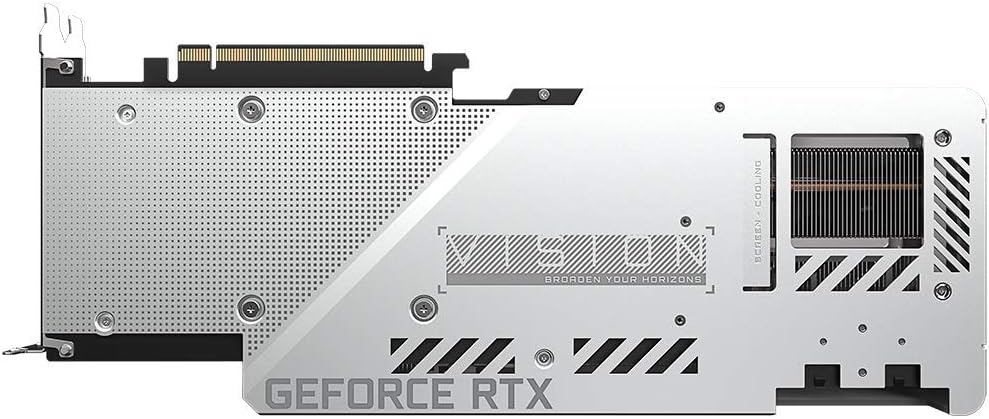
Зураг: Ар талд view of the GIGABYTE GeForce RTX 3080 Vision OC 10G Graphics Card, highlighting the protective metal backplate with ventilation cutouts and the GeForce RTX branding.
- Хэргийг хаах: Компьютерийн гэрний тагийг буцааж тавиад бүх кабелийг дахин холбоно уу.
- Connect display: Монитороо график карт дээрх дэлгэцийн гаралтын аль нэгэнд (HDMI эсвэл DisplayPort) холбоно уу.
Ашиглалтын заавар
1. Драйвер суулгах
- Асаалт: Turn on your computer. The system may boot into a lower resolution or use a generic display driver.
- Драйверуудыг татаж авах: Албан ёсны GIGABYTE-д зочилно уу webсайт (www.gigabyte.com) эсвэл NVIDIA-ийн албан ёсны төлөөлөгч webсайт (www.nvidia.com/drivers).
- Select product: Navigate to the support section and locate the drivers for the GeForce RTX 3080 series.
- Драйверуудыг суулгах: Download the latest recommended drivers and follow the on-screen instructions to complete the installation. A system restart may be required.
2. Програм хангамжийн тохиргоо
- GIGABYTE Control Center / AORUS Engine: For advanced control over your graphics card, including fan speed adjustment, overclocking profiles, and RGB Fusion 2.0 lighting customization, download and install the GIGABYTE Control Center or AORUS Engine software from the GIGABYTE webсайт.
- NVIDIA GeForce туршлага: Install NVIDIA GeForce Experience for optimal game settings, driver updates, and access to features like ShadowPlay.
Засвар үйлчилгээ
- Тоос арилгах: График картын сэнс болон радиаторын тоосыг шахсан агаараар тогтмол цэвэрлэж байгаарай. Цэвэрлэхийн өмнө системийг унтрааж, залгуураас нь салгасан эсэхээ шалгаарай.
- Сэнсний үзлэг: Periodically check the fans for any obstructions or unusual noises.
- Драйверын шинэчлэлтүүд: Keep your graphics drivers updated to ensure optimal performance and stability.
Алдааг олж засварлах
Дэлгэцийн гаралт байхгүй
- Хяналтын кабелийг график карт болон дэлгэцтэй найдвартай холбосон эсэхийг шалгаарай.
- График карт нь PCIe үүрэнд бүрэн суусан эсэхийг шалгана уу.
- Check that all required PCIe power connectors are securely attached to the graphics card.
- Боломжтой бол өөр дэлгэцийн кабель эсвэл монитороор туршиж үзээрэй.
Системийн тогтворгүй байдал эсвэл эвдрэл
- Цахилгаан хангамжийнхаа хамгийн бага ватттай тэнцэж байгаа эсэхийг шалгаарайtage requirement (750W).
- График драйверуудаа хамгийн сүүлийн хувилбар болгон шинэчилнэ үү.
- Monitor GPU temperatures using software like GIGABYTE Control Center to check for overheating.
- Check for conflicts with other installed drivers or software.
Гүйцэтгэл муу
- Ensure drivers are correctly installed and up to date.
- Verify that the graphics card is running at its intended clock speeds (can be checked with monitoring software).
- Check background applications that might be consuming system resources.
- Ensure your system's BIOS/UEFI is updated.
Үзүүлэлтүүд
| График боловсруулах нэгж | NVIDIA GeForce RTX 3080 |
| Видео санах ой | 10 ГБ GDDR6X |
| Санах ойн интерфейс | 320-бит |
| Цагийг нэмэгдүүлэх | 1800 МГц |
| Санах ойн хурд | 19000 МГц |
| Гаралтын портууд | DisplayPort, HDMI |
| Хамгийн их дижитал нарийвчлал | 7680x4320 (via DisplayPort 1.4a) |
| Олон-view | 4 |
| Card Dimensions (LxWxH) | 12.6 x 4.96 x 2.17 инч (320 x 126 x 55 мм) |
| Санал болгож буй PSU | 750 Вт |
| Эрчим хүчний холбогч | 2х 8 зүү |
| PCI Express | 4.0 x16 |
| Загварын дугаар | GV-N3080VISION OC-10GD 2.0 |
Баталгаат хугацааны мэдээлэл
GIGABYTE products are covered by a limited warranty. The specific terms and duration of the warranty may vary by region and product. Please refer to the official GIGABYTE website or your product's packaging for detailed warranty information and registration procedures. Keep your proof of purchase for warranty claims.
Техникийн дэмжлэг
Техникийн тусламж, драйвер татаж авах, түгээмэл асуултууд болон нэмэлт дэмжлэг авахыг хүсвэл албан ёсны GIGABYTE дэмжлэгт зочилно уу webсайт:
Та мөн GIGABYTE-н хэрэглэгчийн үйлчилгээнд өгсөн холбоо барих мэдээллээр холбогдож болно webөөрийн бүс нутагт зориулсан сайт.


