1. Танилцуулга
The ACEMIC GT-5 is a portable digital wireless microphone system designed for instruments, particularly electric blowpipes, and stage performances. It features digital audio transmission, 16 selectable frequencies, and a digital ID code to prevent interference. This manual provides detailed instructions for setting up, operating, and maintaining your GT-5 system.

Зураг 1.1: The ACEMIC GT-5 wireless microphone system, showing the transmitter (left) and the receiver (right). The transmitter features a 6.35mm plug, while the receiver has controls for power and frequency synchronization.
2. Багцын агуулга
Бүх зүйл байгаа эсэхийг шалгахын тулд багцын агуулгыг шалгана уу:
- GT-5 Wireless Transmitter
- GT-5 Wireless Receiver
- Battery (Note: While the product specifications list a battery as an included component, some descriptions indicate it may not be included. Please verify upon receipt.)
3. Үндсэн шинж чанарууд
- Digital wireless audio transmission for clear sound.
- Pre-set 16 selectable frequencies to avoid interference.
- Digital ID code technology for robust signal integrity.
- Operating range of up to 40 meters (line-of-sight).
- Suitable for electric blowpipe, stagцахим үзүүлбэр, гудамжны үзүүлбэр.
- Portable plug-on receiver, directly connects to mixers or active speakers.
- Lithium battery power supply for extended use.
4. Тохируулах заавар
4.1. Батерейг цэнэглэх
Both the transmitter and receiver are powered by 3.7V lithium batteries. Ensure both units are fully charged before first use. Connect the appropriate charging cables (not specified in product details, assume standard USB charging) to a power source.
4.2. Хүлээн авагчийг холбох
- Identify the receiver unit. It features a 6.35mm (1/4 inch) plug.
- Plug the receiver directly into the 6.35mm input jack of your mixer, amplifier, or active speaker. The receiver's plug can swivel for optimal positioning.

Зураг 4.2.1: The GT-5 receiver connected to a mixer, demonstrating its plug-and-play functionality.
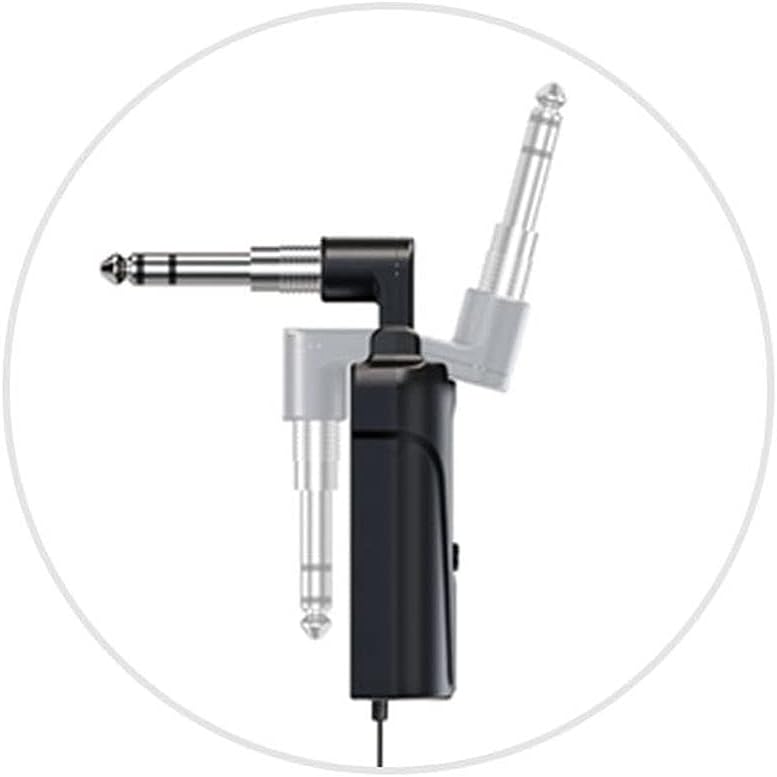
Зураг 4.2.2: Detail of the receiver's swivel plug, allowing for flexible connection angles.
4.3. Powering On and Synchronization
- Turn on the receiver by pressing its power button. The display should illuminate.
- Turn on the transmitter by pressing its power button.
- The system uses IR sync to download the frequency from the receiver to the transmitter. Ensure both units are in close proximity (within a few inches) and facing each other's IR windows (if present, otherwise ensure general proximity).
- Press the "SYNC" button on the receiver (or follow specific synchronization instructions if provided with the physical product) to initiate frequency pairing. The RF indicator on both units should show a stable connection once synchronized.
- If interference occurs, you can change the frequency. The system offers 16 selectable channels. Refer to the operating section for frequency adjustment.

Зураг 4.3.1: The GT-5 transmitter attached to an electric blowpipe, ready for use.
5. Ашиглалтын заавар
5.1. Микрофон ашиглах
Once the transmitter and receiver are synchronized, the system is ready for use. The transmitter is designed to be attached to an instrument, such as an electric blowpipe.
- Ensure the microphone is positioned correctly to capture the instrument's sound effectively.
- Monitor the audio output from your mixer/speaker to adjust volume levels as needed.
- Maintain a line-of-sight operating range of up to 40 meters between the transmitter and receiver for optimal signal quality. Obstacles can reduce this range.
5.2. Давтамжийн өөрчлөлт
If you experience interference or need to operate multiple GT-5 systems simultaneously, you can change the operating frequency.
- On the receiver, use the channel selection buttons (usually labeled CHR or similar, or up/down arrows) to cycle through the 16 available frequencies.
- After selecting a new frequency on the receiver, perform the IR synchronization process again (as described in Section 4.3) to pair the transmitter with the new frequency.
6. Засвар үйлчилгээ
- Цэвэрлэгээ: Use a soft, dry cloth to clean the exterior of the transmitter and receiver. Do not use liquid cleaners or solvents.
- Хадгалах: Ашиглаагүй үед системийг нарны шууд тусгал, хэт температураас хол, сэрүүн, хуурай газар хадгална.
- Батерейны арчилгаа: For optimal battery life, avoid fully discharging the batteries frequently. If storing for extended periods, charge the batteries to approximately 50% every few months.
- Чийгнээс зайлсхийх: Protect the units from water and excessive humidity.
7. Алдаа засах
| Асуудал | Боломжит шалтгаан | Шийдэл |
|---|---|---|
| Дууны гаралт байхгүй |
|
|
| Хөндлөнгийн оролцоо эсвэл статик |
|
|
| Батерейны богино хугацаа |
|
|
8. Техникийн үзүүлэлтүүд
Ерөнхий системийн үзүүлэлтүүд:
- Давтамжийн хүрээ: Region dependent
- Аудио дамжуулалт: Digital wireless
- Аудио С.ampling горим: 48 кГц
- Сонгох боломжтой давтамжууд: 16 pre-set channels
- ID код: Digital ID code for interference prevention
- Үйл ажиллагааны хүрээ: Up to 40m (line-of-sight)
- Эрчим хүчний хангамж: 3.7V Lithium battery (for both units)
Хүлээн авагчийн үзүүлэлтүүд:
- Модуляцийн горим: pi/4 DQPSK
- Хоцролт: <6 мс
- Давтамжийн хариу: 60Hz - 15KHz ± 2dB
- Нийт гармоник гажуудал: <0.8% (1КГц)
- Дохио/дуу чимээний харьцаа: >92дБ
- Хүлээн авах мэдрэмж: -92 дБм
- Гаралт: 6.35 мм залгуур
- Тасралтгүй хэрэглээ: >6 цаг
- Хэмжээ: 185 x 20 x 10 мм
Дамжуулагчийн үзүүлэлтүүд:
- Модуляцийн горим: pi/4 DQPSK
- Дамжуулагчийн хүч: 10мВт
- Мэдрэмж: -47 дБ ± 2 дБ
- Frequency Change: IR sync
- Микрофоны төрөл: Конденсатор
- Микрофоны хэмжээ: Φ14 x 5.0 мм
- Тасралтгүй хэрэглээ: >6 цаг
- Хэмжээ: 125 x 40 x 20 мм
9. Баталгаат хугацаа ба дэмжлэг
For warranty information and technical support, please refer to the documentation provided with your purchase or contact ACEMIC customer service directly. Keep your proof of purchase for warranty claims.


