1. Бүтээгдэхүүн дууссанview
The ZdalaMit BN59-01330C is a replacement remote control designed for various Samsung Smart TV models. It features voice control functionality, allowing for convenient operation of your television.
This remote requires 2 x AA size alkaline batteries (not included) for operation.
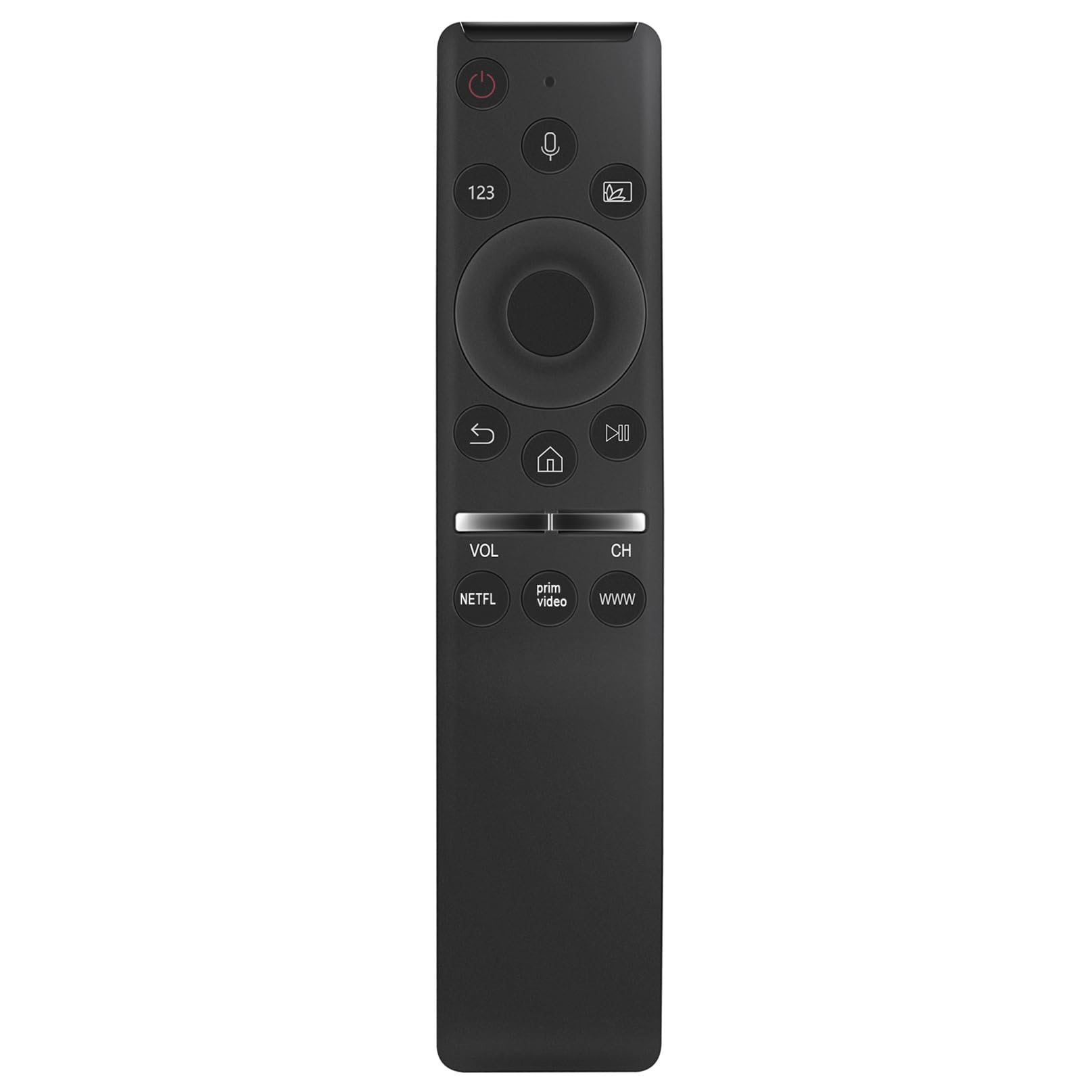
Зураг 1.1: Урд view of the ZdalaMit BN59-01330C remote control.
Samsung телевизийн загваруудтай нийцтэй:
- QA50Q65T, QA43Q60T, QA49Q80T, QA43Q65T, QA75Q70T, QA50Q60T, QA55Q80T, QA55Q60T, QA55Q65T, QA85Q80T, QA65Q65T, QA58Q60T, QA65Q60T, QA75Q60T, QA55Q70T, QA65Q70T, QA65Q80T, QA75Q80T, QA85Q60T, QA85Q70T
2. Тохиргоо
2.1 Батерей суурилуулах
The remote control requires two AA size alkaline batteries. Ensure correct polarity when inserting the batteries.
- Алсын удирдлагын ар талд байгаа зайны тасалгааны тагийг ол.
- Тасалгааг нээхийн тулд тагийг доош нь гулсуулж эсвэл түгжээг (хэрэв байгаа бол) дарна уу.
- Insert two AA alkaline batteries, matching the (+) and (-) terminals as indicated inside the compartment.
- Зайны тасалгааны тагийг сольж, байрандаа найдвартай товшиж байгаа эсэхийг шалгаарай.
2.2 Алсын удирдлагыг хослуулах
Before using the voice control and some other functions, the remote must be paired with your Samsung TV. Follow these steps:
- Таны Samsung ТВ асаалттай байгаа эсэхийг шалгаарай.
- Алсын удирдлагыг телевизор руугаа чиглүүл.
- -г нэгэн зэрэг дараад удаан дар Буцах button (usually an arrow pointing left) and the Тоглуулах/түр зогсоох товчийг ойролцоогоор 3 секунд дарна уу.
- Таны телевизийн дэлгэц дээр амжилттай холболтын мессеж гарч ирэх ёстой.
If pairing is unsuccessful, ensure the batteries are correctly installed and try again. Move closer to the TV if necessary.
3. Ашиглалтын заавар
This section details the primary functions and button layout of your ZdalaMit BN59-01330C remote control.

Зураг 3.1: Урд view highlighting the voice control feature.
3.1 Товчлуурын функцууд
- Асаах товч (⏻): ТВ-г асаана, унтраана.
- Voice Control Button (🎤): Activates the voice command feature. Press and hold to speak your command.
- 123 Товчлуур: Accesses the virtual numeric keypad.
- Олон-View/Source Button: Changes input source or activates multi-view горим.
- Чиглэлийн самбар (дээш, доош, зүүн, баруун): Navigates menus and selections.
- Сонгох/Нэвтрэх товч: Сонголтыг баталгаажуулна.
- Буцах товч (↶): Өмнөх дэлгэц эсвэл цэс рүү буцна.
- Гэрийн товчлуур (⌂): Accesses the Smart Hub or home screen.
- Тоглуулах/түр зогсоох товчлуур (⏯): Медиа тоглуулахыг (тоглуулах, түр зогсоох) удирдана.
- Дууг нэмэх/бууруулах (VOL): ТВ-ийн дууны хэмжээг тохируулна.
- Сувгийг дээш/доошлуулах (CH): ТВ сувгуудыг өөрчилнө.
- NETFLIX Button: Netflix програм руу шууд нэвтрэх.
- Ерөнхий видео товч: Prime Video програм руу шууд нэвтрэх.
- WWW товчлуур: Direct access to the web хөтөч.
3.2 Дуут удирдлага ашиглах
The voice control feature allows you to issue commands to your TV using your voice. Ensure the remote is paired with your TV before using this feature.
- -г удаан дар Дуут хяналтын товчлуур (микрофон дүрс).
- Алсын удирдлага дээр байрлах микрофон руу тодорхой ярь.
- Release the button when you have finished speaking your command.
Examples of voice commands include "Open Netflix," "Change to Channel 5," "Volume up," or "хайх [movie title]."
4. Засвар үйлчилгээ
4.1 Алсын удирдлагыг цэвэрлэх
Алсын удирдлагын гадаад төрх байдал болон ажиллагааг хадгалахын тулд тогтмол цэвэрлэж байгаарай.
- Алсын удирдлагын гадаргууг зөөлөн, хуурай даавуугаар арчина.
- Do not use liquid cleaners, sprays, or abrasive materials, as these can damage the remote.
4.2 Батерейг солих
Replace the batteries when the remote control's performance degrades or if it stops responding. Refer to Section 2.1 Battery Installation for detailed steps.
- Батерейг хоёуланг нь зэрэг зэрэг сольж байгаарай.
- Use new AA alkaline batteries.
- Ашигласан батерейг орон нутгийн дүрэм журмын дагуу устгана уу.
5. Алдаа засах
If you encounter issues with your remote control, refer to the following common solutions.
5.1 Алсын удирдлага хариу өгөхгүй байна
- Батерейг шалгах: Ensure batteries are correctly inserted with the correct polarity. Replace old or depleted batteries with new AA alkaline batteries.
- Алсын удирдлагыг дахин холбох: If the remote was previously working but stopped, try re-pairing it with your TV. Refer to Section 2.2 Pairing the Remote Control.
- Саад бэрхшээл: Ensure there are no objects blocking the line of sight between the remote and the TV's infrared receiver (though this remote uses Bluetooth for voice, some functions might still rely on IR).
5.2 Дуут удирдлага ажиллахгүй байна
- Хослуулах төлөв: Voice control requires the remote to be paired via Bluetooth. Confirm the remote is successfully paired with your TV (Section 2.2).
- Микрофоны товчлуур: Ensure you are pressing and holding the Voice Control Button while speaking.
- Тодорхой ярь: Удирдлагын микрофон руу тодорхой бөгөөд шууд ярь.
- ТВ -ийн тохиргоо: Check your TV's sound or voice control settings to ensure the feature is enabled.
6. Техникийн үзүүлэлтүүд
| Онцлог | Дэлгэрэнгүй |
|---|---|
| Загварын дугаар | BN59-01330C |
| Брэнд | ЗдалаМит |
| Бүтээгдэхүүний хэмжээс | 5 x 1.2 x 0.6 инч |
| Зүйлийн жин | 1.41 унц |
| Батерей шаардлагатай | 2 х АА шүлтлэг батерей |
| Онцлог шинж чанар | Дуут хайлт |
| Өнгө | Хар |
| Тохиромжтой төхөөрөмжүүд | Samsung Televisions (specific models listed in Section 1) |

Image 6.1: Dimensions of the ZdalaMit BN59-01330C remote control.
7. Баталгаат хугацааны мэдээлэл
Specific warranty details for the ZdalaMit BN59-01330C remote control are typically provided by the seller or manufacturer at the time of purchase. Please refer to your purchase documentation or contact the seller directly for information regarding warranty coverage, terms, and conditions.
8. Хэрэглэгчийн дэмжлэг
If you have any questions, require further assistance, or encounter issues not covered in this manual, please do not hesitate to contact the seller or manufacturer directly. Contact information can usually be found on your purchase receipt or the product packaging.
For general inquiries, you may also visit the ZdalaMit brand page or the retailer's support section where the product was purchased.


