1. Танилцуулга
The ION Audio Boombox Deluxe Stereo is a versatile audio system designed to provide a range of listening experiences. It combines classic audio playback options with modern connectivity, featuring an AM/FM radio, a cassette player, Bluetooth streaming, and USB/Micro SD card playback. This manual provides detailed instructions for setting up, operating, and maintaining your device.

Зураг 1: Урд view of the ION Audio Boombox Deluxe Stereo, showcasing its dual speakers, cassette deck, and radio tuner display.
2. Хайрцагт юу байна
- Boombox Deluxe Unit
- Цахилгаан кабель
- Түргэн шуурхай ажиллагааны гарын авлага
3. Тохиргоо
3.1 Төхөөрөмжийг тэжээх
The Boombox Deluxe can be powered using the included AC power cable or by batteries for portable use. Insert the AC power cable into the AC IN port on the back of the unit and plug it into a standard wall outlet. For battery operation, open the battery compartment (typically on the bottom or back) and insert the required D-cell batteries (not included), ensuring correct polarity.
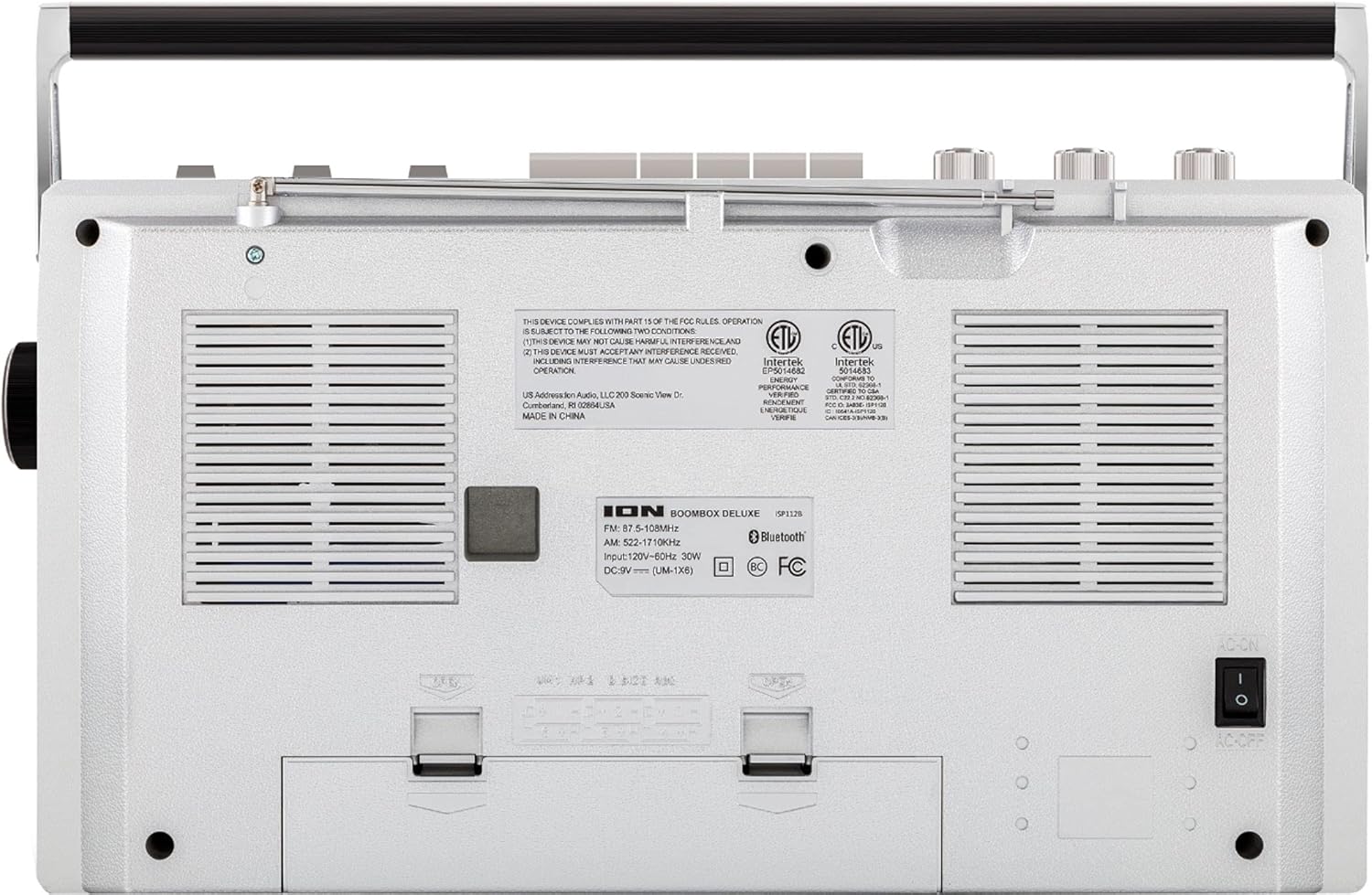
Figure 2: Rear panel of the Boombox Deluxe, highlighting the AC power input and battery compartment location.
3.2 Антенны тохируулга
For optimal AM/FM radio reception, extend the telescopic antenna located on the top of the unit. Adjust its position for the clearest signal.
4. Ашиглалтын заавар
4.1 Ерөнхий хяналтууд
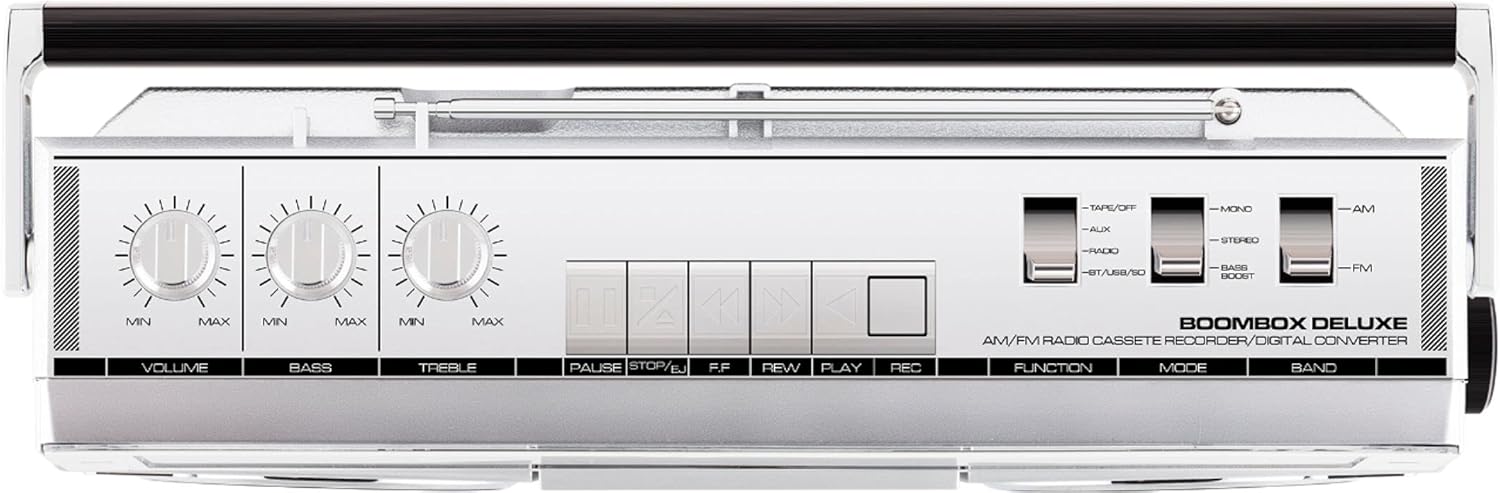
Figure 3: Top panel controls, including Volume, Bass, Treble knobs, and cassette playback buttons.
- Эзлэхүүний товчлуур: Дууны гаралтын ерөнхий түвшинг тохируулна.
- Басс бариул: Бага давтамжийн аудио гаралтыг тохируулна.
- Гурвалсан товчлуур: Өндөр давтамжийн аудио гаралтыг тохируулна.
- Функц шилжүүлэгч: Selects between Tape/Off, Aux, Radio, and BT/USB/SD modes.
- Горим солих: Selects between Mono, Stereo, and Bass Boost audio modes.
- Band Switch: Selects between AM and FM radio bands.
4.2 Радио үйл ажиллагаа
- -г тохируулах Чиг үүрэг шилжүүлэгч "Радио" руу.
- -г тохируулах Band Switch to 'AM' or 'FM'.
- -г ашиглана уу Тохируулах товчлуур to select your desired radio station. The frequency will be displayed on the tuner scale.
4.3 Кассет тоглуулагчийн ажиллагаа
- -г тохируулах Чиг үүрэг шилжүүлэгч to 'Tape/Off'.
- дээр дарна уу Зогсоох/зайлуулах товчийг дарж хуурцагны тасалгааг нээнэ.
- Нээлттэй ирмэгийг дээш харуулан хуурцагны соронзон хальсыг оруулна. Тасалгааг хаа.
- дээр дарна уу Тоглох тоглуулах товчийг дарна уу.
- Ашиглах Rewind (REW) болон Хурдан урагшлах (FF) соронзон хальсыг удирдах товчлуурууд.
- дарна уу Түр зогсоох to temporarily stop playback. Press again to resume.
- дарна уу Зогсоох/зайлуулах тоглуулахыг зогсоож, соронзон хальсыг гаргах.
- To record, ensure the Чиг үүрэг шилжүүлэгч is set to 'Tape/Off' and press the Record (REC) товчлууртай нэгэн зэрэг Тоглох товч.
4.4 Bluetooth холболт

Figure 4: Side panel with USB and Micro SD card slots, and playback controls for digital media.
- -г тохируулах Чиг үүрэг шилжүүлэгч to 'BT/USB/SD'. The unit will enter Bluetooth pairing mode, indicated by a flashing LED.
- On your Bluetooth-enabled device (e.g., smartphone, tablet), search for 'ION Boombox Deluxe' in the Bluetooth settings.
- Select 'ION Boombox Deluxe' to pair. Once connected, a confirmation tone will sound, and the LED will stop flashing.
- You can now stream audio from your device to the Boombox Deluxe. Use your device's controls or the boombox's playback buttons (Play/Pause, Next/Previous Track) for media control.
4.5 USB/Micro SD тоглуулах
- -г тохируулах Чиг үүрэг шилжүүлэгч to 'BT/USB/SD'.
- Insert a USB flash drive or Micro SD card (with compatible audio files) into the respective slot on the side of the unit.
- The unit will automatically detect and begin playing audio files.
- Use the playback control buttons (Play/Pause, Next/Previous Track, Delete) on the side panel to manage your music.
4.6 Туслах оролт

Figure 5: Side panel with headphone output and auxiliary input jacks.
- -г тохируулах Чиг үүрэг шилжүүлэгч to 'Aux'.
- Connect an external audio device (e.g., MP3 player, CD player) to the AUX ДАХЬ jack using a 3.5mm audio cable (not included).
- Audio from the connected device will play through the boombox speakers. Control playback from your external device.
5. Онцлогууд
- Integrated Stereo System with Dual Speakers
- Bluetooth утасгүй дамжуулалт
- AM/FM радио тохируулагч
- Кассет тоглуулагч/бичлэг
- USB болон Micro SD карт тоглуулах
- Auxiliary Input for External Devices
- Adjustable Bass and Treble Controls
- Portable Design with Carry Handle
6. Техникийн үзүүлэлтүүд
| Тодорхойлолт | Дэлгэрэнгүй |
|---|---|
| Брэнд | ION аудио |
| Загвар | Boombox Deluxe |
| Холболтын технологи | Bluetooth, USB |
| Чанга яригчийн төрөл | Стерео |
| Эрчим хүчний эх үүсвэр | Battery Powered (D-cell), AC Power |
| Өнгө | Хар, Мөнгө |
| Зүйлийн жин | 8.93 фунт |
| Багцын хэмжээ | 18.1 x 11.1 x 7.6 инч |
7. Алдаа засах
- Эрчим хүчгүй:
Ensure the AC power cable is securely connected to both the unit and a working power outlet. If using batteries, check that they are inserted correctly and are not depleted. - Радио хүлээн авалт муу:
Fully extend the telescopic antenna and adjust its position. Try relocating the unit to an area with better signal reception, away from potential interference sources like other electronic devices. - Кассет тоглуулахгүй/бичлэг хийхгүй байна:
Ensure the tape is inserted correctly and the cassette compartment is fully closed. Check that the tape is not tangled or damaged. For recording, ensure both Play and Record buttons are pressed simultaneously. - Bluetooth холбогдоогүй байна:
Make sure the Boombox Deluxe is in 'BT/USB/SD' mode and in pairing mode (flashing LED). Ensure Bluetooth is enabled on your external device and it is within range (typically 30 feet). Try unpairing and re-pairing the device. - No Sound from USB/Micro SD:
Verify that the USB drive or Micro SD card is inserted correctly and contains compatible audio files (e.g., MP3). Ensure the volume is turned up on the boombox.
8. Засвар үйлчилгээ
- Цэвэрлэгээ: Төхөөрөмжийн гадна талыг цэвэрлэхийн тулд зөөлөн, хуурай даавуу ашиглана уу. Шингэн цэвэрлэгч, уусгагчийг бүү ашигла.
- Кассет тавцангийн арчилгаа: Periodically clean the tape heads and pinch rollers with a cotton swab lightly dampened with isopropyl alcohol to ensure optimal playback and recording quality.
- Батерей хадгалах: Хэрэв төхөөрөмжийг удаан хугацаагаар ашиглахгүй бол гоожиж, гэмтэхээс сэргийлж батерейг нь салгаж авна уу.
9. Баталгаат хугацаа ба дэмжлэг
This product is offered as an Amazon Renewed item. Amazon Renewed products are professionally inspected and tested to work and look like new. If you are not satisfied with your purchase, renewed products are eligible for replacement or refund under the Amazon Renewed Guarantee. For specific details regarding the Amazon Renewed Guarantee, please refer to the Amazon Renewed program terms and conditions on the Amazon webсайт.
For further assistance or technical support, please contact ION Audio customer service or refer to their official webтуслах нөөцийн сайт.


