Танилцуулга
The Anova Precision Smart Oven is a versatile countertop appliance designed to bring professional-grade cooking capabilities to your home kitchen. It combines convection, steam, bake, broil, roast, and dehydrate functions, offering precise temperature control for a wide range of culinary tasks. This manual provides essential information for the safe and effective operation and maintenance of your Anova Precision Smart Oven.
For optimal performance and longevity, please read this manual thoroughly before first use and retain it for future reference.
Аюулгүй байдлын мэдээлэл
Гал түймэр гарах, цахилгаанд цохиулах, хүний биед гэмтэл учруулах эрсдлийг бууруулахын тулд цахилгаан хэрэгсэл ашиглахдаа аюулгүй байдлын үндсэн арга хэмжээг үргэлж дагаж мөрдөөрэй.
- Халуун гадаргуу дээр хүрч болохгүй. Бариул эсвэл бариулыг ашигла.
- Цахилгаан цочролоос хамгаалахын тулд утас, залгуур, төхөөрөмжийг ус болон бусад шингэнд дүрж болохгүй.
- Хүүхэд болон түүний ойролцоо ямар нэгэн цахилгаан хэрэгсэл ашиглаж байгаа үед нарийн хяналт тавих шаардлагатай.
- Ашиглаагүй үед болон цэвэрлэхийн өмнө залгуураас салга. Эд ангиудыг өмсөх, тайлахын өмнө хөргөнө.
- Гэмтсэн утас, залгууртай, эсвэл төхөөрөмж эвдэрсэн эсвэл ямар нэгэн байдлаар гэмтсэний дараа ямар ч төхөөрөмжийг бүү ажиллуул.
- Төхөөрөмжийн үйлдвэрлэгчээс зөвлөдөггүй нэмэлт хэрэгслийг ашиглах нь гэмтэл учруулж болзошгүй.
- Гадаа бүү ашигла.
- Ширээ, лангууны ирмэг дээр утсыг өлгөх, халуун гадаргуу дээр хүрч болохгүй.
- Халуун хий, цахилгаан шатаагч, халсан зууханд хийж болохгүй.
- Халуун тос эсвэл бусад халуун шингэн агуулсан төхөөрөмжийг зөөхдөө маш болгоомжтой байх хэрэгтэй.
- Төхөөрөмжийг зориулалтаас өөр зориулалтаар бүү ашиглаарай.
Бүрэлдэхүүн хэсгүүд дууссанview
Familiarize yourself with the main components of your Anova Precision Smart Oven:
- Зуухны хөндий: Гол хоол хийх камер.
- Усны сав: Removable tank for steam generation. Located on the side.
- Хяналтын самбар: Digital display and knobs for setting temperature, time, and cooking modes.
- Хоолны туршилт: Detachable probe for precise internal temperature monitoring.
- Removable Racks: Multiple racks for various cooking needs.
- Жигнэмэгийн тогоо: Included pan for general baking and roasting.

Зураг 1: Урд view of the Anova Precision Smart Oven, showing the main oven cavity, control panel, and side-mounted water tank.

Зураг 2: Дотоод засал view of the Anova Precision Smart Oven, illustrating the two removable racks and the included baking pan.

Figure 3: A user demonstrating the removal of the clear water tank from the side of the Anova Precision Smart Oven for refilling or cleaning.
Тохиргоо
Савлах, байрлуулах
- Зуух болон бүх дагалдах хэрэгслийг савлагаанаас болгоомжтой авч хая.
- Remove any protective film or packaging materials from the oven.
- Place the oven on a stable, level, heat-resistant surface with adequate clearance from walls and other appliances for ventilation. Ensure at least 4 inches of space on all sides and above the oven.
- Цахилгааны залгуурт хялбархан нэвтрэх боломжтой эсэхийг шалгаарай.
Анхны цэвэрлэгээ
- Эхний хэрэглээний өмнө зуухны дотор болон гадна талыг зар сурталчилгаагаар арчинаamp даавуу.
- Wash the removable racks, baking pan, and water tank with warm, soapy water. Rinse thoroughly and dry completely.
Усны сав бэлтгэх
- Remove the water tank from its housing on the side of the oven.
- Fill the water tank with distilled water. Do not use tap water as it can lead to mineral buildup.
- Securely reinsert the water tank into its housing until it clicks into place.
Эрчим хүчний холболт
Plug the oven into a grounded electrical outlet. The display will illuminate, indicating the oven is ready for use.
Ашиглалтын заавар
Хяналтын самбар дууссанview
The Anova Precision Smart Oven features an intuitive control panel with a digital display and rotary knobs for setting cooking parameters. The display shows temperature, time, and current cooking mode.
Connecting to the Anova App
For enhanced control and access to a recipe library, download the Anova Oven app on your smartphone. Follow the in-app instructions to connect your oven via Wi-Fi.
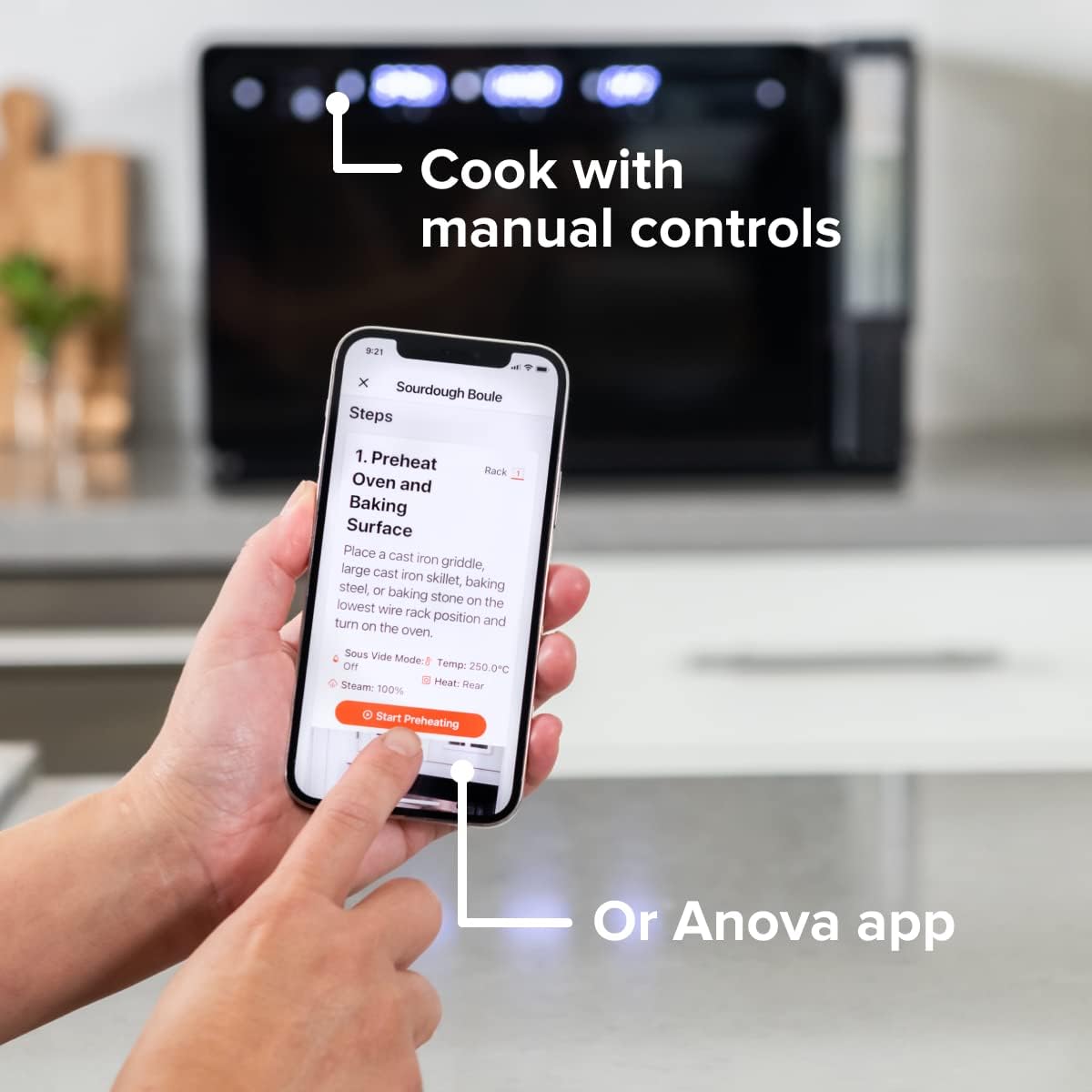
Figure 4: A user interacting with the Anova app on a smartphone, demonstrating remote control capabilities for the oven.
Үндсэн хоол хийх горимууд
The oven offers several cooking modes:
- Конвекц: Uses a fan to circulate hot air for even cooking and browning.
- Уур: Injects steam into the oven cavity, ideal for baking bread, steaming vegetables, or sous vide style cooking.
- Combi (Convection + Steam): Combines hot air and steam for moist interiors and crispy exteriors.
- Жигнэсэн/шарсан: Standard oven functions for baking and roasting.
- Шаргал: High heat from the top element for searing and browning.
- Шингэн алдалт: Low heat and fan circulation for drying foods.
Setting a Program (Manual Control)
- Turn the mode knob to select your desired cooking mode.
- Adjust the temperature using the temperature knob.
- Цагийн бариулыг ашиглан хоол хийх цагийг тохируулна уу.
- Хоол хийж эхлэхийн тулд Start/Pause товчийг дарна уу.
- To use the food probe, insert it into the thickest part of your food before starting. The oven will cook until the target internal temperature is reached.
Sous Vide горим
The Anova Precision Oven can achieve sous vide style results without a water bath. Use the steam function and the food probe to cook food to a precise internal temperature, ensuring tenderness and juiciness.
Steam Injection for Baking
For perfect breads with crispy crusts and soft interiors, utilize the steam injection feature. Ensure the water tank is filled before starting a steam-assisted baking program.

Figure 5: Two loaves of freshly baked bread, showcasing the results of steam injection for a perfect crust and crumb. The Anova Precision Smart Oven is visible in the background.
Засвар үйлчилгээ, цэвэрлэгээ
Regular cleaning and maintenance will ensure the longevity and optimal performance of your Anova Precision Smart Oven.
Өдөр тутмын цэвэрлэгээ
- After each use, allow the oven to cool completely.
- Дотор болон гадна гадаргууг зар сурталчилгаагаар арчинаamp даавуу болон зөөлөн угаалгын нунтаг. Зүлгүүрийн цэвэрлэгч эсвэл үрэгч арчдаснаас зайлсхий.
- Remove and clean the racks and baking pan with warm, soapy water.
- Empty and rinse the water tank after each use, especially if using steam functions. Allow it to air dry before reinserting.
Descaling (Steam Function Users)
If you frequently use the steam function, mineral buildup may occur. The oven may indicate when descaling is needed. Refer to the Anova app or online resources for detailed descaling instructions using a descaling solution.
Хадгалах
When not in use for extended periods, ensure the oven is clean and dry. Store it in a cool, dry place.
Алдааг олж засварлах
This section addresses common issues you might encounter with your Anova Precision Smart Oven.
| Асуудал | Боломжит шалтгаан | Шийдэл |
|---|---|---|
| Зуух асахгүй байна. | Холбогдоогүй; хүчээ өгөөчtage; Хэлхээ таслагч уналтад орсон. | Зуух нь ажлын залгуурт найдвартай холбогдсон эсэхийг шалгаарай. Өрхийн таслуурыг шалгана уу. |
| Уур гаргаагүй. | Water tank empty or not properly seated; mineral buildup. | Fill water tank with distilled water and ensure it is correctly inserted. Perform descaling if necessary. |
| Хоол жигд чанаж болохгүй. | Improper rack placement; overcrowding; fan obstruction. | Refer to recipe for recommended rack position. Avoid overcrowding the oven. Ensure nothing obstructs the convection fan. |
| Wi-Fi холболтын асуудал. | Wi-Fi нууц үг буруу; чиглүүлэгч хэт хол; сүлжээний хөндлөнгийн оролцоо. | Double-check Wi-Fi password. Move oven closer to router or use a Wi-Fi extender. Restart oven and router. |
If the problem persists after attempting these solutions, please contact Anova Customer Support.
Үзүүлэлтүүд
- Брэнд: Анова хоолны газар
- Загварын нэр: Нарийвчлалтай зуух
- Загварын дугаар: АН900-10
- Бүтээгдэхүүний хэмжээ: 18"D x 22"W x 14"H
- Барааны жин: 59 фунт
- Өнгө: Хар
- Хяналтын төрөл: Бариул
- Эрчим хүчний эх үүсвэр: Цахилгаан
- Оруулсан бүрэлдэхүүн хэсгүүд: Water tank, pan, temp probe
- Онцлог шинж чанар: Програмчлагдах боломжтой
Баталгаат болон дэмжлэг
The Anova Precision Smart Oven comes with a manufacturer's warranty. Please refer to the warranty card included with your product or visit the official Anova Culinary webнарийвчилсан баталгаат нөхцөлийг сайтаас авна уу.
For technical support, troubleshooting assistance, or to inquire about replacement parts, please contact Anova Customer Support:
- Онлайн дэмжлэг: -д зочилно уу Anova Culinary Store on Amazon эсвэл тэдний албан тушаалтан webсайт.
- Хэрэглэгчийн гарын авлага (PDF): Хэрэглэгчийн дэлгэрэнгүй гарын авлагыг эндээс татаж авах боломжтой энэ холбоос.

Figure 6: The Anova Precision Smart Oven integrated with a smart home assistant (Alexa), demonstrating its connectivity features.