Танилцуулга
The FreedConn T-COMVB Bluetooth Helmet Headset is designed to provide wireless communication for motorcyclists. This system allows for hands-free phone calls, music listening, FM radio, GPS voice prompts, and intercom communication between riders. It features Bluetooth 5.0 technology, noise cancellation, and a waterproof design for various riding conditions.
Хайрцагт юу байна
Таны багцад бүх бүрэлдэхүүн хэсгүүд байгаа эсэхийг шалгана уу:
- FreedConn T-COMVB Bluetooth Headset Unit (x2 for 2-pack)
- Стерео чанга яригч
- Boom Microphone (for open-face/modular helmets)
- Soft-Wire Microphone (for full-face helmets)
- Helmet Mount Bracket (clip-on and adhesive options)
- USB цэнэглэгч кабель
- Хэрэглэгчийн гарын авлага
- Velcro Pads for Speakers and Microphone
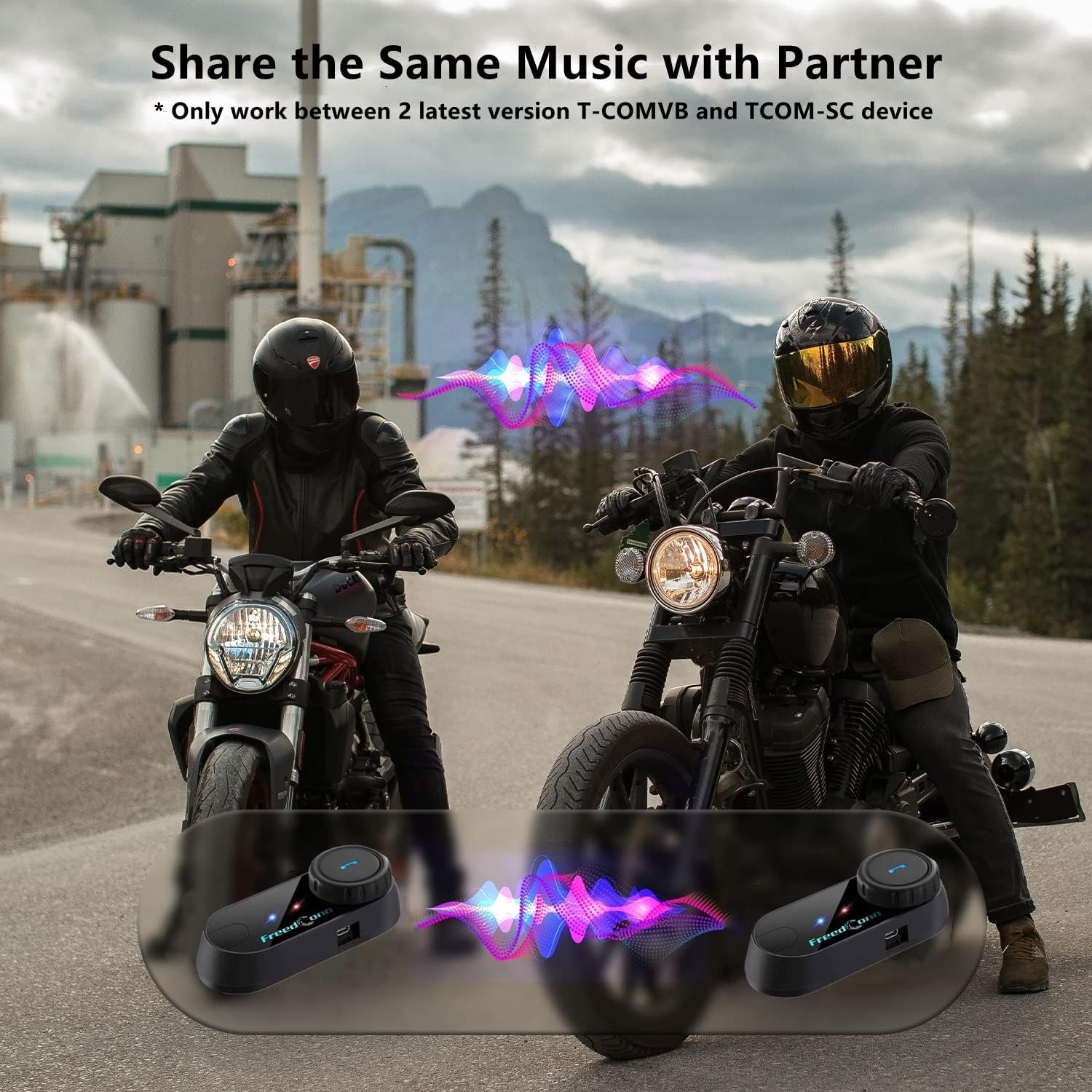
Image: Package contents for the FreedConn T-COMVB Bluetooth Helmet Headset 2-pack, showing all included accessories.
Тохиргоо
1. Төхөөрөмжийг цэнэглэж байна
Before first use, fully charge the T-COMVB unit. Connect the USB charging cable to the headset's charging port and a USB power source. The indicator light will show charging status.
- Цэнэглэх хугацаа: Ойролцоогоор 3-4 цаг.
- Зайны хугацаа: Up to 7-8 hours of intercom, 10 hours of phone calls/music, 300 hours standby.

Image: Visual representation of the 400mAh battery capacity and estimated usage times for intercom, phone calls, and standby.
2. Microphone Selection
Choose the appropriate microphone for your helmet type:
- Boom микрофон: Recommended for open-face, half, and modular flip-up helmets.
- Зөөлөн утастай микрофон: Recommended for full-face and off-road helmets.
Connect the chosen microphone and speakers to the corresponding ports on the headset unit.
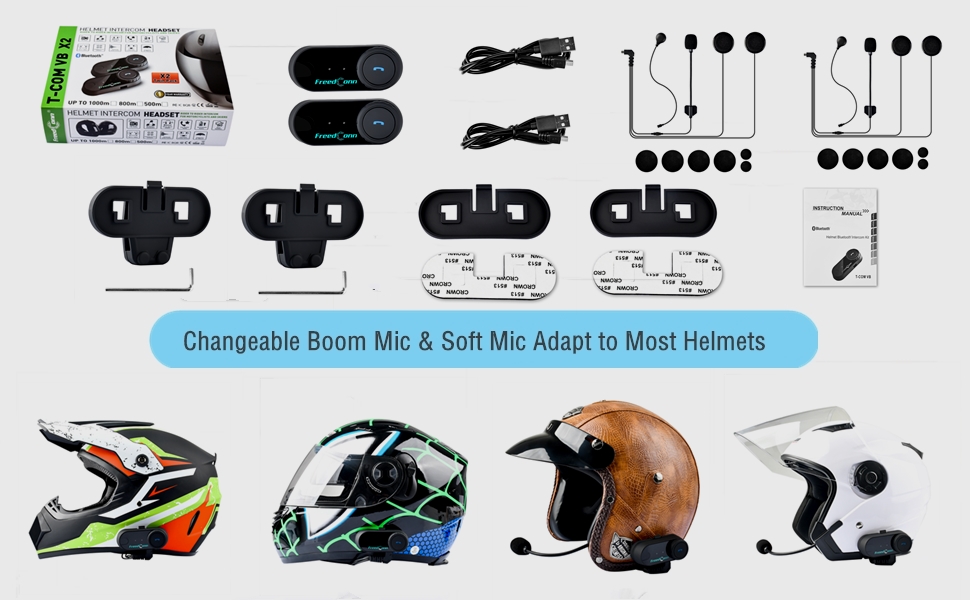
Image: Illustration demonstrating the compatibility of boom and soft-wire microphones with various helmet styles.
3. Дуулга суурилуулах
Mount the T-COMVB unit to the side of your helmet using either the clip-on bracket or the adhesive bracket. Ensure the unit is securely attached and the speakers are positioned correctly inside the helmet for optimal audio.

Image: A FreedConn T-COMVB unit securely installed on the exterior of a motorcycle helmet.
Ашиглалтын заавар
1. Асаах/унтраах
- Асаах: Заагч гэрэл анивчих хүртэл Power товчийг дараад барина уу.
- Унтраах: Заагч гэрэл унтрах хүртэл Power товчийг удаан дар.
2. Bluetooth Pairing (with Phone/GPS)
To connect your T-COMVB to a Bluetooth-enabled device (phone, GPS):
- Ensure the T-COMVB is off.
- Хослуулах горимыг илтгэх индикаторын гэрэл улаан, цэнхэр өнгөөр ээлжлэн анивчих хүртэл Асаах товчийг ойролцоогоор 5-7 секундын турш дарна уу.
- On your phone or GPS, enable Bluetooth and search for available devices.
- Select "FreedConn T-COMVB" from the list. If prompted, enter "0000" as the PIN.
- Хослуулсны дараа заагч гэрэл цэнхэр өнгөтэй аажмаар анивчина.

Image: The T-COMVB headset demonstrating its Bluetooth 5.0 and universal connectivity with different devices and helmet types.
3. Intercom Communication (Rider to Rider)
The T-COMVB supports intercom communication with other T-COMVB or TCOM-SC units.
- Ensure both units are powered on and not connected to other Bluetooth devices.
- On one unit, press and hold the Intercom button until the indicator light flashes red and blue alternately.
- On the second unit, press the Intercom button once.
- The units will automatically search and pair. Once connected, the indicator lights will flash blue slowly.
- To initiate intercom, press the Intercom button once. To end, press it again.
4. Хөгжим тоглуулах, хуваалцах
Once paired with your phone, you can play music. Music sharing is supported between two latest version T-COMVB and TCOM-SC devices.
- Тоглуулах/түр зогсоох: Multi-function товчийг нэг удаа дарна уу.
- Дараагийн дуу: Rotate the Multi-function button clockwise.
- Өмнөх бичлэг: Rotate the Multi-function button counter-clockwise.
- Хөгжим хуваалцах: While music is playing, press and hold the Intercom button on both units to initiate music sharing.

Image: Two riders sharing music through their FreedConn T-COMVB headsets, highlighting the music sharing feature.
5. FM радио
To activate the built-in FM radio:
- Turn On FM: FM товчийг нэг удаа дарна уу.
- Сувгуудыг сканнердах: Rotate the Multi-function button to scan for stations.
- Turn Off FM: Press the FM button again.
6. Утасны дуудлага
When paired with your phone, the T-COMVB allows for hands-free calls.
- Дуудлагад хариулах: Multi-function товчийг нэг удаа дарна уу.
- Дуудлага дуусгах: Дуудлагын үеэр олон функцтэй товчлуурыг нэг удаа дар.
- Дуудлагаас татгалзах: Олон үйлдэлт товчлуурыг 2 секундын турш барина уу.
- Сүүлийн дугаарыг дахин залгах: Олон үйлдэлт товчийг хоёр удаа дарна уу.
- Voice Assistant (Siri/Google Voice): Press the Voice Assistant button to activate your phone's voice assistant.

Image: Icons representing voice assistant activation (Siri, Google Voice) for hands-free calling functionality.
Засвар үйлчилгээ
- Цэвэрлэгээ: Зөөлөн ашиглах, damp cloth to clean the unit. Do not use harsh chemicals or solvents.
- Усны эсэргүүцэл: The unit is waterproof, but avoid submerging it in water. Ensure all ports are securely closed when exposed to rain.
- Батерейны арчилгаа: If the device is not used for an extended period, charge it at least once a month to preserve battery life.

Image: The FreedConn T-COMVB headset on a helmet, illustrating its waterproof feature in rainy conditions.
Алдааг олж засварлах
- Эрчим хүчгүй: Ensure the unit is fully charged. Connect to a power source and check the charging indicator.
- Bluetooth-г холбох боломжгүй: Ensure the unit is in pairing mode (red and blue flashing light). Make sure other Bluetooth devices are disconnected. Try restarting both the headset and your phone/GPS.
- Чанга яригчаас чимээ гарахгүй: Check that the speakers are securely plugged into the headset unit. Ensure volume is not set to minimum.
- Intercom Not Connecting: Ensure both units are T-COMVB or TCOM-SC models and are in intercom pairing mode. Keep units within range (up to 800 meters).
- Аудио чанар муу/дуу чимээ: Ensure the microphone is positioned correctly, close to your mouth. The T-COMVB features advanced noise cancellation technology.

Image: A visual representation of the advanced noise cancellation technology, demonstrating its effect on sound quality.
Үзүүлэлтүүд
| Загвар | T-COMVB |
| Bluetooth хувилбар | 5.0 + EDR |
| Домофон холбооны хүрээ | Up to 800 meters (2-3 riders) |
| Зайны багтаамж | 400 мАч |
| Цэнэглэх хугацаа | 3-4 цаг |
| Дотуур холбооны цаг | 7-8 цаг |
| Phone Call/Music Time | 10 цаг |
| Зогсоолын цаг | 300 цаг |
| Усны эсэргүүцэл | Усны хамгаалалттай |
| Хяналтын арга | Voice, Manual Buttons |
| Онцлог шинж чанарууд | Microphone Included, Noise Cancellation, FM Radio |
| Материал | Полимер |
| Зүйлийн жин | Approximately 1.15 pounds (for 2 units) |
Баталгаат болон дэмжлэг
For warranty information, technical support, or service inquiries, please refer to the contact details provided with your purchase or visit the official FreedConn webсайт. Баталгаат нэхэмжлэл гаргахын тулд худалдан авалтаа нотлох баримтаа хадгалаарай.


