Танилцуулга
Thank you for choosing the Anweller Fingerprint Bicycle Lock. This smart lock offers advanced biometric fingerprint authentication and Bluetooth connectivity for enhanced security and convenience. This manual provides detailed instructions for setting up, operating, and maintaining your lock to ensure optimal performance and longevity.
The Anweller YL-C3BF features a durable 12mm steel wire cable with PVC rubber cover, IP65 waterproof rating, and a long-lasting rechargeable battery. It supports up to 15 sets of fingerprints and allows remote management via a smartphone application.
Бүтээгдэхүүн дууссанview
The Anweller Fingerprint Bicycle Lock combines robust physical security with modern smart features. It is designed for various applications, including bicycles, motorcycles, scooters, and other items requiring secure locking.

Зураг: Дууслааview of the Anweller Smart Bike Lock highlighting fingerprint and app unlock, outdoor waterproof, 15 fingerprint storage, sensitive sensing, lockable doors/windows, and USB charging.
Гол онцлогууд:
- Хос түгжээг тайлах аргууд: Fingerprint and Bluetooth App.
- Fast Unlocking: 0.2-second fingerprint recognition.
- Олон хурууны хээ: Stores up to 15 sets (2 administrators, 13 regular users).
- Удаан эдэлгээтэй барилга: 12mm diameter steel wire cable with PVC rubber coating.
- Цаг агаарт тэсвэртэй: IP65 waterproof and rainproof rating.
- Цэнэглэдэг батерей: USB charging, up to 6 months standby or 1800+ unlocks per charge.
- Апп менежмент: Remote authorization, unlock history, and lock status monitoring.
- Олон талын хэрэглээ: Suitable for bicycles, motorcycles, scooters, gates, and more.
Багцын агуулга
Дараах зүйлсийн багцад байгаа эсэхийг шалгана уу.
- Anweller Fingerprint Bicycle Lock (Model YL-C3BF)
- USB цэнэглэгч кабель
- Fixed Mounting Bracket
- Хэрэглэгчийн гарын авлага
Тохируулах гарын авлага
1. Анхны цэнэглэлт
Before first use, fully charge the lock. Connect the provided USB cable to the charging port on the lock and a standard USB power adapter (not included). The indicator light will show charging status.

Image: Close-up of the lock showing the USB charging port, typically located under a protective cover.
2. Суурилуулах бэхэлгээг суурилуулах
Attach the fixed mounting bracket to your bicycle frame or seat post. Ensure it is securely fastened to prevent movement during riding. The lock can then be easily attached to and detached from this bracket.

Image: Illustration of the lock's mounting bracket being installed on a bicycle's seat post.
3. Registering Administrator Fingerprints
The first two fingerprints registered will be designated as administrator fingerprints. These are required to add or remove other user fingerprints.
- Press and hold the fingerprint sensor until the indicator light turns blue.
- Place your finger on the sensor. Lift and repeat several times, rotating your finger slightly each time, until the indicator light turns green. This registers the first administrator fingerprint.
- Repeat the process for the second administrator fingerprint.

Image: A hand demonstrating the placement of a finger on the lock's sensor for fingerprint registration.
4. Downloading and Connecting the App
хайх the "Anweller Smart Lock" app (or similar, refer to packaging for exact name) on your smartphone's app store (iOS or Android). Install the app and follow the on-screen instructions to pair your lock via Bluetooth. Ensure Bluetooth is enabled on your phone.

Image: Demonstrates both app-based unlocking and fingerprint unlocking methods for the Anweller bicycle lock.
Ашиглалтын заавар
1. Хурууны хээгээр түгжээ тайлах
Place a registered finger on the fingerprint sensor. The lock will unlock within 0.2 seconds if the fingerprint is recognized. The indicator light will turn green briefly.
2. Unlocking with Bluetooth App
Open the Anweller Smart Lock app on your paired smartphone. Ensure Bluetooth is active. Select your lock from the device list and tap the "Unlock" button within the app. The lock will disengage.
3. Adding User Fingerprints (via App or Admin Fingerprint)
You can add up to 13 additional user fingerprints. This can be done through the app or directly on the lock using an administrator fingerprint.
- Аппликешнээр дамжуулан: In the app, navigate to "User Management" or "Fingerprint Management." Follow the prompts to add a new fingerprint. You may need to verify with an administrator fingerprint on the lock.
- Directly on Lock: Place an administrator finger on the sensor until the light turns blue, then quickly remove it. Place the new user's finger on the sensor, lifting and repeating until the light turns green.
4. Removing Fingerprints (via App)
All fingerprints, including administrator ones, can be managed and removed through the smartphone application. Navigate to the "User Management" section and select the fingerprints you wish to delete.
5. Remote Authorization and Unlock Records (via App)
The app allows you to remotely authorize temporary access to your lock for others. You can also view a detailed history of all unlock events, including time and method, ensuring you stay informed about your lock's usage.

Image: Screenshots of the Anweller app demonstrating remote authorization features and a log of unlock records.
Засвар үйлчилгээ
1. Батерейг цэнэглэж байна
The lock features a rechargeable Lithium-polymer battery. When the battery level drops below 10%, the red indicator light will flash rapidly during unlocking, signaling that a charge is needed. Connect the lock to a USB power source using the provided cable. A full charge can last for approximately 6 months in standby mode or over 1800 unlock cycles.

Image: Visual representation of the low battery indicator and how battery status is displayed in the app.
2. Цэвэрлэгээ
Wipe the lock body and fingerprint sensor with a soft, dry cloth. Avoid using abrasive cleaners or solvents that could damage the finish or electronic components. Ensure the fingerprint sensor is clean for optimal recognition.
3. Усны эсэргүүцэл
The lock has an IP65 waterproof rating, meaning it is protected against dust ingress and low-pressure water jets from any direction. While it can withstand rain and splashes, avoid submerging the lock in water for extended periods.

Image: The lock shown under a stream of water, illustrating its IP65 waterproof and rainproof capabilities.
Алдааг олж засварлах
1. Fingerprint Not Recognized
- Хуруугаа цэвэр, хуурай эсэхийг шалгаарай.
- Make sure the fingerprint sensor is clean and free of dirt or moisture.
- Мэдрэгч дээр хуруугаа дахин байрлуулж үзнэ үү.
- If the issue persists, try re-registering your fingerprint or using an alternative registered fingerprint.
2. Lock Not Responding
- Check the battery level. If low, charge the lock immediately.
- Ensure the lock is not exposed to extreme temperatures.
- If completely unresponsive, try connecting it to a power source to see if it powers on.
3. Програмын холболтын асуудал
- Ухаалаг утсан дээрээ Bluetooth идэвхжсэн эсэхийг шалгаарай.
- Make sure your smartphone is within close proximity to the lock.
- Апп-ыг дахин эхлүүлээд дахин холбогдоно уу.
- If issues persist, try unpairing and re-pairing the lock in the app settings.
Үзүүлэлтүүд
| Онцлог | Дэлгэрэнгүй |
|---|---|
| Загварын дугаар | YL-C3BF |
| Түгжээг тайлах аргууд | Fingerprint, Bluetooth App |
| Хурууны хээ багтаамж | Up to 15 sets (2 Admin, 13 User) |
| Unlocking Speed | 0.2 секунд |
| Кабелийн материал | Steel wire with PVC rubber cover |
| Кабелийн диаметр | 12 мм |
| Кабелийн урт | 1.5 meters (coiled design) |
| Усны хамгаалалттай үнэлгээ | IP65 |
| Зайны төрөл | Лити-полимер |
| Цэнэглэх порт | USB |
| Зогсоолын цаг | 6 сар хүртэл |
| Unlock Cycles per Charge | 1800 гаруй удаа |
| Хэмжээ (L x W x H) | 12.4 x 8.9 x 15 см |
| Жин | 560 грамм |
| Өнгө | Хар |
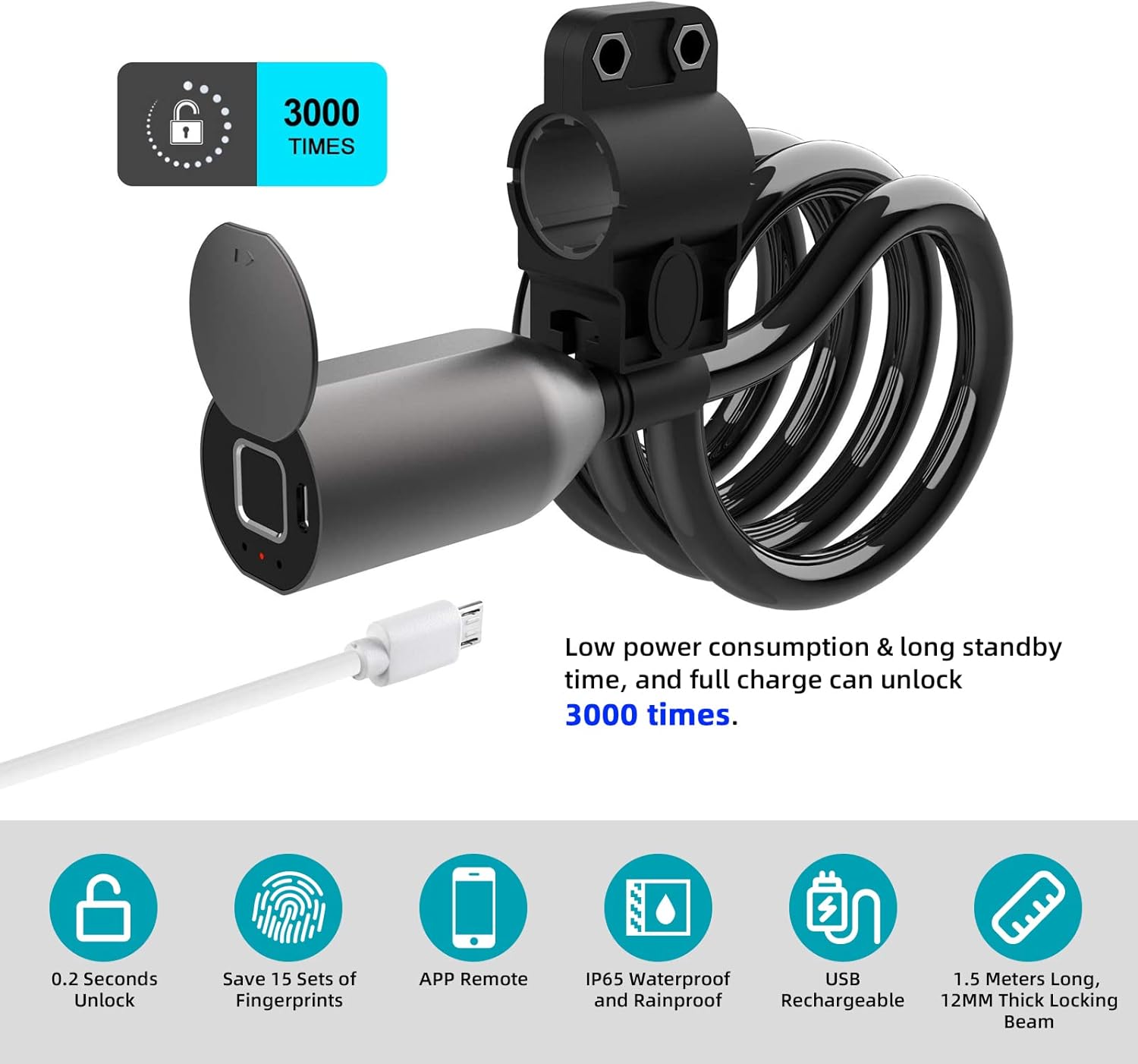
Image: Visual summary of the lock's key features and specifications.
Баталгаат болон дэмжлэг
Anweller is committed to providing high-quality products and customer satisfaction. Your Anweller Fingerprint Bicycle Lock comes with a comprehensive warranty. For specific warranty details, please refer to the product packaging or contact Anweller customer service.
For any questions, technical assistance, or support needs, please contact our customer service team. Online customer service is available 24/7 to assist you.
- Харилцагчийн үйлчилгээ: Refer to the contact information provided on the product packaging or the official Anweller webсайт.
- Баталгаат зарга: Баталгаат хугацаатай холбоотой аливаа лавлагаанд худалдан авалтын баримтаа хадгална уу.


