Танилцуулга
This manual provides detailed instructions for the setup, operation, and maintenance of your Moultrie W800 All-Purpose Series A Trail Camera. Please read this guide thoroughly to ensure proper use and optimal performance of your device.
Бүтээгдэхүүн дууссанview
The Moultrie W800 is a high-performance trail camera designed for capturing images and videos of wildlife. It features an Illumi-Night Sensor for clear nighttime captures and a robust design for outdoor use.
Гол онцлогууд:
- Captures 26 Megapixel images for high clarity.
- 70-foot flash and detection range.
- Fast 0.5 second trigger speed.
- Moultrie Smokescreen Camo Pattern for discreet placement.
Хайрцагт юу байгаа вэ:
- Moultrie W800 Trail Camera
- 8 АА батерей
- Суурилуулах оосор

Image: Moultrie W800 Trail Camera in its retail packaging, showing the camera, batteries, and key features on the box.
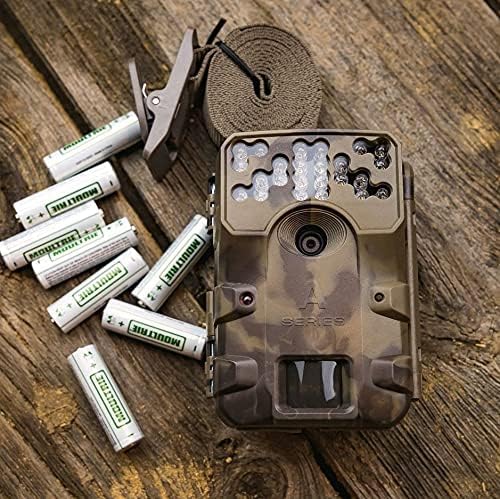
Image: The Moultrie W800 trail camera displayed with the included 8 AA batteries and a mounting strap, ready for setup.
Тохиргоо
1. Зай суурилуулах
- Камерын орон сууцны түгжээг нээнэ үү.
- Зөв туйлшралыг (+/-) хангаж, батерейны хэсэгт 8 ширхэг АА батерейг хийнэ үү.
- Close the camera housing latch securely.
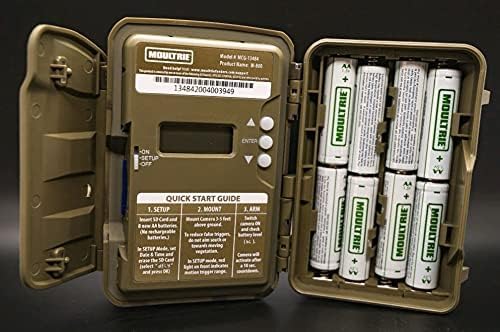
Image: An open Moultrie W800 camera, revealing the battery compartment on the right, the control panel with a small screen, and buttons on the left. This view is essential for battery and SD card installation.
2. SD картыг суурилуулах
- Камерын орон сууц нээлттэй байхад SD картны үүрийг олоорой.
- Insert a standard SD card (up to 32GB) into the slot until it clicks into place. Ensure the card is inserted in the correct orientation.
- It is recommended to format the SD card using the camera's menu settings before first use.
3. Камер суурилуулах
- Select a suitable location, typically a tree or post, where the camera can capture the desired area.
- Mount the camera approximately 3-5 feet above the ground.
- Use the provided mounting strap to secure the camera firmly. Thread the strap through the camera's mounting slots and tighten it around the object.
- Angle the camera to avoid direct sunlight and to minimize false triggers from swaying branches.

Image: A Moultrie W800 trail camera, in its camouflage casing, securely mounted to a tree trunk using a strap, demonstrating a typical field setup.
Ашиглалтын заавар
Үндсэн үйл ажиллагаа
- Асаах/унтраах: Locate the power switch inside the camera housing. Slide it to the 'ON' position to power on the camera. Slide to 'OFF' to power off.
- Тохируулах горим: After powering on, the camera will typically enter 'SETUP' mode. In this mode, you can adjust settings such as date, time, photo/video mode, resolution, and trigger delay using the control buttons and display.
- Arming the Camera: Once settings are configured, slide the power switch to the 'ARM' position. The camera will initiate a countdown (e.g., 10 seconds) to allow you to leave the area without triggering a capture. After the countdown, the camera will be active and ready to detect motion.
- Шалгах төлөв: The small display inside the camera housing provides status information, including battery level, SD card status, and current mode.
Засвар үйлчилгээ
- Цэвэрлэгээ: Periodically clean the camera lens and sensor window with a soft, lint-free cloth. Avoid abrasive materials or harsh chemicals.
- Зай шалгах: Regularly check battery levels, especially before extended deployment. Replace all batteries simultaneously to ensure consistent power.
- SD картын менежмент: Format the SD card regularly to prevent data corruption and ensure optimal performance. Back up important images/videos before formatting.
- Housing Integrity: Ensure the camera housing latch is always securely closed to protect against moisture and dust.
Алдааг олж засварлах
- Камер зураг авахгүй байна:
- Check if the camera is in 'ARM' mode.
- Ensure the SD card is properly inserted and has sufficient free space.
- Verify that batteries have adequate charge.
- Check camera settings for trigger delay or sensitivity.
- SD картыг форматлах.
- Зургийн чанар муу:
- Камерын линз болон мэдрэгч цонхыг цэвэрлэ.
- Ensure the camera is mounted at the recommended height and angle.
- Камерын өмнө саад тотгор байгаа эсэхийг шалгаарай.
- Батерейны богино хугацаа:
- Use fresh, high-quality alkaline or lithium AA batteries.
- Хэт их температур нь батерейны гүйцэтгэлд нөлөөлж болно.
- Frequent video recording or high trigger frequency can consume more power.
Үзүүлэлтүүд
Detailed technical specifications for the Moultrie W800 Trail Camera:
| Онцлог | Тодорхойлолт |
|---|---|
| Үр дүнтэй шийдэл | 26 МП |
| Триггерийн хурд | 0.5 секунд |
| Флэш хүрээ | 70 фут |
| Илрүүлэх хүрээ | 70 фут |
| Гэрэл багатай технологи | Illumi-Night Sensor (Night Color) |
| Видео бичлэгийн нягтрал | 720p |
| Видео бичлэгийн формат | MPEG-4 |
| Флаш санах ойн төрөл | SD (32 ГБ хүртэл) |
| Эрчим хүчний эх үүсвэр | 8 АА батерей |
| Холболтын технологи | Утасгүй (Wi-Fi) |
| Хяналтын арга | Апп |
| Онцлог шинж чанарууд | Хөдөлгөөн мэдрэгч, Шөнийн хараа |
| Олон улсын хамгаалалтын зэрэглэл | IP54 |
| Зүйлийн жин | 1.12 фунт |
| Багцын хэмжээ | 8.62 x 5.39 x 3.43 инч |
| UPC | 053695134840 |

Image: The back of the Moultrie W800 retail box, detailing performance specifications such as trigger speed, detection range, flash range, battery life, and SD card compatibility.
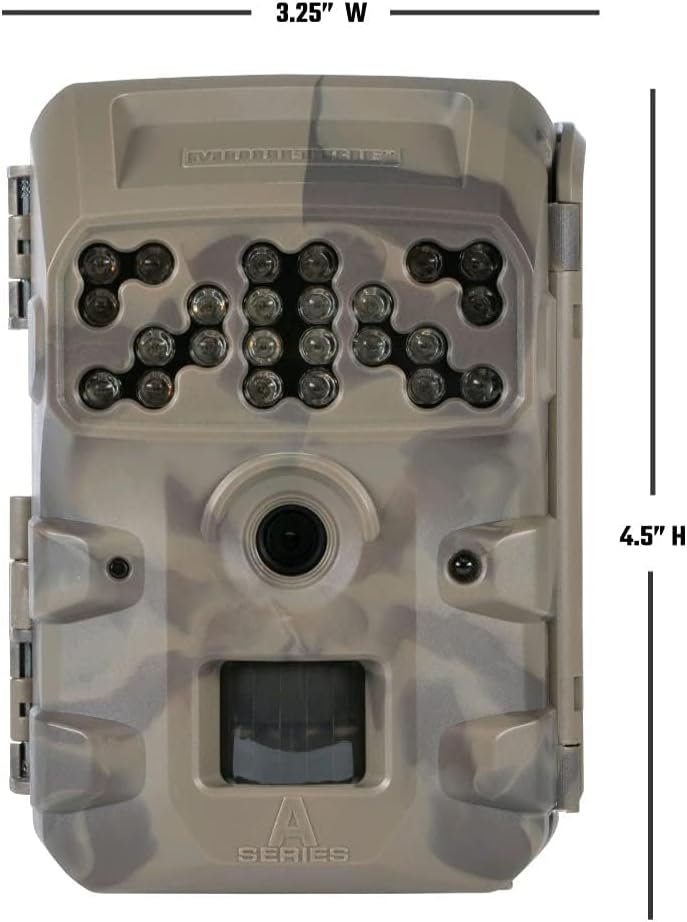
Зураг: Урд view of the Moultrie W800 trail camera with its dimensions clearly labeled: 3.25 inches wide and 4.5 inches high.
Баталгаат болон дэмжлэг
Баталгаат мэдээлэл:
The Moultrie W800 Trail Camera comes with a 2 жилийн баталгаат хугацаа худалдан авсан өдрөөс эхлэн үйлдвэрлэлийн согогийг хамарна. Баталгаат заргад зориулж худалдан авалтаа нотлох баримтаа үлдээнэ үү.
Хэрэглэгчийн дэмжлэг:
For technical assistance, troubleshooting, or warranty inquiries, please visit the official Moultrie support webсайт:


