1. Танилцуулга
This user manual provides detailed instructions for the operation and maintenance of your Sunbuck AS-60BU Home Audio Amplifier Stereo Receiver. This 2-channel amplifier is designed to enhance your home audio experience, offering versatile input options including Bluetooth 5.0, USB, SD card, AUX, CD, Line-in, and microphone inputs. Please read this manual thoroughly before using the product to ensure proper function and safety.

Figure 1: Sunbuck AS-60BU Amplifier and Remote Control
2. Аюулгүй ажиллагааны заавар
- Энэ төхөөрөмжийг бороо, чийгэнд бүү тавь.
- Тагийг нь авч болохгүй. Дотор нь хэрэглэгчийн засварлах боломжтой эд анги байхгүй. Мэргэшсэн ажилтнуудад үйлчилгээ үзүүлнэ үү.
- Төхөөрөмжийн эргэн тойронд зохих агааржуулалтыг хангах. Агааржуулалтын нүхийг хааж болохгүй.
- Зөвхөн газардуулгатай AC цахилгаан залгуурт холбоно уу.
- Цахилгааны залгуур болон өргөтгөлийн утсыг хэт ачаалж болохгүй.
- Төхөөрөмжийг дулааны эх үүсвэрийн ойролцоо эсвэл нарны шууд тусгалд байрлуулахаас зайлсхий.
- Аянга цахилгаантай шуургатай үед эсвэл удаан хугацаагаар ашиглаагүй үед цахилгааныг салга.
- Хүүхдийн гар хүрэхгүй газар хадгална.
3. Багцын агуулга
Бүх зүйл таны багцад байгаа эсэхийг шалгана уу:
- Sunbuck AS-60BU Ampамьд хүлээн авагч
- Хувьсах гүйдлийн цахилгааны утас
- Хэрэглэгчийн гарын авлага (энэ баримт бичиг)
- Алсын удирдлага

Зураг 2: Хайрцагт юу байна
4. Бүтээгдэхүүн дууссанview
4.1 Урд самбар

Зураг 3: Урд болон хойд самбарын зохион байгуулалт
| Онцлог | Тодорхойлолт |
|---|---|
| POWER (ON/OFF) | Төхөөрөмжийн үндсэн цахилгаан унтраалга. |
| AUX оролт | Гадны аудио төхөөрөмжийг холбох 3.5 мм үүр. |
| Оролт сонгогч | Rotary knob to select audio input source: LINE, CD, AUX, MEDIA PLAYER. |
| BASS хяналт | Бага давтамжийн аудио гаралтыг тохируулна. |
| TREBLE Хяналт | Өндөр давтамжийн аудио гаралтыг тохируулна. |
| ECHO хяналт | Adjusts the echo effect for microphone inputs. |
| M.TONE Control | Adjusts the microphone tone. |
| MIC VOLUME Control | Adjusts the volume of the microphone inputs. |
| Мастер боть | Main volume control for all audio output. |
| USB/SD/MMC Port | Input for USB flash drives and SD/MMC cards for media playback. |
| MEDIA PLAYER Display & Buttons | Digital display and controls (MODE, Play/Pause, Previous, Next) for USB/SD/Bluetooth playback. |
| MIC 1 / MIC 2 | 6.35 мм микрофон оролттой. |
4.2 Арын самбар
| Онцлог | Тодорхойлолт |
|---|---|
| CD L/R IN | RCA stereo input for CD players. |
| LINE L/R IN | RCA stereo input for general line-level audio sources. |
| FM антен | Connection point for the FM radio antenna. |
| Тогтмол гүйдлийн оролт | Цахилгаан оролт ampнастан. |
| Speaker Output (L/R) | Идэвхгүй чанга яригчийг холбох зориулалттай холбогч тулгуурууд (4-16 ом). |
5. Тохиргоо
Follow these steps to set up your Sunbuck AS-60BU ampамь нас:
- Чанга яригчийн холболт: Connect your passive speakers to the "Speaker Output (L/R)" binding posts on the rear panel. Ensure correct polarity (+ to + and - to -) for optimal sound. This amplifier supports speakers with an impedance range of 4 to 16 ohms.
- Аудио эх үүсвэрийн холболт:
- For CD players, connect RCA cables from the CD player's output to the "CD L/R IN" on the ampнастан.
- For other line-level devices (e.g., tape drive, tuner), connect RCA cables to the "LINE L/R IN".
- For devices with a 3.5mm output (e.g., smartphones, tablets), use a 3.5mm audio cable to connect to the "AUX INPUT" on the front panel.
- For PC connection, use appropriate cables to connect your PC's audio output to either the LINE IN or AUX IN.

Зураг 4: Холболтын схем
- FM антенны холболт: If you plan to use the FM radio function, connect an FM antenna to the "FM Antenna" terminal on the rear panel.
- Эрчим хүчний холболт: -ийг баталгаажуулах amplifier's POWER switch is in the OFF position. Connect the supplied AC power cord to the "DC Power Input" on the rear panel and then to a suitable wall outlet.
6. Ашиглалтын заавар
6.1 Асаах/унтраах
Асаахын тулд ampөргөгч, дарна уу ХҮЧ switch to the ON position. The LED display will illuminate. To turn off, press the ХҮЧ OFF байрлалд шилжүүлнэ.
6.2 Оролтын сонголт
-г эргүүл Оролт сонгогч knob on the front panel to choose your desired audio source (LINE, CD, AUX, MEDIA PLAYER). When selecting MEDIA PLAYER, you can then use the MODE button on the front panel or remote to switch between USB, SD, and Bluetooth modes.
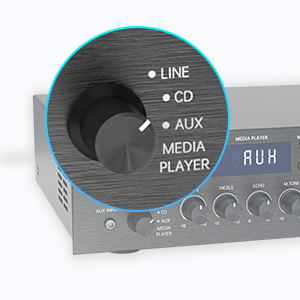
Figure 5: Input Selector
6.3 Bluetooth холболт
Bluetooth-ээр холбогдохын тулд:
- -г тохируулах Оролт сонгогч to MEDIA PLAYER.
- дээр дарна уу MODE Дэлгэц дээр "BLUETOOTH" эсвэл "BT" гарч иртэл товчийг дарна уу.
- Мобайл төхөөрөмж дээрээ (ухаалаг утас, таблет, зөөврийн компьютер) Bluetooth-г идэвхжүүлж, боломжтой төхөөрөмжүүдийг хайж олоорой.
- Select "SUNBUCK" or "AS-60BU" from the list to pair.
- Хослуулсны дараа та төхөөрөмжөөсөө аудиог утасгүйгээр дамжуулах боломжтой ampнастан.
The Bluetooth range is approximately 40+ feet, but can be affected by obstacles and interference.

Зураг 6: Bluetooth холболт
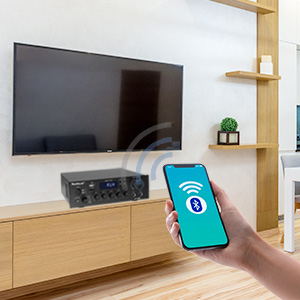
Figure 7: Bluetooth Connection Indicator
6.4 USB/SD карт тоглуулах
To play media from a USB drive or SD/MMC card:
- Insert your USB flash drive or SD/MMC card into the corresponding port on the front panel.
- -г тохируулах Оролт сонгогч to MEDIA PLAYER.
- The amplifier will automatically detect and begin playing supported audio files (MP3, WAV, WMA, APE, FLAC).
- Use the Play/Pause, Previous, and Next buttons on the front panel or remote to control playback.
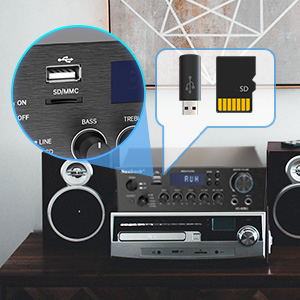
Figure 8: USB/SD Card Slots
6.5 Микрофоны хэрэглээ
Connect up to two microphones to the MIC 1 and MIC 2 jacks on the front panel. Adjust the MIC ХЭРЭГ, ЭХО, ба M.TONE controls to achieve your desired sound for karaoke or public address.

Figure 9: Ideal for Karaoke and Home Entertainment
6.6 FM радио
FM радиог ашиглахын тулд:
- Ensure an FM antenna is connected to the rear panel.
- -г тохируулах Оролт сонгогч to MEDIA PLAYER.
- дээр дарна уу MODE дэлгэц дээр "FM" гарч ирэх хүртэл товчийг дарна уу.
- Use the Previous/Next buttons to scan for stations. Note that this model cannot fix and save FM stations.

Figure 10: FM Mode Display
6.7 Аудио тохируулга
-г ашиглана уу басс, ТРЕБЛ, ба Мастер боть knobs on the front panel to fine-tune your audio output. The Мастер боть controls the overall sound level.
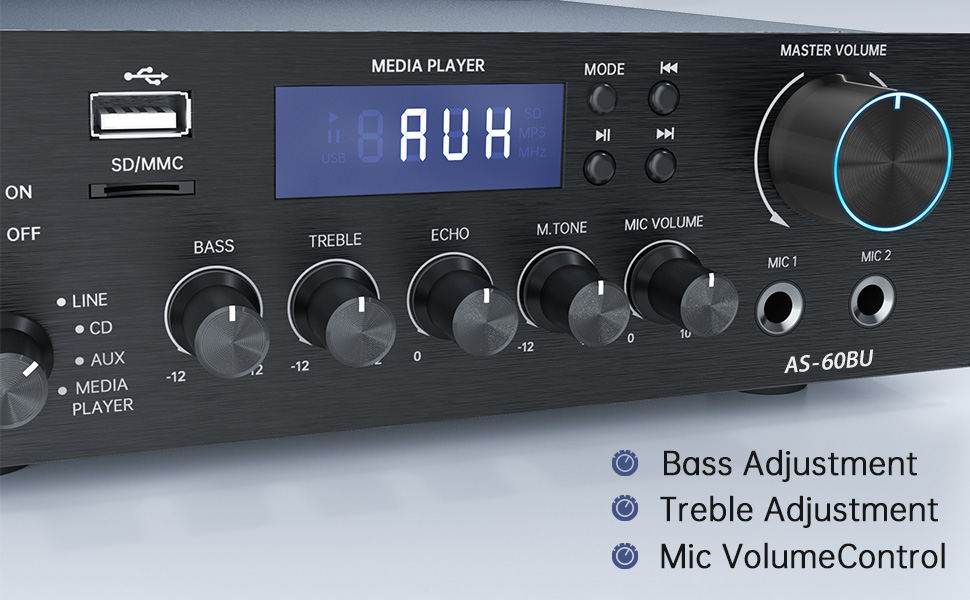
Figure 11: Audio Adjustment Controls
Video 1: Demonstration of Sunbuck AS-60BU amplifier features and sound quality.
7. Засвар үйлчилгээ
- Цэвэрлэгээ: Гаднах хэсгийг цэвэрлэхийн тулд зөөлөн, хуурай даавуу ашиглана уу ampөргөгч. Шингэн цэвэрлэгч эсвэл аэрозоль хэрэглэж болохгүй.
- Хадгалах: Удаан хугацаагаар ашиглаагүй тохиолдолд хадгална ampАчаалагчийг сэрүүн, хуурай газар, нарны шууд тусгал болон хэт өндөр температураас хол хадгална уу.
- Агааржуулалт: Хэт халалтаас урьдчилан сэргийлэхийн тулд агааржуулалтын нүхийг тоос шороо, хог хаягдалгүй байлгах хэрэгтэй.
8. Алдаа засах
| Асуудал | Боломжит шалтгаан | Шийдэл |
|---|---|---|
| Дууны гаралт байхгүй. | Incorrect input selected, loose speaker connections, low volume. | Verify input selection, check speaker wiring polarity and tightness, increase MASTER VOLUME. |
| Bluetooth connection unstable or short range. | Obstacles between device and amplifier, interference, device too far. | Reduce distance between devices, remove obstacles, avoid other wireless devices. |
| Алсын удирдлага ажиллахгүй байна. | Dead batteries, line of sight blocked. | Replace batteries, ensure clear path to ampөргөгч төхөөрөмжийн IR хүлээн авагч. |
| Settings not saved after power off. | This is normal behavior for some settings (e.g., input mode). | Re-select desired input mode after powering on. |
| Гажуудсан аудио. | Input signal too high, speaker impedance mismatch, faulty cables. | Reduce source volume, ensure speakers are within 4-16 ohm range, check/replace cables. |
9. Техникийн үзүүлэлтүүд
- Загвар: AS-60BU
- Эрчим хүчний гаралт: MAX 400W x 2 (RMS 70W x 2)
- Сувгууд: 2 суваг
- Чанга яригчийн эсэргүүцэл: 4-16 Ом
- Гаралтын эсэргүүцэл: 0.1 Ом
- Оролтууд: 2 x RCA Audio (CD, Line), 2 x Microphone (6.35mm), USB 2.0, SD Card, Bluetooth 5.0, AUX In (3.5mm), FM Radio
- Дэмжигдсэн аудио форматууд (USB/SD): MP3, WAV, WMA, APE, FLAC
- Бүтээгдэхүүний хэмжээ: 8.27 x 7.68 x 2.44 инч
- Жин: 3.24 фунт
- Үйлдвэрлэгч: JS Electronics Limited
- Эхний боломжтой: 9 оны есдүгээр сарын 2021
10. Баталгаат хугацаа ба дэмжлэг
Sunbuck products are designed for reliability and performance. For warranty information or technical support, please refer to the contact details provided with your purchase documentation or visit the official Sunbuck webсайт. Худалдан авалтын баримтаа баталгаат нэхэмжлэлд зориулж худалдан авалтын баталгаа болгон хадгална уу.
For further assistance, you may contact the manufacturer, JS Electronics Limited.


