1. Танилцуулга
Thank you for choosing the Inkbird BBQGO BG-CT2D Digital Food Thermometer. This device is designed to help you achieve perfectly cooked meals by accurately monitoring food temperatures. Featuring dual probes, a touch screen, and preset temperature options, it is ideal for use with ovens, grills, smokers, and various cooking methods. Please read this manual thoroughly before use to ensure proper operation and longevity of your thermometer.
2. Бүтээгдэхүүн дууссанview
2.1 Гол онцлогууд
- Хос датчик: Monitor two different foods or two parts of the same food simultaneously. Probes are 40 inches (100cm) long and heat-resistant.
- Өргөн температурын хүрээ: Measures from -20℃ to 250℃ (-4°F to 482°F) with an accuracy of ±2℃/±2°F.
- Урьдчилан тохируулсан цэсүүд: Includes factory-preset temperatures and doneness levels for 8 types of meat (Beef, Lamb, Veal, Hamburger, Pork, Turkey, Chick, Fish).
- Тохиромжтой дизайн: Features two magnets for attachment to metal surfaces and a back stand for tabletop use. Silicone cover provides protection.
- Touch Screen & LCD Backlight: Easy-to-read large LCD with sensitive touch controls and backlight for clear visibility in any lighting condition.
- Built-in Timer & Alarm: Set cooking times from 59 seconds to 99 minutes. An alarm sounds when the set temperature is reached or time expires, preventing overcooking.
2.2 Бүрэлдэхүүн хэсэг
The Inkbird BBQGO BG-CT2D thermometer consists of the main unit and two temperature probes.

Image: The main thermometer unit with its two temperature probes, showing approximate dimensions.

Image: A detailed diagram illustrating the various parts and buttons of the thermometer, including probe channels, display areas, and control buttons.
- 1. Magnet: For attaching to metal surfaces.
- 2. Цахилгаан унтраалга: Төхөөрөмжийг асаана/унтраана.
- 3. Support Frame: Ширээний тавцан дээр байрлуулах зориулалттай.
- 4. Probe Jack: Connects the temperature probes.
- 5. Зайны тасалгаа: Holds 2 AAA batteries (not included).
- 6. Preset Meat Type: Displays the selected meat type.
- 7. Probe Channel: Indicates which probe (1 or 2) is active.
- 8. Doneness Level: Shows the selected doneness (e.g., RARE, MEDIUM).
- 9. Alarm Temperature: Displays the target temperature for the alarm.
- 10. Одоогийн температур: Shows the real-time temperature from the probe.
- M товч: Changes preset mode or turns on the alarm.
- T товчлуур: Selects doneness level or switches between °C/°F.
- CH товч: Selects probe channel or sets an alarm.
3. Тохиргоо
3.1 Батерей суурилуулах
- Термометрийн ар талд батерейны тасалгааг олоорой.
- Зайны тагийг нээ.
- Зөв туйлшралыг (+/-) баталгаажуулж, 2 AAA батерейг (оруулаагүй) оруулаарай.
- Зайны тагийг сайтар хаа.

Image: The rear of the thermometer unit with the battery compartment open, indicating where to insert 2 AAA batteries.
3.2 Холбох датчик
- Ensure the thermometer unit is powered off.
- Insert the stainless steel probes into the probe jacks located on the sides of the main unit. Ensure they are fully inserted for a secure connection.
Image: The thermometer unit with both probes correctly connected to the side jacks.
3.3 Асаах/унтраах
- To power on, slide the power switch on the back of the unit to the "ON" position.
- Унтраахын тулд цахилгаан унтраалгыг "OFF" байрлал руу шургуулна уу.

Зураг: Ойрын зураг view of the power switch located on the side of the thermometer unit.
4. Ашиглалтын заавар
4.1 Температурын нэгжийн сонголт (°C/°F)
Цельсийн (°C) болон Фаренгейтийн (°F) хооронд шилжихийн тулд товчийг дарна уу T button on the touch screen. The display will update accordingly.

Image: The thermometer display indicating the option to select between Celsius and Fahrenheit temperature units.
4.2 Selecting Probe Channel
дээр дарна уу CH button to switch between Probe 1 and Probe 2. The selected channel will be highlighted on the display.
4.3 Using Preset Temperatures
- дээр дарна уу M button to cycle through the 8 preset meat types (BEEF, LAMB, VEAL, HAMBURGER, PORK, TURKEY, CHICK, FISH).
- Once a meat type is selected, press the T button to choose the desired doneness level (e.g., RARE, MED RARE, MEDIUM, WELL). The target temperature will adjust automatically.
- Insert the probe into the thickest part of the food, avoiding bone or gristle.
- The thermometer will display the current temperature and the set alarm temperature. An alarm will sound when the food reaches the target temperature.
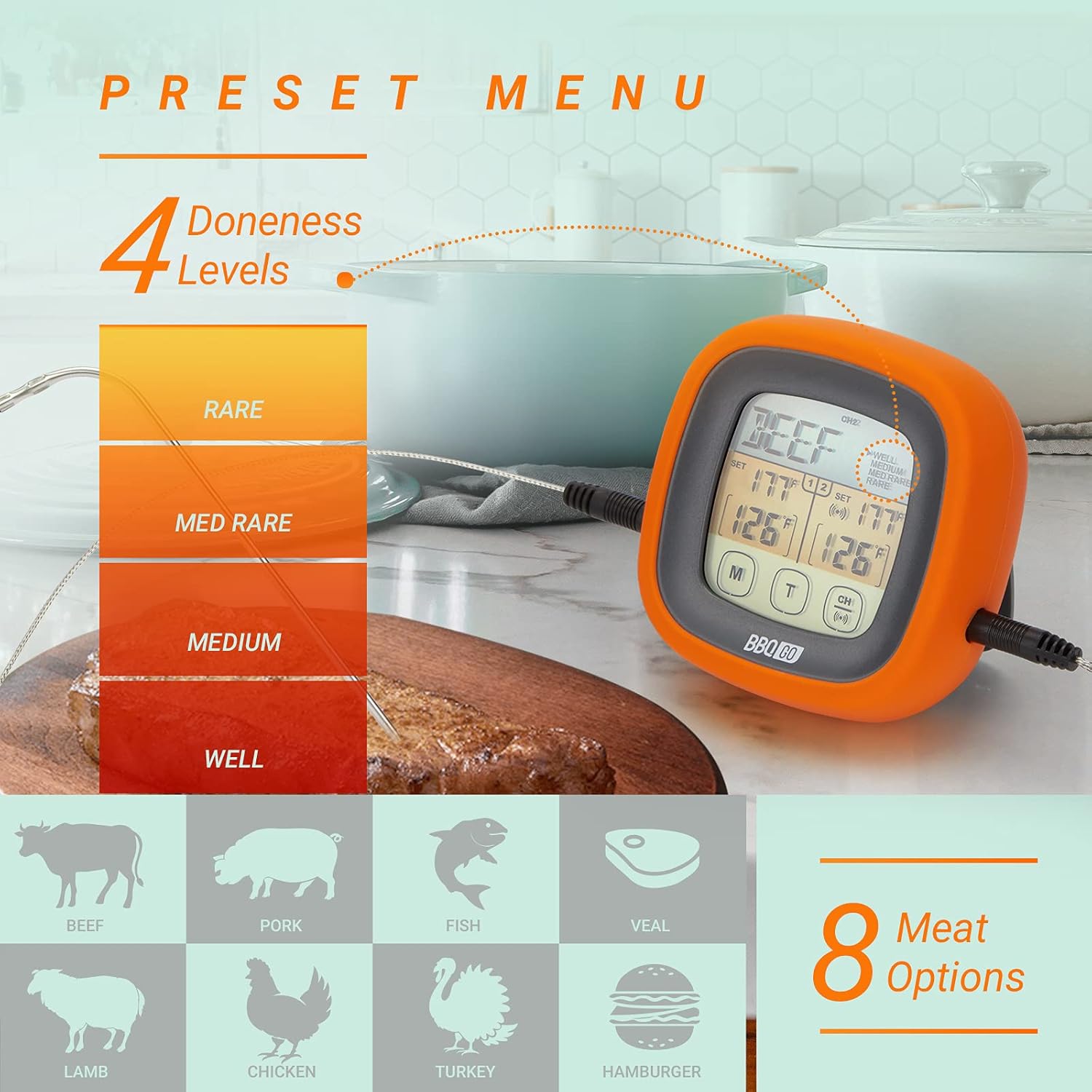
Image: The thermometer display illustrating the selection of various meat types and their corresponding doneness levels.
4.4 Setting Custom Temperatures
If you prefer a specific temperature not covered by the presets:
- Select the desired probe channel using the CH товч.
- -г удаан дар CH button until the alarm temperature starts flashing.
- -г ашиглана уу M болон T buttons to adjust the target temperature up or down.
- дарна уу CH тохиргоог баталгаажуулахын тулд дахин дарна уу.
4.5 Таймер функц
The thermometer includes a built-in timer:
- To activate the timer, press and hold the M button until the timer digits appear.
- -г ашиглана уу M болон T buttons to set the desired time (up to 99 minutes, 59 seconds).
- дарна уу CH таймерыг эхлүүлэх эсвэл түр зогсоох.
- Таймер тэг цэгт хүрэхэд дохиолол дуугарна.
4.6 арын гэрэлтүүлгийн удирдлага
The LCD backlight can be activated for better visibility:
- Press any button to momentarily activate the backlight.
- The backlight will automatically turn off after a short period of inactivity to conserve battery.

Image: The thermometer display illuminated by its backlight, demonstrating clear readability in low-light conditions.
5. Засвар үйлчилгээ
5.1 Цэвэрлэгээ
- Термометрийн нэгж: Үндсэн нэгжийг зараар арчихamp даавуу. Төхөөрөмжийг усанд дүрж эсвэл урсгал усны доор байрлуулж болохгүй.
- Сорьцууд: Wash the stainless steel probes with warm soapy water after each use. Rinse thoroughly and dry completely before storage. The probe wires are heat-resistant but should not be submerged in water.
5.2 Хадгалалт
- Термометр болон датчикийг ашиглаагүй үедээ цэвэр, хуурай газар хадгална уу.
- Хэт өндөр температур эсвэл өндөр чийгшилд хадгалахаас зайлсхий.
5.3 Батерейг солих
Replace batteries when the display becomes dim or the unit fails to power on. Follow the battery installation steps in Section 3.1.
6. Алдаа засах
| Асуудал | Боломжит шалтгаан | Шийдэл |
|---|---|---|
| Дэлгэц хоосон эсвэл бүдэг байна. | Батерей бага эсвэл үхсэн; зайны буруу суурилуулалт. | Батерейг шинэ AAA батерейгаар сольж, зөв туйлшралыг баталгаажуулна уу. |
| Температурын буруу заалт. | Probe not fully inserted; probe tip touching bone/gristle; probe damaged. | Ensure probe is fully inserted into the food's thickest part, away from bone. If problem persists, the probe may need replacement. |
| Сэрүүлэг дуугарахгүй байна. | Alarm function not activated; volume too low (if applicable); unit malfunction. | Ensure alarm temperature is set. Check if the unit has a volume setting (this model does not, so this is a general troubleshooting tip). Contact support if issue persists. |
| Мэдрэгчтэй дэлгэц хариу өгөхгүй байна. | Unit frozen; temporary software glitch. | Төхөөрөмжийг дахин тохируулахын тулд батерейг салгаад буцааж оруулна уу. |
7. Техникийн үзүүлэлтүүд
| Онцлог | Дэлгэрэнгүй |
|---|---|
| Загварын нэр | BG-CT2D |
| Брэнд | Бэхэн шувуу |
| Температурын хүрээ | -20℃-аас 250℃ (-4°F-ээс 482°F) |
| Нарийвчлал | ±2℃/±2°F |
| Туршилтын урт | 40 инч (100 см) |
| Дэлгэцийн төрөл | Арын гэрэлтүүлэг бүхий LCD дэлгэц |
| Эрчим хүчний эх үүсвэр | 2 x AAA батерей (оруулаагүй) |
| Онцлог шинж чанарууд | Fast Reading System, Dual Probes, Touch Screen, Preset Menus, Timer, Magnetic Back, Stand, Silicone Cover |
| Гаднах материал | Acrylonitrile Butadiene Styrene, Silicon |
| Бүтээгдэхүүний арчилгаа | Oven Safe (probes only), Wipe Clean (main unit) |
8. Баталгаат хугацаа ба дэмжлэг
Inkbird products are designed for reliability and performance. For specific warranty information regarding your Inkbird BBQGO BG-CT2D Digital Food Thermometer, please refer to the warranty card included in your product packaging or visit the official Inkbird webсайт.
If you encounter any issues or have questions about your product, please contact Inkbird customer support through their official website or the retailer where you purchased the product. Please have your model number (BG-CT2D) and purchase details ready when contacting support.
You can visit the Inkbird store for more information: Inkbird Official Store


