1. Бүтээгдэхүүн дууссанview
The Anderic OEM NSRCFNA21 Smart Remote is an original equipment manufacturer (OEM) replacement remote control specifically designed for various Insignia TV models. This remote provides seamless functionality and user-friendly operation, ensuring reliable control over your television.
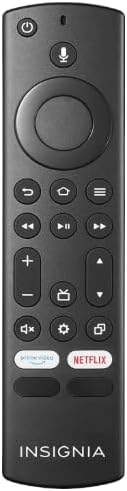
Зураг 1.1: The Anderic OEM NSRCFNA21 Smart Remote. This image displays the front view of the black remote control, featuring various buttons for power, voice control, navigation, volume, channel, and dedicated streaming service buttons.
Гол онцлогууд нь:
- Original Quality: An authentic OEM product, ensuring performance and reliability comparable to the remote originally supplied with your TV.
- Хэрэглэгчдэд ээлтэй дизайн: Intuitive buttons and controls for easy navigation, volume adjustment, channel changes, and access to various TV functions.
- Найдвартай гүйцэтгэл: Provides a stable and responsive connection for accurate command execution.
2. Тохируулах, холбох заавар
To ensure proper functionality, the remote control must be paired with your Insignia TV. Follow these steps carefully:
- ТВ-г дахин тохируулах: Unplug your Insignia TV from its power source. Wait for approximately 30 seconds.
- Power On TV: Plug the TV back into the power source and turn it on. Allow the TV to fully boot up.
- Хослолыг эхлүүлэх: Once the TV has completely booted up and is displaying content, press and hold the Гэр button on the Anderic NSRCFNA21 remote control for up to 30 seconds.
- Remote Update (if prompted): Your TV may display a message indicating that the remote needs an update. If prompted, allow the TV to proceed with the update. This process may take 1 to 3 minutes to complete.
- Баталгаажуулалт: After the update (if any) and pairing process, test the remote's functions (e.g., volume, channel, navigation) to confirm successful pairing.
If the remote does not pair after following these steps, repeat the process or refer to the troubleshooting section.
3. Алсын удирдлагатай ажиллах
The Anderic NSRCFNA21 remote control features an intuitive layout for easy operation of your Insignia TV. Below are the general functions of the primary buttons:
- Цахилгаан товч: ТВ-г асаах эсвэл унтраана.
- Дуут хяналтын товчлуур: Агуулга хайх эсвэл ТВ-г удирдах дуут командыг идэвхжүүлдэг.
- Navigation Pad (Directional Buttons and Select): Цэсээр шилжих, зүйлсийг сонгоход ашигладаг.
- Нүүр хуудас товч: Returns to the TV's main home screen.
- Буцах товчлуур: Өмнөх дэлгэц эсвэл цэс рүү буцна.
- Цэс/Сонголтууд Товч: Accesses additional menu options or settings.
- Дууны хэмжээг нэмэгдүүлэх/доошруулах: Adjusts the TV's audio volume.
- Суваг дээш/доошоо: Телевизийн сувгийг өөрчилдөг.
- Дууг хаах товч: ТВ-ийн аудиог хаах эсвэл нээх.
- Тохиргооны товчлуур: ТВ-ийн тохиргооны цэсийг нээнэ.
- Оруулах/Эх сурвалж товч: Changes the TV's input source (e.g., HDMI 1, HDMI 2).
- Dedicated Streaming Service Buttons: Provides quick access to popular streaming applications (e.g., Amazon Prime Video, Netflix).
4. Тохиромжтой байдал
The Anderic OEM NSRCFNA21 Smart Remote is compatible with the following Insignia TV models:
- NS24DF310NA21
- NS39DF310NA21
- NS50DF710NA21
- NS55DF710NA21
This remote also replaces the following models:
- NSRCFNA19 Rev B Fire
- NSRCFNA19revB
- NSRCFNA21 Fire
- NSRCFNA21 Rev E
- NSRCFNA21-Rev-E
Ensure your TV model is listed above for optimal performance.
5. Засвар үйлчилгээ
Proper maintenance can extend the life and functionality of your remote control.
- Зай солих: The remote requires two AAA batteries. Replace batteries when the remote's responsiveness decreases or it stops functioning. Ensure correct polarity when inserting new batteries.
- Цэвэрлэгээ: Use a soft, dry cloth to clean the remote's surface. Avoid using liquid cleaners or abrasive materials, as these can damage the remote.
- Хадгалах: Удирдлагыг хуурай газар, хэт температур, нарны шууд тусгалаас хол байлга.
6. Алдаа засах
If you encounter issues with your Anderic NSRCFNA21 Smart Remote, try the following troubleshooting steps:
- Алсын удирдлага хариу өгөхгүй байна:
- Check the batteries. Replace them with fresh AAA batteries, ensuring correct polarity.
- Алсын удирдлага болон ТВ-ийн мэдрэгчийн хооронд ямар ч саад бэрхшээл байхгүй эсэхийг шалгаарай.
- 2-р хэсэгт тайлбарласны дагуу хослуулах процессыг дахин оролдоно уу.
- Завсрын функциональ байдал:
- Энэ нь батерейны цэнэг бага байгааг илтгэж болно. Батерейг солих.
- Ensure you are within the effective range of the TV's sensor.
- Pairing Fails:
- Confirm your TV model is listed in the compatibility section (Section 4).
- Ensure the TV is fully booted up before attempting to hold the Home button.
- Try unplugging the TV for a longer period (e.g., 1-2 minutes) before plugging it back in and re-attempting pairing.
Хэрэв эдгээр алхмуудыг хийсний дараа асуудал арилахгүй бол цаашид тусламж авахын тулд хэрэглэгчийн дэмжлэгтэй холбогдоно уу.
7. Техникийн үзүүлэлтүүд
| Брэнд | Андерик |
| Загварын дугаар | NSRCFNA21 Rev B |
| Тохиромжтой төхөөрөмжүүд | Insignia Televisions |
| Эрчим хүчний эх үүсвэр | 2 AAA батерей (шаардлагатай) |
| Зүйлийн жин | 1.76 унц |
| Багцын хэмжээ | 6.3 x 2.95 x 0.67 инч |
| Өнгө | Хар |
| Үйлдвэрлэгч | Дан'с Электроникс гэх мэт ХХК |
8. Баталгаат хугацаа ба дэмжлэг
For warranty information or technical support, please contact the manufacturer, Anderic (Dan's Electronics Etc., Inc.). Refer to the product packaging or the official Anderic webтусгай холбоо барих мэдээлэл болон баталгаат нөхцөлийг авах сайт.
хаягаар зочилж болно Амазон дээрх Андерик дэлгүүр дэлгэрэнгүй мэдээллийг авна уу.


