Танилцуулга
The HTC True Wireless Earbuds 2 offer a seamless audio experience with advanced features designed for comfort and convenience. These earbuds utilize the latest Bluetooth 5.1 technology for instant pairing and stable connections across various devices. Enjoy extended listening times, intuitive touch controls, and a comfortable, ergonomic fit for all-day use.

Image: HTC True Wireless Earbuds 2 in their pink charging case, showcasing авсаархан дизайн.

Image: A display of HTC True Wireless Earbuds 2 in three available colors: white, black, and pink.
Видео: Албан тушаалтан ирсэнview of the HTC True Wireless Bluetooth Earbuds, highlighting key features and design.
Хайрцагт юу байна
Your HTC True Wireless Earbuds 2 package includes the following items:
- HTC True Wireless Earbuds 2 (Left and Right)
- USB-C цэнэглэгч кабель
- Rubber Eartips (Two pairs: Large and Small sizes, in addition to the pre-installed medium size)
- Цэнэглэх хайрцаг
Video: An unboxing video for the HTC True Wireless Earbuds 2, showing the contents of the package.
Тохиргоо
1. Чихэвч болон гэрийг цэнэглэж байна
Before first use, ensure both the earbuds and the charging case are fully charged. Connect the provided USB-C cable to the charging port on the case and plug the other end into a compatible USB power source. The indicator light on the case will show charging status. A full charge provides up to 8 hours of listening time for the earbuds and up to 32 hours total with the charging case.

Image: Pink HTC True Wireless Earbuds 2 and their charging case, illustrating the 30-hour combined battery life.
2. Таны төхөөрөмжтэй хослуулах
- Цэнэглэх хайрцгийг нээнэ үү. Чихэвч автоматаар хослуулах горимд орно.
- Төхөөрөмж дээрээ (ухаалаг утас, таблет, зөөврийн компьютер) Bluetooth тохиргоо руу очно уу.
- Select "HTC True Wireless Earbuds 2" from the list of available devices.
- Холбогдсоны дараа та аудио сануулга сонсох бөгөөд чихэвч дээрх заагч гэрэл өөрчлөгдөх болно.
The earbuds utilize Bluetooth 5.1 for quick and stable connections. They are compatible with iOS, Android, and Windows devices.

Image: A diagram illustrating the quick pairing process and wide compatibility of the HTC True Wireless Earbuds 2 with various devices.
3. Achieving Optimal Comfort
The earbuds are ergonomically crafted for a secure and comfortable in-ear fit. Experiment with the included rubber eartips (small, medium, large) to find the size that provides the best seal and comfort for your ears. A proper fit enhances sound quality and noise isolation.

Image: A woman wearing pink HTC True Wireless Earbuds 2 while working on a laptop, emphasizing the ultra-lightweight comfort and ergonomic design.
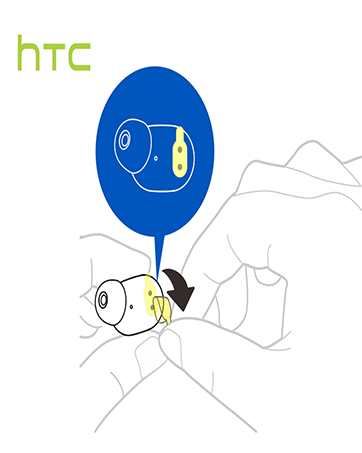
Image: A diagram illustrating the correct method for inserting an earbud to ensure a secure and comfortable fit.
Ашиглалтын заавар
Удирдлагад хүрнэ үү
The HTC True Wireless Earbuds 2 feature intuitive touch controls on each earbud for easy management of your audio and calls:
- Тоглуулах/түр зогсоох: Зүүн/баруун чихэвчийг нэг удаа товшино уу.
- Дуудлагад хариулах: Зүүн чихэвчийг нэг удаа товшино уу.
- Дуудлага таслах: Баруун чихэвчийг нэг удаа товшино уу.
- Дуудлагаас татгалзах: Tap and hold left/right earbud for 2 seconds.
- Өмнөх бичлэг: Tap and hold left earbud for 2 seconds.
- Дараагийн дуу: Tap and hold right earbud for 2 seconds.
- Дууг нэмэгдүүлэх: Tap left earbud twice.
- Дууг багасгах: Tap right earbud twice.
- Дуут туслахыг идэвхжүүлэх: Tap left/right earbud three times.

Image: A visual guide detailing the simple touch controls for the pink HTC True Wireless Earbuds 2.

Image: A visual guide detailing the simple touch controls for the black HTC True Wireless Earbuds 2.
Нэг удаагийн чихэвч ашиглах
You can use either earbud independently for mono audio or calls. Simply take one earbud out of the case, and it will automatically connect to your device. This feature allows for versatility depending on your listening needs.

Image: Two smartphones connected to individual pink HTC True Wireless Earbuds 2, showcasing the versatility of using one or both earbuds.

Image: A diagram illustrating the versatility of using one or both black HTC True Wireless Earbuds 2 with different devices.
Засвар үйлчилгээ
Цэвэрлэгээ ба арчилгаа
- Чихэвч болон цэнэглэгчийн хайрцгийг зөөлөн, хуурай даавуугаар тогтмол цэвэрлэ.
- Remove eartips and clean them with mild soap and water if necessary, ensuring they are completely dry before reattaching.
- Зүлгүүрийн материал эсвэл хатуу химийн бодис хэрэглэхээс зайлсхий.
Усны эсэргүүцэл
The HTC True Wireless Earbuds 2 are IPX5 waterproof, meaning they are protected against low-pressure water jets from any direction. This makes them suitable for workouts and light rain. However, they are not designed for submersion in water.
Алдааг олж засварлах
If you encounter any issues with your HTC True Wireless Earbuds 2, please refer to the following common solutions:
| Асуудал | Шийдэл |
|---|---|
| Чихэвчийг хослуулахгүй байна | Ensure earbuds are charged. Place them back in the case, close, then reopen to re-enter pairing mode. Check your device's Bluetooth settings and forget/remove previous connections if necessary. |
| Нэг чихний чихнээс ямар ч дуу гарахгүй | Хоёр чихэвч хоёулаа цэнэглэгдсэн эсэхийг шалгаарай. Хоёуланг нь буцааж гэрт нь хийгээд буцааж гаргаж үзнэ үү. Төхөөрөмжтэйгээ дахин холбоно уу. |
| Мэдрэгчийн удирдлага хариу өгөхгүй байна | Ensure earbuds are clean and dry. Restart your device and re-pair the earbuds. |
| Дууны чанар муу | Adjust the eartips for a better seal. Ensure your device is within the 10m Bluetooth range. Check for interference from other wireless devices. |
Үзүүлэлтүүд
| Онцлог | Дэлгэрэнгүй |
|---|---|
| Загварын нэр | HTC True Wireless Earbuds 2 |
| Загварын дугаар | HTC TWS3 |
| Холболтын технологи | Утасгүй (Bluetooth 5.1) |
| Батерейны хугацаа (чихэвч) | Нэг цэнэглэлтээр 8 цаг хүртэл ажиллана |
| Зайны хугацаа (цэнэглэх хайрцагтай) | 32 цаг хүртэл |
| Цэнэглэх хайрцагны батерейны багтаамж | 500 мАч |
| Усны эсэргүүцлийн түвшин | IPX5 (Усны хамгаалалттай) |
| Хяналтын төрөл | Touch Control (Volume, Play/Pause, Call Management, Voice Assistant) |
| Чихний байрлал | Чихэнд |
| Давтамжийн хүрээ | 20-20,000 Гц |
| Зүйлийн жин | 2.82 унц |
| Бүтээгдэхүүний хэмжээс | 1.71 x 1.71 x 1.36 инч |
Баталгаат болон дэмжлэг
HTC provides a 12-month warranty for the True Wireless Earbuds 2. For any support inquiries or warranty claims, please contact HTC customer service through their official webтухайн бүтээгдэхүүнийг худалдаж авсан сайт эсвэл жижиглэнгийн худалдаачин.
Дэлгэрэнгүй мэдээллийг албаны хүнээс авна уу HTC Store on Amazon.


