1. Аюулгүй ажиллагааны заавар
Бүтээгдэхүүнийг ашиглахаасаа өмнө эдгээр аюулгүй байдлын зааврыг анхааралтай уншина уу. Энэхүү гарын авлагыг ирээдүйд лавлах зорилгоор хадгална уу.
- Энэ бүтээгдэхүүн нь зөвхөн дотор ашиглах зориулалттай. Чийг эсвэл хэт өндөр температурт бүү өртүүл.
- Do not attempt to open or modify the device. This may void the warranty and pose a safety risk.
- Төхөөрөмжийг хүүхдээс хол байлга.
- Use only the provided micro-USB cable for charging.
- LED гэрлийн эх үүсвэр рүү шууд харж болохгүй.
2. Багцын агуулга
Бүх зүйл багцад байгаа эсэхийг шалгаарай:
- ANSMANN Under-Cabinet Light M
- Micro-USB цэнэглэгч кабель
- Зааварчилгааны гарын авлага
3. Бүтээгдэхүүн дууссанview
The ANSMANN Under-Cabinet Light M is a versatile, rechargeable LED lamp designed for various indoor applications. It features a motion sensor, adjustable color temperatures, and a slim design for discreet placement.

Image 1: The ANSMANN Under-Cabinet Light M, showcasing its sleek, white design and integrated motion sensor.
Гол онцлогууд:
- PIR хөдөлгөөн мэдрэгч: Automatically activates the light when motion is detected in low-light conditions.
- Twilight Sensor: Ensures the light only activates in dark environments, conserving battery life.
- Тохируулах өнгөний температур: Choose between 3 color temperatures (cool white, neutral white, warm white) or activate all LEDs for maximum brightness.
- Алхамгүй бүдэгрүүлэх: Adjust brightness by holding down the control button.
- Цэнэглэдэг батерей: Integrated battery for cordless operation, charged via micro-USB.
- Соронзон бэхэлгээ: Easy installation and removal with a magnetic strip.

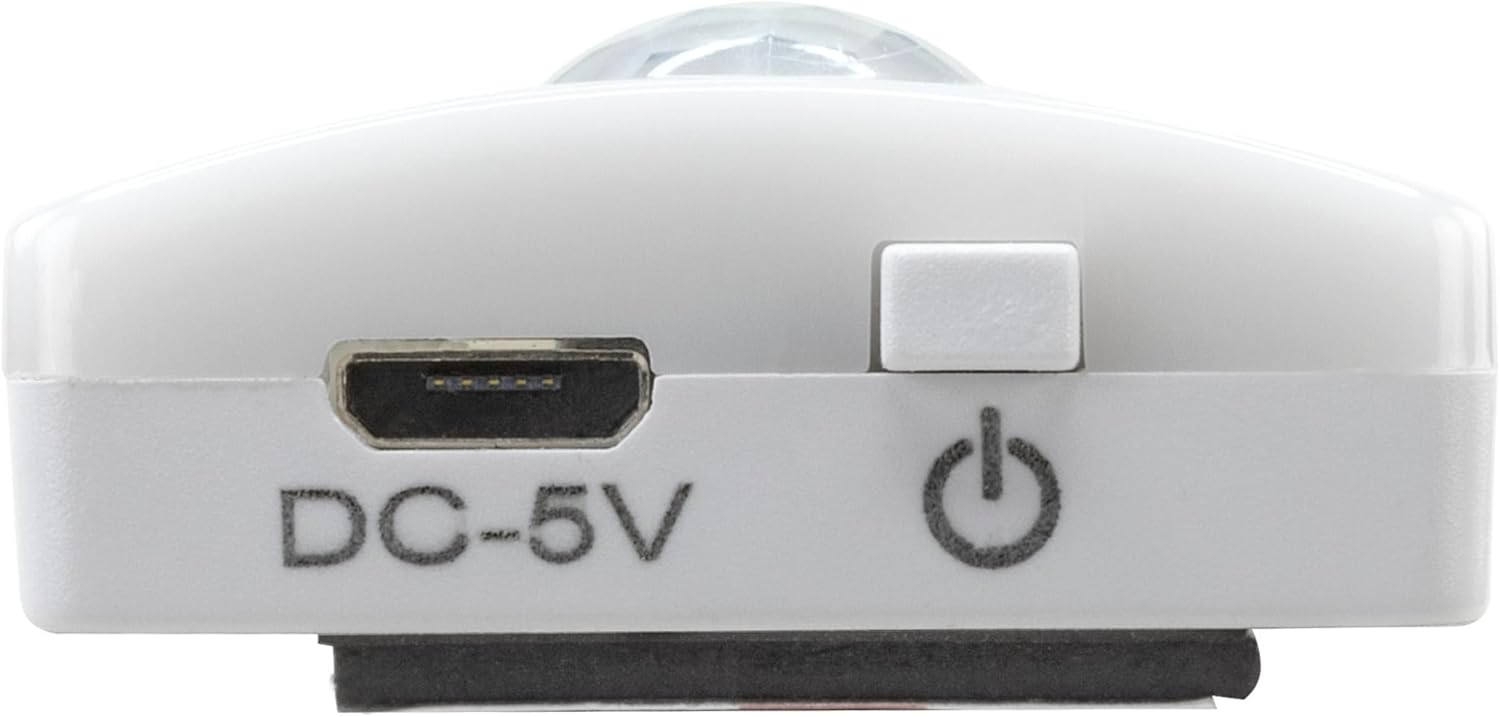
Image 2: Diagram illustrating the Micro-USB Port, On/Off button, and PIR motion sensor on the device.
4. Тохиргоо ба суурилуулалт
The Under-Cabinet Light M offers flexible installation options using its integrated magnetic strip.
Соронзон бэхэлгээ:
- Identify a suitable, clean, and dry surface for installation (e.g., inside a cabinet, under a shelf).
- The light comes with a fixed magnetic strip on its back. For non-metallic surfaces, use the included adhesive strip.
- Peel off the protective film from the adhesive strip and firmly press it onto the desired surface.
- Attach the Under-Cabinet Light M to the adhesive strip. The magnetic connection will hold it in place.
Зураг 3: Ойролцоогоор view of the magnetic strip and the removable adhesive strip, demonstrating the mounting mechanism.

Зураг 4: Жишээ ньample of the under-cabinet light installed in a modern kitchen setting, providing illumination over a countertop.
5. Үйл ажиллагаа
The Under-Cabinet Light M offers intuitive control for its lighting functions.
Асаах/унтраах:
- Locate the On/Off button (refer to Image 2).
- Press the button once to turn the light on or off.
Өнгөний температурыг тохируулах:
- With the light on, short press the control button repeatedly to cycle through the 3 available color temperatures: cool white, neutral white, and warm white.
- A fourth press will activate all LEDs for maximum brightness.
Чийрэгжүүлэх функц:
- To adjust the brightness, press and hold the control button. The light will gradually dim or brighten. Release the button when the desired brightness level is reached.
Motion and Twilight Sensor:
- When the light is in motion sensor mode, it will automatically turn on when movement is detected within its range.
- The integrated twilight sensor ensures that the motion sensor only activates the light in dark environments, preventing unnecessary illumination during daylight hours.
6. Цэнэглэх
The Under-Cabinet Light M is equipped with a rechargeable battery for convenient cordless use.
- When the battery is low, the light output may decrease or the light may not turn on.
- Gently detach the light from its magnetic mounting surface.
- Connect the provided micro-USB cable to the micro-USB port on the light (refer to Image 2).
- Connect the other end of the micro-USB cable to a suitable USB power source (e.g., USB wall adapter, computer USB port).
- An indicator light will show the charging status (e.g., red for charging, green for fully charged).
- Once fully charged, disconnect the cable and reattach the light to its mounting surface.

Зураг 5: Нарийвчилсан view of the Micro-USB charging port and the On/Off button, essential for charging and operation.
7. Засвар үйлчилгээ
To ensure the longevity and optimal performance of your Under-Cabinet Light M, follow these simple maintenance guidelines:
- Clean the light regularly with a soft, dry cloth. Do not use abrasive cleaners or solvents.
- Ensure the motion sensor lens is kept clean and free from obstructions for proper function.
- Store the light in a cool, dry place if not in use for extended periods.
8. Алдаа засах
If you encounter issues with your Under-Cabinet Light M, refer to the following common problems and solutions:
| Асуудал | Боломжит шалтгаан | Шийдэл |
|---|---|---|
| Гэрэл асдаггүй. | Батерей дуусч байна. | Charge the light using the micro-USB cable. |
| Хөдөлгөөн мэдрэгч хөдөлгөөнийг илрүүлэхгүй байна. | Ensure the sensor is clean and unobstructed. Check if the environment is dark enough for the twilight sensor to activate. | |
| Гэрэл цэнэглэхгүй. | Алдаатай кабель эсвэл тэжээлийн эх үүсвэр. | Try a different micro-USB cable or USB power adapter. |
| Цэнэглэх порт бохир байна. | Gently clean the micro-USB port with a dry, soft brush. | |
| Гэрэл анивчих эсвэл бүдэг байна. | Батерей бага. | Төхөөрөмжийг дахин цэнэглэ. |
Хэрэв эдгээр шийдлүүдийг туршиж үзсэний дараа асуудал хэвээр байвал хэрэглэгчийн дэмжлэгтэй холбогдоно уу.
9. Техникийн үзүүлэлтүүд
| Онцлог | Дэлгэрэнгүй |
|---|---|
| Загварын дугаар | 1600-0438 |
| Бүтээгдэхүүний хэмжээс | 25L x 3.5W x 1.3H см (9.84L x 1.38W x 0.51H инч) |
| Зүйлийн жин | 112 грамм (0.25 фунт) |
| Эрчим хүчний эх үүсвэр | Батерейгаар ажилладаг |
| Цэнэглэх порт | Micro-USB (DC-5V) |
| Материал | Хуванцар |
| Өнгө | Цагаан |
| Суурилуулалтын төрөл | Wall Mount (Magnetic) |
| Өрөөний төрөл | Dining Room, Kitchen, Wardrobe, Hallway, etc. |
10. Баталгаат хугацаа ба дэмжлэг
ANSMANN products are manufactured with high-quality standards. For information regarding warranty terms and conditions, please refer to the documentation provided with your purchase or visit the official ANSMANN webсайт.
For technical support or inquiries, please contact ANSMANN customer service through their official channels.


