1. Танилцуулга
This manual provides essential information for the safe and efficient use of your Aligator A675 Senior Double SIM 2G Mobile Phone. Please read it carefully before using the device and keep it for future reference. The Aligator A675 is designed for ease of use, featuring large buttons and a clear display, making it ideal for senior users.
2. Багцын агуулга
Бүх зүйл багцад байгаа эсэхийг шалгаарай:
- Aligator A675 Mobile Phone
- Батерей
- Цэнэглэгч
- Хэрэглэгчийн гарын авлага (энэ баримт бичиг)
Хэрэв ямар нэг зүйл дутуу эсвэл эвдэрсэн бол жижиглэн худалдаалагчтайгаа холбоо барина уу.
3. Төхөөрөмж дууссанview
Familiarize yourself with the key components of your Aligator A675 phone.

Зураг 3.1: Урд ба хойд view of the Aligator A675 mobile phone. The front shows the display, keypad, and navigation buttons. The back features the speaker and camera module.
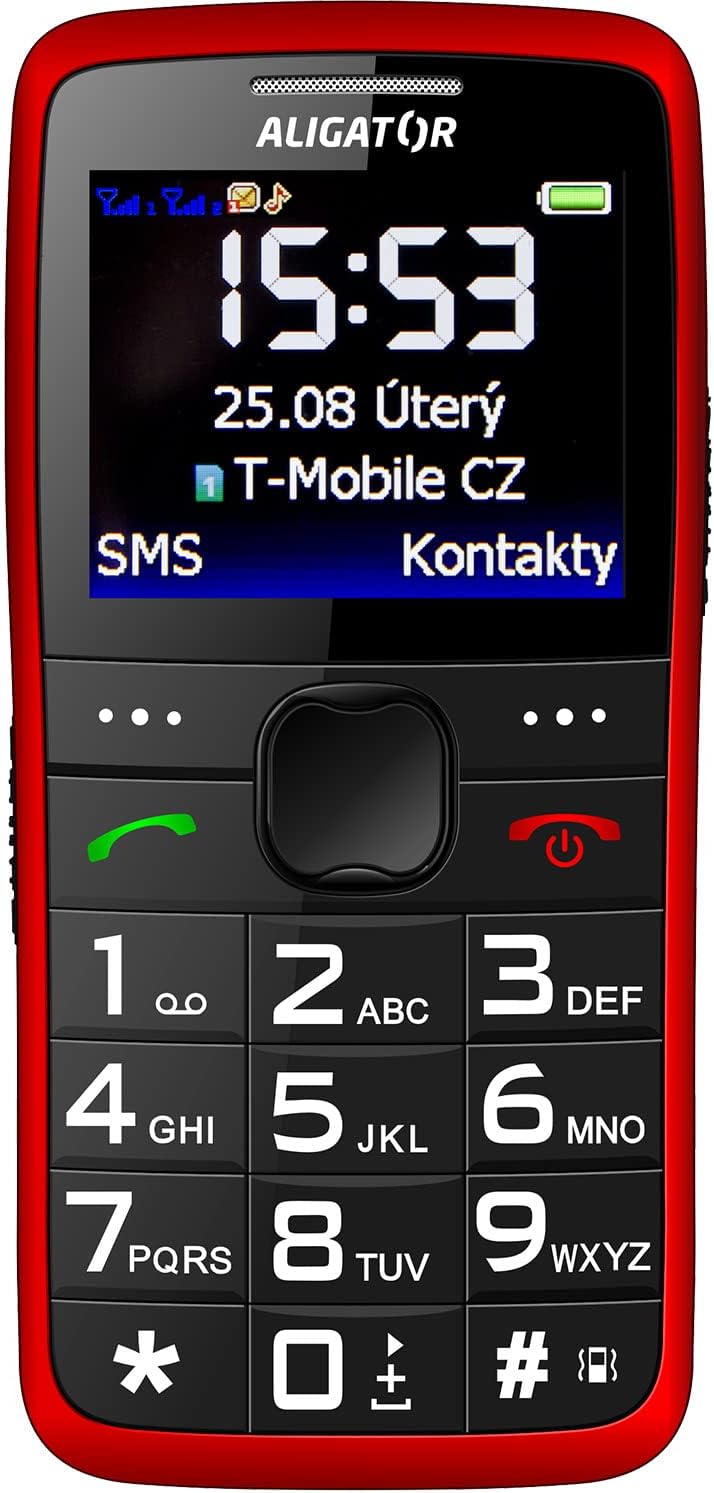
Зураг 3.2: Нарийвчилсан урд view of the Aligator A675 mobile phone, highlighting the large display, clear numeric keypad, and dedicated call/end buttons.
3.1 Урд хэсэг View
- Дэлгэц: Shows time, date, network status, battery level, and menu options.
- Навигацийн түлхүүр: Цэс болон сонголтуудаар гүйлгэхэд ашигладаг.
- Дуудлагын товчлуур (Ногоон): Дуудлага эхлүүлж, ирж буй дуудлагад хариулдаг.
- Дуусгах/Асаах товчлуур (Улаан): Ends calls, returns to the home screen, and powers the phone on/off.
- Товчлуур: Numeric keys (0-9), asterisk (*), and hash (#) for dialing and text input.
3.2 Буцах View
- Чанга яригч: For ringtones and hands-free calls.
- Камер: For basic photo capture.
- SOS товчлуур: A dedicated button for emergency calls/SMS (refer to section 5.4 for setup).
4. Тохиргоо
Follow these steps to prepare your phone for first use.
4.1 SIM карт оруулах
- Утасны арын тагийг ховилоос нь зөөлөн татаж нээ.
- Хэрэв батерейг оруулсан бол салга.
- Locate the SIM card slots. The Aligator A675 supports two SIM cards (Dual SIM).
- Carefully insert your 2G GSM SIM card(s) into the designated slot(s) with the gold contacts facing down, ensuring they are correctly oriented.
- Ensure the SIM cards are securely in place.
4.2 Зайг оруулах
- Align the battery contacts with the contacts in the phone's battery compartment.
- Gently press the battery into place until it fits snugly.
- Арын тагийг буцааж тавиад, байрлалдаа товшиж байгаа эсэхийг шалгаарай.
4.3 Утсаа цэнэглэх
- Connect the charger cable to the charging port on the phone (usually located at the bottom).
- Цэнэглэгчийг цахилгаан залгуурт холбоно уу.
- Дэлгэц дээрх батерейны дүрс нь цэнэглэлтийн төлөвийг харуулна.
- Allow the phone to charge completely before first use. This typically takes a few hours.
5. Утсыг ажиллуулах
Basic functions and features of your Aligator A675.
5.1 Асаах/унтраах
- Асаахын тулд: -г удаан дар End/Power Button (red button) until the screen lights up.
- Унтраахын тулд: -г удаан дар End/Power Button until the power-off options appear, then confirm.
5.2 Дуудлага хийх, хүлээн авах
- Дуудлага хийхийн тулд: Гарын товчлуурыг ашиглан утасны дугаараа оруулаад товчийг дарна уу Дуудлага хийх товч (green button).
- Дуудлагад хариулахын тулд: дээр дарна уу Дуудлага хийх товч утас дуугарах үед.
- Дуудлага дуусгахын тулд: дээр дарна уу End/Power Button.
5.3 SMS илгээх болон хүлээн авах
- Navigate to the 'Messages' menu using the navigation key.
- Шинэ SMS бичихийн тулд 'Зурвас бичих'-г сонгоно уу.
- Хүлээн авагчийн дугаарыг оруулна уу эсвэл харилцагчдаас сонгоно уу.
- Type your message using the keypad. Press the appropriate key multiple times for different letters (e.g., '2' for A, B, C).
- 'Илгээх'-ийг сонгоно уу.
- Ирж буй мессежүүд дэлгэц дээр гарч ирэх бөгөөд 'Ирсэн имэйл'-д хадгалагдана.
5.4 SOS функц
The SOS function allows you to quickly contact pre-set emergency numbers.
- Setting Up SOS Numbers: Go to 'Settings' > 'SOS Settings'. Add up to 5 emergency contact numbers.
- SOS-г идэвхжүүлж байна: -г удаан дар SOS товчлуур утасны ар талд хэдэн секундын турш барина уу.
- The phone will automatically send an emergency SMS to the pre-set numbers and then start dialing them one by one until a call is answered.
5.5 Харилцагчид
- Харилцагч нэмэх: Go to 'Contacts' > 'Add New'. Enter the name and phone number, then save.
- Харилцагч хайж байна: Go to 'Contacts' and use the navigation key to scroll or type the first letters of the name.
6. Засвар үйлчилгээ, арчилгаа
Proper care ensures the longevity of your Aligator A675 phone.
- Цэвэрлэгээ: Use a soft, dry cloth to clean the phone's surface. Avoid liquid cleaners or abrasive materials.
- Батерейны арчилгаа: Do not expose the battery to extreme temperatures. Avoid fully discharging the battery frequently.
- Хадгалах: Утсаа нарны шууд тусгал, чийгээс хол, сэрүүн, хуурай газар хадгал.
- Усны эсэргүүцэл: This phone is not water-resistant. Avoid contact with liquids.
7. Алдаа засах
Нийтлэг асуудлууд ба тэдгээрийн шийдэл.
| Асуудал | Боломжит шалтгаан | Шийдэл |
|---|---|---|
| Утас асахгүй байна | Батерей бага байна; Батерейг зөв оруулаагүй байна | Charge the battery; Reinsert the battery correctly |
| Дуудлага хийх/хүлээн авах боломжгүй | No network signal; SIM card not inserted; SIM card not activated | Move to an area with better signal; Reinsert SIM card; Contact your network provider |
| Дуудлагын үеэр дуу гарахгүй | Volume too low; Speaker blocked | Increase call volume; Check if speaker is obstructed |
| SOS функц ажиллахгүй байна | SOS numbers not set; No network signal | Set up SOS numbers in settings; Ensure network coverage |
Хэрэв асуудал хэвээр байвал хэрэглэгчийн тусламжтай холбогдоно уу.
8. Техникийн үзүүлэлтүүд
Key technical details of the Aligator A675.
- Брэнд: ALIGATOR
- Загвар: A675
- Утасгүй оператор: Түгжээг тайлсан
- Утасгүй сүлжээний технологи: GSM (2G)
- Дэлгэцийн хэмжээ: 3 инч
- Хүний интерфэйсийн оролт: Товчлуур
- SIM дэмжлэг: Хос SIM
9. Баталгаат хугацаа ба дэмжлэг
Your Aligator A675 phone is covered by a standard manufacturer's warranty. Please refer to the warranty card included in your package for specific terms and conditions, including the warranty period and coverage details.
For technical support, service, or warranty claims, please contact your retailer or the official Aligator customer service. Contact information can typically be found on the manufacturer's webсайт эсвэл сав баглаа боодол дээр.
Аливаа баталгаат үйлчилгээнд шаардагдах тул худалдан авалтын баримтаа (баримт эсвэл нэхэмжлэх) хадгална уу.