1. Танилцуулга
Thank you for choosing the Homvana H101 Cool Mist Humidifier. This device is designed to improve air quality and comfort in your home. It functions as a 3-in-1 unit, offering cool mist humidification, aromatherapy, and ambient lighting. The H101 features a 3.6L capacity, quiet operation, and a convenient top-fill design for ease of use and maintenance.

Image: Homvana H101 Cool Mist Humidifier with its control panel and an essential oil dropper.
2. Аюулгүй ажиллагааны заавар
Please read all safety instructions carefully before using the humidifier. Keep this manual for future reference.
- Чийгшүүлэгчийг үргэлж нарны шууд тусгал, дулааны эх үүсвэрээс хол, хатуу, тэгш, ус нэвтэрдэггүй гадаргуу дээр байрлуул.
- Чийгшүүлэгчийг хивс, алчуур болон бусад шингээгч гадаргуу дээр шууд байрлуулж болохгүй.
- Чийгшүүлэгчийг хүүхэд, тэжээвэр амьтдын гар хүрэхгүй газар хадгал.
- Зөвхөн цэвэр, сэрүүн цоргоны ус эсвэл нэрмэл ус хэрэглээрэй. Халуун ус хэрэглэж болохгүй.
- Do not add essential oils directly into the water tank. Use the designated aroma pad.
- Чийгшүүлэгчийг дүүргэх, цэвэрлэх, зөөхөөс өмнө цахилгааныг нь салга.
- The humidifier is BPA-free and features an automatic shut-off function when the water level is low, preventing dry running.
- Do not block the mist outlet or air inlet.
3. Багцын агуулга
Бүх зүйл багцад байгаа эсэхийг шалгаарай:
- Homvana H101 Humidifier Unit
- Усны сав (зөөврийн)
- Essential Oil Pad (pre-installed or separate)
- Cleaning Brushes (2)
- Хэрэглэгчийн гарын авлага
- Эрчим хүчний адаптер
4. Бүтээгдэхүүн дууссанview
Familiarize yourself with the components of your Homvana H101 humidifier.

Image: The Homvana H101 humidifier highlighting its dual 360° mist nozzles and TurboMist technology for efficient humidification.
Үндсэн бүрэлдэхүүн хэсэг:
- Mist Nozzles: Dual 360° rotatable nozzles for directing mist.
- Усны сав: Transparent, 3.6L capacity, removable for easy filling and cleaning.
- Үндсэн нэгж: Contains the control panel, fan, and transducer.
- Хяналтын самбар: Touch-sensitive buttons for power, mist level, light, and timer.
- Aroma Pad Slot: Located on the side or back of the base for essential oils.
5. Тохиргоо
Эхний тохиргоог хийхийн тулд дараах алхмуудыг дагана уу:
- Баглаа задлах: Бүх савлагааны материалыг авч, чийгшүүлэгчийг тэгш, тогтвортой гадаргуу дээр байрлуулна.
- Усны савыг дүүргэх: The H101 features a top-fill design. Remove the top cover and pour clean, cool water directly into the water tank. Do not exceed the maximum fill line.
- Хамгаалалтын бүрээс: Place the top cover back onto the water tank.
- Эрчим хүчийг холбох: Plug the power adapter into the humidifier and then into a suitable power outlet.
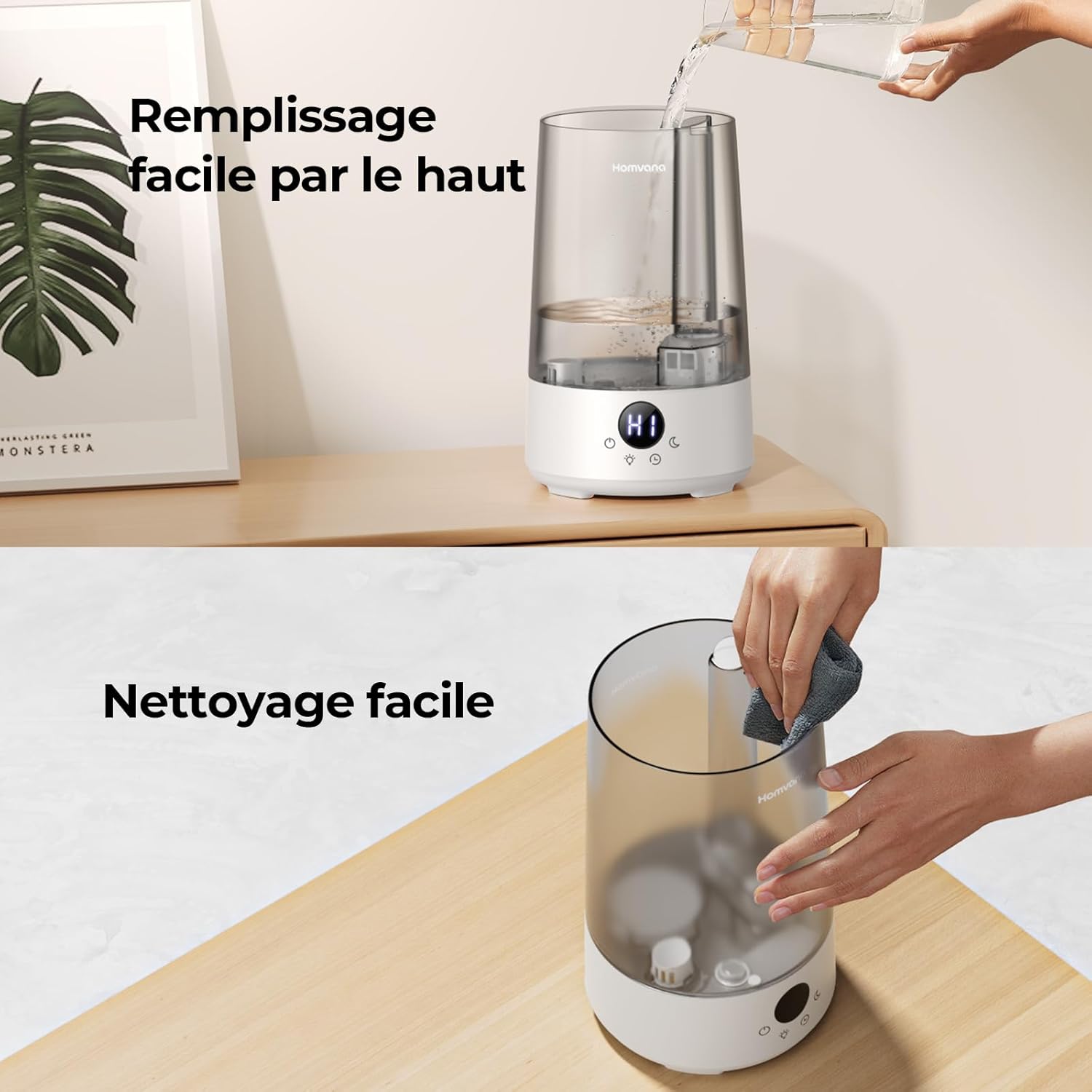
Image: Demonstrates the easy top-fill method for adding water and the wide opening for convenient cleaning.
6. Үйл ажиллагаа
Learn how to use the various functions of your Homvana H101 humidifier.
Power On/Off and Mist Level:
- Асаах товчийг дарна уу (⏻) to turn the humidifier on. It will start in low mist mode.
- Press the power button again to switch between High (HI) and Low (LO) mist modes.
- Press and hold the power button to turn the humidifier off.

Image: Illustrates the 3.6L capacity, providing up to 15 hours of mist in High Mode and 29 hours in Sleep Mode.
Таймер функц:
- Таймер товчийг дарна уу (🕒) ажиллах хугацааг тохируулахын тулд.
- Available timer settings are 2, 4, 6, 8, or 10 hours. The humidifier will automatically turn off after the selected time.

Image: Displays the 5-level timer function with options for 2H, 4H, 6H, 8H, and 10H.
Ambient Light / Night Light:
- Гэрлийн товчийг дарна уу (💡) to cycle through 7 different color options or turn the light off.
- This function can serve as a night light.

Image: The humidifier displaying its 7 color light options, suitable for creating a calming atmosphere.
Үнэрт эмчилгээний функц:
- Locate the aroma pad slot on the side or back of the humidifier base.
- Add 2-6 drops of your preferred essential oil onto the aroma pad.
- Эфирийн тосыг шууд усны саванд хийж болохгүй, учир нь энэ нь төхөөрөмжийг гэмтээж болзошгүй.

Image: A hand adding essential oil to the aroma pad of the humidifier, demonstrating the aromatherapy feature.
Унтах горим:
- Press the sleep mode button (☾) to activate sleep mode.
- In sleep mode, the display lights will turn off, and the humidifier will operate at its lowest noise level (below 16 dB) for undisturbed rest.
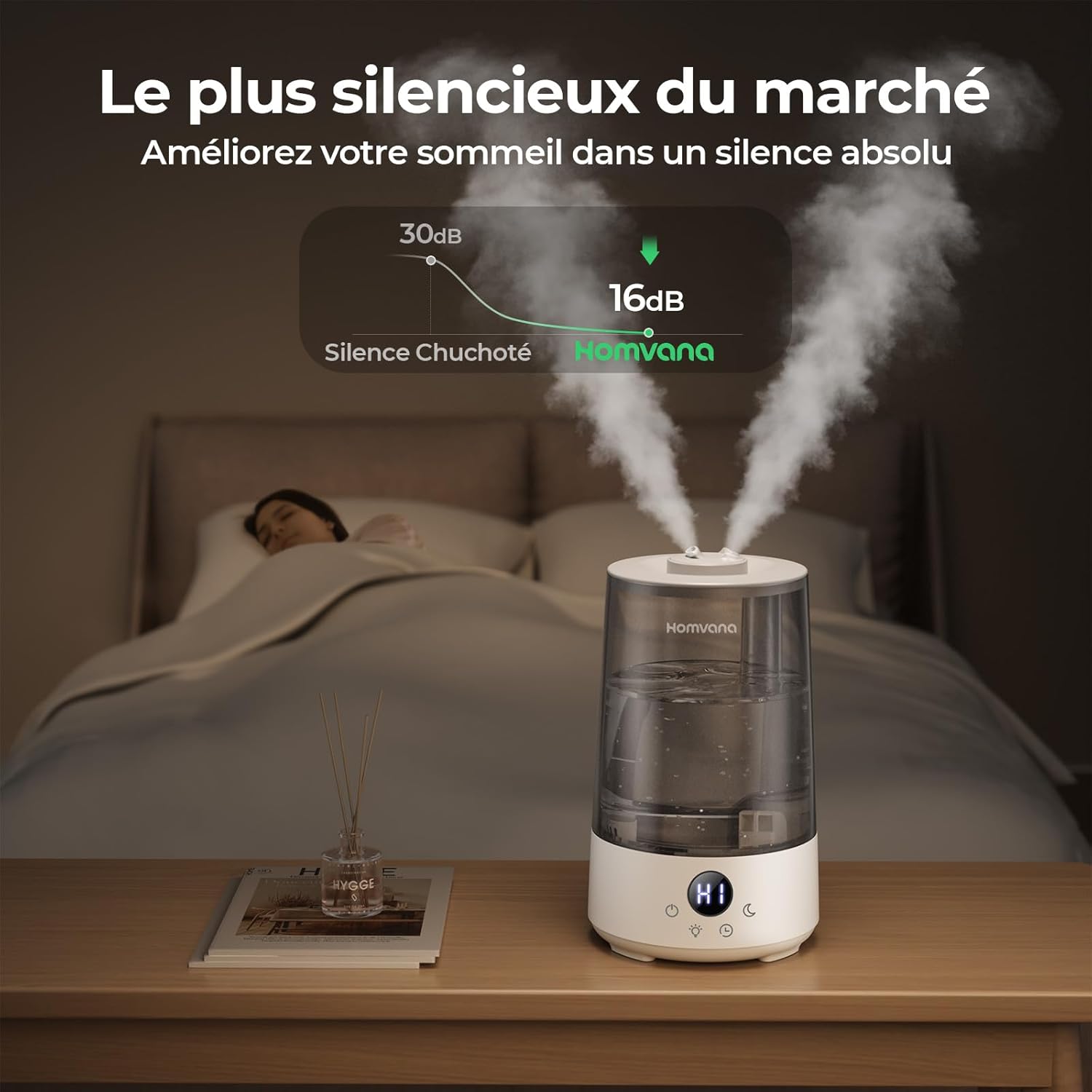
Image: The humidifier operating quietly at 16dB, illustrating its suitability for bedroom use and undisturbed sleep.
7. Засвар үйлчилгээ
Чийгшүүлэгчийн оновчтой ажиллагаа, эрүүл ахуйг хангахын тулд тогтмол цэвэрлэгээ хийх нь чухал юм.
Өдөр тутмын засвар үйлчилгээ:
- Сав болон суурийн үлдэгдэл усыг зайлуулна.
- Усны сав болон суурийг цэвэр усаар зайлж угаана.
- Хэрэглэх бүрийн өмнө цэвэр усаар дүүргэ.
Долоо хоног тутмын цэвэрлэгээ:
- Салгах: Цэвэрлэхийн өмнө чийгшүүлэгчийг үргэлж салга.
- Дизассембл хийх: Remove the water tank and mist nozzles.
- Цэвэр усны сав: Use a soft brush or cloth to clean the inside of the water tank. For mineral buildup, use a solution of white vinegar (1 part) and water (1 part) and let it soak for 30 minutes, then rinse thoroughly.
- Цэвэр суурь нэгж: Carefully clean the transducer (the small disc in the base) and the water basin with a soft brush or cloth. Do not submerge the base unit in water.
- Clean Aroma Pad: Replace the essential oil pad if it becomes saturated or dirty.
- Угаах, хатаах: Бүх эд ангиудыг цэвэр усаар сайтар зайлж, дахин угсрахаасаа өмнө агаарт бүрэн хатаана.
Image: The humidifier's wide opening facilitates easy access for thorough cleaning of the water tank.
8. Алдаа засах
Нийтлэг асуудлууд болон тэдгээрийн шийдлүүдийг энэ хэсгээс харна уу.
Problem 1: Low Mist Output
Боломжит шалтгаан ба шийдэл:
- Clean the transducer plate and water tank with citric acid or detergent to remove oil or residue.
- Та анхны цахилгаан адаптер ашиглаж байгаа эсэхээ шалгаарай.

Image: Visual guide for troubleshooting low mist output, showing cleaning and adapter checks.
Problem 2: No Mist, but Screen is On
Боломжит шалтгаан ба шийдэл:
- Та анхны цахилгаан адаптер ашиглаж байгаа эсэхээ шалгаарай.
- Check for water in the base.
- If there is no water, clean the water tank, especially around the bottom valve.

Image: Visual guide for troubleshooting no mist with the screen on, detailing checks for adapter, water, and tank cleanliness.
Problem 3: No Mist and Screen is Off
Боломжит шалтгаан ба шийдэл:
- Та анхны цахилгаан адаптер ашиглаж байгаа эсэхээ шалгаарай.
- Inspect the DC plug for any signs of water or electrolysis. If dry, reconnect the adapter. In case of water damage, discontinue use immediately.

Image: Visual guide for troubleshooting no mist with the screen off, focusing on adapter and DC plug inspection.
Problem 4: High Humidity in a Localized Area
Боломжит шалтгаан ба шийдэл:
- Orient the mist nozzles in different directions to distribute mist more evenly.
- Switch to a lower mist setting.

Image: Visual guide for troubleshooting localized high humidity, suggesting mist nozzle adjustment and mist level reduction.
9. Техникийн үзүүлэлтүүд
| Онцлог | Тодорхойлолт |
|---|---|
| Брэнд | Хомвана |
| Загварын нэр | H101 |
| Өнгө | Саарал |
| Бүтээгдэхүүний хэмжээ (L x W x H) | 19.5 x 20.7 x 28.5 см |
| Жин | 1.3 кг |
| Усны савны багтаамж | 3.6 литр |
| Үйлдлийн горим | Хэт авианы |
| Ботьtage | 120 вольт |
| Ашиглалтын дуу чимээний түвшин | <16 dB (Sleep Mode) |
| Хамгийн их ажиллах хугацаа | Up to 34 hours (Low Mist) |
| Онцлог шинж чанарууд | 3-in-1 (Humidification, Aromatherapy, Ambient Light), Top-Fill, Auto Shut-off (Low Water), Timer |
| Өрөөний төрөл | Bedroom, Small Rooms (up to 35 m²) |

Image: The compact dimensions of the Homvana H101 humidifier, suitable for small rooms and tables, with a coverage area of up to 35 m².
10. Баталгаат хугацаа ба дэмжлэг
Homvana offers a dedicated customer service experience.
- 3-Year Care Plan: If you encounter any quality issues with your Homvana H101 humidifier within 3 years of purchase, Homvana will provide a replacement unit.
- For further assistance, troubleshooting, or warranty claims, please contact Homvana customer support through the retailer's platform or the official Homvana webсайт.

Image: Homvana's 'Smile Service' indicating a 3-year replacement policy for quality issues.


