Танилцуулга
Thank you for choosing the BUFFBEE Alarm Clock with Wireless Charging Station. This device combines a digital alarm clock with a versatile wireless charging stand, designed to charge your iPhone, Apple Watch, and AirPods simultaneously. It features a dimmable LED display, adjustable volume, and multiple safety protections to ensure efficient and secure charging. Please read this manual carefully before use to ensure proper operation and to maximize the lifespan of your product.
Хайрцагт юу байна
Багцаа нээхдээ дараах зүйлс багтсан эсэхийг шалгана уу.
- BUFFBEE Alarm Clock with Wireless Charging Station
- USB-C цэнэглэгч кабель
- Эрчим хүчний адаптер
- Хэрэглэгчийн гарын авлага (энэ баримт бичиг)
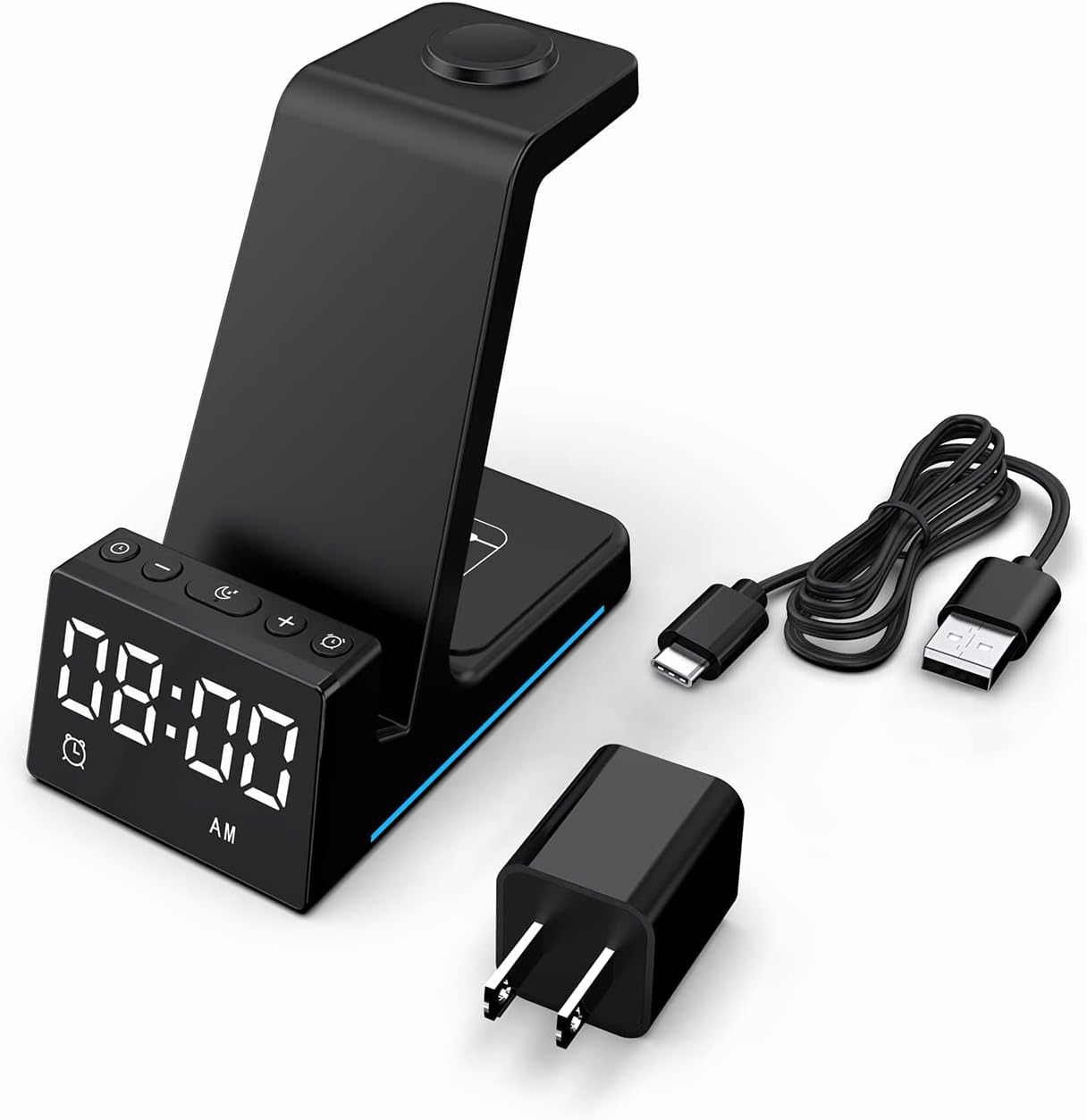
Зураг: Бүтээгдэхүүний савлагаанд багтсан бүх бүрэлдэхүүн хэсгүүд.
Бүтээгдэхүүн дууссанview
The BUFFBEE Alarm Clock with Wireless Charging Station is designed for convenience and efficiency. It features dedicated charging areas for your smartphone, Apple Watch, and AirPods, alongside a clear digital clock display.
Гол онцлогууд:
- Дижитал сэрүүлэгтэй цаг: Features adjustable brightness and volume, with 12/24 hour format options.
- Wireless Phone Charging: Supports 15W, 10W, 7.5W, and 5W output for various wireless charging enabled smartphones.
- Apple Watch цэнэглэж байна: Dedicated magnetic charging spot for Apple Watch Series 2-7, SE.
- AirPods цэнэглэж байна: Wireless charging pad for AirPods 2 (with wireless charging case), AirPods 3, and AirPods Pro.
- Аюулгүй байдлын хамгаалалт: Built-in overcharge, overvoltage, overheat, and overcurrent protection.

Image: The charging station with devices in place, highlighting its multi-device capability.

Image: Diagram illustrating the internal safety features and charging coils.
Тохиргоо
Follow these steps to set up your BUFFBEE Alarm Clock with Wireless Charging Station:
- Эрчим хүчийг холбох: Insert the USB-C end of the charging cable into the port on the back of the charging station. Plug the other end of the cable into the provided power adapter, then plug the adapter into a wall outlet. The digital display will light up, indicating power is connected.
- Place Devices:
- Ухаалаг утас: Place your wireless charging enabled smartphone vertically or horizontally on the main charging stand. Ensure it is centered for optimal charging.
- Apple Watch: Place your Apple Watch on the magnetic charging disc at the top of the stand.
- AirPods: Place your AirPods (with wireless charging case) on the flat charging pad at the base of the unit.
- Цэнэглэж байгааг баталгаажуулах: A blue indicator light will briefly illuminate when a device is correctly placed and charging. Your device's screen will also show a charging icon.
Video: Official product video demonstrating the setup and charging capabilities of the BUFFBEE Alarm Clock with Wireless Charging Station for iPhone, Apple Watch, and AirPods.

Image: Universal compatibility chart for different devices and charging wattages.
Ашиглалтын заавар
Цагийг тохируулах
- -г удаан дар Цагийн тохиргоо button (usually marked with a clock icon) for 3 seconds. The hour digits will begin to flash.
- -г ашиглана уу + болон - цагийг тохируулах товчлуурууд.
- дээр дарна уу Цагийн тохиргоо Минутын тохиргоо руу шилжихийн тулд товчийг дахин дарна уу. Минутын цифрүүд анивчих болно.
- -г ашиглана уу + болон - минут тохируулах товчлуурууд.
- дээр дарна уу Цагийн тохиргоо button one more time to confirm and exit time setting mode.
- To switch between 12-hour and 24-hour format, briefly press the Цагийн тохиргоо button when not in setting mode.
Сэрүүлэг тохируулах
- -г удаан дар Сэрүүлэг button (usually marked with an alarm clock icon) for 3 seconds. The alarm hour digits will flash.
- -г ашиглана уу + болон - Сэрүүлгийн цагийг тохируулах товчлуурууд.
- дээр дарна уу Сэрүүлэг button again to switch to alarm minute adjustment. The alarm minute digits will flash.
- -г ашиглана уу + болон - Сэрүүлгийн минутыг тохируулах товчлуурууд.
- дээр дарна уу Сэрүүлэг Сэрүүлгийн тохиргооны горимыг баталгаажуулж, гарахын тулд товчийг дахин нэг удаа дарна уу.
- To activate or deactivate the alarm, briefly press the Сэрүүлэг товчлуур. Дэлгэц дээр дохиоллын дүрс гарч ирнэ/алга болно.
- When the alarm sounds, press any button to activate the snooze function (typically 9 minutes). To turn off the alarm completely, press and hold the Сэрүүлэг товч.

Зураг: Дууслааview of the digital alarm clock features.
Дэлгэцийн гэрэлтүүлгийг тохируулж байна
The LED display has multiple brightness levels to suit your preference, especially for nighttime use.
- дээр дарна уу Гэрэлтүүлэг button (usually marked with a sun icon) repeatedly to cycle through the available brightness levels (e.g., 100%, 40%, 3%, 1%, 0% off).
- Select the desired brightness level. The '0% off' setting turns the display completely off for undisturbed sleep.

Image: Visual representation of the 5-level adjustable brightness settings.
Сэрүүлгийн дууг тохируулах
The alarm volume can be adjusted to your preferred level.
- While the alarm is sounding, or during alarm setting mode, press the Эзлэхүүн button (usually marked with a speaker icon) to cycle through the available volume levels.
- Хүссэн эзлэхүүнийг сонгоно уу.

Image: Illustration of the 3-level adjustable volume feature.
Засвар үйлчилгээ
Цэнэглэх станцынхаа урт наслалт, оновчтой ажиллагааг хангахын тулд дараах засвар үйлчилгээний удирдамжийг дагаж мөрдөнө үү.
- Цэвэрлэгээ: Disconnect the power before cleaning. Use a soft, dry cloth to wipe the surface. Do not use abrasive cleaners, solvents, or chemical sprays.
- Шингэнээс зайлсхийх: Keep the device away from water and other liquids. Do not operate with wet hands.
- Температур: Store and operate the device in a dry environment at room temperature. Avoid extreme heat or cold.
- Харьцуулах: Төхөөрөмжийг болгоомжтой харьц. Унах, хүчтэй нөлөө үзүүлэхээс зайлсхий.
- Эрчим хүчний хангамж: Only use the provided power adapter and cable. Using unauthorized power sources may damage the device and void the warranty.
Алдааг олж засварлах
If you encounter any issues with your BUFFBEE Alarm Clock with Wireless Charging Station, please refer to the following troubleshooting guide:
| Асуудал | Боломжит шалтгаан | Шийдэл |
|---|---|---|
| Device is not powering on. | Power cable not connected properly; Power adapter faulty; Wall outlet not working. | Ensure the USB-C cable is securely connected to both the station and the power adapter. Try a different wall outlet. Verify the power adapter is functioning. |
| Smartphone/AirPods not charging wirelessly. | Device not placed correctly; Device not wireless charging compatible; Phone case too thick; Foreign objects on charging pad. | Reposition the device to ensure it is centered on the charging pad. Remove any thick phone cases or metallic objects. Confirm your device supports Qi wireless charging. |
| Apple Watch цэнэглэхгүй байна. | Watch not placed correctly; Watch charger not making contact; Watch model not supported. | Ensure the Apple Watch is securely placed on the magnetic charging disc. Remove any watch cases that might obstruct contact. This charger supports Apple Watch Series 2-7, SE. |
| Цэнэглэх нь удаан эсвэл завсарлагатай. | Using a non-original power adapter/cable; Device overheating; Multiple devices charging simultaneously. | Use the provided power adapter and cable. Ensure the device is in a well-ventilated area. Charging multiple devices may slightly reduce individual charging speeds. |
| Alarm clock display is too bright/dim. | Гэрэлтүүлгийн тохиргоог тохируулах шаардлагатай. | дээр дарна уу Гэрэлтүүлэг button to cycle through the 5 brightness levels, including 'off'. |
| Alarm is not sounding or is too quiet/loud. | Alarm not set or deactivated; Volume level too low/high. | Verify the alarm is activated (alarm icon visible). Adjust the alarm volume using the Эзлэхүүн товч. |
Үзүүлэлтүүд
| Онцлог | Дэлгэрэнгүй |
|---|---|
| Бүтээгдэхүүний хэмжээс | 6.3 x 1.5 x 3.5 инч |
| Зүйлийн жин | 15.8 унц |
| Брэнд | BUFFBEE |
| Холбогч төрөл | Утасгүй |
| Тохиромжтой төхөөрөмжүүд | Cellular Phones, Apple Watch, AirPods (with wireless charging case) |
| Тохиромжтой утасны загварууд | Samsung Galaxy S10 series, iPhone 8 and newer, other Qi-enabled phones |
| Онцлог шинж чанар | Adjustable, Fast Charging, Wireless Charger, Wireless Charging |
| Оролтын хэмжээtage | 9 вольт |
| Нийт USB портууд | 1 (цахилгаан оролтын хувьд) |
| Ватtage | 15 watts (max output) |
| Үзүүлэлт | Qi |
| Эрчим хүчний эх үүсвэр | AC Adapter (Battery Powered refers to internal clock battery backup, not main power) |
Баталгаат болон дэмжлэг
Your BUFFBEE Alarm Clock with Wireless Charging Station comes with a standard manufacturer's warranty. For specific warranty details, including duration and coverage, please refer to the warranty card included in your product packaging or contact BUFFBEE customer support directly.
If you require technical assistance, have questions about product operation, or need to report a defect, please reach out to BUFFBEE customer service through the contact information provided on the product packaging or the official BUFFBEE webсайт. Дэмжлэг үзүүлэх үйлчилгээтэй холбогдохдоо бүтээгдэхүүний загвар болон худалдан авсан огноог бэлэн байлгана уу.