1. Танилцуулга
This manual provides essential information for setting up, operating, and maintaining your TECLAST X11 2-in-1 Laptop/Tablet. The TECLAST X11 is a versatile device designed to function as both a portable tablet and a compact laptop, running on Windows 10 Home. It features a 10.1-inch Full HD display, an Intel N4020 processor, 6GB RAM, and 128GB of internal storage.
2. Хайрцагт юу байна
- TECLAST X11 Tablet
- Эрчим хүчний адаптер
- USB кабель
- Хэрэглэгчийн гарын авлага (энэ баримт бичиг)
Note: The keyboard and stylus pen are sold separately and are not included in the standard package.
3. Бүтээгдэхүүн дууссанview
3.1 Гол онцлогууд
- 2-ын-1 дизайн: Seamlessly switch between tablet and laptop modes.
- Дэлгэц: 10.1-inch IPS Full HD (1920x1200) touchscreen.
- Процессор: Intel Gemini Lake Reflash N4020 CPU (up to 2.8GHz).
- Санах ой ба Хадгалалт: 6GB RAM, 128GB eMMC ROM (expandable up to 256GB via TF card).
- Үйлдлийн систем: Урьдчилан суулгасан Windows 10 Home.
- Холболт: Dual-band 2.4G/5G WiFi, Bluetooth 4.2.
- Камерууд: 5MP арын камер, 2MP урд камер.
- Портууд: USB 3.0, Mini-HDMI, Headphone Jack, DC Port.
- Тулгуур: Adjustable U-shaped kickstand (0° to 145°).
3.2 Төхөөрөмжийн зохион байгуулалт
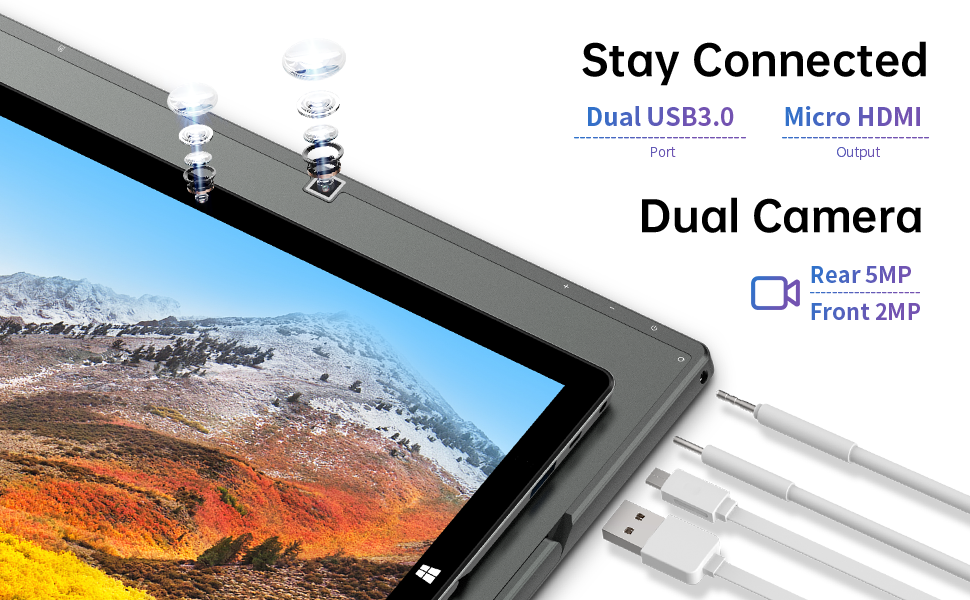
Зураг: хажуу тал view of the TECLAST X11 tablet highlighting the USB 3.0 port, Micro HDMI output, and front/rear cameras.

Зураг: Нарийвчилсан view of the TECLAST X11's side ports, including USB 3.0, Mini-HDMI, DC power input, and headphone jack.
4. Тохиргоо
4.1 Анхны цэнэглэлт
Before first use, fully charge your TECLAST X11 tablet. Connect the provided power adapter to the DC port on the device and plug it into a power outlet. The charging indicator will illuminate.
4.2 Асаах/унтраах
- Асаахын тулд: Дэлгэц асах хүртэл асаах товчийг удаан дарна уу.
- Унтраахын тулд: Асаах товчийг удаан дараад, дэлгэц дээрх сонголтуудаас "Унтрах"-ыг сонгоно уу. Эсвэл Эхлэх цэс > Асаах > Унтрах руу очно уу.
- Унтах горим: Төхөөрөмжийг унтах горимд оруулах эсвэл сэрээхийн тулд Асаах товчийг товч дарна уу.
4.3 Windows-ийн анхны тохиргоо
Upon first power-on, follow the on-screen instructions to complete the Windows 10 setup process. This includes selecting your region, language, connecting to a Wi-Fi network, and creating a user account.
5. Ашиглалтын заавар
5.1 Горимуудын хооронд шилжих
The TECLAST X11 is designed for flexibility, allowing you to switch between tablet and laptop modes.
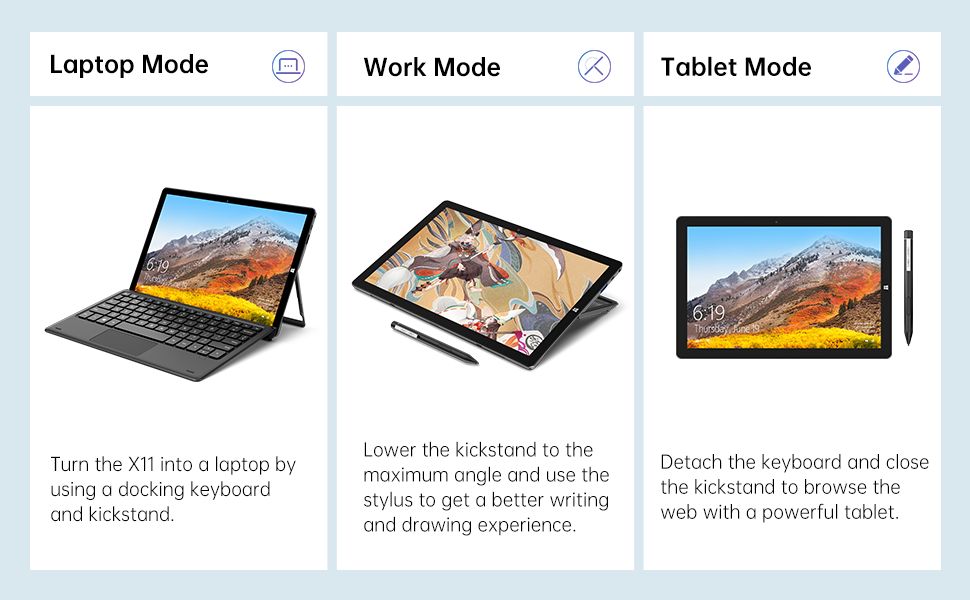
Image: The TECLAST X11 in laptop mode with the keyboard attached and kickstand deployed.
Зөөврийн компьютерын горим: Attach the magnetic docking keyboard and deploy the integrated kickstand. The device will automatically detect the keyboard and switch to laptop interface.

Image: A user holding the TECLAST X11 in tablet mode, interacting with the touchscreen.
Таблет горим: Detach the keyboard. The device will automatically switch to tablet mode, optimizing the interface for touch input.

Зураг: Ар талд view of the TECLAST X11 showing the adjustable kickstand extended.
Тулгуурын хэрэглээ: The integrated U-shaped kickstand can be adjusted from 0° to 145° for comfortable viewing or typing angles.
5.2 Мэдрэгчтэй дэлгэц ашиглах
The 10.1-inch IPS display supports 10-point multi-touch. Use standard touch gestures for navigation, zooming, and interaction with applications.
5.3 External Connectivity
- USB 3.0: Connect external devices such as USB drives, mice, or printers.
- Mini-HDMI: Илүү том дэлгэц авахын тулд гадаад дэлгэц эсвэл телевизортой холбогдоно уу.
- Bluetooth 4.2: Pair with Bluetooth-enabled accessories like headphones or speakers.
- Wi-Fi: Connect to wireless networks for internet access. Supports 2.4G and 5G bands.
5.4 Видео үзүүлэх
Video: An official TECLAST video demonstrating the features and versatility of the X11 Windows tablet with its detachable keyboard and various usage scenarios.
6. Засвар үйлчилгээ
6.1 Төхөөрөмжийг цэвэрлэх
- Дэлгэц болон гаднах гадаргууг цэвэрлэхийн тулд зөөлөн, хөвөнгүй даавуу ашиглана уу.
- Зөрүүд тэмдгийн хувьд бага зэрэг dampдаавууг ус эсвэл дэлгэцэнд тэсвэртэй цэвэрлэгээний уусмалаар арчина.
- Хүчтэй химийн бодис, зүлгүүрийн материал, хэт их чийгийг ашиглахаас зайлсхий.
6.2 Батерейны арчилгаа
- Зайны ашиглалтын хугацааг уртасгахын тулд хэт өндөр температураас зайлсхий.
- Төхөөрөмжийг бүрэн цэнэглэж эсвэл бүрэн цэнэггүй болгож удаан хугацаагаар бүү орхи.
- Зөвхөн анхны эсвэл баталгаажсан тохирох цэнэглэгчийг ашиглана уу.
6.3 Програм хангамжийн шинэчлэлтүүд
Regularly check for and install Windows updates to ensure optimal performance, security, and access to the latest features. Go to Start Menu > Settings > Update & Security > Windows Update.
7. Алдаа засах
| Асуудал | Боломжит шийдэл |
|---|---|
| Төхөөрөмж асахгүй байна | Ensure the device is charged. Connect the power adapter and try again. If unresponsive, press and hold the Power button for 10-15 seconds to perform a hard reset. |
| Wi-Fi холболтын асуудал | Check if Wi-Fi is enabled in Windows settings. Restart your router and the tablet. Ensure you are within range of the Wi-Fi signal. |
| Гар хариу өгөхгүй байна | Ensure the keyboard is securely attached to the magnetic docking port. Restart the tablet. Verify that the keyboard was purchased separately and is compatible. |
| Удаан гүйцэтгэл | Close unnecessary applications. Check for Windows updates. Ensure sufficient free storage space. Run a disk cleanup. |
| Screen rotation not working | Check if auto-rotate is enabled in Windows Action Center (swipe in from the right edge of the screen or click the icon in the taskbar). |
8. Техникийн үзүүлэлтүүд
| Онцлог | Дэлгэрэнгүй |
|---|---|
| Загварын нэр | X11 2-in-1 Tablet |
| Дэлгэцийн хэмжээ | 10.1 инч |
| Дэлгэцийн нягтрал | 1920 x 1200 пиксел (FHD IPS) |
| Процессор | Intel Gemini Lake Reflash N4020 (1.1GHz - 2.8GHz) |
| RAM | 6 ГБ DDR4 SDRAM |
| Хатуу диск | 128 GB eMMC (expandable up to 256GB via TF card) |
| График карт | Нэгдсэн Intel UHD график 600 |
| Үйлдлийн систем | Windows 10 Нүүр хуудас |
| Утасгүй төрөл | Bluetooth 4.2, Dual-band WiFi (2.4G + 5G) |
| Арын Webкамерын нягтрал | 5 МП |
| Урд Webкамерын нягтрал | 2 МП |
| Портууд | USB 3.0, Mini-HDMI, Headphone Jack, DC Port |
| Зүйлийн жин | 2.31 фунт (ойролцоогоор 1.05 кг) |
| Батерей | 1 Лити Полимер батерей (дагсан) |
9. Баталгаат хугацаа ба дэмжлэг
TECLAST provides a 12 сарын баталгаат үйлчилгээ for the X11 2-in-1 Laptop/Tablet. If you encounter any issues or have questions regarding your device, please contact TECLAST customer support. Refer to the contact information provided with your product packaging or visit the official TECLAST webТусламжийн дэлгэрэнгүй мэдээллийг сайтаас авна уу.


