1. Танилцуулга
Thank you for choosing the iPega PG-P4008 Wireless Game Controller. This manual provides detailed instructions on how to set up, operate, and maintain your controller. The PG-P4008 offers broad compatibility with PS4, PS3, Android (10.0+), iOS (13.0+), and Windows PC, connecting wirelessly via Bluetooth for an enhanced gaming experience.
2. Бүтээгдэхүүн дууссанview
The iPega PG-P4008 is designed for versatile gaming across multiple platforms. It features a comfortable ergonomic design, responsive controls, and several advanced functionalities to immerse you in your games.
Гол онцлогууд:
- Wireless Bluetooth connectivity (BT2.1+EDR) with up to 8 meters range.
- No driver installation required for connection.
- Integrated colored LED light indicator for operational status.
- Dual motors for realistic vibration feedback during gameplay.
- Built-in three-dimensional acceleration sensor and gyroscope sensor with six-axis induction.
- Integrated speaker and 3.5mm earphone jack for game audio.
- Dual-point capacitive touchpad for enhanced control.
- Compatible with PS4, PS3, Android (10.0+), iOS (13.0+), and Windows PC.
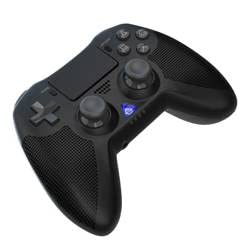
Зураг 1: Урд view of the iPega PG-P4008 Wireless Game Controller. This image displays the controller's ergonomic design, dual analog sticks, D-pad, action buttons, touchpad, and the central LED indicator.
3. Тохиргоо ба холболт
The PG-P4008 controller connects wirelessly via Bluetooth. Follow these steps to pair your controller with your device:
- Асаах: Ensure the controller is charged. Press and hold the PS товч (or equivalent power button) to turn on the controller.
- Хослуулах горим:
- For PS4/PS3: Connect the controller to the console using a USB cable. Once recognized, you can disconnect the cable for wireless play. The connection method is similar to the official P4 controller.
- For Android/iOS: Activate Bluetooth on your mobile device. On the controller, press and hold the SHARE button + PS button simultaneously until the LED indicator flashes rapidly, indicating pairing mode. Select "PG-P4008" (or similar) from your device's Bluetooth list to connect.
- For Windows PC: Ensure your PC has Bluetooth capability. On the controller, press and hold the PS button + OPTIONS button simultaneously until the LED indicator flashes rapidly. On your PC, go to Bluetooth settings, add a new device, and select "PG-P4008" (or similar) to pair.
- Амжилттай холболт: Once connected, the LED indicator on the controller will change to a solid color, indicating a successful pairing.
Жич: No additional driver software is required for operation. The controller supports a stable connection up to 8 meters.
4. Ашиглалтын заавар
LED үзүүлэлт:
The built-in colored LED light indicates the controller's operational status and player assignment, similar to the official PS4 controller. Different colors will signify different stages or player numbers.
Чичиргээний санал хүсэлт:
The controller features dual motors embedded in the handles, providing tactile vibration feedback to enhance your gaming immersion. This feedback will vary based on in-game events.
Мэдрэгч самбар:
The dual-point capacitive touchpad allows for intuitive control in games that support touch input, offering an additional layer of interaction.
Аудио функц:
Connect your 3.5mm earphones to the integrated jack on the controller to experience game audio directly, providing a private and immersive sound experience.
5. Засвар үйлчилгээ
- Keep the controller dry and away from moisture to prevent damage to internal components.
- Хянагчийг зөөлөн, хуурай даавуугаар тогтмол цэвэрлээрэй. Хүчтэй химийн бодис эсвэл зүлгүүрийн материал хэрэглэхээс зайлсхий.
- Хянагчийг ашиглаагүй үед сэрүүн, хуурай газар хадгална.
- Хянагчийг хэт өндөр температур эсвэл нарны шууд тусгалд өртүүлэхээс зайлсхий.
- Do not attempt to disassemble or modify the controller, as this will void any potential warranty and may cause damage.
6. Алдаа засах
- Хянагч холбогдоогүй байна:
- Хянагч бүрэн цэнэглэгдсэн эсэхийг шалгаарай.
- Таны төхөөрөмж дээр Bluetooth идэвхжсэн эсэхийг шалгана уу.
- Make sure the controller is in the correct pairing mode for your device (refer to Section 3).
- Хянагч болон төхөөрөмжөө хоёуланг нь дахин эхлүүлээд үзээрэй.
- Төхөөрөмжийнхөө Bluetooth жагсаалтаас өмнөх холболтуудыг устгаад дахин хослуулахыг оролдоно уу.
- Оролтын хоцрогдол эсвэл салалт:
- Ensure you are within the 8-meter operating range.
- Бусад утасгүй төхөөрөмжүүдийн хөндлөнгийн оролцоог багасгах.
- Check for any physical obstructions between the controller and the device.
- Чичиргээ ажиллахгүй байна:
- Таны тоглож буй тоглоом чичиргээний хариуг дэмждэг эсэхийг шалгаарай.
- Чичиргээ идэвхжсэн эсэхийг шалгахын тулд тоглоомын доторх тохиргоог шалгана уу.
- Audio not working via 3.5mm jack:
- Ensure your earphones are properly plugged in.
- Check the volume settings on your device and in-game.
- Test with another pair of earphones to rule out earphone issues.
7. Техникийн үзүүлэлтүүд
| Загварын дугаар | PG-P4008 |
| Брэнд | iPega |
| Холболт | Bluetooth (BT2.1+EDR) |
| Утасгүй сүлжээ | 8 метр хүртэл |
| Тохиромжтой төхөөрөмжүүд | PS4, PS3, Android (10.0+), iOS (13.0+), Windows PC |
| Онцлог шинж чанарууд | Wireless, Touchpad, Vibration, 6-axis Gyroscope, Built-in Speaker, 3.5mm Audio Jack |
| Товчлуурын тоо | 17 |
| Эрчим хүчний эх үүсвэр | Батерейгаар ажилладаг |
8. Баталгаат хугацаа ба дэмжлэг
Information regarding product warranty and customer support is not provided within this manual. Please refer to the product packaging or the retailer's webБаталгаат хугацааны талаарх дэлгэрэнгүй мэдээлэл болон тусламж авахын тулд хэрэглэгчийн дэмжлэгтэй хэрхэн холбогдох талаар сайтаас үзнэ үү.