1. Аюулгүй байдлын мэдээлэл
Read and understand all instructions before beginning installation. This product must be installed in accordance with the applicable installation code by a person familiar with the construction and operation of the product and the hazards involved. Failure to follow these instructions may result in electric shock, fire, or serious personal injury.
- Суурилуулалт, засвар үйлчилгээ хийхээс өмнө үндсэн таслуураас тэжээлийг үргэлж салга.
- Ensure all electrical connections are in accordance with local codes, ordinances, and the National Electric Code.
- Сэнсийг шалнаас ирний арын ирмэг хүртэл хамгийн багадаа 7 фут (2.1 метр) зайтай суурилуулсан байх ёстой.
- The fan must be mounted to a ceiling outlet box marked "Acceptable for Fan Support of 35 lbs (15.9 kg) or less."
- Гэмтсэн иртэй сэнсийг ажиллуулж болохгүй. Хэрэв нэг нь гэмтсэн бол бүх ирийг солино.
- Сэнсний ирний замд объект байрлуулахаас зайлсхий.
- This fan is ETL Listed for indoor and outdoor use. Ensure proper sealing for outdoor installations to prevent water damage.
2. Багцын агуулга
Суулгахаасаа өмнө бүх бүрэлдэхүүн хэсгүүд байгаа эсэхийг шалгаарай.
- Мотор угсралт
- Сэнс ир (3)
- Downrod (5" and 10" included for Downrod Mount)
- Хаалт суурилуулах
- Халхавч
- Хананд суурилуулсан алсын удирдлагатай
- Хөнгөн иж бүрдэл
- Тоног төхөөрөмжийн багц (эрэг, самар, жийргэвч)
- Зааварчилгааны гарын авлага

Image: Main components of the OFANTOP 52-Inch Smart Ceiling Fan.
3. Бүтээгдэхүүний техникийн үзүүлэлтүүд
| Брэнд | OFANTOP |
| Загварын нэр | 52YFT-7068 |
| Хэмжээ | 52 инч |
| Хутганы тоо | 3 |
| Моторын төрөл | Сойзгүй DC мотор |
| Агаарын урсгалын хүчин чадал | Минутанд 6031 куб фут (CFM) |
| Эрчим хүчний эх үүсвэр | AC/DC (120 Volts AC) |
| Ватtage | 35 ватт |
| Хяналтын арга | Remote, App (Smart Life), Voice (Alexa, Google Assistant) |
| Гэрлийн шинж чанарууд | Dimmable, 3 Color Temperature Options (3000K, 4500K, 6000K), Memory Function |
| Дотор/гадаа ашиглах | Yes (ETL Listed, IP44 for outdoor) |
| Суурилуулах төрөл | Downrod Mount (5" and 10" downrods included) |
| Дуу чимээний түвшин | 35дБ (чимээгүй ажиллагаа) |
| Эрчим хүчний хэмнэлт | 75% Less Energy than AC Fan |

Image: Energy Efficiency label for the ceiling fan.
4. Суурилуулах заавар
4.1 Суулгахаас өмнөх шалгах хуудас
- Хэлхээ таслагч дээр цахилгааныг салгасан эсэхийг шалгаарай.
- Танд шаардлагатай бүх хэрэгсэл (халив, утас тайлагч, шат гэх мэт) байгаа эсэхийг шалгаарай.
- Verify the mounting location can support the fan's weight (16.42 lbs).
- Choose the appropriate downrod length (5" or 10") for your ceiling height.
4.2 Суурилуулах сонголтууд
This fan supports both standard downrod mount and angled mount (up to 20 degrees).
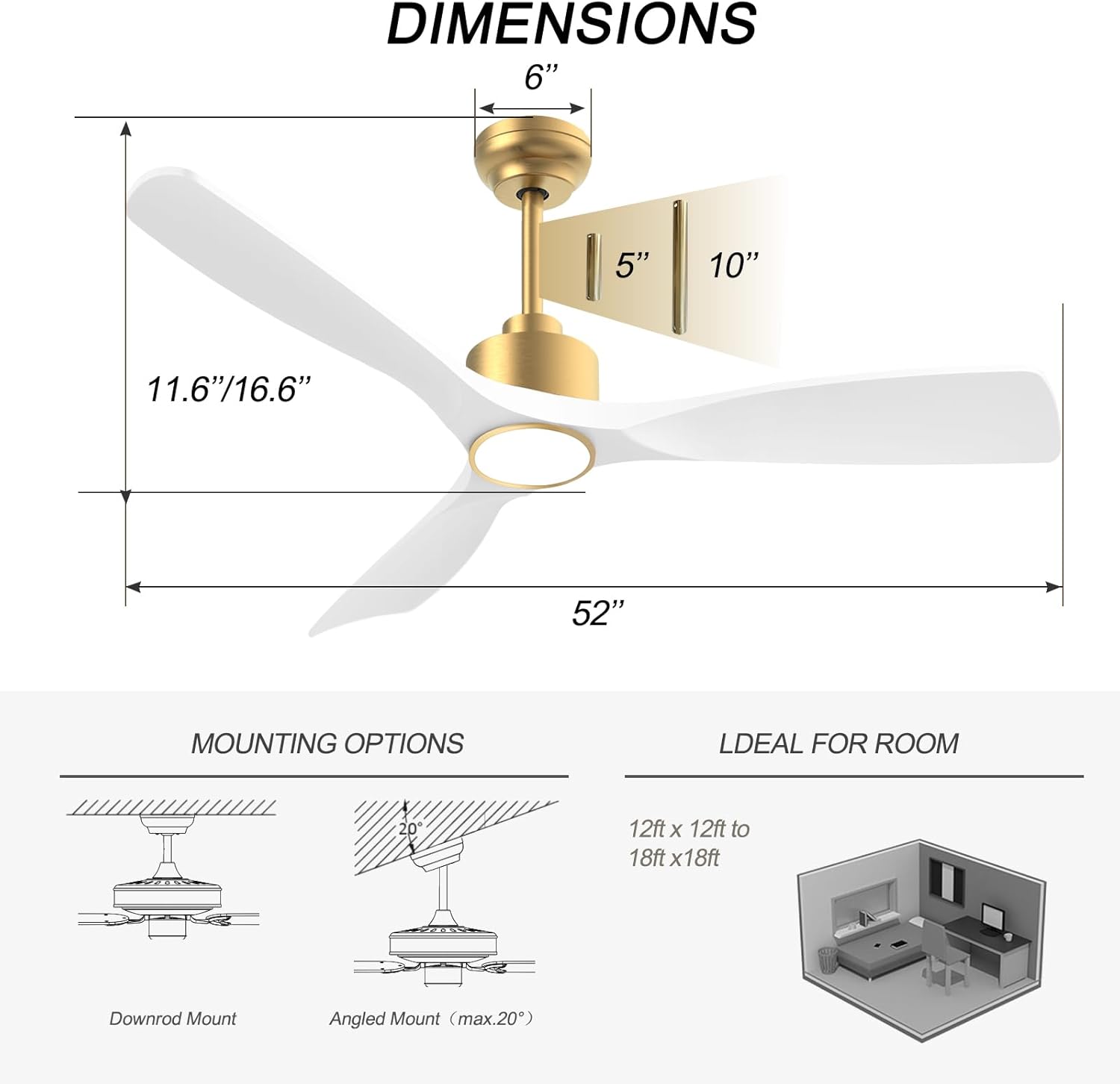
Image: Diagram showing fan dimensions and available downrod and angled mounting options.
- Өгөгдсөн боолтыг ашиглан бэхэлгээний хаалтыг таазны гаралтын хайрцагт бэхлэнэ үү.
- Цахилгааны утсыг таазнаас бэхэлгээний төв нүхээр дамжуулна.
- Assemble the downrod to the motor assembly, ensuring all screws are tightened securely.
- Сэнсний угсралтыг болгоомжтой өргөж, бэхэлгээний бэхэлгээнээс өлгө.
4.3 Утас
The fan features quick connectors for simplified wiring.
- Connect the fan's wires to the household wiring according to the color codes (typically black to black, white to white, green/bare copper to ground).
- Бүх холболтууд нь утсан самар ашиглан найдвартай байгаа эсэхийг шалгаарай.
- Бүх утсыг гаралтын хайрцагт сайтар оруулаарай.
Video: A short demonstration of the fan's appearance and operation. This video is a 7-second preview and shows the fan spinning with its light on.
4.4 Ирний бэхэлгээ
- Carefully attach each of the three fan blades to the motor housing using the provided screws.
- Ensure all screws are tightened evenly to prevent wobbling.
Видео: Дууслааview of the BOOSANT White and Gold Ceiling Fan, demonstrating its features and design. This video provides a general look at the fan's aesthetics and functionality.
4.5 Гэрлийн иж бүрдэл суурилуулах
- Гэрлийн хэрэгслийн утсыг сэнсний мотороос гарсан харгалзах утаснуудтай холбоно уу.
- Secure the light kit assembly to the bottom of the fan motor housing.
5. Ашиглалтын заавар
5.1 Алсын удирдлагын функцууд
The included remote control allows for convenient operation of all fan and light functions.
- Асаах/унтраах: Сэнс болон гэрлийг асааж, унтраадаг.
- Сэнсний хурд: Select from 6 different fan speeds.
- Гэрэл асаах/унтраах: Гэрлийг бие даан удирддаг.
- Өнгөний температур: Cycle through 3 color temperature options (3000K Warm White, 4500K Natural White, 6000K Cool White).
- Диммер: Гэрлийн тод байдлыг тохируулна уу.
- Урвуу хөдөлгүүр: Зуны (доош чиглэсэн агаарын урсгал) болон өвлийн (дээш чиглэсэн агаарын урсгал) горимуудын хооронд шилжинэ үү.
- Цаг хэмжигч: Set the fan to turn off automatically after a set period (e.g., 1H, 2H, 4H, 8H).
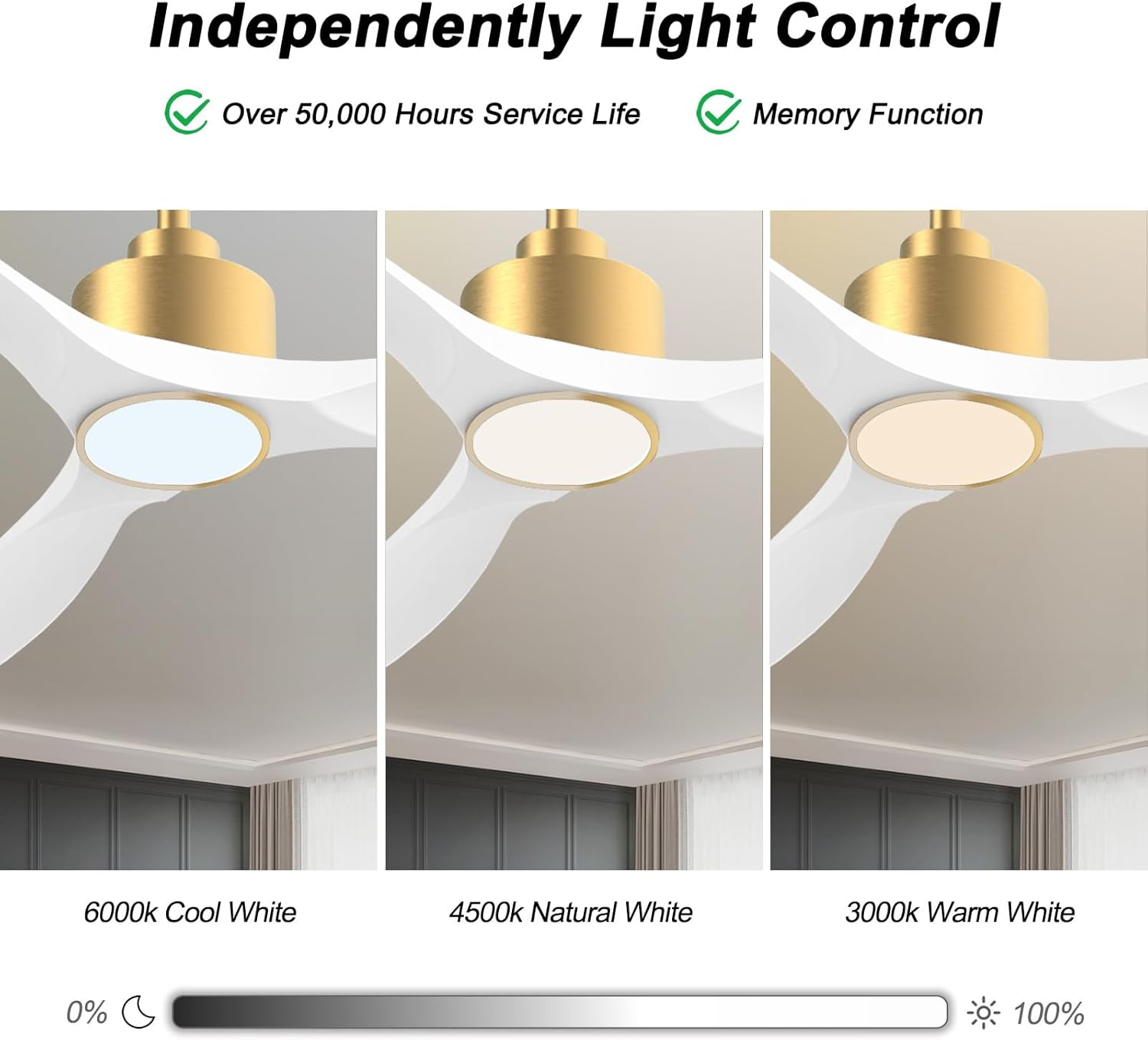
Image: Visual representation of the three adjustable light color temperatures (Warm, Natural, Cool White).

Image: Illustration of the reversible motor function for summer cooling and winter warm air circulation.
5.2 Smart Control (App/Voice)
The OFANTOP Smart Ceiling Fan can be controlled via the Smart Life app or voice assistants like Amazon Alexa and Google Assistant.
- Апп татаж авах: Төхөөрөмжийнхөө апп дэлгүүрээс "Smart Life" аппликейшнийг татаж аваарай.
- Wi-Fi холболт:
- Таны Wi-Fi сүлжээ 2.4GHz байгаа эсэхийг шалгаарай.
- Turn the fan power off and back on at the switch.
- Within 10 seconds, press the "8H Fan Timer & Wi-Fi Pairing" button on the remote for 3 seconds to enter pairing mode.
- Open the Smart Life app, select "Add Device" or click the "+" in the upper right corner.
- Find the fan device and click "ADD".
- Fill in your 2.4GHz Wi-Fi name and password.
- Wait for the connection to complete. A beep from the fan indicates successful pairing.
- Дуут удирдлага: Once paired with the Smart Life app, enable the Smart Life skill/action in your Amazon Alexa or Google Assistant app to control the fan with voice commands.

Image: Depiction of smart control features, including compatibility with Google Assistant and Amazon Alexa.
Video: Instructions on how to connect the BOOSANT 102 Series Smart Ceiling Fan to the Smart Life app for mobile control. This video details the Wi-Fi pairing process.
6. Засвар үйлчилгээ
- Цэвэрлэгээ: Сэнсийг цэвэрлэхийн тулд зөөлөн арчиж, damp даавуу. Зүлгүүрийн цэвэрлэгч, уусгагчийг бүү ашигла.
- Хутга арчилгаа: Ирний боолтуудын чангалалтыг үе үе шалгаж байгаарай. Сул ир нь дайвалзаж, чимээ шуугиан үүсгэж болзошгүй.
- Гэрлийн эх үүсвэр: The integrated LED light source is designed for long life (over 50,000 hours) and is not user-replaceable.
- Мотор: DC мотор нь засвар үйлчилгээ шаарддаггүй бөгөөд тосолгоо шаарддаггүй.
7. Алдаа засах
| Асуудал | Боломжит шалтгаан | Шийдэл |
|---|---|---|
| Сэнс эхлэхгүй байна | Сэнсний цахилгаан байхгүй; Сул утас холболт; Алсын удирдлагын зай бага. | Хэлхээ таслагчийг шалгах; Бүх утасны холболтыг шалгах; Алсын удирдлагын батерейг солих. |
| Сэнс ганхаж байна | Суларсан ирний эрэг; Буруу тэнцвэржүүлсэн ир; Суларсан бэхэлгээний хаалт. | Tighten all blade screws; Use a balancing kit (not included) if necessary; Ensure mounting bracket is securely fastened. |
| Гэрэл ажиллахгүй байна | Loose wire connection to light kit; LED driver failure; Remote control issue. | Check light kit wiring; Contact customer support if LED driver is suspected; Check remote battery/functionality. |
| Алсын удирдлага ажиллахгүй байна | Battery depleted; Remote not paired with fan; Obstruction between remote and receiver. | Replace battery (23A 12V); Re-pair remote with fan (refer to pairing instructions); Ensure clear line of sight. |
| Wi-Fi холболтын асуудал | Incorrect Wi-Fi password; 5GHz Wi-Fi network; Fan not in pairing mode. | Verify password; Ensure 2.4GHz network is used; Follow app pairing instructions carefully. |
8. Баталгаат хугацаа ба дэмжлэг
OFANTOP products are manufactured to the highest quality standards. For specific warranty details and customer support, please refer to the warranty card included with your purchase or contact OFANTOP customer service directly. Keep your proof of purchase for warranty claims.
Холбоо барих мэдээлэл: Refer to your product packaging or the official OFANTOP webхамгийн сүүлийн үеийн холбоо барих мэдээллийг авах сайт.


