1. Танилцуулга
Thank you for choosing the Dalton 2000VA Uninterruptible Power Supply (UPS). This device is designed to provide reliable power backup and protection for your electronic equipment against power outages, surges, and fluctuations. Please read this manual thoroughly before installation and operation to ensure optimal performance and safety.
2. Аюулгүй ажиллагааны чухал заавар
Гал түймэр, цахилгаанд цохиулах, гэмтэх эрсдэлийг бууруулахын тулд дараах үндсэн аюулгүй байдлын урьдчилан сэргийлэх арга хэмжээг үргэлж дагаж мөрдөөрэй.
- UPS-ийг нээж болохгүй casing. Дотор нь хэрэглэгчийн засварлах боломжтой эд анги байхгүй. Мэргэшсэн үйлчилгээний ажилтнуудад үйлчилгээ үзүүлнэ үү.
- Do not use the UPS in environments with excessive dust, humidity, or extreme temperatures.
- UPS нь газардуулгатай цахилгаан залгуурт холбогдсон эсэхийг шалгаарай.
- Do not connect non-computer related items like medical equipment, life support equipment, or household appliances to the UPS.
- Position the UPS in a well-ventilated area, away from direct sunlight or heat sources.
- In case of emergency, press the power button to turn off the UPS and disconnect it from the AC power source.
3. Багцын агуулга
Таны багцад бүх зүйл байгаа эсэхийг шалгана уу:
- Dalton 2000VA UPS Unit
- Цахилгааны утас
- USB Communication Cable (if applicable)
- Хэрэглэгчийн гарын авлага (энэ баримт бичиг)

Зураг 3.1: Урд view of the Dalton 2000VA UPS unit, showing the display screen and power button.
4. Тохиргоо ба суурилуулалт
Follow these steps to set up your UPS:
- Савлах: UPS-ийг савлагаанаас нь болгоомжтой салга. Тээвэрлэлтийн явцад ямар нэгэн эвдрэл гарсан эсэхийг шалгана уу.
- Байршил: Place the UPS on a flat, stable surface in a cool, dry, and well-ventilated area. Ensure there is adequate space around the unit for airflow.
- Анхны төлбөр: Before connecting any devices, plug the UPS power cord into a grounded wall outlet. Allow the unit to charge for at least 8 hours to ensure the battery is fully charged. The display will indicate charging status.
- Холбох төхөөрөмжүүд:
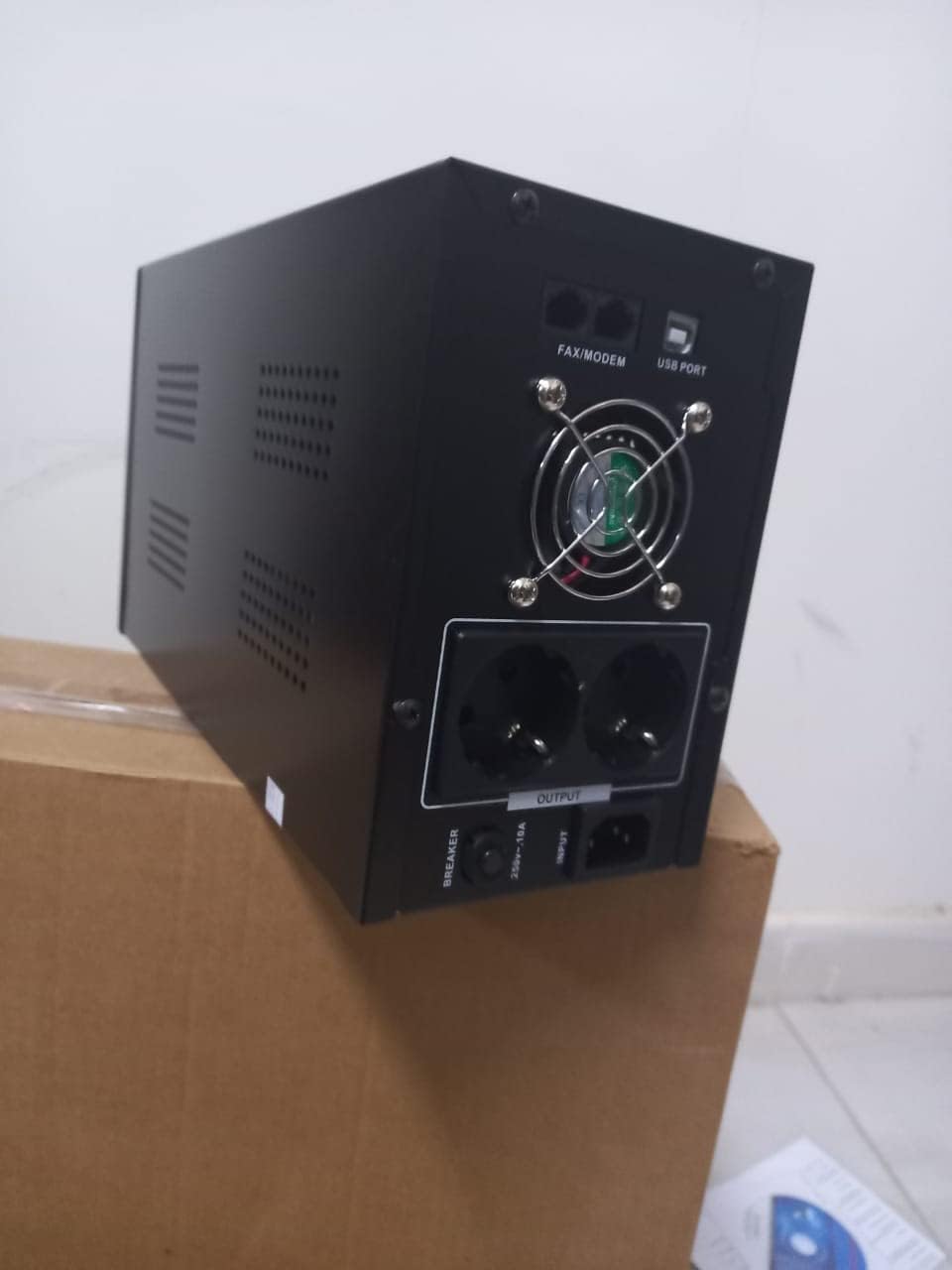
Зураг 4.1: Ар талд view of the Dalton 2000VA UPS, highlighting the input power port, output sockets, and USB/Modem ports.
- Once the battery is charged, connect your computer, monitor, and other critical electronic devices to the UPS output sockets.
- Do not overload the UPS. Refer to the specifications section for maximum load capacity.
- If applicable, connect the USB communication cable from the UPS to your computer for monitoring software (software not included, check manufacturer's webсайт).
5. UPS-ийг ажиллуулах
5.1 Асаах/унтраах
- Асаахын тулд: After connecting to AC power and charging, press and hold the power button on the front panel for approximately 3 seconds until you hear a beep and the display illuminates.
- Унтраахын тулд: Press and hold the power button for approximately 3 seconds until you hear a beep and the display turns off. If the UPS is running on battery, it will shut down immediately. If connected to AC, it will switch to bypass mode before shutting down.
5.2 Дэлгэцийг ойлгох
The front panel LCD display provides real-time status information:
- IN: Оролтын хэмжээг харуулнаtage from the utility power.
- ГАРАХ: Гаралтын ботыг харуулнаtage provided by the UPS to connected devices.
- Хэвийн: Indicates the UPS is operating on utility power.
- Сарьсан багваахай: Батерейны одоогийн цэнэгийн түвшинг харуулна.
- Ачаалах: хувийг заанаtagхолбогдсон төхөөрөмжүүдийн ашиглаж буй UPS-ийн хүчин чадлын хэмжээ.
- Battery Mode Icon: Appears when the UPS is running on battery power during an outage.

Зураг 5.1: Хажуу тал view of the UPS, showing the illuminated display with power status indicators.
5.3 Батерейг нөөцлөх функц
Хүчтэй болсон тохиолдолд уtage, the UPS will automatically switch to battery power, providing continuous power to your connected devices. The duration of backup power depends on the load connected and the battery's charge level. The UPS will emit an audible alarm during battery operation.
When utility power returns, the UPS will automatically switch back to AC power and begin recharging its battery.
6. Засвар үйлчилгээ
- Батерейны арчилгаа: To maximize battery life, ensure the UPS is always connected to an AC outlet to keep the battery charged. If the UPS is stored for an extended period, recharge it every three months for at least 8 hours.
- Цэвэрлэгээ: Disconnect the UPS from all power sources before cleaning. Use a soft, dry cloth to wipe the exterior. Do not use liquid or aerosol cleaners.
- Агааржуулалт: Regularly check that the ventilation openings are not blocked by dust or debris to prevent overheating.
7. Алдаа засах
Нийтлэг асуудлууд болон тэдгээрийн шийдлүүдийг доорх хүснэгтээс харна уу.
| Асуудал | Боломжит шалтгаан | Шийдэл |
|---|---|---|
| UPS асахгүй байна. | Battery not charged or power cord disconnected. | Ensure power cord is securely plugged in and allow battery to charge for 8 hours. |
| UPS нь хэвийн горимд тасралтгүй дуугардаг. | Хэт ачааллын нөхцөл. | Disconnect non-essential equipment until the alarm stops. Check total load. |
| Богино нөөцлөх хугацаа. | Батерей бүрэн цэнэглэгдээгүй эсвэл ашиглалтын хугацаа дуусах дөхөж байна. | Allow UPS to charge for 8 hours. If issue persists, battery may need replacement (contact service center). |
| UPS does not provide power during outage. | Battery discharged or internal fault. | Ensure UPS was fully charged. If problem persists, contact authorized service center. |
8. Техникийн үзүүлэлтүүд
| Онцлог | Дэлгэрэнгүй |
|---|---|
| Бүтээгдэхүүний хэмжээс | 12.5 x 22.5 x 38 см |
| Үйлдвэрлэгч | Далтон |
| Брэнд нэр | Ерөнхий |
| Өнгө | Хар |
| Материал | Металл |
| Одоогийн | 5 Ampээ |
| Form Factor | Тавиур |
| Давтамжийн хүрээ | 50-60 Гц |
| Гаралтын ботьtage | 220 вольт |
| Холбогч төрөл | AC |
9. Баталгаат хугацаа ба дэмжлэг
Dalton provides an authorized maintenance center for all Uninterruptible Power Supply units. For warranty claims, technical support, or service inquiries, please contact your local Dalton authorized distributor or service center. Keep your purchase receipt as proof of purchase for warranty validation.
For further assistance, please visit the official Dalton webсайт эсвэл хэрэглэгчийн дэмжлэгтэй холбоо барина уу.


