1. Танилцуулга
Thank you for choosing the Dalton 10 kVA Uninterruptible Power Supply (UPS) unit. This manual provides essential information for the safe and efficient operation of your UPS. Please read this manual thoroughly before installation and operation, and keep it for future reference.
This UPS is designed to provide reliable power protection for critical equipment, safeguarding against power outages, surges, and fluctuations. Its advanced technology ensures stable and clean power delivery, extending the lifespan of your connected devices.
2. Аюулгүй байдлын мэдээлэл
Always observe the following safety precautions to prevent injury or damage to the UPS and connected equipment:
- UPS-ийг нээж болохгүй casing. Дотор нь хэрэглэгчийн засвар үйлчилгээ хийх хэсэг байхгүй. Бүх үйлчилгээг мэргэшсэн үйлчилгээний ажилтнуудад шилжүүлээрэй.
- UPS нь газардуулгатай цахилгаан залгуурт холбогдсон эсэхийг шалгаарай.
- Do not block ventilation openings. Adequate airflow is crucial for proper cooling.
- UPS-ийг хэт их тоос шороо, чийгшил ихтэй эсвэл хэт өндөр температуртай газарт суурилуулахаас зайлсхий.
- Disconnect the UPS from the AC power source before performing any maintenance or moving the unit.
- Batteries can present a risk of electrical shock and high short-circuit current. Observe proper precautions when working with batteries.
3. Багцын агуулга
Carefully unpack the UPS and check if all items are present and undamaged. If any items are missing or damaged, contact your dealer immediately.
- Dalton 10 kVA UPS Unit
- Хэрэглэгчийн гарын авлага (энэ баримт бичиг)
- Оролтын цахилгаан кабель
- Output Power Cables (quantity may vary)
- USB Communication Cable (for monitoring software)
- Програм хангамжийн CD (хэрэв байгаа бол)
4. Бүтээгдэхүүн дууссанview
The Dalton 10 kVA UPS is a robust power protection solution. Below is an overview of its typical components and features.
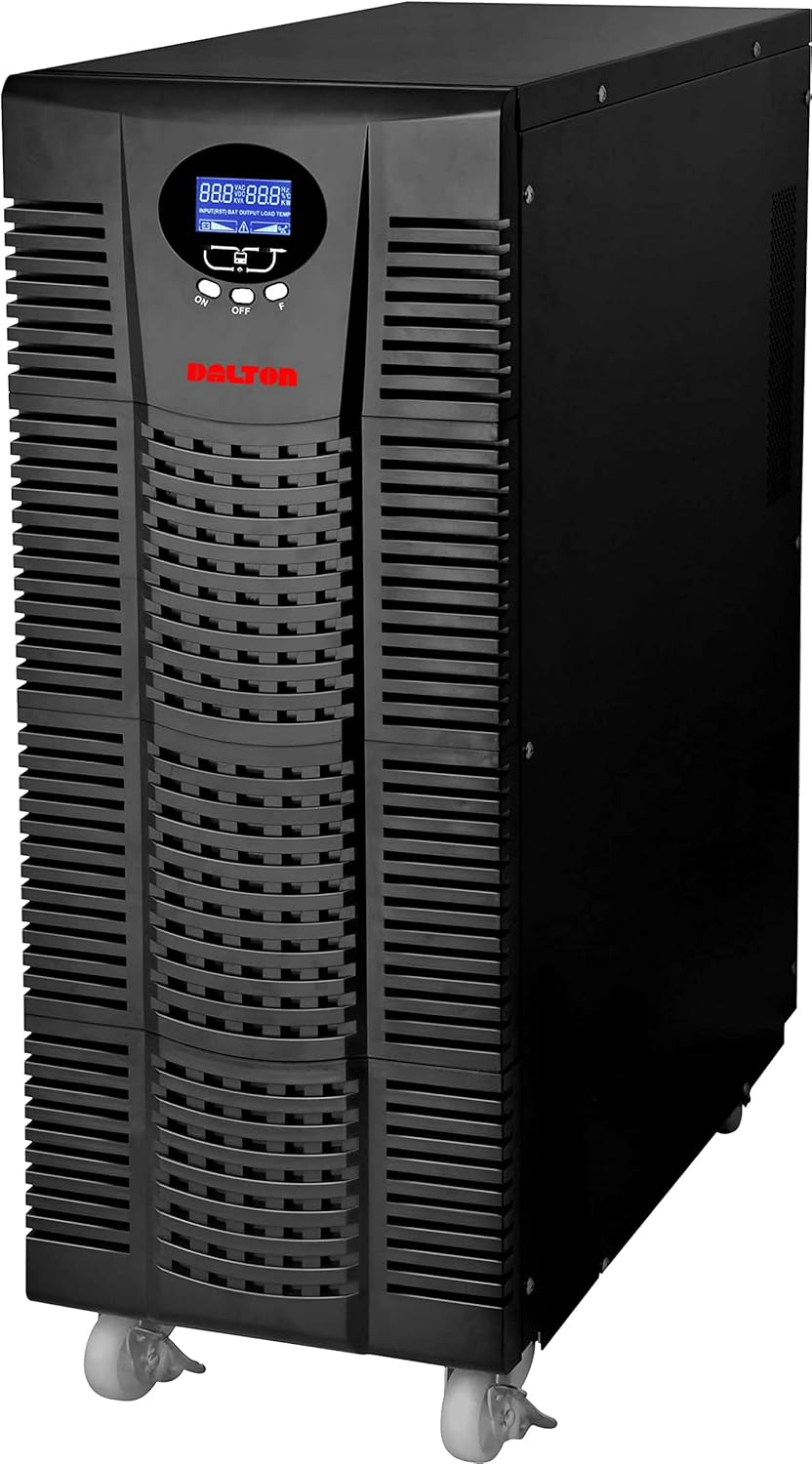
Зураг 4.1: Урд view of the Dalton 10 kVA UPS unit. This image displays the tall, black tower design of the UPS, featuring a prominent vented front panel for airflow and integrated wheels at the base for easy mobility. The control panel and display are visible towards the top of the unit.
4.1 Урд самбар
- LCD дэлгэц: Shows real-time status, input/output voltage, battery level, load percentage, алдааны кодууд.
- Хяналтын товчлуурууд: Used to navigate menus, acknowledge alarms, and perform system tests.
- Цахилгаан товч: UPS-г асаах эсвэл унтраах.
4.2 Арын самбар
- Оролтын цахилгаан холбогч: For connecting the UPS to the main AC power source.
- Гаралтын савнууд: For connecting protected equipment.
- Communication Ports (USB/RS232): Хяналт болон удирдлагын зорилгоор компьютерт холбогдох зориулалттай.
- External Battery Connector (if applicable): For connecting optional external battery packs.
- Хэлхээ таслагч: Хэт ачааллаас хамгаалах үйлчилгээ үзүүлдэг.
5. Тохиргоо ба суурилуулалт
Follow these steps for proper installation of your UPS unit:
- Байршил:
- UPS-ийг цэвэр, хуурай, агааржуулалт сайтай газар байрлуул.
- Ensure sufficient clearance around the unit for proper airflow.
- Нарны шууд тусгал, дулааны эх үүсвэр, хэт их чийгнээс зайлсхий.
- Зайны анхны цэнэг:
- UPS-ийг газардуулсан AC тэжээлийн залгуурт холбоно уу.
- Allow the UPS to charge for at least 8 hours before connecting any equipment to ensure full battery capacity. The display will indicate charging status.
- Холбох төхөөрөмж:
- With the UPS turned off and fully charged, connect your critical equipment (computers, servers, networking devices) to the UPS output receptacles.
- Do not connect laser printers or other high-surge current devices to the battery-backed outlets, as this may overload the UPS.
- Асааж байна:
- Press and hold the power button on the front panel until you hear a beep and the display illuminates.
- The UPS will perform a self-test and then enter normal operating mode.
6. Ашиглалтын заавар
6.1 Хэвийн ажиллагаа
Once powered on, the UPS continuously monitors the incoming AC power. In normal mode, it provides clean and stable power to connected devices.
6.2 Зайны горим
If the utility power fails or fluctuates outside acceptable limits, the UPS will automatically switch to battery mode, providing power from its internal batteries. An audible alarm will sound, and the LCD display will indicate "Battery Mode".
- During battery mode, save your work and shut down connected equipment gracefully to prevent data loss.
- The duration of battery backup depends on the load connected and the battery charge level.
6.3 UPS-г унтраах
To turn off the UPS and disconnect power to connected devices:
- Shut down all connected equipment.
- Press and hold the power button on the UPS until it powers off.
- Disconnect the UPS from the AC power outlet.
7. Засвар үйлчилгээ
7.1 Батерейны арчилгаа
- Regularly charge the batteries by keeping the UPS connected to AC power.
- Perform a battery self-test periodically (refer to your UPS display menu for this option) to check battery health.
- Batteries have a limited lifespan (typically 3-5 years). Contact service for battery replacement when performance degrades.
7.2 Цэвэрлэгээ
- UPS-ийн гадна талыг зөөлөн, хуурай даавуугаар арчина.
- Шингэн болон аэрозолийн цэвэрлэгч бүү ашигла.
- Агааржуулалтын нүхнүүд нь тоос шороо, хог хаягдлаас цэвэрлэгдсэн эсэхийг шалгаарай.
8. Алдаа засах
Энэ хэсэгт таны UPS-тэй холбоотой нийтлэг асуудлуудын шийдлүүдийг харуулав.
| Асуудал | Боломжит шалтгаан | Шийдэл |
|---|---|---|
| UPS асахгүй байна. | АС оролтын тэжээл байхгүй; Батерей бага; UPS-ийн алдаа. | Check power cord connection and wall outlet. Allow UPS to charge for several hours. Contact service if problem persists. |
| UPS нь хэвийн горимд тасралтгүй дуугардаг. | Overload; Battery fault. | Reduce connected load. Perform battery self-test. |
| Богино нөөцлөх хугацаа. | Overload; Old battery; Insufficient charging. | Reduce load. Replace battery. Ensure UPS is fully charged. |
For issues not listed here, or if solutions do not resolve the problem, please contact Dalton customer support.
9. Техникийн үзүүлэлтүүд
| Онцлог | Дэлгэрэнгүй |
|---|---|
| Брэнд | Далтон |
| Загвар | 10 кВА UPS |
| Хамгийн их хүч | 10,000 ватт |
| Гаралтын хүч | 10,000 ватт |
| Давтамжийн хүрээ | 50/60 Гц (± 3 Гц) |
| Холбогч төрөл | IEC 320, Battery |
| Өнгө | Хар |
| Материал | Металл |
| ASIN | B09NC2FXNC |
| Эхний боломжтой огноо | 9 оны арванхоёрдугаар сарын 2021 |
10. Баталгаат хугацаа ба дэмжлэг
Dalton provides comprehensive support for its products. As authorized distributors in the Arab Republic of Egypt, we maintain an authorized service center for all Dalton UPS units.
- For technical assistance, troubleshooting, or warranty claims, please contact our authorized service center.
- Ensure you have your product model and ASIN (B09NC2FXNC) ready when contacting support.
- Зөвшөөрөлгүй засвар эсвэл өөрчлөлт хийснээр бүтээгдэхүүний баталгаа хүчингүй болно.
For more information, please visit the official Dalton webсайт эсвэл орон нутгийн дистрибьютертэй холбогдоно уу.


