Танилцуулга
This manual provides detailed instructions for the safe and effective use of your VAULTEK Barikade Series 2 Compact Pistol Safe. Please read all instructions carefully before operating the safe to ensure proper function and security. This safe is designed for secure storage of firearms and valuables, featuring durable construction and a Smart Sense Digital Keypad for quick access.
Юу багтсан бэ
Доор жагсаасан бүх зүйл таны багцад байгаа эсэхийг шалгаарай.
- VAULTEK Barikade Series 2 Compact Pistol Safe
- Backup Manual Keys (2)
- Хамгаалалтын ган кабель
- Суурилуулах тоног төхөөрөмж (эрэг)
- Зааварчилгааны гарын авлага

Image: The VAULTEK Barikade Series 2 safe shown with its included accessories: backup keys, steel security cable, and mounting hardware.
Тохиргоо
1. Initial Power-Up and Battery Installation
- Батерейны тасалгааг ихэвчлэн сейфний доод талд эсвэл дотор талд байрлуул.
- Install a 9-volt battery (not included) into the compartment, ensuring correct polarity.
- Close the battery compartment securely. The safe is now powered.
2. Хувийн хослолоо тохируулах
- With the safe open, locate the programming button inside the safe.
- Press and release the programming button. The keypad lights will illuminate.
- Enter your desired 4 to 8 digit code on the Smart Sense Digital Keypad.
- Press and hold the programming button until the keypad lights flash, confirming the new code is set.
- Test your new code with the safe door open to ensure it functions correctly before closing.

Image: Close-up of the Smart Sense Digital Keypad with illuminated buttons, used for setting and entering access codes.
3. Securing the Safe
The Barikade Series 2 safe can be secured using the included steel security cable or mounting hardware.
Using the Steel Security Cable:
- Loop the steel security cable around a fixed object (e.g., car seat frame, desk leg).
- Insert the cable end into the designated security cable port on the safe.
- Ensure the cable is securely fastened to prevent unauthorized removal of the safe.

Image: The VAULTEK Barikade safe shown secured to a car seat using the steel security cable, demonstrating its anti-theft feature.
Using Mounting Hardware:
- Тохиромжтой суурилуулах гадаргууг тодорхойл.
- Use the pre-drilled holes on the safe as a template to mark drilling locations.
- Secure the safe using the provided screws and appropriate tools.
Ашиглалтын заавар
Opening the Safe with Your Code:
- Touch the Smart Sense Digital Keypad to activate it.
- Enter your personal 4 to 8 digit code.
- The safe will unlock, and the lid will partially lift due to the Lid Assist System.
Opening the Safe with Backup Keys:
- Locate the front keyway on the safe.
- Insert one of the backup manual keys into the keyway.
- Сейфийг онгойлгохын тулд түлхүүрийг эргүүлнэ үү.

Зураг: Ойрын зураг view of the front keyway on the safe, used for manual key access with the provided backup keys.
Сейфийг хаах:
Gently close the lid until it latches securely. Ensure no items obstruct the closing mechanism.
Гол онцлогууд
- Компакт дизайн: Fits a full-size handgun up to 10.875 inches or two compact firearms.
- Smart Sense Digital Keypad: Proprietary touch-sensitive function responds with quick, simple taps for rapid access.
- Удаан эдэлгээтэй барилга: Constructed from precision-formed 14-gauge rugged steel for enhanced security.
- Anti-Pry Reinforced Construction: Designed to resist prying attempts, offering robust protection.
- TampИлрүүлэх: Alerts to unauthorized access attempts.
- Interior Lid Organizer: Provides storage for small documents, cards, and other essentials.
- Lid Assist System: Partially lifts the lid upon unlocking for easier access to contents.
- Дотоод LED гэрэл: Illuminates the safe's contents for visibility in low-light conditions.
- Impact Resistant Latch: Designed to withstand high impact forces.
- Micro-USB порт: Allows the safe to be powered externally if the battery dies (Micro-USB cable not included).
- Хамгаалалтын кабель: Includes a steel security cable for securing the safe to a fixed object.

Image: The interior of the VAULTEK Barikade safe, showcasing the lid organizer for documents and cards, and the main compartment for firearms.
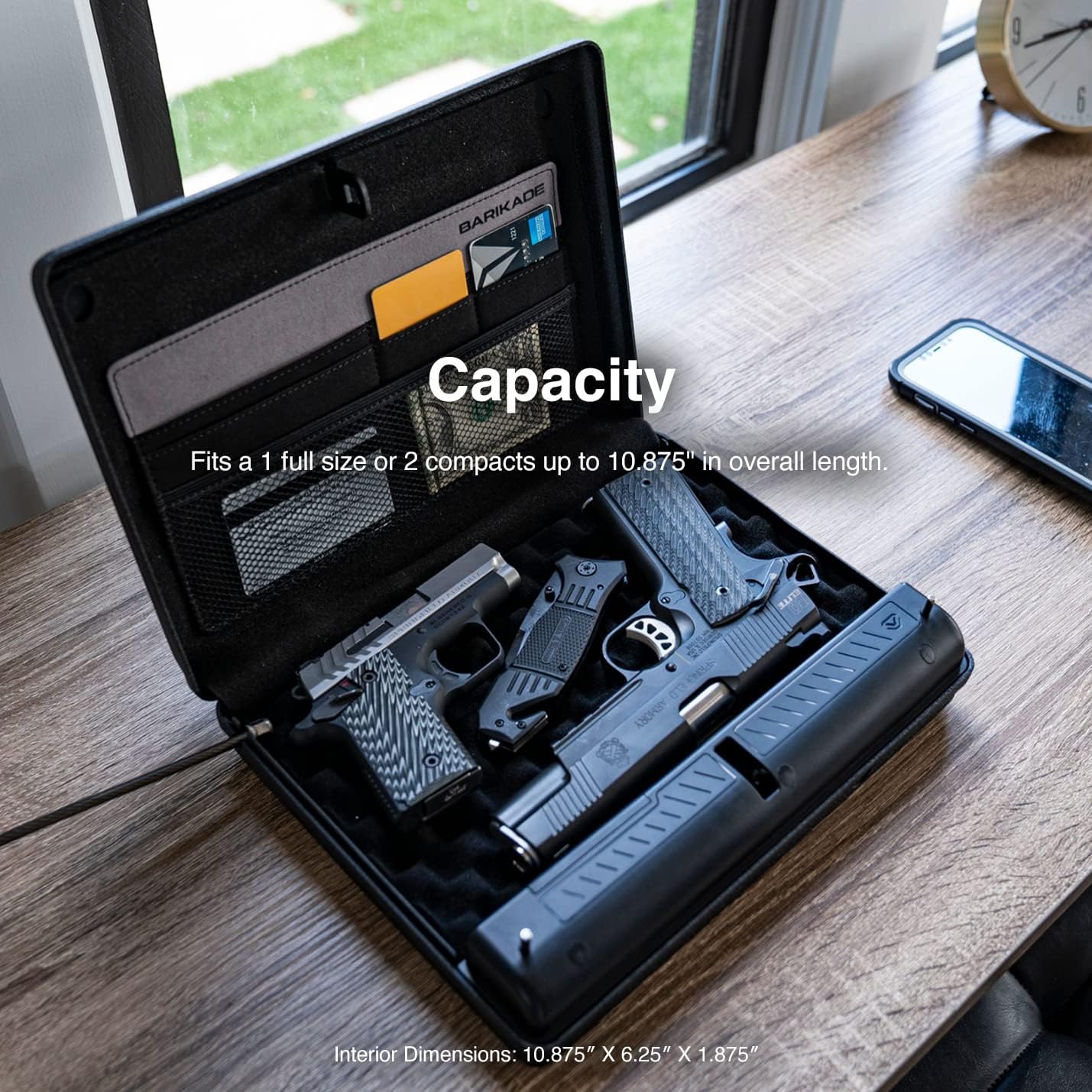
Image: The interior of the VAULTEK Barikade safe demonstrating its capacity to hold two compact firearms or one full-size handgun.
Бүтээгдэхүүн дууссанview Видео
Video: An official VAULTEK video showcasing the features and functionality of the Barikade Series 2 safe, including its keypad, interior, and security options.
Үзүүлэлтүүд
| Онцлог | Дэлгэрэнгүй |
|---|---|
| Брэнд | VAULTEK |
| Загварын дугаар | BKD2D-SB |
| Бүтээгдэхүүний хэмжээс (гадаад) | 2.5"D x 11.25"W x 9"H |
| Item Dimensions (Internal) | 10.875"L x 6.25"W x 1.875"H (ойролцоогоор) |
| Түгжээний төрөл | Keypad, Key |
| Өнгө | Хар |
| Материал | Alloy Steel (14-gauge) |
| Онцлог шинж чанар | Зөөврийн |
| Суурилуулах төрөл | Freestanding, Mountable |
| Усны эсэргүүцлийн түвшин | Усанд тэсвэртэй биш |
| Зайны ашиглалт | Up to 1 year under normal use |
| UPC | 850012691297 |
Засвар үйлчилгээ
- Зай солих: Replace the 9-volt battery annually or when the low battery indicator activates.
- Цэвэрлэгээ: Гадна талыг зөөлөн арчиж, damp даавуу. Зүлгүүрийн цэвэрлэгч эсвэл уусгагчаас зайлсхий.
- Товчлуурын арчилгаа: Keep the keypad clean and dry. Avoid excessive force when pressing buttons.
- Дотоод бүрэлдэхүүн хэсгүүд: Periodically check internal foam and lid organizer for wear and tear.
Алдааг олж засварлах
- Сейф дараах кодоор нээгддэггүй:
- - Ensure the battery is not depleted. Replace if necessary.
- - Re-enter the code carefully, ensuring each tap registers on the Smart Sense Keypad.
- - Use the backup keys to open the safe and re-program your code.
- Товчлуур хариу өгөхгүй байна:
- - Check battery power. Connect a Micro-USB cable to an external power source if the battery is dead.
- - Ensure the keypad is clean and free from debris.
- Safe is difficult to close:
- - Check for any obstructions inside the safe that might be preventing the lid from closing completely.
- - Ensure the internal foam is properly seated.
- Tamper alert activates frequently:
- - Review the safe's placement and ensure it is not being accidentally bumped or moved.
- - If persistent, contact customer support.
Баталгаат болон дэмжлэг
VAULTEK бүтээгдэхүүнүүд нь бат бөх, найдвартай байхаар бүтээгдсэн. Баталгаат хугацааны талаарх тодорхой мэдээллийг авахыг хүсвэл бүтээгдэхүүнтэй хамт ирсэн баталгаат картыг үзнэ үү эсвэл албан ёсны VAULTEK вэбсайтад зочилно уу. website. For technical support, replacement parts, or any inquiries, please contact VAULTEK customer service through their official channels.
Онлайн дэмжлэг: www.vaulteksafe.com/support


