Танилцуулга
The AOLION Stereo Headset Adapter is designed to enhance your gaming experience on Xbox One controllers. This adapter allows you to connect most wired stereo gaming headsets with a 3.5mm audio jack (CTIA plug standard) directly to your Xbox controller, providing convenient control over game sound and voice chat.
Багцын агуулга
- 1 × AOLION Stereo Headset Adapter
- 1 × Хэрэглэгчийн гарын авлага
Бүтээгдэхүүн дууссанview
The adapter features intuitive controls for managing your audio experience during gameplay.

Зураг 1: Урд view of the headset adapter showing control buttons.
- Game Balance Button: Adjusts the balance towards game audio.
- Chat Balance Button: Adjusts the balance towards voice chat audio.
- Микрофоны дууг хаах товчлуур: Toggles microphone on/off.
- Дууг нэмэгдүүлэх товчлуур: Increases overall volume.
- Дууг бууруулах товчлуур: Decreases overall volume.
- 3.5 мм аудио залгуур: For connecting your stereo gaming headset.
- USB холбогч: For connecting to the Xbox controller.
Тохиромжтой байдал
This headset adapter is compatible with a wide range of Xbox One controllers and stereo gaming headsets:
- Xbox Controllers: Xbox One, Xbox One S, Xbox One X, Xbox Elite Wireless Controller Series 1, Xbox Elite Wireless Controller Series 2, Xbox Series S, and Xbox Series X Controllers.
- Чихэвч: Most wired stereo gaming headsets featuring a 3.5mm audio jack (using the CTIA plug standard).

Figure 2: The adapter is compatible with multiple Xbox controller models.

Figure 3: The adapter supports standard 3.5mm CTIA headsets.
Тохиргоо
Setting up your AOLION Stereo Headset Adapter is a simple plug-and-play process.
- Connect the Adapter to the Controller: Align the USB connector of the headset adapter with the expansion port at the bottom of your Xbox controller. Gently push until it clicks securely into place.
- Чихэвчээ холбоно уу: Plug your wired stereo gaming headset's 3.5mm audio jack into the corresponding port on the bottom of the headset adapter.
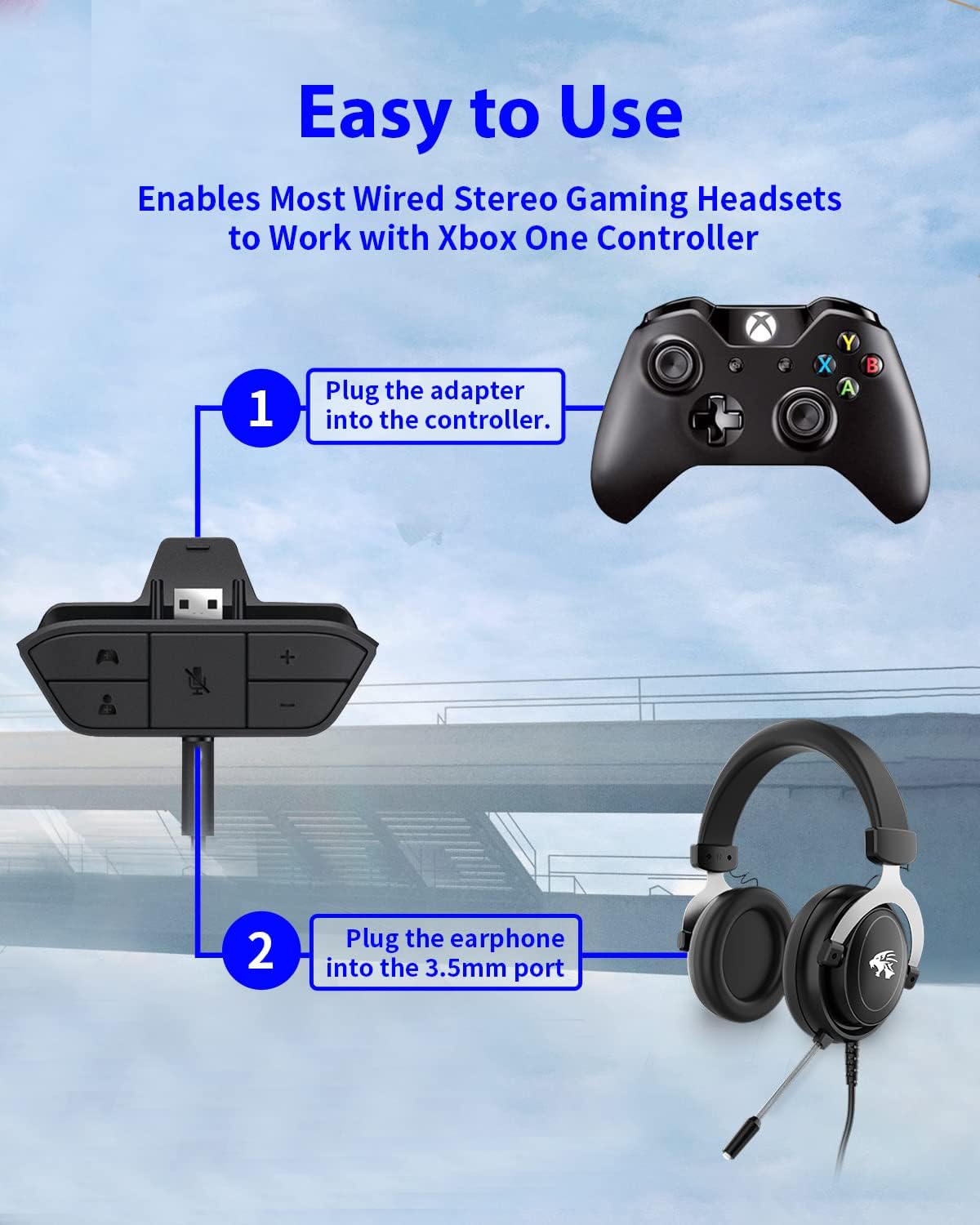
Figure 4: Step-by-step connection guide for the headset adapter.
Video 1: Demonstration of connecting the headset adapter to an Xbox controller.
Чухал тэмдэглэл: For optimal performance and to resolve potential audio issues, it is recommended to update your Xbox controller's firmware after connecting the adapter. This can typically be done through your Xbox console's settings (Settings > Devices & connections > Accessories > Select your controller > ... > Controller settings > Update firmware).
Ашиглалтын заавар
Once connected, use the buttons on the adapter to control your audio:
- Дууг нэмэгдүүлэх/дооруулах (+/-): Press the '+' button to increase the overall volume of both game and chat audio. Press the '-' button to decrease it.
- Microphone Mute (Microphone Icon): Press this button to mute or unmute your microphone. An indicator light (if present) or on-screen notification may confirm the mute status.
- Game/Chat Balance (Controller Icon / Person Icon):
- дээр дарна уу Хянагчийн дүрс button to increase game audio volume and decrease chat audio volume.
- дээр дарна уу Хүний дүрс button to increase chat audio volume and decrease game audio volume.
Зураг 5: Нарийвчилсан view of the adapter's control buttons.
Засвар үйлчилгээ
To ensure the longevity and optimal performance of your headset adapter, follow these simple maintenance guidelines:
- Адаптерийг цэвэр, тоос шороо, хог хаягдлаас цэвэр байлга. Цэвэрлэхэд зөөлөн, хуурай даавуу ашиглаарай.
- Адаптерийг хэт өндөр температур, чийгшил, нарны шууд тусгалд оруулахаас зайлсхий.
- Адаптерийг өөрөө задлах, засах гэж бүү оролдоорой, учир нь энэ нь баталгааг хүчингүй болгоно.
- Бие махбодид гэмтэл учруулахгүйн тулд адаптерыг ашиглаагүй үед аюулгүй газар хадгална уу.
Алдааг олж засварлах
If you encounter issues with your AOLION Stereo Headset Adapter, please refer to the following common solutions:
| Асуудал | Боломжит шалтгаан / шийдэл |
|---|---|
| No audio or poor audio quality (buzzing, peaking) |
|
| Микрофон ажиллахгүй байна |
|
| Game/Chat balance not working |
|
Хэрэв эдгээр алхмуудыг хэрэгжүүлсний дараа асуудал хэвээр байвал хэрэглэгчийн дэмжлэгтэй холбогдоно уу.
Үзүүлэлтүүд
| Онцлог | Дэлгэрэнгүй |
|---|---|
| Загварын дугаар | WGXB004005 |
| Брэнд | АОЛИОН |
| Бүтээгдэхүүний хэмжээ (L x W x H) | 3.15 x 1.57 x 0.79 инч (8 x 4 x 2 см) |
| Өнгө | Хар |
| Холбогч төрөл | Auxiliary (3.5mm CTIA standard) |
| Тохиромжтой төхөөрөмжүүд | Xbox One, One S, One X, Elite 1, Elite 2, Series S, Series X Controllers; 3.5mm CTIA Stereo Headsets |
Баталгаат болон дэмжлэг
AOLION stands behind the quality of its products. This Stereo Headset Adapter comes with:
- 60 хоногийн мөнгө буцааж өгөх баталгаа: If you are not entirely satisfied with your purchase within 60 days, you may be eligible for a full refund.
- 24 сарын баталгаа: We provide a 24-month warranty against manufacturing defects from the date of purchase.
For any questions, concerns, or warranty claims, please contact us through Amazon. We are committed to responding to your inquiries within 12 hours to ensure your complete satisfaction.