1. Танилцуулга
Thank you for choosing the InFocus P120 INL412 Multimedia Projector. This manual provides essential information for the safe and efficient operation of your projector. Please read it thoroughly before using the device and retain it for future reference. The InFocus P120 INL412 is designed for versatile multimedia presentations, offering clear and vibrant images for various applications.
2. Аюулгүй байдлын мэдээлэл
To ensure safe operation and prevent damage to the projector, please observe the following safety precautions:
- Агааржуулалтын нүхийг бүү бөглөөрэй. Хэт халалтаас сэргийлж, проекторын эргэн тойронд агаарын урсгалыг хэвийн байлгах хангалттай зайтай байлгаарай.
- l байх үед проекторын линз рүү шууд харахаас зайлсхийamp тод гэрэл нь нүдийг гэмтээж болзошгүй тул асаалттай байна.
- Do not place the projector on an unstable cart, stand, or table. The projector may fall, causing serious injury to a child or adult, and serious damage to the unit.
- Хэрэв проекторыг удаан хугацаагаар ашиглахгүй бол цахилгааны утсыг ханын залгуураас салга.
- Бүх засвар үйлчилгээг мэргэшсэн үйлчилгээний ажилтнуудад даатга. Проекторыг өөрөө нээх эсвэл засах гэж бүү оролд.
- Keep the projector away from water or moisture. Do not expose it to rain or immerse it in liquid.
- Use only the power cord supplied with the projector or an authorized replacement.
3. Багцын агуулга
Доор жагсаасан бүх зүйл таны проекторын багцад байгаа эсэхийг шалгана уу.
- InFocus P120 INL412 Multimedia Projector
- Цахилгааны утас
- Батерейтай алсын удирдлага
- VGA кабель
- Хэрэглэгчийн гарын авлага (энэ баримт бичиг)
- Түргэн эхлүүлэх гарын авлага
4. Бүтээгдэхүүн дууссанview
Familiarize yourself with the main components of your InFocus P120 INL412 projector.
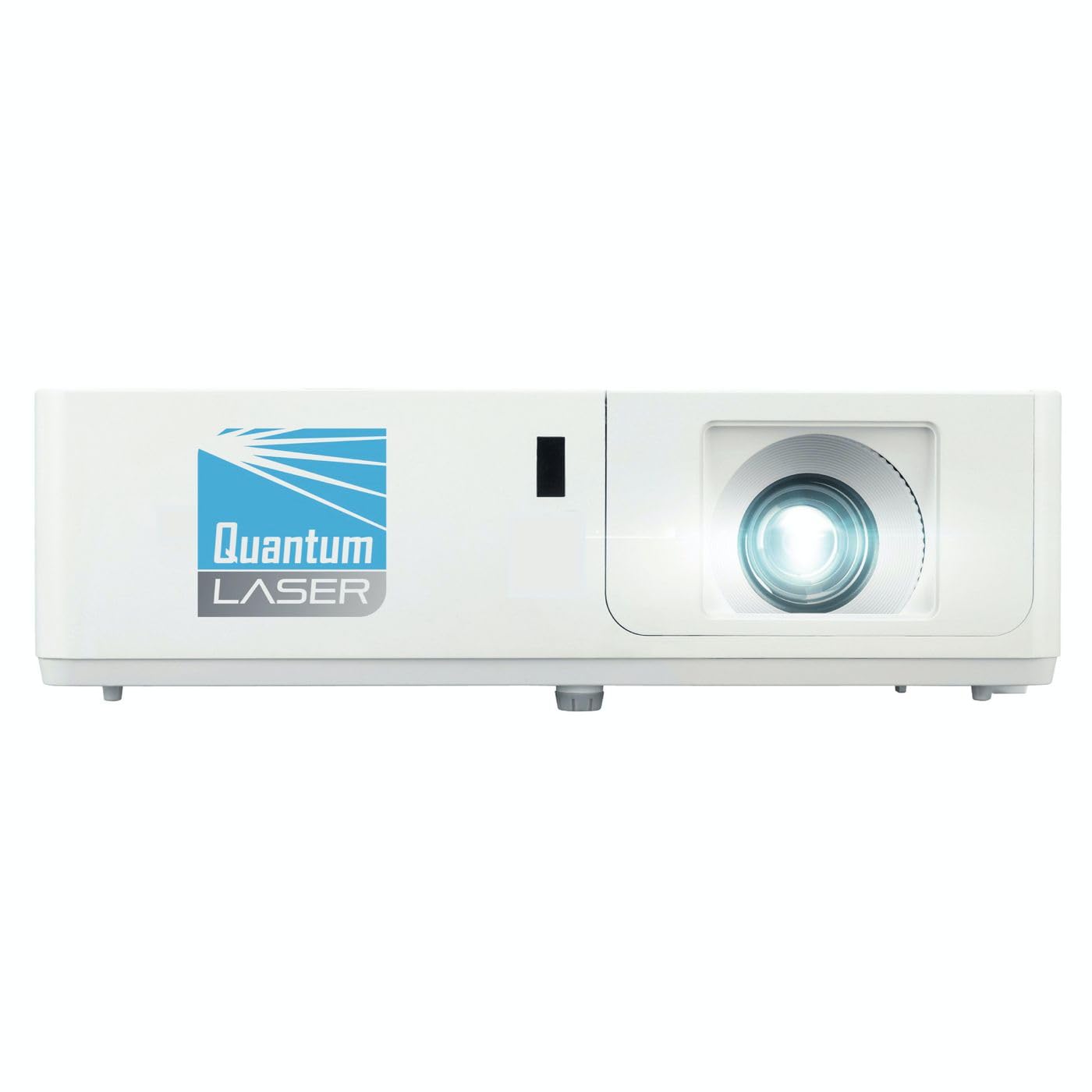
Зураг 1: Урд view of the InFocus P120 INL412 Multimedia Projector, showing the lens and ventilation grilles.
4.1 Урд самбар
- Проекцийн линз: Дэлгэц дээр дүрсийг гаргадаг.
- Фокус бөгж: Төсөөлөгдөж буй зургийн тод байдлыг тохируулна.
- Томруулах бөгж: Adjusts the size of the projected image.
- IR хүлээн авагч: Алсын удирдлагаас дохио хүлээн авдаг.
4.2 Топ самбар
- Хяналтын самбар: Buttons for power, menu navigation, source selection, and keystone correction.
- Заагч гэрэл: Display the projector's status (e.g., power, lamp, temperature).
4.3 Rear Panel (Connectivity)
- HDMI оролт: Connects to HDMI-enabled devices (laptops, Blu-ray players).
- VGA оролт: VGA гаралттай компьютерт холбогдоно.
- USB порт: For service or connecting USB devices (if supported by model).
- Аудио оролт/гаралт: Гадаад аудио эх үүсвэр эсвэл чанга яригчийг холбох зориулалттай.
- Цахилгаан оролт: Цахилгааны утсыг холбодог.
5. Тохиргоо
Проекторын анхны тохиргоог хийхдээ дараах алхмуудыг дагана уу.
- Байршил: Place the projector on a stable, flat surface or mount it securely. Ensure the projector is positioned at an appropriate distance from the screen to achieve the desired image size.
- Эрчим хүчний холболт: Connect the power cord to the projector's power inlet and then to a grounded electrical outlet.
- Эх сурвалж төхөөрөмжийг холбох: Connect your source device (e.g., laptop, DVD player) to the projector using an appropriate cable (HDMI, VGA, etc.). Ensure the cable is securely connected to both the source and the projector.
- Асаах: Press the power button on the projector's control panel or the remote control to turn on the projector. The power indicator light will illuminate.
- Adjust Focus and Zoom: Once an image is projected, rotate the focus ring on the lens until the image is sharp and clear. Use the zoom ring to adjust the image size to fit your screen.
- Түлхүүр чулууны залруулга: If the image appears trapezoidal, use the keystone correction function (either via buttons on the projector/remote or through the on-screen menu) to square the image.
6. Ашиглалтын заавар
6.1 Асаах/унтраах
- Асаахын тулд: Press the power button once. The projector will go through a warm-up sequence.
- Унтраахын тулд: Press the power button twice. The first press will prompt a shutdown confirmation; the second press will initiate shutdown. Allow the projector to cool down completely before unplugging.
6.2 Эх сурвалж сонгох
Press the 'Source' button on the projector or remote control to cycle through available input sources (HDMI, VGA, etc.) until your desired source is displayed.
6.3 Цэсийн навигаци
Press the 'Menu' button to access the on-screen display (OSD) menu. Use the arrow buttons to navigate through options and 'Enter' or 'OK' to select. Use the 'Exit' or 'Menu' button to close the OSD.
- Зургийн тохиргоо: Adjust brightness, contrast, color, aspect ratio, and picture mode.
- Дэлгэцийн тохиргоо: Configure keystone, projection mode (front/rear, desktop/ceiling), and resolution.
- Аудио тохиргоо: Дууны хэмжээ болон аудио гаралтын сонголтыг хянах.
- Системийн тохиргоо: Manage language, timer, power-saving modes, and factory reset.
7. Засвар үйлчилгээ
Тогтмол засвар үйлчилгээ нь таны проекторын ашиглалтын хугацааг уртасгаж, оновчтой гүйцэтгэлийг баталгаажуулдаг.
- Линз цэвэрлэх: Проекторын линзийг оптик гадаргууд зориулсан зөөлөн, хөвөнгүй даавуугаар зөөлөн арчина. Зүлгүүрийн цэвэрлэгч эсвэл хэт их хүч хэрэглэж болохгүй.
- Засгийн газрын цэвэрлэгээ: Use a soft, dry cloth to clean the projector's exterior. For stubborn marks, dampen the cloth slightly with water. Avoid using harsh chemicals.
- Агаар шүүгч цэвэрлэх/солих: Check the air filter periodically. If your model has a removable filter, clean it with a soft brush or vacuum cleaner. Replace the filter as recommended in the on-screen menu or when visibly dirty to maintain proper ventilation.
- Lamp Солих: Проектор лamp хязгаарлагдмал хугацаатай. Хэзээ лamp life indicator appears, or the image brightness significantly decreases, replace the lamp according to the instructions provided in the full service manual or by a qualified technician. Always allow the projector to cool down completely before attempting lamp солих.
8. Алдаа засах
Нийтлэг асуудлууд болон тэдгээрийн шийдлүүдийг доорх хүснэгтээс харна уу.
| Асуудал | Боломжит шалтгаан | Шийдэл |
|---|---|---|
| Зураг харагдахгүй байна | Power cord disconnected, incorrect input source, source device off. | Check power connections. Select correct input source. Ensure source device is powered on. |
| Зураг бүдэг байна | Линз нь фокусгүй, проекцын зай буруу байна. | Adjust the focus ring on the lens. Reposition the projector closer or further from the screen. |
| Зураг нь трапец хэлбэртэй байна | Проектор нь дэлгэцтэй перпендикуляр биш байна. | Use keystone correction (manual or automatic) to square the image. |
| Проектор хэт халж, унтардаг | Blocked ventilation, dirty air filter. | Ensure clear space around vents. Clean or replace the air filter. |
| Алсын удирдлага ажиллахгүй байна | Dead batteries, obstruction between remote and projector, incorrect angle. | Replace batteries. Ensure clear line of sight to IR receiver. Point remote directly at the projector. |
9. Техникийн үзүүлэлтүүд
Key technical specifications for the InFocus P120 INL412 Multimedia Projector:
| Онцлог | Тодорхойлолт |
|---|---|
| Загварын дугаар | P120 INL412 (Item model number: 7296144) |
| Дэлгэцийн төрөл | DLP |
| Төрөлхийн тогтоол | 1280 x 800 |
| Дэлгэцийн хамгийн дээд нарийвчлал | 1280 x 800 |
| Холболтын технологи | USB (and other standard inputs like HDMI, VGA) |
| Бүтээгдэхүүний хэмжээс | 5.25 x 0.31 x 1.66 инч |
| Зүйлийн жин | 6.6 фунт |
| Үйлдвэрлэгч | Фокуст |
10. Баталгаат хугацаа ба дэмжлэг
The InFocus P120 INL412 Multimedia Projector comes with a standard manufacturer's warranty. Please refer to the warranty card included in your package for specific terms and conditions, including warranty duration and coverage details. For technical support, service, or further inquiries, please visit the official InFocus support webсайт эсвэл харилцагчийн үйлчилгээний хэлтэстэй холбогдоно уу.
Хамгийн сүүлийн үеийн тусламжийн мэдээллийг авахыг хүсвэл зочилно уу: www.infocus.com/support