1. Танилцуулга
This manual provides detailed instructions for the safe and efficient operation of your InFocus P120 INL412 Multimedia Projector (Model INL4128). Please read this manual thoroughly before using the projector and keep it for future reference. This projector is designed for high-quality image projection, suitable for various applications including presentations, home entertainment, and gaming.
2. Аюулгүй байдлын мэдээлэл
Проекторыг гэмтээхээс сэргийлж, хэрэглэгчийн аюулгүй байдлыг хангахын тулд дараах аюулгүй байдлын арга хэмжээг дагаж мөрдөнө.
- Агааржуулалт: Проекторын эргэн тойронд хангалттай агааржуулалтыг хангана уу. Агааржуулалтын нүхийг бүү хааж болохгүй. Ханан болон бусад зүйлээс хамгийн багадаа 30 см (12 инч) зайтай байлгаарай.
- Эрчим хүчний эх үүсвэр: Зөвхөн заасан тэжээлийн эх үүсвэр болон боть ашиглана ууtage. Connect the power cord securely.
- Дулаан: The projector generates heat during operation. Do not touch the projector's vents or exhaust areas directly after use.
- Гэрлийн гаралт: l байх үед проекторын линз рүү шууд харж болохгүйamp асаалттай, учир нь хүчтэй гэрэл нүдийг гэмтээж болно.
- Байршил: Проекторыг тогтвортой, тэгш гадаргуу дээр байрлуул. Нарны шууд тусгалд, дулааны эх үүсвэрийн ойролцоо, чийгшил ихтэй, тоос шороотой газар байрлуулахаас зайлсхий.
- Цэвэрлэгээ: Цэвэрлэхийн өмнө цахилгааны утсыг салга. Зөөлөн, хуурай даавуу хэрэглээрэй. Шингэн болон аэрозол цэвэрлэгч хэрэглэж болохгүй.
- Үйлчилгээ: Проекторыг өөрөө засварлах гэж бүү оролдоорой. Бүх үйлчилгээг мэргэшсэн үйлчилгээний ажилтнуудад шилжүүлээрэй.
3. Бүтээгдэхүүн дууссанview
3.1 Top Panel and Lens Area
The top panel features the control buttons for basic operation and the lens area with focus and zoom adjustments.

Зураг 3.1: Дээд тал view of the InFocus P120 INL412 projector, highlighting the control panel on the right and the lens adjustment area on the left. The InFocus logo is visible on the top surface.
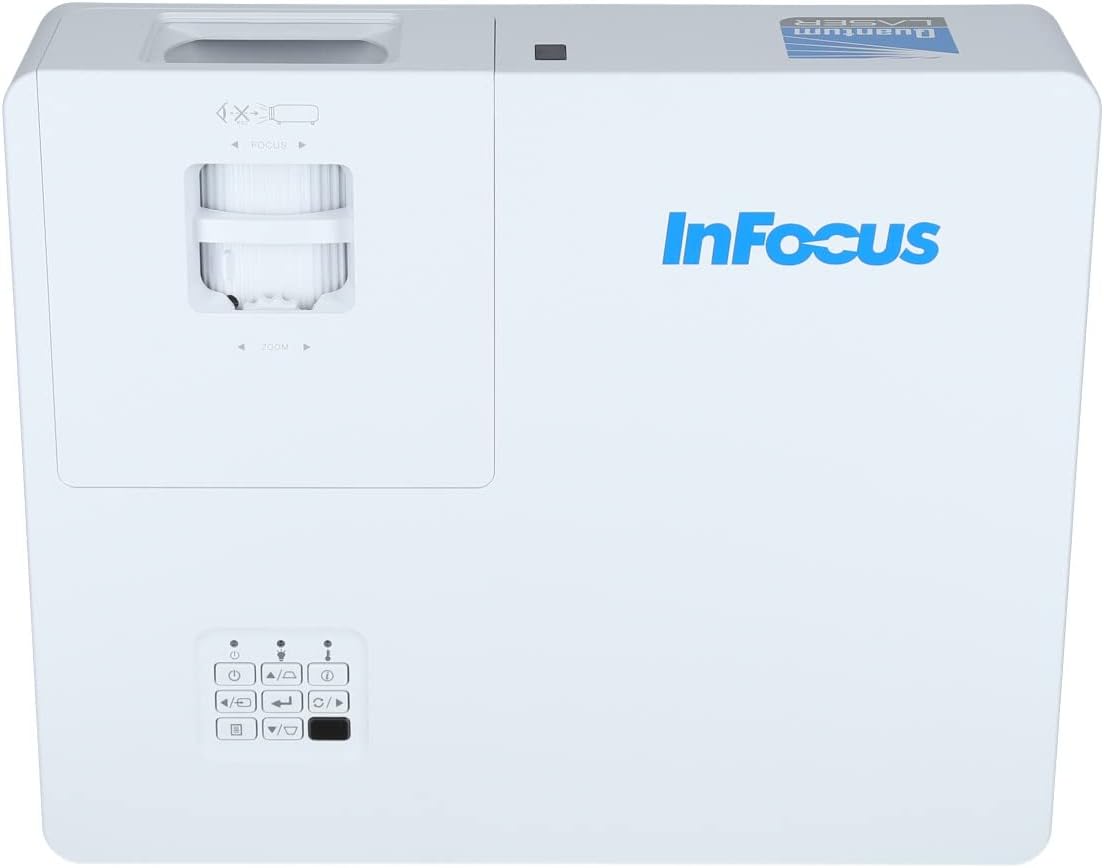
Зураг 3.2: Илүү ойртох view of the projector's top panel, showing the focus and zoom rings near the lens opening and the array of control buttons for power, menu, source selection, and navigation.
3.2 Арын самбарын холболтууд
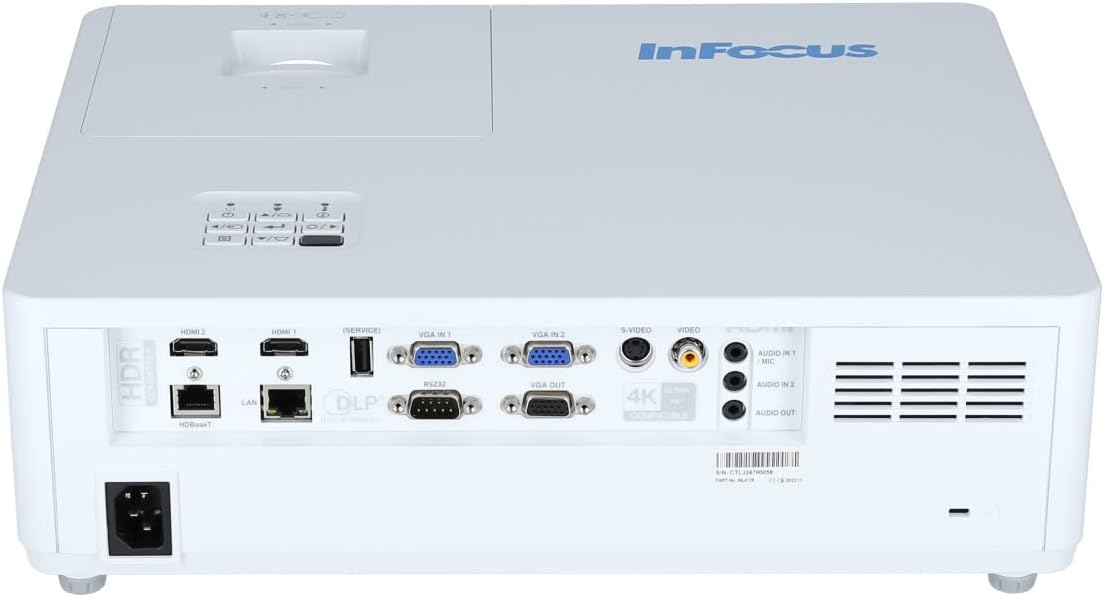
The rear panel provides various input and output ports for connecting external devices.

Figure 3.3: Rear panel of the InFocus P120 INL412 projector, displaying a comprehensive array of connectivity options including HDMI (x2), USB, S-Video, Ethernet (LAN), VGA In (x2), VGA Out, RS232, and Audio In/Out ports. The power input is located on the bottom left.
Key ports include:
- HDMI 1 ба 2: For connecting high-definition digital video and audio sources.
- USB: For connecting USB devices, potentially for media playback or firmware updates.
- S-видео: For connecting older video sources.
- VGA IN 1 & 2: For connecting computers or other devices with VGA output.
- VGA OUT: For connecting to an external monitor.
- Ethernet (LAN): Сүлжээний холболт болон хяналтын хувьд.
- Audio IN 1 & 2 / Audio OUT: Аналог аудио холболтын хувьд.
- RS232: Цуваа хяналтын хувьд.
- Эрчим хүчний оролт: Хувьсах гүйдлийн цахилгааны утсыг холбох зориулалттай.
3.3 Front and Side Panels
The front panel houses the projection lens and front ventilation, while the side panels feature additional ventilation grilles.

Зураг 3.4: Урд view of the InFocus P120 INL412 projector, displaying the main projection lens on the right and the extensive front ventilation grille on the left, crucial for heat dissipation.
Зураг 3.5: Хажуу тал view of the InFocus P120 INL412 projector, illustrating the side ventilation grilles that contribute to maintaining optimal operating temperature.
4. Тохиргоо
4.1 Проекторын байршил
Position the projector on a stable, flat surface or mount it securely. Ensure the projector is within the optimal projection distance for your screen size. Maintain clear space around the projector for proper ventilation.
4.2 Төхөөрөмжүүдийг холбох
Before connecting any cables, ensure the projector and all source devices are powered off.
- HDMI холболт: Connect an HDMI cable from your source device (e.g., laptop, Blu-ray player, gaming console) to either the HDMI 1 or HDMI 2 port on the projector.
- VGA холболт: Connect a VGA cable from your computer to either VGA IN 1 or VGA IN 2. For audio, connect a separate audio cable from your computer's audio output to the corresponding Audio IN port on the projector.
- USB холболт: Insert a USB drive into the USB port for media playback (if supported by firmware) or service functions.
- Ethernet (LAN) холболт: Connect an Ethernet cable to the LAN port for network control or updates.
- Аудио гаралт: If using external speakers, connect an audio cable from the Audio OUT port on the projector to your audio system.
4.3 Эрчим хүчний холболт
Connect the power cord to the projector's power input and then plug the other end into a grounded electrical outlet.
5. Ашиглалтын заавар
5.1 Асаах/унтраах
- Асаах: дээр дарна уу Хүч button on the projector's control panel or the remote control. The power indicator light will change.
- Унтраах: дээр дарна уу Хүч button again. A confirmation message may appear. Press the button a second time to confirm shutdown. Allow the projector to cool down before unplugging it.
5.2 Фокус болон томруулалтыг тохируулах
Rotate the focus ring around the lens until the image appears sharp and clear. Use the zoom ring to adjust the image size to fit your screen.
5.3 Оролтын эх үүсвэрийг сонгох
дээр дарна уу Эх сурвалж button on the control panel or remote control to cycle through available input sources (HDMI 1, HDMI 2, VGA 1, VGA 2, S-Video, USB). Select the input corresponding to your connected device.
5.4 Цэсийн навигаци
-г ашиглана уу Цэс button to access the on-screen display (OSD) menu. Use the arrow buttons to navigate through menu options and the Оруулна уу button to select. Press Цэс дахин гарахын тулд.
6. Засвар үйлчилгээ
6.1 Линзийг цэвэрлэх
Gently wipe the lens with a soft, lint-free cloth specifically designed for optical surfaces. Do not use abrasive cleaners or excessive force, as this can scratch the lens.
6.2 Cleaning the Projector Exterior
Проекторын цонхыг цэвэрлэхийн тулд зөөлөн, хуурай даавуу ашиглаарай.asing. For stubborn dirt, dampen the cloth slightly with water, then wipe dry immediately. Avoid getting liquids into the projector's openings.
6.3 Агааржуулалтын арчилгаа
Regularly check the projector's ventilation grilles for dust accumulation. Use a soft brush or a vacuum cleaner with a brush attachment to gently remove dust from the vents to ensure proper airflow and prevent overheating.
7. Алдаа засах
7.1 Зураг харагдахгүй байна
- Проектор асаалттай, тэжээлийн заагч гэрэл тогтвортой байгаа эсэхийг шалгаарай.
- Verify that the video cable (HDMI, VGA, etc.) is securely connected to both the projector and the source device.
- Check that the correct input source is selected on the projector.
- Confirm that the source device (laptop, player) is powered on and outputting a signal.
7.2 Зураг бүдэг эсвэл фокусгүй байна
- Зураг тод болтол проекторын линз дээрх фокусын цагиргийг тохируулна уу.
- Ensure the projector is at the correct distance from the screen.
- Проекторын линз бохир байвал түүнийг цэвэрлэ.
7.3 Дуугүй
- If using HDMI, ensure the source device's audio output is set to HDMI.
- If using VGA, ensure a separate audio cable is connected from the source to the projector's Audio IN port.
- Проектор болон эх төхөөрөмж дээрх дууны түвшний тохиргоог шалгана уу.
- If using external speakers, ensure they are properly connected to the Audio OUT port and powered on.
8. Техникийн үзүүлэлтүүд
| Онцлог | Дэлгэрэнгүй |
|---|---|
| Брэнд | InFocus |
| Үйлдвэрлэгч | Фокуст |
| Загварын нэр | P120 INL412 |
| Загварын дугаар | INL4128 |
| Жил | 2023 |
| Тоног төхөөрөмжийн интерфейс | Ethernet, HDMI, S-Video, USB |
| Зүйлүүдийн тоо | 1 |
| Харьцаа | 16:9 |
| Ватtage | 341 ватт |
| Батерейнууд багтсан | Үгүй |
| Батерей шаардлагатай | Үгүй |
| Form Factor | Ширээний компьютер |
| Суурилуулах төрөл | Ширээний бэхэлгээ |
| Алсын удирдлага багтсан | Тиймээ |
| Бүтээгдэхүүний хэмжээс | 56.13 x 46.48 x 25.15 см |
| Зүйлийн жин | 5.5 кг |
| Зургийн дээд хэмжээ | 308.28 инч |
| Зургийн хамгийн бага хэмжээ | 910.63 миллиметр |
| Эхний боломжтой огноо | 5 оны нэгдүгээр сарын 2022 |
9. Баталгаат хугацаа ба дэмжлэг
For warranty information and technical support, please refer to the documentation included with your purchase or visit the official InFocus webсайт. Баталгаат нэхэмжлэл гаргахын тулд худалдан авалтаа нотлох баримтаа хадгалаарай.


