Танилцуулга
This manual provides essential information for setting up, operating, maintaining, and troubleshooting your Xiaomi Redmi Note 11S smartphone. Please read this guide thoroughly to ensure optimal performance and longevity of your device.
Нэг гаруйview of the Redmi Note 11S, highlighting its 108MP pro-grade main camera, 90Hz FHD+ AMOLED DotDisplay, and 33W Pro fast charging capabilities.
Тохиргоо
1. Хайрцагнаас задлах, анхны үзлэг
Carefully unpack your Redmi Note 11S. Ensure all items are present:
- Xiaomi Redmi Note 11S ухаалаг гар утас
- Машины хурдан цэнэглэгч
- SIM тавиурыг гаргагч
- Ханын цэнэглэгч
2. SIM карт суурилуулах
The Redmi Note 11S supports dual nano SIM cards. To install:
- Төхөөрөмжийн хажуу талд байгаа SIM картны тавиурыг олоорой.
- SIM тавиурыг гадагшлуулах хэрэгслийг тавиурын дэргэдэх жижиг нүхэнд хийж, тавиур гарч иртэл зөөлөн дарна уу.
- Нано SIM картаа тавиур дээрх зориулалтын үүрэнд хийнэ үү. Алтан контактуудыг доош харуулсан эсэхийг шалгаарай.
- Тавиурыг утсандаа болгоомжтой оруулаарай.
3. Анхны цэнэглэлт ба асаалттай
Before first use, it is recommended to fully charge your device. Connect the wall charger to the phone and a power outlet. The Redmi Note 11S supports 33W Pro fast charging for quick recharging of its 5000mAh battery.

Illustration of the 33W Pro fast charging feature for the 5000mAh battery, showing charging efficiency and estimated usage times for video, calling, and music.
To power on, press and hold the power button located on the side of the device until the Xiaomi logo appears.
Ашиглалтын заавар
1. Үндсэн навигаци
The Redmi Note 11S features a responsive touchscreen. Use gestures such as tap, swipe, pinch, and spread to navigate the MIUI 12 operating system. The power button controls screen on/off and device power, while the volume buttons adjust audio levels.
2. Дэлгэцийн онцлог
Your device is equipped with a 6.43-inch FHD+ AMOLED DotDisplay with a 90Hz high refresh rate for smooth visuals. It also includes Sunlight Display for readability in bright conditions and Reading Mode 3.0 to reduce eye strain.

The 6.43-inch FHD+ AMOLED DotDisplay of the Redmi Note 11S, emphasizing its 90Hz high refresh rate for a responsive touchscreen experience.
3. Камерын систем
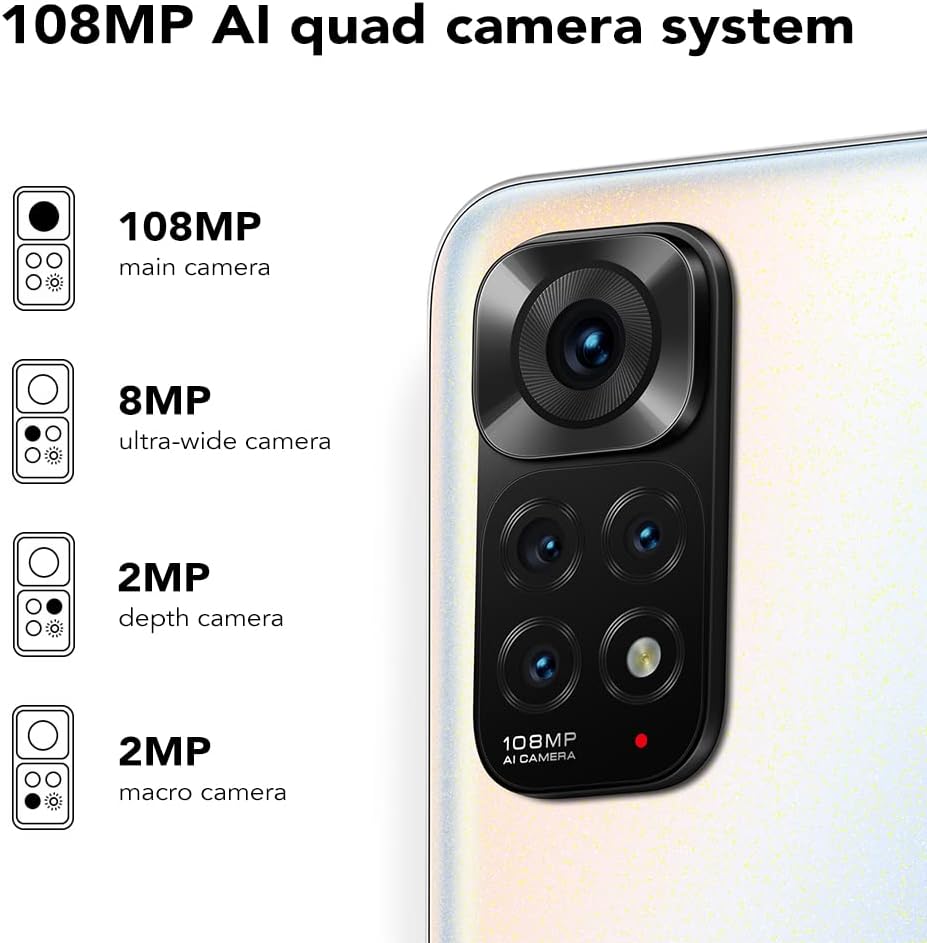
The Redmi Note 11S features a 108MP AI quad camera system on the rear and a 16MP selfie camera. The rear camera setup includes:
- 108 МП Үндсэн камер
- 8 МП Хэт өргөн камер
- 2 МП Макро камер
- 2 МП Гүн камер
Open the Camera application to access various modes such as Photo, Video, Portrait, Night Mode, and more.

Нарийвчилсан view of the 108MP AI quad camera system on the Redmi Note 11S, featuring a 108MP main camera, 8MP ultra-wide camera, 2MP depth camera, and 2MP macro camera.
4. Хадгалалт ба гүйцэтгэл
The device comes with 128GB of internal storage, expandable up to 1TB via a microSD card (sold separately). It is powered by the MediaTek Helio G96 processor, ensuring smooth performance for daily tasks and gaming.
5. Холболт
The Redmi Note 11S supports 4G cellular networks, Wi-Fi, and GPS for navigation and location services.
Засвар үйлчилгээ
1. Төхөөрөмжөө цэвэрлэж байна
Утасныхаа дэлгэц болон их биеийг цэвэрлэхдээ зөөлөн, хөвөнгүй даавуу ашиглаарай. Хүчтэй химийн бодис эсвэл зүлгүүрийн материал хэрэглэхээс зайлсхий. Төхөөрөмжийг хэт их чийгэнд бүү оруул.
2. Програм хангамжийн шинэчлэлтүүд
Таны төхөөрөмж хамгийн сүүлийн үеийн боломжууд, аюулгүй байдлын засварууд болон гүйцэтгэлийн сайжруулалттай байхын тулд програм хангамжийн шинэчлэлтүүдийг тогтмол шалгаж, суулгана уу. руу шилжих Тохиргоо > Утасны тухай > MIUI хувилбар шинэчлэлтүүдийг шалгахын тулд.
3. Зайны арчилгаа
Батерейны ашиглалтын хугацааг уртасгахын тулд:
- Хэт их температураас зайлсхий.
- Зайг байнга бүрэн шавхаж болохгүй.
- Use the original charger provided with the device.
4. Дулаан ялгаруулалт
The Redmi Note 11S incorporates LiquidCool technology with multiple layers of graphite and copper foil for efficient heat dissipation. Ensure proper airflow around the device during heavy usage to prevent overheating.

Дотоод view illustrating the multi-dimensional heat dissipation system using LiquidCool technology, which incorporates multiple layers of graphite and copper foil for efficient cooling.
Алдааг олж засварлах
This section addresses common issues you might encounter with your Redmi Note 11S.
Төхөөрөмж асахгүй байна
- Батерей цэнэглэгдсэн эсэхийг шалгаарай. Төхөөрөмжийг цэнэглэгчтэй дор хаяж 30 минут холбоно уу.
- Албадан дахин асаахын тулд асаах товчийг 10-15 секундын турш дарна уу.
Apps Freezing or Crashing
- Асуудалтай аппликейшнийг хаагаад дахин нээнэ үү.
- Програмын кэш болон өгөгдлийг цэвэрлэх Тохиргоо > Аппликешн > Програмыг удирдах > [Аппын нэр] > Өгөгдлийг арилгах.
- Таны програмууд болон үйлдлийн системүүд шинэчлэгдсэн эсэхийг шалгаарай.
Зайны хугацаа муу
- Adjust screen brightness and reduce screen timeout.
- Шаардлагагүй үед Wi-Fi, Bluetooth, GPS зэрэг ашиглагдаагүй функцуудыг идэвхгүй болго.
- Identify and close power-consuming apps running in the background.
Сүлжээний холболтын асуудлууд
- Төхөөрөмжөө дахин эхлүүлнэ үү.
- SIM картаа зөв оруулсан эсэхийг шалгана уу.
- Сүлжээний тохиргоог дахин тохируулах Тохиргоо > Холболт ба хуваалцах > Wi-Fi, мобайл сүлжээ болон Bluetooth-г дахин тохируулах.
Үзүүлэлтүүд
The following table outlines the key specifications for the Xiaomi Redmi Note 11S (Model: 2201117SY).
| Онцлог | Тодорхойлолт |
|---|---|
| Загварын нэр | NOTE 11s |
| Загварын дугаар | 2201117 SY |
| Брэнд | XIAOMI |
| Үйлдлийн систем | MIUI 12 |
| Дэлгэцийн хэмжээ | 6.43 инч |
| Дэлгэцийн төрөл | FHD+ AMOLED DotDisplay, 90Hz Refresh Rate |
| Арын камер | 108MP Main, 8MP Ultra-wide, 2MP Macro, 2MP Depth |
| Урд камер | 16 МП |
| RAM | 6 ГБ |
| Санах ойн хадгалах багтаамж | 128 ГБ (1 ТБ хүртэл өргөжүүлэх боломжтой) |
| Зайны багтаамж | 5000 саяampцаг (mAh) |
| Цэнэглэж байна | 33W Pro хурдан цэнэглэлт (бүрэн цэнэглэлтээр 58 минут) |
| Үүрэн холбооны технологи | 4G |
| Утасгүй зөөгч | Бүх тээвэрлэгчдэд зориулсан түгжээг тайлсан |
| Холболтын технологиуд | Wi-Fi, үүрэн холбоо |
| Онцлог шинж чанарууд | Dual SIM, GPS, Smartphone |
| Бүтээгдэхүүний хэмжээс | 2.9 x 0.32 x 6.29 инч |
| Зүйлийн жин | 6.3 унц (179 грамм) |
| Өнгө | Сувдан цагаан |

The aesthetic flat-frame design of the Redmi Note 11S, highlighting its slim profile (8.09mm thickness) and light weight (179g) for a comfortable grip.
Баталгаат хугацааны мэдээлэл
Specific warranty terms and conditions for the Xiaomi Redmi Note 11S may vary by region and retailer. Please refer to the warranty card included with your product packaging or visit the official Xiaomi website for detailed warranty information applicable to your purchase. Retain your proof of purchase for warranty claims.
Дэмжлэг
For further assistance, technical support, or service inquiries regarding your Xiaomi Redmi Note 11S, please visit the official Xiaomi support website or contact their customer service. You can typically find contact information and FAQs on the manufacturer's official webсайт.