Танилцуулга
This manual provides detailed instructions for the VEDINDUST HDMI ARC Digital to Analog Audio Converter. This device is designed to extract audio from an HDMI ARC-enabled television and convert digital audio signals (Toslink/Coaxial) into analog L/R stereo or 3.5mm jack outputs. It supports various audio formats and offers multiple input options for versatile connectivity.
Please read this manual carefully before using the product to ensure proper operation and to maximize its performance.
Багцын агуулга
Бүх зүйл багцад байгаа эсэхийг шалгана уу:
- 1x VEDINDUST HDMI ARC Digital to Analog Audio Converter
- 1х USB цахилгаан кабель
- 1x HDMI кабель
- 1x хэрэглэгчийн гарын авлага

Бүтээгдэхүүн дууссанview
The VEDINDUST HDMI ARC Digital to Analog Audio Converter is a compact device designed to manage various audio signals. It features multiple input and output ports for flexible audio routing.
Төхөөрөмжийн зохион байгуулалт
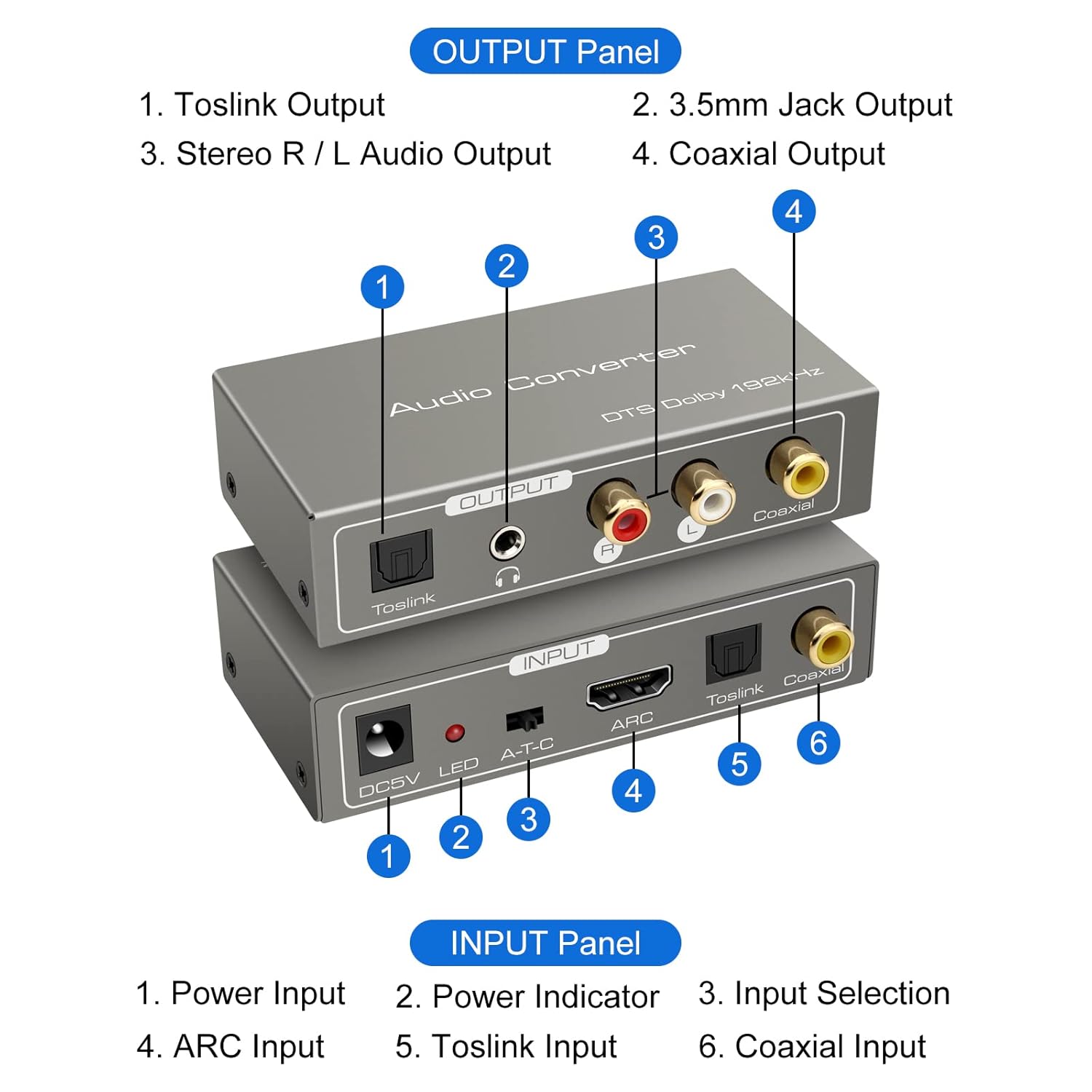
Оролтын самбар:
- DC5V тэжээлийн оролт: Connect the provided USB power cable here.
- LED үзүүлэлт: Төхөөрөмж асаалттай үед гэрэлтдэг.
- A-T-C Input Selection Switch: Used to select the audio input mode (A for ARC, T for Toslink, C for Coaxial).
- ARC оролт: Connect an HDMI cable from an ARC-compatible TV's HDMI ARC port.
- Toslink оролт: Connect an optical fiber cable from your audio source.
- Коаксиаль оролт: Connect a coaxial cable from your audio source.
Output Panel:
- Toslink гаралт: Connect to an optical input on an ampөргөгч эсвэл дууны систем.
- 3.5mm Jack Output: Connect to headphones or an auxiliary input on an audio device.
- Stereo R/L Audio Output: Connect RCA cables to the L/R analog inputs of an ampамьд эсвэл чанга яригч.
- Коаксиаль гаралт: Connect to a coaxial input on an ampөргөгч эсвэл дууны систем.
Тохируулах заавар
Follow these steps to correctly set up your VEDINDUST audio converter:
1. Эрчим хүчний холболт
- Connect the provided USB power cable to the DC5V input port on the converter.
- Plug the other end of the USB power cable into a 5V USB power adapter (not included) or a USB port on your TV/device.
- Ensure the LED indicator on the converter illuminates, indicating it is powered on.
2. Аудио оролтын холболт
Choose one of the following input methods based on your audio source:

ARC Input Mode:
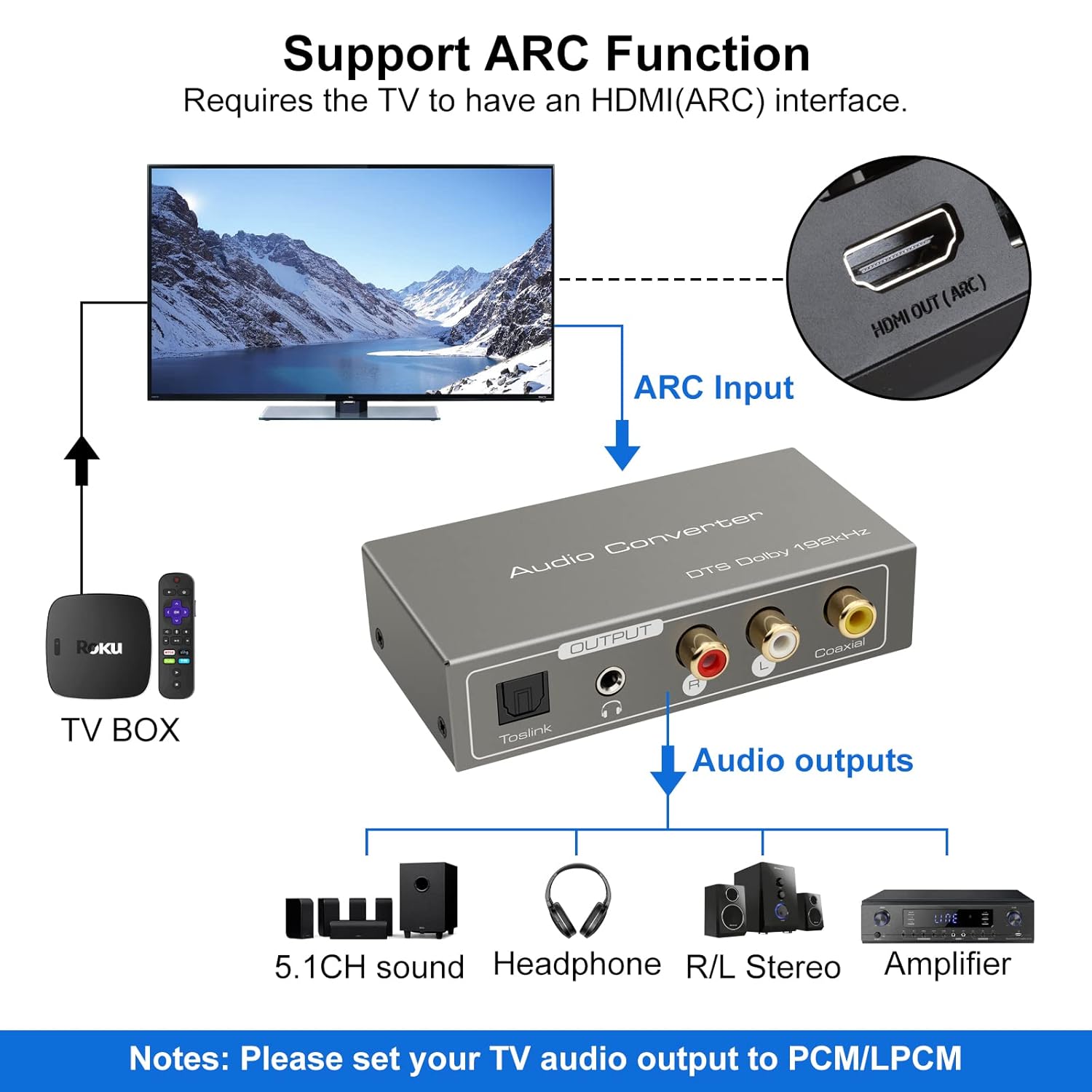
- Connect an HDMI cable from your ARC-compatible television's HDMI ARC output port to the ARC input port on the converter.
- Ensure your television's HDMI port supports ARC functionality.

TOSLink Input Mode:
- Connect an optical fiber cable from your audio source (e.g., game console, Blu-ray player) to the Toslink input port on the converter.
Coaxial Input Mode:
- Connect a coaxial cable from your audio source to the Coaxial input port on the converter.
3. Audio Output Connection
Connect the converter's output ports to your desired audio receiving devices:
- For Digital Audio: Connect an optical fiber cable to the Toslink Output or a coaxial cable to the Coaxial Output, then connect to your amplifier, soundbar, or home cinema system.
- For Analog Audio: Connect RCA L/R cables to the Stereo R/L Audio Output, or a 3.5mm audio cable to the 3.5mm Jack Output. Connect these to your amplifier, speakers, or headphones.
Ашиглалтын заавар
1. Оруулах горимын сонголт
Use the A-T-C switch on the input panel to select the active audio input:
- Шилжүүлэгчийг тохируулна уу 'A' for HDMI ARC input.
- Шилжүүлэгчийг тохируулна уу 'T' for TOSLink optical input.
- Шилжүүлэгчийг тохируулна уу 'C' for Coaxial input.

2. Audio Format Configuration
For optimal performance and to ensure audio output, especially when using the R/L or 3.5mm jack outputs, it is crucial to configure the audio format on your source device (e.g., TV, game console).
- Чухал: If you experience no sound output, set the audio format of your signal source (e.g., TV audio settings) to PCM or LPCM.
- The converter supports DTS / DSD / LPCM formats for Toslink/Coaxial output. However, for R/L or 3.5mm jack outputs, only LPCM/PCM audio format input is supported.
Алдааг олж засварлах
If you encounter issues while using the VEDINDUST HDMI ARC Digital to Analog Audio Converter, please refer to the following common problems and solutions:
-
Дууны гаралт байхгүй:
- Ensure the converter is properly powered via the DC5V input and the LED indicator is on.
- Verify that the A-T-C input selection switch is set to the correct input mode (A for ARC, T for Toslink, C for Coaxial).
- Check the audio settings on your source device (TV, game console, etc.). The audio output format must be set to PCM or LPCM, especially for analog (RCA L/R or 3.5mm) outputs.
- Confirm that all audio cables (HDMI, optical, coaxial, RCA, 3.5mm) are securely connected to both the converter and your audio devices.
- Test with different audio cables if possible, to rule out faulty cables.
-
ARC Function Not Working:
- Ensure your television's HDMI port specifically supports Audio Return Channel (ARC). Not all HDMI ports are ARC-enabled.
- Check your TV's audio settings to ensure ARC is enabled and configured correctly.
- Try restarting both your TV and the converter.
-
Аудио чанар муу:
- Ensure all connections are tight and free from interference.
- Verify that the audio format from your source is compatible with the converter's outputs (LPCM/PCM for analog outputs).
- Avoid using excessively long or low-quality cables, which can degrade signal integrity.
Техникийн үзүүлэлтүүд
| Бүтээгдэхүүний хэмжээ (L x W x H) | 9.8 x 5 x 0.1 см |
| Жин | 250 грамм |
| Үйлдвэрлэгч | ВЕДИНДУСТ |
| Загварын дугаар | 20220119 |
| Гарал үүслийн улс | Хятад |
| Өнгө | Саарал |
| Холбогч төрөл | HDMI, 3.5mm Jack, Toslink, Coaxial |
| Тохиромжтой төхөөрөмжүүд | Game Console, Blu-ray Player, Television, DVD Player, Satellite Receiver, Apple TV, HDTV, Soundbar, Amplifier, Speakers, Home Cinema System, AV Ampнастан |
| Кабелийн төрөл | HDMI, Optical, Coaxial, Auxiliary |
| Портын тоо | 5 |
| UPC | 798610310694 |
| Дэмжигдсэн Сampлинг давтамжууд | 32 KHz, 44.1 KHz, 48 KHz, 96 KHz, 192 KHz (24-bit) |
| Supported Audio Formats (Digital Output) | DTS, Dolby-AC3, DSD, LPCM |
| Supported Audio Formats (Analog Output) | LPCM, PCM |
Арчилгаа, засвар үйлчилгээ
To ensure the longevity and optimal performance of your VEDINDUST audio converter, please follow these care guidelines:
- Цэвэрлэгээ: Use a soft, dry cloth to clean the device. Do not use liquid cleaners or aerosol sprays, as they may damage the unit.
- Хадгалах: Төхөөрөмжийг нарны шууд тусгал, хэт температураас хол, сэрүүн, хуурай газар хадгална.
- Харьцуулах: Төхөөрөмжийг унагах эсвэл хүчтэй нөлөөнд оруулахаас зайлсхий.
- Байгаль орчин: Keep the device away from water, moisture, and high humidity environments.
Баталгаат болон хэрэглэгчийн дэмжлэг
For warranty information or if you require further assistance with your VEDINDUST HDMI ARC Digital to Analog Audio Converter, please contact VEDINDUST customer support through the retailer where you purchased the product or refer to the contact information provided with your purchase documentation.
Аливаа баталгаат нэхэмжлэлийн хувьд худалдан авалтаа нотлох баримтаа хадгална уу.