Танилцуулга
Thank you for choosing the Inateck KB02017 AZERTY Keyboard. This manual provides detailed instructions for setting up, operating, and maintaining your keyboard to ensure optimal performance and longevity. Please read this manual thoroughly before use.
Тохиромжтой байдал
The Inateck KB02017 keyboard is compatible with the following iPad models:
- iPad 10.2-inch (9th Generation, 2021)
- iPad 10.2-inch (8th Generation, 2020)
- iPad 10.2-inch (7th Generation, 2019)
- iPad Air 3 (10.5-inch, 2019)
- iPad Pro 10.5 инчийн

This image illustrates the compatible iPad models and how to locate your iPad's model number for verification.
Багцын агуулга
Дараах зүйлсийн багцад байгаа эсэхийг шалгана уу.
- Inateck KB02017 Magnetic Detachable Keyboard
- Хамгаалалтын хайрцаг
- USB цэнэглэгч кабель
- Хэрэглэгчийн гарын авлага
Бүтээгдэхүүний онцлог
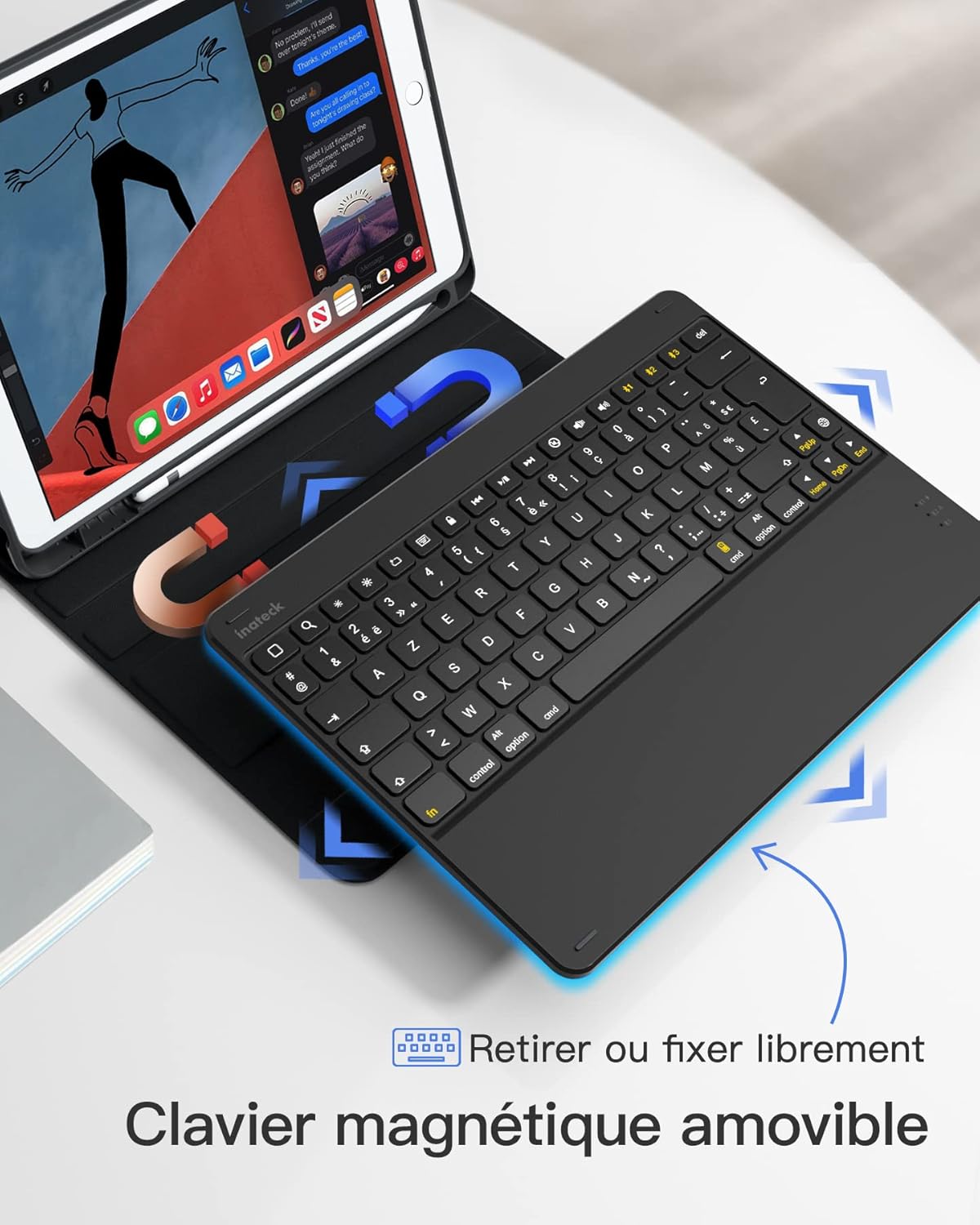
- Magnetic Detachable Design: The keyboard can be easily detached from the protective case, offering flexibility and portability. This allows you to use the iPad with or without the keyboard.
- True French AZERTY Layout: Designed with a genuine French AZERTY keyboard layout for comfortable and familiar typing.
- Олон Viewөнцөг: The case supports three adjustable viewing angles, allowing you to find the most comfortable position for typing, viewing, or drawing.
- Independent iOS Shortcut Keys: A dedicated row of shortcut keys provides quick access to various iOS functions, enhancing productivity.
- Бүрэн хамгаалалт: The flexible and shock-resistant protective case safeguards your iPad from daily bumps and scratches.
- Батерейны урт наслалт: Enjoy up to 100 hours of continuous operation or 50 days of standby time on a single charge.

The keyboard features a magnetic detachable design for versatile use.

The keyboard features a true French AZERTY layout.

Тохируулах боломжтой viewing angles provide ergonomic comfort.
Тохиргоо
1. Гарыг цэнэглэж байна
Before first use, fully charge the keyboard. Connect the provided USB charging cable to the keyboard's charging port and a USB power source. The charging indicator light will show the charging status.
2. Bluetooth хослол
- Гар цэнэглэгдэж, асаалттай байгаа эсэхийг шалгаарай.
- Өөрийн iPad дээр очно уу Тохиргоо > Bluetooth мөн Bluetooth-г асаана уу.
- -г удаан дар Fn + C keys simultaneously on the keyboard for 3 seconds. The Bluetooth indicator light will start flashing, indicating the keyboard is in pairing mode.
- On your iPad, look for "Inateck KB02017" (or similar name) in the list of available devices and tap to connect.
- Once connected, the Bluetooth indicator light on the keyboard will stop flashing and remain solid for a few seconds, then turn off.
The keyboard connects to your iPad via Bluetooth.
Ашиглалтын заавар
Товчлуурын товчлууруудыг ашиглах
The top row of the keyboard features dedicated iOS shortcut keys for quick access to various functions. These keys allow you to control your iPad efficiently without touching the screen.
| Түлхүүр дүрс | Чиг үүрэг |
|---|---|
| Гэр | Үндсэн дэлгэц рүү буцах |
| хайх | Activate Spotlight Search |
| Гэрэл буурах | Дэлгэцийн тод байдлыг багасгах |
| Гэрэлтүүлэх | Дэлгэцийн тод байдлыг нэмэгдүүлэх |
| Keyboard Hide/Show | Hide or show the on-screen keyboard |
| Өмнөх зам | Өмнөх медиа зам руу очно уу |
| Тоглуулах/түр зогсоох | Play or pause media playback |
| Дараагийн дуу | Дараагийн медиа зам руу очно уу |
| Дууг хаах | Дууны дууг хаах эсвэл нээх |
| Дууг багасгах | Дууны хэмжээг багасгах |
| Дууны хэмжээг нэмэгдүүлэх | Дууны хэмжээг нэмэгдүүлэх |
| Дэлгэцийг түгжих | Lock the iPad screen |

Dedicated shortcut keys for iOS functions.
Засвар үйлчилгээ
Цэвэрлэгээ
Гарыг цэвэрлэхийн тулд гадаргууг зөөлөн, d-ээр зөөлөн арчина.amp даавуу. Хүчтэй химийн бодис эсвэл зүлгүүрийн материал хэрэглэхээс зайлсхий. Гарны дотоод эд ангиудад шингэн орохгүй байхыг анхаар.
Батерейны арчилгаа
The keyboard is powered by a rechargeable battery. To prolong battery life:
- Charge the keyboard regularly, even if not in frequent use.
- Гарыг хэт өндөр температурт оруулахаас зайлсхий.
- Хэрэв удаан хугацаагаар хадгалах юм бол хадгалахаасаа өмнө батерейг 50% хүртэл цэнэглэ.

The keyboard offers long battery life for extended use.
Алдааг олж засварлах
Keyboard Fails to Connect via Bluetooth
- Clear the paired device history for "Inateck KB02017" on your iPad.
- Deactivate and then reactivate the keyboard's Bluetooth.
- -г удаан дар Fn + C keys for 3 seconds to enter Bluetooth pairing mode.
- Tap on "Inateck KB02017" in your iPad's Bluetooth device list to pair.
Some Keys Transmit Incorrect Values
If keys are not producing the expected characters (e.g., 'A' instead of 'Q' for AZERTY layout), ensure the correct keyboard layout is selected on your iPad:
- руу оч Тохиргоо > Генерал > Гар.
- Товшино уу Гар, дараа нь Add New Keyboard... if 'French (AZERTY)' is not listed.
- Доод Тоног төхөөрөмжийн гар, ensure the correct 'French (AZERTY)' layout is selected for your Inateck KB02017.

Common troubleshooting steps for connectivity and key input issues.
Үзүүлэлтүүд
| Онцлог | Дэлгэрэнгүй |
|---|---|
| Брэнд | Инатек |
| Загварын дугаар | KB02017 |
| Өнгө | Хар саарал |
| Холболтын технологи | Bluetooth |
| Эрчим хүчний төрөл | Батерейгаар ажилладаг |
| Гарын тайлбар | Бие даасан |
| Тохиромжтой төхөөрөмжүүд | iPad 2021/2020/2019 (9th/8th/7th Generation), iPad Air 3, iPad Pro 10.5 |
| Хэмжээ (L x W x H) | 25.5 x 19.8 x 1.8 см |
| Бүтээгдэхүүний жин | 0.65 кг (1.43 фунт) |
| Онцлог шинж чанар | Хөнгөн жинтэй |
| Материал | Aluminum, Polycarbonate, PBT |
Баталгаат болон дэмжлэг
For warranty information or technical support, please refer to the documentation included with your purchase or visit the official Inateck website. Contact details for customer service can typically be found on the product packaging or the brand's support page.