Laser DVD-HD012

Laser DVD CD Player HD012 User Manual

Model: DVD-HD012

Бүтээгдэхүүн дууссанview

The Laser DVD CD Player HD012 is a versatile multi-region player designed to provide a comprehensive home entertainment experience. It supports a wide array of disc and digital media formats, ensuring compatibility with your existing media library. Equipped with HDMI and AV outputs, it offers flexible connectivity options for various television setups. Its compact design and user-friendly interface make it an ideal addition to any home cinema system.

Laser DVD CD Player HD012 with remote control

Image: The Laser DVD CD Player HD012, a sleek black unit, is shown with its remote control resting on top. The player features a disc tray, USB port, and a digital display.

Юу багтсан бэ

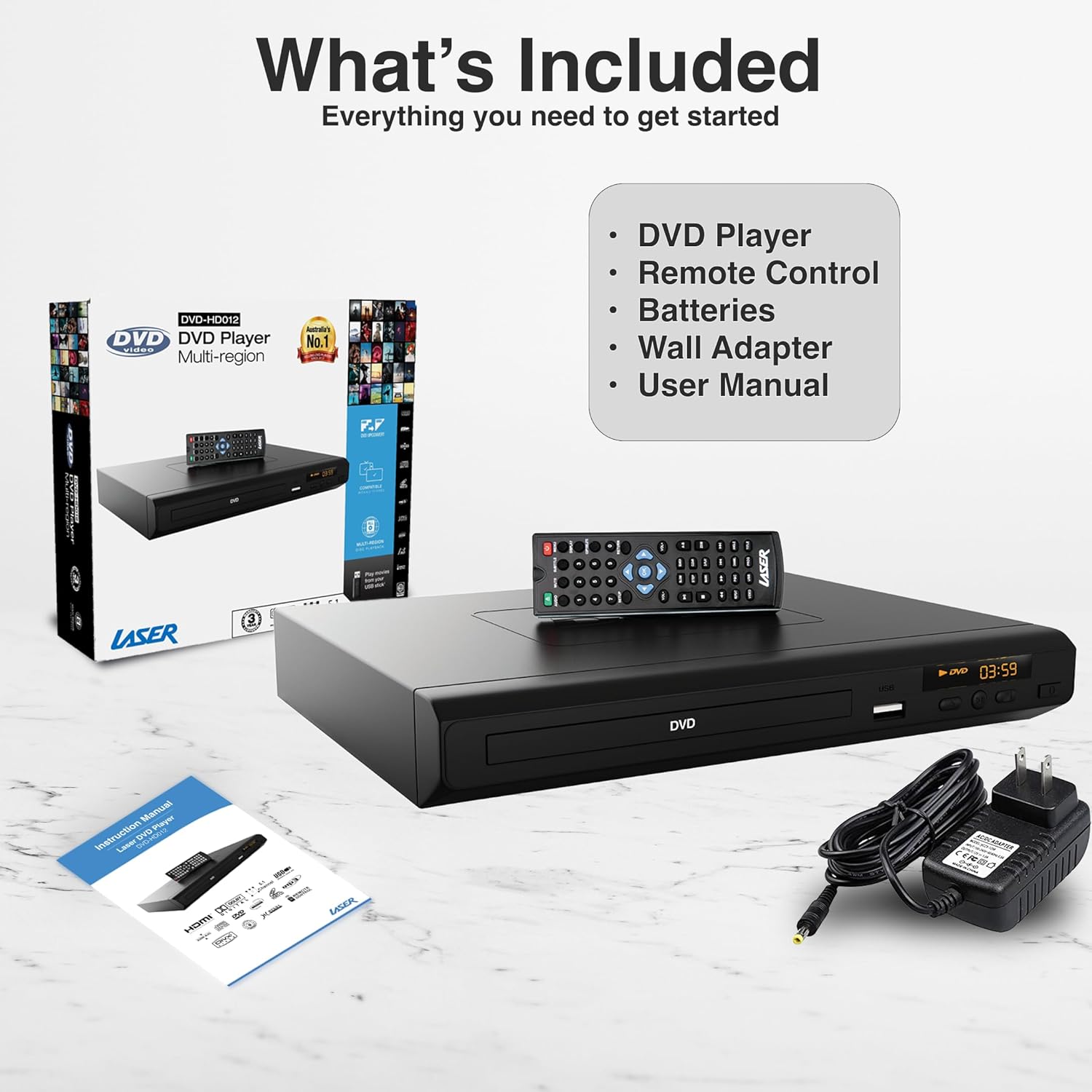
Upon unboxing your Laser DVD CD Player HD012, please verify that all the following components are present:

  • DVD Player (Model: DVD-HD012)
  • Алсын удирдлага
  • Wall Adapter (Power Supply)
  • Хэрэглэгчийн гарын авлага (энэ баримт бичиг)
  • Тэмдэглэл: Алсын удирдлагын батерейг багтаагүй бөгөөд тусад нь худалдаж авах шаардлагатай.
Contents included with the Laser DVD CD Player HD012

Image: A visual representation of the items included in the product package: the DVD player, its remote control, a wall power adapter, and the user manual, alongside the product packaging box.

Тохируулах гарын авлага

1. Connecting the Player to Your Television

The Laser DVD CD Player HD012 offers multiple connectivity options to suit your television setup:

  • HDMI Connection (Recommended for High Definition): For the best audio and video quality, connect an HDMI cable (not included) from the HDMI OUT port on the DVD player to an available HDMI IN port on your television. This single cable transmits both digital video and audio signals.
  • RCA Composite Connection (Standard Definition): If your television does not have an HDMI port, or if you prefer an analog connection, use an RCA composite cable (not included). Connect the yellow video cable to the VIDEO OUT port on the DVD player and the yellow VIDEO IN port on your TV. Connect the red and white audio cables to the AUDIO OUT (R/L) ports on the DVD player and the corresponding red and white AUDIO IN (R/L) ports on your TV.
HDMI Output connection diagram for Laser DVD Player

Image: An illustration demonstrating the HDMI output capability of the DVD player, showing a television screen displaying content and the DVD player connected via an HDMI cable, emphasizing high-definition video from a single cable.

2. Powering On the Player

  1. Connect the provided wall adapter to the DC IN port on the back of the DVD player.
  2. Ханын адаптерийг ердийн цахилгаан залгуурт холбоно уу.
  3. дээр дарна уу ХҮЧ button on the front of the DVD player or on the remote control to turn the unit on. The display will illuminate.
  4. Select the correct input source (HDMI or AV) on your television using your TV's remote control.

Ашиглалтын заавар

1. Диск тоглуулах

  1. Ensure the player is powered on and connected to your TV.
  2. дээр дарна уу НЭЭХ/ХААХ дискний тавиурыг нээхийн тулд урд самбар эсвэл алсын удирдлага дээрх товчлуурыг дарна уу.
  3. Carefully place a DVD or CD disc onto the tray with the label side facing up.
  4. дээр дарна уу НЭЭХ/ХААХ button again to close the tray. The player will automatically begin reading the disc.
  5. Use the remote control's ТОГЛОХ/ЗОГСООХ, ЗОГС, БУЦАХ, ба ХУРДАН Урагшаа Тоглуулахыг удирдах товчлуурууд.
Laser DVD Player supporting multiple media formats

Image: The DVD player and remote are shown with text indicating support for various video and additional media formats, including DVD-RW, VCD, CD-R, DivX, MP3, JPEG, AVI, MPEG, MPEG4, VOB, and FLV.

2. USB медиа тоглуулах

The player supports playback of digital media files from USB memory devices.

  1. Insert your USB flash drive into the USB port on the front of the DVD player.
  2. The player should automatically detect the USB device and display a menu for selecting media types (e.g., Photo, Music, Movie).
  3. Фолдерууд болон files using the arrow keys on the remote control and press ENTER сонгох.
  4. дарна уу ТОГЛОХ to start playback of the selected file.

3. Алсын удирдлагатай функцууд

The included IR remote control provides full functionality for operating your DVD player. Key buttons include:

  • ХҮЧ: Тоглогчийг асаах эсвэл унтраана.
  • НЭЭХ/ХААХ: Дискний тавиурыг нээж хаадаг.
  • ТОГЛОХ/ЗОГСООХ: Тоглуулахыг эхлүүлэх эсвэл түр зогсоох.
  • ЗОГСООХ: Тоглуулахыг зогсооно.
  • Өмнөх/Дараагийн: Өмнөх эсвэл дараагийн бүлэг/дуу руу алгасах.
  • REW/FF: Rewinds or fast forwards through content.
  • VOL +/-: Adjusts the volume (if connected directly to an audio system or TV via analog output).
  • ТОХИРУУЛАХ: Системийн тохиргооны цэсэнд хандана.
  • TITLE/MENU: Accesses the disc title or main menu.
  • USB: Switches input to USB mode.

4. Region-Free Playback

This DVD player is designed to be multi-region (region-free), allowing you to play DVDs from any region worldwide (Region 0-6). This feature ensures broad compatibility with your international DVD collection.

Region-Free Playback feature of Laser DVD Player

Image: The DVD player and remote are depicted against a global map background, highlighting its "Region-Free Playback" capability, allowing users to enjoy DVDs from any part of the world, supporting both PAL and NTSC formats.

5. Supported Media Formats

The Laser DVD CD Player HD012 supports a wide range of disc and digital media formats:

АнгилалДэмжигдсэн форматууд
Дискийн форматDVD-R/-RW, DVD-Video, DVD+R/+RW, CD, CD-R/RW, VCD, SVCD, HDCD
Video Formats (via USB)AVI, DivX, MPEG, MPEG4, VOB, FLV
Audio Formats (via USB/Disc)MP3, WMA, Dolby Digital, DTS
Image Formats (via USB)JPEG

The player also features built-in Anti-Shock and Error-Correction technologies to ensure uninterrupted viewсонсох, сонсох таашаал.

Full HD 1080p immersive audiovisual experience with Laser DVD Player

Image: A living room setup showing the DVD player connected to a large television displaying a movie in Full HD 1080p, indicating an immersive audiovisual experience with Dolby 7.1 Surround Sound support.

Засвар үйлчилгээ

To ensure the longevity and optimal performance of your Laser DVD CD Player HD012, follow these maintenance guidelines:

  • Төхөөрөмжийг цэвэрлэх: Use a soft, dry cloth to wipe the exterior of the player. Do not use liquid cleaners, abrasive cleaners, or chemical sprays, as these can damage the finish.
  • Дискний арчилгаа: Handle discs by their edges. Keep discs clean and free of dust, fingerprints, and scratches. Use a soft, lint-free cloth to wipe discs from the center outwards if cleaning is necessary.
  • Агааржуулалт: Ensure the player is placed in a well-ventilated area. Do not block any ventilation openings on the unit. Avoid placing it on soft surfaces like carpets or blankets that could obstruct airflow.
  • Хадгалах: When not in use for extended periods, disconnect the power adapter and store the player in a cool, dry place away from direct sunlight and extreme temperatures.

Алдааг олж засварлах

If you encounter issues with your DVD player, please refer to the following common problems and their solutions:

АсуудалБоломжит шалтгаан / шийдэл
Хүч чадалгүй
  • Ensure the power adapter is securely connected to the player and the electrical outlet.
  • Цахилгаан залгуур ажиллаж байгаа эсэхийг өөр төхөөрөмжид залгаж шалгана уу.
  • Press the POWER button on the player or remote control.
Зурагтаар зураг байхгүй
  • HDMI эсвэл RCA кабель нь тоглуулагч болон ТВ хоёуланд нь найдвартай холбогдсон эсэхийг шалгана уу.
  • Ensure your TV is set to the correct input source (e.g., HDMI 1, AV).
  • Check if the disc is inserted correctly and is not damaged.
Дуу алга
  • Аудио кабелийн холболтыг шалгана уу (HDMI эсвэл RCA).
  • ТВ эсвэл аудио хүлээн авагчийнхаа дууны түвшинг нэмэгдүүл.
  • Ensure the player's volume is not muted or set too low.
  • Verify the audio settings in the player's setup menu.
Диск тоглогдохгүй байна / "Диск байхгүй" алдаа
  • Диск нь цэвэр, зураас, толбо байхгүй эсэхийг шалгаарай.
  • Дискийг шошготой талыг нь дээш харуулан зөв оруулсан эсэхийг шалгана уу.
  • Check if the disc format is supported by the player (refer to Supported Media Formats section).
Алсын удирдлага ажиллахгүй байна
  • Ensure fresh batteries are installed correctly (polarity).
  • Point the remote directly at the player's IR sensor.
  • Алсын удирдлага болон тоглуулагчийн хоорондох аливаа саад тотгорыг арилга.

Хэрэв эдгээр шийдлүүдийг туршиж үзсэний дараа асуудал хэвээр байвал хэрэглэгчийн дэмжлэгтэй холбогдоно уу.

Техникийн үзүүлэлтүүд

ОнцлогДэлгэрэнгүй
БрэндЛазер
ЗагварDVD-HD012
Тохиромжтой төхөөрөмжүүдТелевиз
Дэмжигдсэн Медиа ТөрлүүдCD, DVD, VCD (and various digital formats via USB as listed above)
Холбогч төрлүүдHDMI, RCA (Composite), USB (1 port)
Дэмжигдсэн аудио форматуудMP3, WMA, Dolby Digital, DTS
Аудио гаралтын горимХүрээлэн
Онцлог шинж чанаруудAnti-Shock, Error-Correction, Multi-Region Playback
Resolution (Upscaling)Up to 3840x2160 (4K) via HDMI (for compatible media and display)
Эрчим хүчний эх үүсвэрУтастай цахилгаан
Бүтээгдэхүүний хэмжээ (L x W x H)22 x 18 x 4.5 см
Зүйлийн жин742 грамм

Баталгаат болон дэмжлэг

Your Laser DVD CD Player HD012 comes with a 3 жилийн баталгаат хугацаа from the date of purchase, providing peace of mind regarding its quality and performance. This warranty covers manufacturing defects and ensures reliable operation under normal use conditions.

For warranty claims, technical assistance, or any inquiries regarding your product, please contact Laser customer support. Keep your proof of purchase (receipt or invoice) readily available as it will be required for any warranty service.

For the most up-to-date support information, including contact details and FAQs, please visit the official Laser webсайт эсвэл худалдан авалтын баримт бичигт өгөгдсөн холбоо барих мэдээллийг лавлана уу.

Холбогдох баримт бичиг - DVD-HD012

Урьдчилсанview BLU-BD1080 бүсийн кодыг өөрчлөх гарын авлага - Лазер
Laser BLU-BD1080 тоглуулагч дээрх DVD болон Blu-ray бүсийн кодыг хэрхэн өөрчлөх талаар олж мэдээрэй. Энэхүү гарын авлага нь өөр өөр орны дискний бүсийн кодыг тохируулах алхам алхмаар зааварчилгааг өгдөг.
Урьдчилсанview Laser DVD Player DVD-HD012 Instruction Manual
Comprehensive instruction manual for the Laser DVD Player model DVD-HD012, covering setup, operation, features, troubleshooting, specifications, and warranty information.
Урьдчилсанview Laser DVD-PT-7D Portable DVD Player User Manual
User manual for the Laser DVD-PT-7D 7-inch portable DVD player, covering setup, playback, system settings, troubleshooting, specifications, and warranty information.
Урьдчилсанview LASER DVD-PT-7D 7" Зөөврийн DVD тоглуулагчийн хэрэглэгчийн гарын авлага
LASER DVD-PT-7D 7 инчийн зөөврийн DVD тоглуулагчийн аюулгүй байдал, ажиллагаа, тохиргоо, алдааг олж засварлах болон техникийн үзүүлэлтүүдийг багтаасан цогц хэрэглэгчийн гарын авлага. Хамгийн оновчтой зугаа цэнгэлийн төлөө төхөөрөмжөө хэрхэн ашиглах талаар суралцаарай.
Урьдчилсанview Laser Retro Blaster CDBB-166 Quick Guide - Setup, Features, and Troubleshooting
Comprehensive quick guide for the LASER Laser Retro Blaster CDBB-166 boombox. Learn how to set up power, clock, use CD, USB, Bluetooth, and Radio functions, manage timers, record to USB, and find troubleshooting tips. Includes warranty information.
Урьдчилсанview LASER MP4-T10 хэрэглэгчийн гарын авлага: Бүрэн гарын авлага
Энэхүү хэрэглэгчийн гарын авлагад LASER MP4-T10 мультимедиа тоглуулагчийг ажиллуулах дэлгэрэнгүй зааварчилгаа, хөгжим тоглуулах, гэрэл зураг гэх мэт зүйлсийг багтаасан болно. viewхөгжим сонсох, видео бичлэг хийх, FM радио, цахим ном унших, төхөөрөмжийн тохиргоо.