Танилцуулга
Thank you for choosing the NACON Asymmetric Wireless Controller for PlayStation 4. This controller is officially licensed for PlayStation 4 and designed to provide an immersive gaming experience with its unique asymmetric stick layout and wireless connectivity. This manual will guide you through the setup, operation, maintenance, and troubleshooting of your new controller.
Хайрцагт юу байна
Бүх зүйл байгаа эсэхийг шалгахын тулд багцынхаа агуулгыг шалгана уу:
- NACON Asymmetric Wireless Controller
- USB хүлээн авагч
- USB цэнэглэгч кабель
- Хурдан эхлүүлэх гарын авлага (энэ дижитал гарын авлагад ороогүй болно)
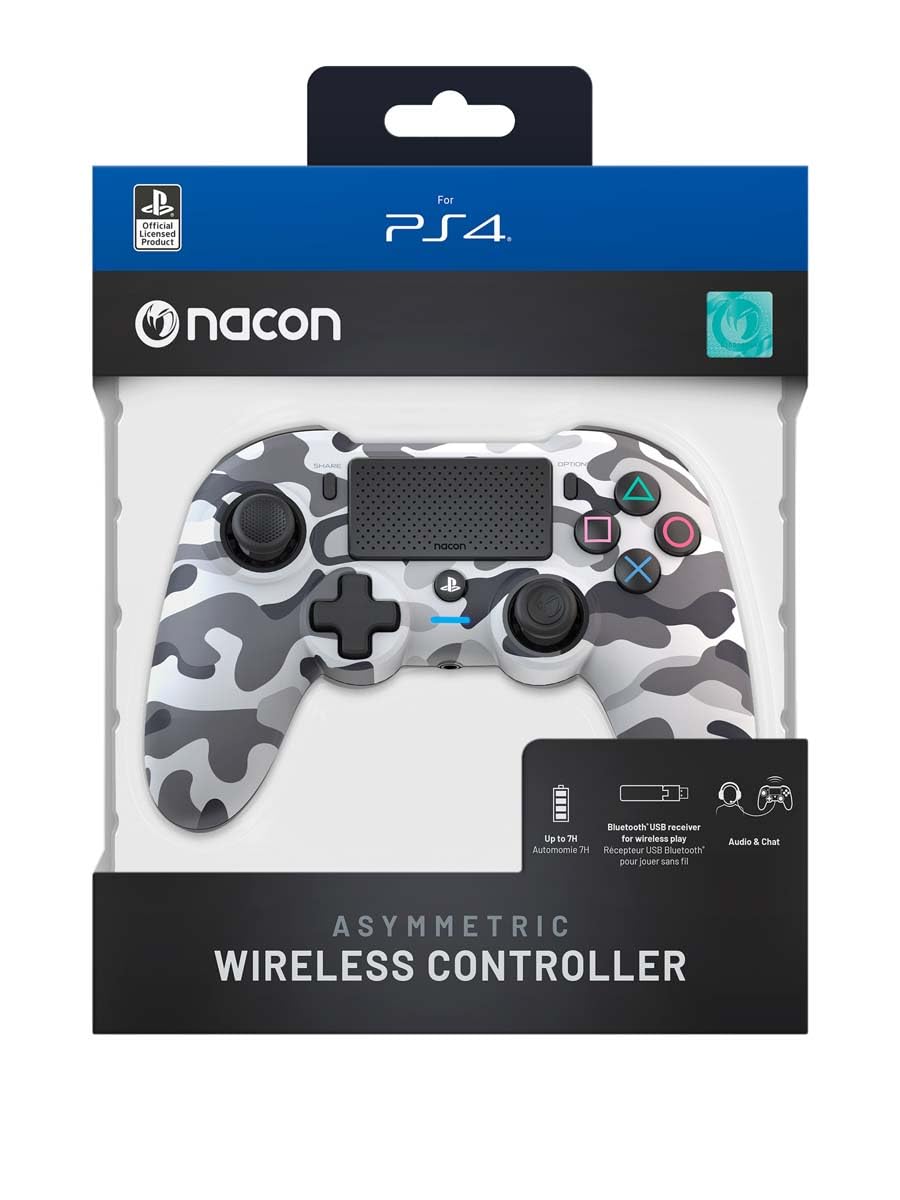
Image: The NACON Asymmetric Wireless Controller shown in its retail packaging, highlighting the product and its key features.
Тохиргоо
1. Хянагчийг цэнэглэж байна
Before first use, fully charge the controller. Connect the small end of the USB charging cable to the controller's charging port and the larger end to a USB port on your PlayStation 4 console or a compatible USB wall adapter. The LED indicator on the controller will show charging status and turn off when fully charged.
2. Connecting to PlayStation 4 (Wireless)
- Insert the USB Receiver into an available USB port on your PlayStation 4 console.
- Press the PlayStation button on the controller. The controller will automatically attempt to pair with the USB Receiver.
- Once successfully paired, the LED indicator on the controller will illuminate steadily, indicating a stable connection.
3. Connecting to PC (Wireless)
The controller can also be used with a PC. Insert the USB Receiver into an available USB port on your PC. The controller should be recognized automatically by Windows as a standard gamepad. Drivers may be installed automatically.

Зураг: Урд view of the NACON Asymmetric Wireless Controller, showcasing its button layout and asymmetric stick design.
Хянагчийг ажиллуулах
Товчлуурын байршил ба функцууд
The NACON Asymmetric Wireless Controller features a familiar PlayStation button layout with an ergonomic asymmetric stick configuration for enhanced comfort and precision.
- Зүүн аналог зөөгч: Used for movement and navigation.
- Баруун аналог зөөгч: Used for camera control and aiming.
- Чиглэлийн дэвсгэр (D-Pad): Нарийвчлалтай чиглэлтэй оролтын хувьд.
- Үйлдлийн товчлуурууд (Гурвалжин, Тойрог, Загалмай, Дөрвөлжин): Standard PlayStation action buttons.
- L1/R1 товчлуурууд: Мөрний товчлуурууд.
- L2/R2 өдөөгч: Analog triggers for precise input.
- ХУВААЛЦАХ Товч: Access sharing features on PS4.
- СОНГОЛТУУД Товч: Тоглоомын цэс болон сонголтуудад хандах.
- PlayStation Button: Power on/off the controller, access PS4 Home Menu.
- Мэдрэгч самбар: Interactive surface for specific game functions.
Зайны үзүүлэлт
The controller includes an LED indicator that provides information on battery status. Refer to the Quick Start Guide for specific LED patterns and their meanings (e.g., low battery, charging, fully charged).
Засвар үйлчилгээ
Цэвэрлэгээ
Удирдлагаа цэвэрлэхийн тулд зөөлөн, хуурай даавуу ашиглана уу. Зөрүүд шороонд бага зэрэг dampen the cloth with water. Do not use harsh chemicals, abrasive cleaners, or solvents, as these can damage the controller's finish and internal components.
Хадгалах
When not in use, store the controller in a cool, dry place away from direct sunlight and extreme temperatures. Avoid placing heavy objects on the controller.
Батерейны арчилгаа
To prolong battery life, avoid fully discharging the controller frequently. If storing for an extended period, charge the battery to approximately 50% before storage and recharge every few months.
Алдааг олж засварлах
| Асуудал | Боломжит шийдэл |
|---|---|
| Хянагч холбогдоогүй байна. |
|
| Хянагч цэнэглэгдэхгүй байна. |
|
| Buttons or sticks are unresponsive. |
|
Хянагчийг дахин тохируулж байна
If the controller is unresponsive or behaving erratically, a soft reset may resolve the issue. Locate the small reset button (often a pinhole) on the back or underside of the controller. Use a thin, pointed object (like a paperclip) to press and hold the button for a few seconds. Then, re-pair the controller with your console.
Үзүүлэлтүүд
- Загварын дугаар:
- 10946680
- Холболт:
- Wireless (via USB Receiver)
- Тохиромжтой байдал:
- PlayStation 4, PC
- Dimensions (Controller):
- Ойролцоогоор 6.89 x 2.76 x 8.27 инч (17.5 x 7 x 21 см)
- Weight (Controller):
- Ойролцоогоор 14.1 унц (400 грамм)
- Үйлдвэрлэгч:
- НАКОН
- Эхний боломжтой огноо:
- 6 оны долдугаар сарын 2022
Баталгаат болон дэмжлэг
For warranty information, technical support, or further assistance with your NACON Asymmetric Wireless Controller, please visit the official NACON webсайт эсвэл хэрэглэгчийн дэмжлэгтэй шууд холбогдоно уу. Баталгаат нэхэмжлэл гаргахын тулд худалдан авалтаа нотлох баримтаа хадгалаарай.
Албан ёсны NACON Webсайт: www.nacongaming.com


