Танилцуулга
This manual provides detailed instructions for the setup, operation, and maintenance of your TOMLOV DM201 HDMI Digital Microscope. Please read this manual thoroughly before using the device to ensure proper function and longevity.
Бүтээгдэхүүн дууссанview
The TOMLOV DM201 is a versatile digital microscope featuring a 7-inch HD screen, 16MP camera, and dual HDMI/USB output. It is designed for various applications including coin inspection, soldering, and general observation.
Гол онцлогууд:
- 7-inch HD IPS Screen: Provides clear and vivid images with a wide viewөнцөг.
- 16MP HD камер: Captures high-resolution photos and videos.
- 2-1200X Magnification: Adjustable magnification for observing fine details.
- Хос гэрэлтүүлгийн систем: Equipped with 6 LED lights around the lens and 2 adjustable side lights for optimal lighting.
- HDMI/USB Output: Connects to external monitors (HDMI) or computers (Windows/Mac via USB) for larger viewing.
- Өргөтгөх хоолой: Included for increased working distance, ideal for viewing entire coins.
- Ухаалаг алсын удирдлага: Allows for hands-free operation, photo/video capture, and settings adjustment.
- Тохируулах тавиур ба монитор: Ergonomic design for flexible positioning and comfortable viewing.
- 32GB Micro-SD Card: Included for saving captured images and videos.
Багцын агуулга:

Зураг: Contents of the TOMLOV DM201 package, including the microscope unit, bracket, base plate, extension tube, remote control, user manual, HDMI cable, USB cable, lens cleaning cloth, 5V charger, and light barrier.
Доор жагсаасан бүх зүйл таны багцад байгаа эсэхийг шалгана уу.
- DM201 Microscope Unit
- Тохируулах хаалт
- Суурь хавтан
- Өргөтгөх хоолой
- Алсын удирдлага
- Хэрэглэгчийн гарын авлага
- HDMI кабель
- USB кабель
- Линз цэвэрлэх даавуу
- 5V цэнэглэгч
- Гэрлийн хаалт
- 32GB Micro-SD Card (pre-installed or separate)
Тохируулах заавар
1. Угсралт:
Follow these steps to assemble your TOMLOV DM201 Digital Microscope:
- Attach the adjustable bracket to the base plate using the provided screws.
- Slide the microscope unit onto the vertical rod of the bracket. Secure it at the desired height using the locking knob.
- Connect the two flexible side LED lights to the designated ports on the base plate. Position them to illuminate your observation area.
- If observing larger objects like entire coins, insert the extension tube between the microscope lens and the main unit to increase the working distance.

Зураг: Fully assembled TOMLOV DM201 Digital Microscope with the 7-inch screen, main lens, flexible side lights, and remote control. An extension tube and 32GB Micro-SD card are also shown separately.
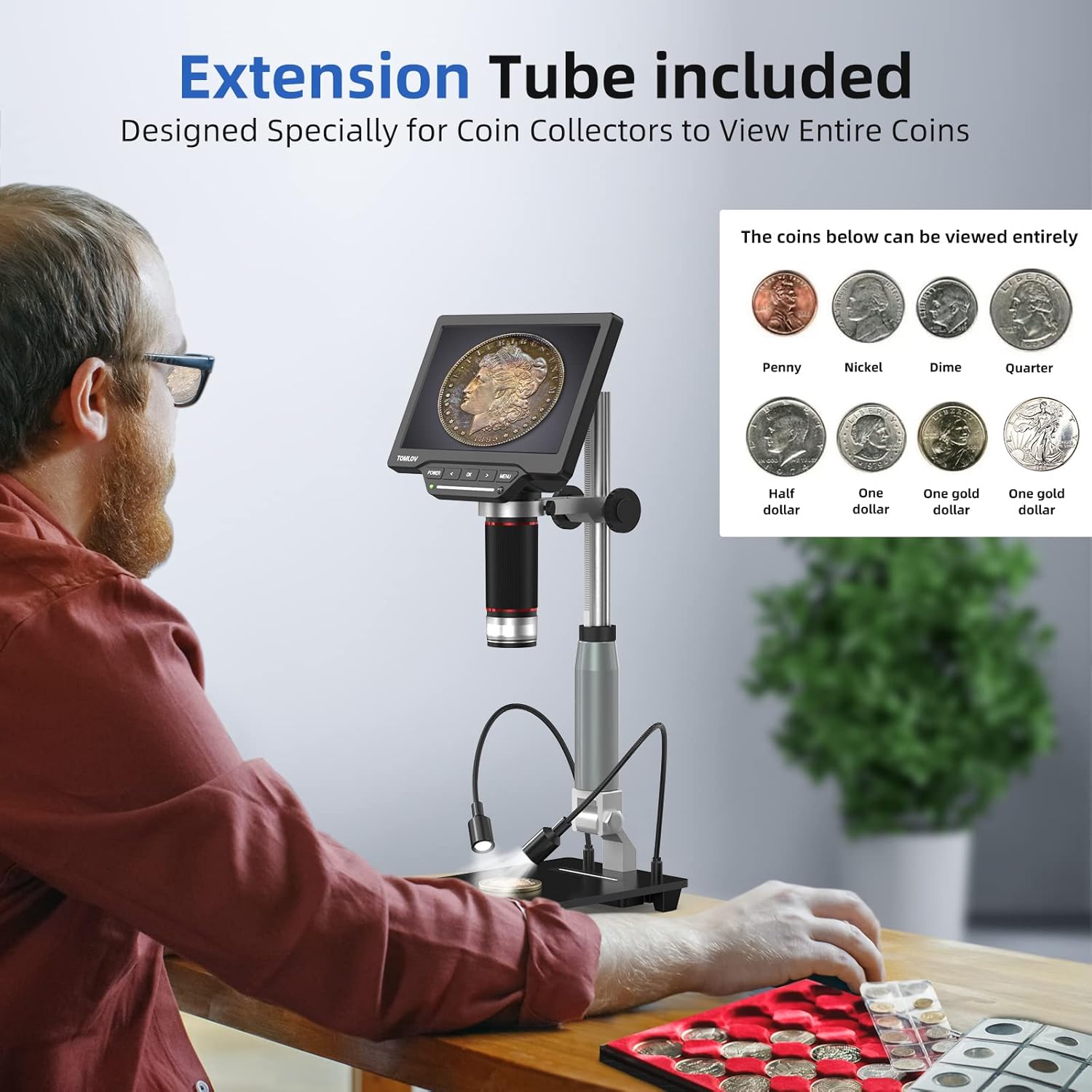
Зураг: A user observing a coin using the TOMLOV DM201 microscope with the extension tube installed, demonstrating its capability to view entire coins.
2. Асаах:
Connect the 5V charger to the microscope's power input and plug it into a power outlet. Press and hold the ХҮЧ button on the microscope unit to turn it on. The screen will illuminate.
3. External Display Connection (Optional):
The DM201 supports output to external displays via HDMI or USB.
- HDMI гаралт: Connect the provided HDMI cable from the microscope's HDMI port to an HDMI-enabled TV or monitor. The microscope display will automatically switch to the external screen.
- USB Output (PC/Mac): Connect the provided USB cable from the microscope's USB port to your computer.
- Windows 10: Open the default "Windows Camera" application.
- макос: Open the "Photo Booth" application.

Зураг: The TOMLOV DM201 microscope connected to a large external monitor via HDMI, showcasing its dual output capability for a larger viewтуршлага.
Ашиглалтын заавар
1. Үндсэн ажиллагаа:
- Асаах/унтраах: -г удаан дар ХҮЧ товч.
- Фокусын тохируулга: Rotate the large focusing knob on the microscope unit to achieve a clear image.
- Magnification (Zoom): The DM201 offers 2X to 1200X magnification. Adjust the distance between the lens and the object, and fine-tune with the focusing knob.
- Цэсийн навигаци: -г ашиглана уу Цэс button to access settings. Use the ЗҮҮН болон ЗӨВ arrow buttons to navigate, and OK сонголтыг баталгаажуулах.

Зураг: A user demonstrating the 2X-1200X zoom capability of the TOMLOV DM201 microscope, observing a peacock feather on the screen.
2. Гэрэлтүүлгийн тохируулга:
The microscope features a dual illumination system:
- Top LED Lights: 6 LEDs surround the main lens. Their brightness can be adjusted via the microscope's controls or remote.
- Side Flexible Lights: 2 adjustable gooseneck lights provide additional illumination. These can be positioned to reduce shadows and highlight specific features of the object.

Зураг: Diagram illustrating the dual illumination system of the TOMLOV DM201, showing both the top LED lights and the two flexible side lights, highlighting their versatility.
3. Зураг болон видео авах:
The DM201 can capture images up to 16MP and record videos at 1080p 30fps or 720p 60fps. All captures are saved to the included 32GB Micro-SD card.
- Зураг авах: Амьд байна view горимд дарна уу OK button on the microscope or the camera button on the remote control.
- Видео бичлэг хийх: Амьд байна view горимд дарна уу Цэс button to switch to video mode (indicated by a video icon). Then, press OK or the video button on the remote to start/stop recording.
- Тоглуулах: Access the gallery/playback mode via the Цэс дахин товчлуурview баригдсан хэвлэл мэдээллийн хэрэгсэл.

Зураг: A collage of images and video frames captured by the TOMLOV DM201, demonstrating its capability to record various subjects like coins, insects, electronic components, and plants.
4. Алсын удирдлага ашиглах:
The remote control provides convenient access to functions without touching the microscope, minimizing vibrations during capture.
- Эрчим хүч: Turn the microscope on/off.
- Зураг/Видео: Switch between photo and video modes, and trigger capture.
- Навигац: Control menu navigation and settings adjustments.
- Гэрэлтүүлэг: LED гэрлийн эрчимийг тохируулна уу.
Засвар үйлчилгээ
- Линз цэвэрлэх: Use the provided lens cleaning cloth or a soft, lint-free cloth specifically designed for optics. Do not use abrasive materials or harsh chemicals.
- Дэлгэц цэвэрлэх: Wipe the screen gently with a microfiber cloth. Avoid excessive pressure.
- Ерөнхий цэвэрлэгээ: Use a soft, dry cloth to wipe the microscope body and stand.
- Хадгалах: Store the microscope in a clean, dry, and dust-free environment when not in use. Avoid extreme temperatures and direct sunlight.
- Батерейны арчилгаа: The microscope contains a Lithium Polymer battery. For optimal battery life, avoid fully discharging the battery frequently and store it with a partial charge if not used for extended periods.
Алдааг олж засварлах
| Асуудал | Боломжит шалтгаан | Шийдэл |
|---|---|---|
| Microscope does not power on. | Бага зай эсвэл тэжээлийн адаптерийн асуудал. | Ensure the microscope is fully charged or connected to a working power outlet. Check the power adapter and cable. |
| Зураг бүдэг байна. | Incorrect focus or working distance. | Rotate the focusing knob to adjust focus. Adjust the height of the microscope unit on the stand. Ensure the object is within the working distance. |
| No image on external monitor/PC. | Incorrect cable connection or software issue. | Verify HDMI/USB cable connections. For PC/Mac, ensure the correct application ("Windows Camera" or "Photo Booth") is open and selected the microscope as the input device. |
| Зураг/видео хадгалах боломжгүй. | SD карт дүүрсэн, оруулаагүй эсвэл эвдэрсэн байна. | Check if the 32GB Micro-SD card is properly inserted. Ensure there is sufficient space. Format the SD card (this will erase all data) or replace it if corrupted. |
| Алсын удирдлага ажиллахгүй байна. | Battery depleted or line of sight blocked. | Replace the remote control battery. Ensure there is a clear line of sight between the remote and the microscope's IR receiver. |
Үзүүлэлтүүд
| Загварын нэр | DM201 |
| Брэнд | ТОМЛОВ |
| Дэлгэцийн хэмжээ | 7 инчийн HD IPS |
| Камерын нягтрал | 16 мегапиксел |
| Томруулах хүрээ | 2X-аас 1200X хүртэл |
| Гаралтын портууд | HDMI, USB |
| Тохиромжтой төхөөрөмжүүд | HDMI Projector & Monitor, Laptop, Personal Computer, Television |
| Хадгалах | 32GB Micro-SD карт (багцад багтсан) |
| Гэрлийн эх үүсвэр | LED (6 top, 2 flexible side) |
| Эрчим хүчний эх үүсвэр | Батерейгаар ажилладаг (1 литийн полимер батерей багтсан) |
| Материал | Металл |
| Өнгө | Мөнгө |
| Зүйлийн хэмжээ | 28.1 x 26.9 x 9.8 см |
| Зүйлийн жин | 1.64 кг |
Баталгаат болон дэмжлэг
TOMLOV products are designed for reliability and performance. For warranty information and technical support, please refer to the official TOMLOV webсайт эсвэл харилцагчийн үйлчилгээтэй шууд холбогдоно уу. Худалдан авалтын баримтаа баталгаат нэхэмжлэлд зориулж худалдан авалтын баталгаа болгон хадгална уу.
Нэмэлт тусламж авахыг хүсвэл зочилно уу: www.tomlov.com