1. Танилцуулга
Худалдан авалт хийсэнд баярлалааasing the Aogamb D3000 Kids Alarm Clock. This device combines a digital alarm clock, Bluetooth speaker, wake-up light, and sleep sound machine to create a versatile and engaging experience for children's bedrooms. Please read this manual carefully to ensure proper use and maintenance of your device.
Багцын агуулга:
- Aogamb D3000 Alarm Clock
- USB цэнэглэгч кабель
- Хэрэглэгчийн гарын авлага

Image: The Aogamb D3000 Alarm Clock, USB charging cable, and user manual are shown as included items.
2. Аюулгүй байдлын мэдээлэл
- Төхөөрөмжийг хэт өндөр температур, нарны шууд тусгал, өндөр чийгшилд бүү тавь.
- Төхөөрөмжийг ус болон бусад шингэнээс хол байлга.
- Төхөөрөмжийг өөрөө задлах, засах гэж бүү оролдоорой. Тусламж авахын тулд хэрэглэгчийн дэмжлэгтэй холбоо барина уу.
- Зөвхөн өгсөн USB цэнэглэгч кабель эсвэл баталгаажуулсан түүнтэй адилтгах төхөөрөмжийг ашиглана уу.
- Ensure the device is placed on a stable surface to prevent falling.
3. Тохиргоо
Анхны цэнэглэлт
Before first use, fully charge the alarm clock using the provided USB cable. Connect the USB cable to the charging port on the back of the device and to a suitable USB power adapter (not included). The charging indicator light will be red during charging and turn blue when fully charged.
Зураг: Ойрын зураг view of the USB charging interface located on the back of the alarm clock.
Хамгаалалтын хальс арилгах
Before operating the device, gently remove the transparent protective film from the black display lens.
Image: A hand is shown peeling off a transparent protective film from the black display area of the alarm clock.
4. Ашиглалтын заавар
Хяналтview
Familiarize yourself with the buttons located on the top of the alarm clock:
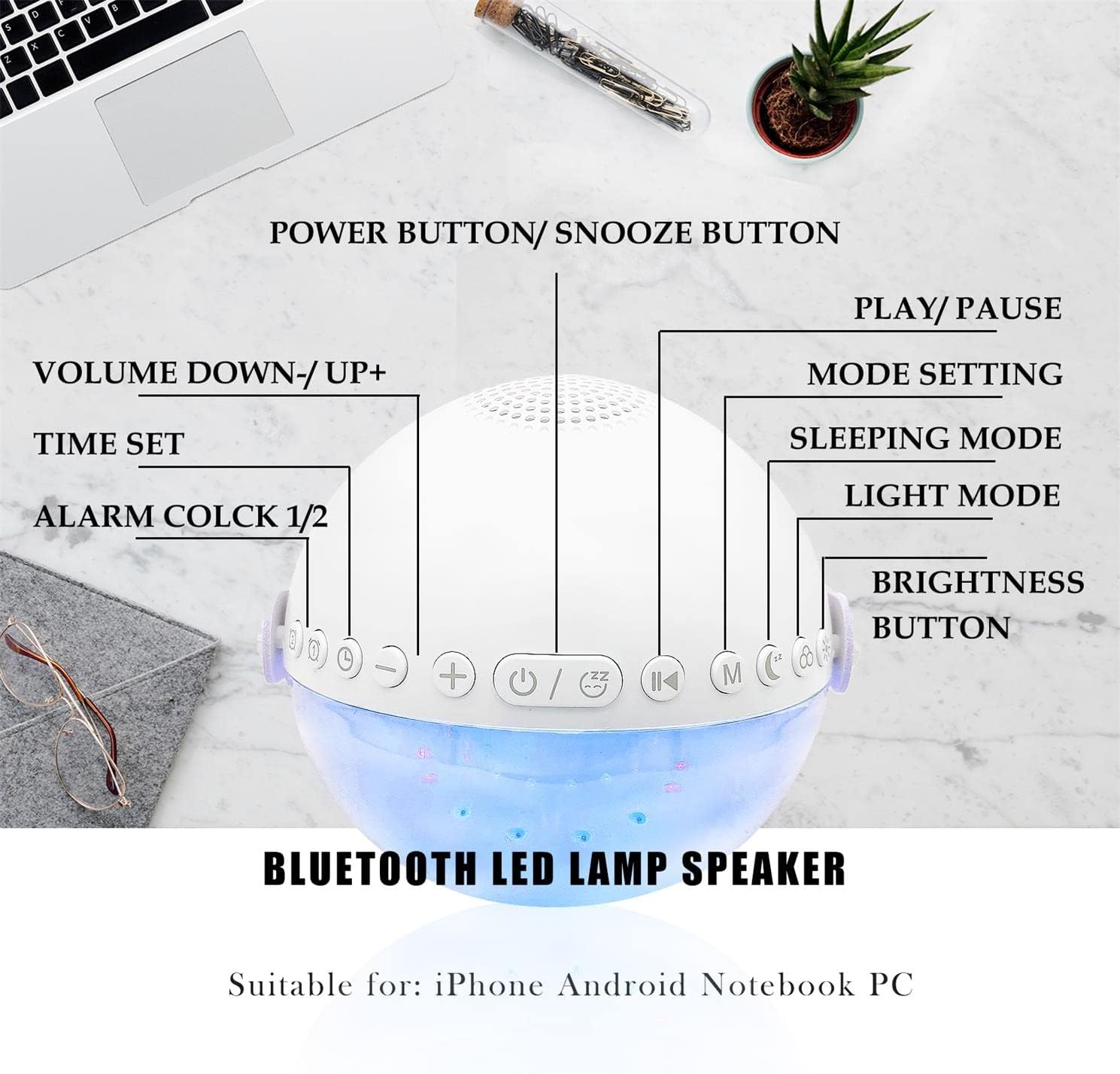
Зураг: Дээд тал нь view of the alarm clock with labels pointing to each button: Power/Snooze, Volume Down/Up, Time Set, Alarm 1/2, Play/Pause, Mode Setting, Sleeping Mode, Light Mode, and Brightness Button.
- Power Button / Snooze Button: Press to power on/off. Short press during an alarm to activate snooze.
- Volume Down (-) / Volume Up (+): Дууны хэмжээг тохируулахын тулд богино дарна уу.
- Цаг тохируулсан: Цаг тохируулах горимд орохын тулд дарна уу.
- Сэрүүлэг 1 / Сэрүүлэг 2: Press to set or activate/deactivate Alarm 1 or Alarm 2.
- Тоглуулах / Түр зогсоох: Controls media playback in Bluetooth or Sound Machine mode.
- Mode Setting (M): Press to cycle through modes (Bluetooth, Sound Machine).
- Унтах горим: Activates sleep mode features.
- Гэрлийн горим: Cycles through light colors and effects.
- Brightness товч: Adjusts display and light brightness.
Цагийн тохиргоо
- дээр дарна уу Цагийн тохиргоо товчлуур. Цагийн дэлгэц анивчих болно.
- -г ашиглана уу Дууны хэмжээг нэмэгдүүлэх (+) or Дууг багасгах (-) цагийг тохируулах товчлуурууд.
- дарна уу Цагийн тохиргоо again to confirm the hour and move to minute setting.
- -г ашиглана уу Дууны хэмжээг нэмэгдүүлэх (+) or Дууг багасгах (-) минут тохируулах товчлуурууд.
- дарна уу Цагийн тохиргоо one more time to confirm and exit time setting.
- The clock supports a 24-hour format.
Alarm Setting (Dual Alarms)
The device features two independent alarms. You can customize ringtones, alarm volume, and light color/brightness for each.
- дээр дарна уу Сэрүүлэг 1 or Сэрүүлэг 2 button to select an alarm. The alarm icon will flash.
- Follow the time setting steps to set the desired alarm time.
- After setting the time, you can customize the alarm sound, volume, and wake-up light settings using the respective buttons (e.g., Гэрэл горим, Эзлэхүүн +/-).
- дээр дарна уу Сэрүүлэг 1 or Сэрүүлэг 2 button again to activate/deactivate the alarm. The alarm icon will appear/disappear on the display.
Image: Two panels illustrate customized alarm times: one for waking up at 7:30 AM and another for going to sleep at 10:00 PM, both for Monday to Friday.
Түр хойшлуулах функц
Сэрүүлэг дуугарах үед товчийг дарна уу Power Button / Snooze Button to activate the snooze function. The alarm will pause for 5 minutes and then sound again. This can be repeated up to three times, after which the alarm will turn off automatically.
Image: The alarm clock is displayed with a clear indication of its snooze function.
Bluetooth чанга яригчийн горим
The alarm clock features advanced Bluetooth 5.0 technology for wireless audio streaming.
- дээр дарна уу Mode Setting (M) button repeatedly until the Bluetooth icon appears on the display.
- On your smartphone or Bluetooth-enabled device, search for "Aogamb D3000" in the Bluetooth settings and pair.
- Once connected, you can play music or audio from your device through the alarm clock speaker.
- -г ашиглана уу Тоглуулах / Түр зогсоох тоглуулахыг удирдах товчлуур.
- -г ашиглана уу Дууны хэмжээг нэмэгдүүлэх (+) or Дууг багасгах (-) дууны хэмжээг тохируулах товчлуурууд.

Image: A child and adult are shown with the alarm clock, which is wirelessly connected to a smartphone via Bluetooth, playing music.
Унтах дууны машин
The alarm clock offers 8 soothing natural sounds to aid sleep or relaxation.
- дээр дарна уу Mode Setting (M) button repeatedly until the Sound Machine icon appears on the display.
- товчийг дарна уу Дууны хэмжээг нэмэгдүүлэх (+) or Дууг багасгах (-) buttons to cycle through the 8 available sounds: Rain, Ocean Waves, Birds, Water Stream, White Noise, Cicada, Bonfire, Tick-Tock.
- дээр удаан дар Дууны хэмжээг нэмэгдүүлэх (+) or Дууг багасгах (-) buttons to adjust the volume of the sleep sounds.
- дээр дарна уу Тоглуулах / Түр зогсоох button to start or stop the sound.

Image: A child and adult are shown sleeping, with the alarm clock nearby. Icons for 8 natural sounds (Rain, Water Stream, Cicadas, Birds, Ocean Waves, White Noise, Bonfire, Tick-Tock) are displayed, indicating the sleep sound feature.
Wake-up Light / Night Light
The alarm clock features a touch-activated backlight and adjustable colored lights.
- Touch-Activated Backlight: Gently tap the device to activate the backlight for checking the time in the dark.
- Гэрлийн горим: дээр дарна уу Гэрэл горим button to cycle through various light colors (Warm White, Green, Red, Blue, Orange, Yellow) and lighting effects (e.g., breathing lights, flashing light).
- Гэрэлтүүлгийг тохируулах: дээр дарна уу Гэрэлтүүлгийн товчлуур to adjust the intensity of the light (3 levels: Low, Middle, High).

Image: The alarm clock is shown displaying various colorful night light options, including 9 different colors, 3 breathing light effects, and 1 flashing light, with adjustable brightness levels (Low, Middle, High).

Image: The alarm clock is shown with various light colors and brightness settings, illustrating its wake-up light functionality.
Sleep Trainer Function (Sun & Moon Icons)
The alarm clock features sun and moon icons on the LED display to help children understand day and night cycles, promoting better sleep habits. The sun icon indicates daytime, and the moon icon indicates nighttime.
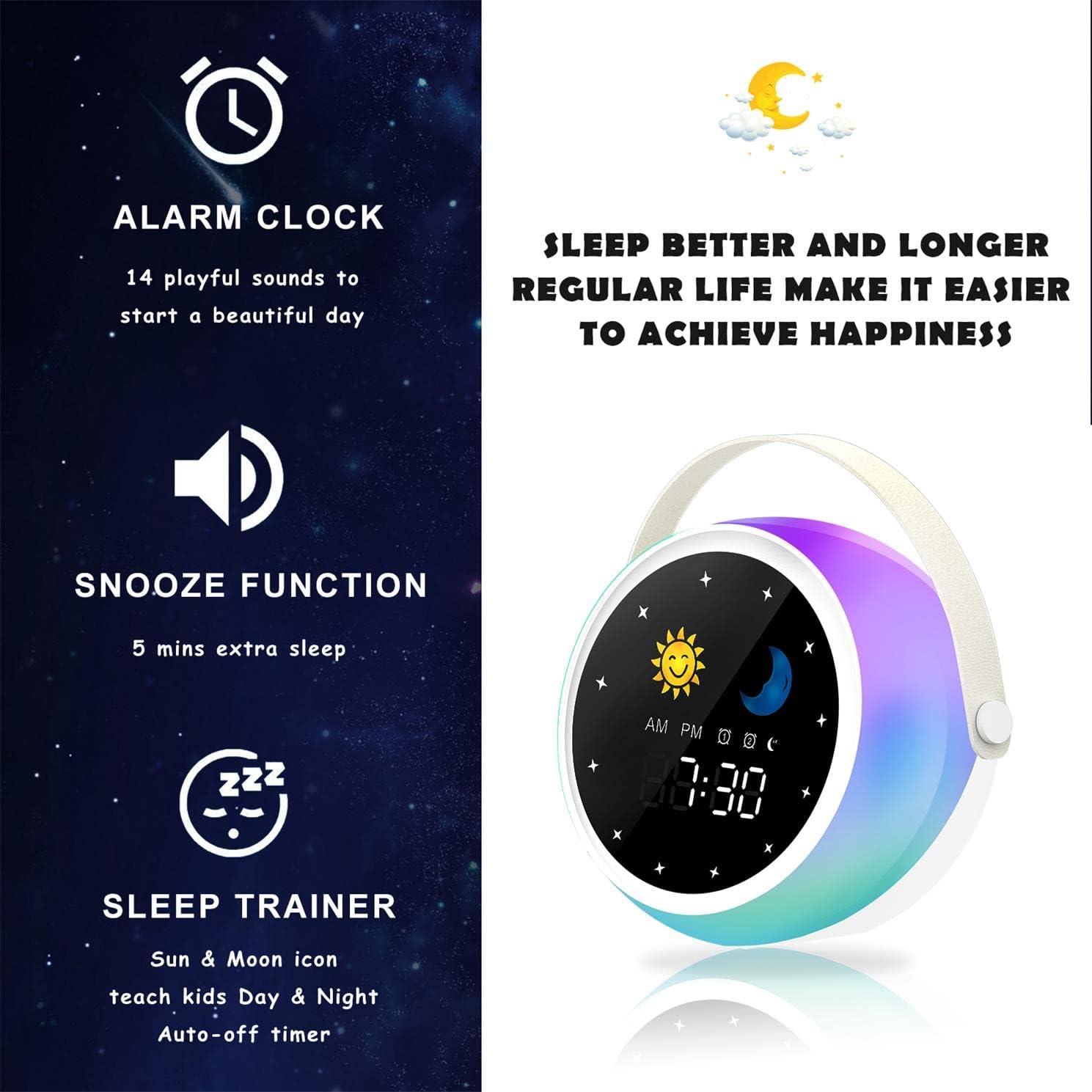
Image: A visual representation of the alarm clock's key features: alarm, snooze, and sleep trainer, with the sun and moon icons visible on the display to teach day and night.

Image: Two panels show the alarm clock display: one for sleep time (10:30 PM with moon icon) and one for wake-up time (7:00 AM with sun icon), illustrating the sleep trainer function.
5. Засвар үйлчилгээ
- Төхөөрөмжийг зөөлөн, хуурай даавуугаар цэвэрлэ. Зүлгүүрийн цэвэрлэгч, уусгагчийг бүү ашигла.
- Цэнэглэх порт нь тоос, хог хаягдалгүй эсэхийг шалгаарай.
- Төхөөрөмжийг удаан хугацаагаар ашиглаагүй бол сэрүүн, хуурай газар хадгална.
6. Алдаа засах
Төхөөрөмж асахгүй байна:
- Ensure the device is fully charged. Connect it to a power source using the USB cable.
- Press and hold the Power Button for a few seconds.
Bluetooth холболтын асуудал:
- Make sure the alarm clock is in Bluetooth mode (Bluetooth icon visible).
- Ensure your smartphone or device's Bluetooth is enabled and within range.
- Try restarting both the alarm clock and your Bluetooth device.
- Төхөөрөмжөө утасныхаа Bluetooth жагсаалтаас мартаад дахин холбож үзнэ үү.
Сэрүүлэг дуугарахгүй байна:
- Verify that the alarm is activated (alarm icon visible on display).
- Check the alarm volume settings.
- Ensure the alarm time is set correctly.
7. Техникийн үзүүлэлтүүд
| Брэнд | Аогамб |
| Загварын дугаар | D3000 |
| Өнгө | Цагаан |
| Хэмжээ (L x W x H) | 12 x 12.1 x 10.5 см |
| Жин | 430 гр |
| Материал | Кристал |
| Дэлгэцийн төрөл | Дижитал |
| Эрчим хүчний эх үүсвэр | Цахилгаан кабель |
| Онцлог шинж чанарууд | Alarm, Charging Port, Snooze, Bluetooth Speaker, Wake-up Light, Sleep Sound Machine |
| Батерейнууд багтсан | Үгүй |
8. Баталгаат хугацаа ба дэмжлэг
This product comes with a standard manufacturer's warranty. For detailed warranty information, please refer to the product packaging or contact Aogamb customer support. If you encounter any issues or have questions not covered in this manual, please reach out to our support team for assistance.
Хэрэглэгчийн тусламжийн холбоо барих: Please refer to the contact information provided on the product packaging or the official Aogamb webсайт.


