1. Танилцуулга
This manual provides comprehensive instructions for the installation, operation, and maintenance of your MUBVIEW Adjustable Angle Mount. This accessory is designed to enhance the viewing capabilities of your compatible video doorbell by allowing precise angle adjustments.

Figure 1: MUBVIEW Doorbell with Adjustable Angle Mount installed.
2. Тохиромжтой байдал
НЗДТГVIEW Adjustable Angle Mount is specifically designed for use with the following MUBVIEW video doorbell models:
- НЗДТГVIEW J7 Doorbell
- НЗДТГVIEW J9 Doorbell
- НЗДТГVIEW J9 Plus Doorbell
Ensure your doorbell model is listed above for proper fit and function.

Figure 2: Visual representation of compatible MUBVIEW doorbell models (J7, J9, J9 Plus).
3. Үндсэн шинж чанарууд
- Тохируулах боломжтой Viewөнцөг Allows horizontal adjustment from 25 to 50 degrees to optimize your doorbell's field of view.
- Сайжруулсан хөдөлгөөн илрүүлэх: Improves the doorbell's ability to detect motion by providing a broader or more targeted viewing талбай.
- Удаан эдэлгээтэй барилга: Manufactured from rugged materials designed to withstand various outdoor weather conditions.
- Хялбар суурилуулалт: Designed for straightforward installation, typically completed within 10-15 minutes with included hardware.
4. Багцын агуулга
Суулгацыг эхлүүлэхийн өмнө бүх бүрэлдэхүүн хэсгүүд байгаа эсэхийг шалгана уу.
- НЗДТГVIEW Тохируулах өнцөгтэй холбох хэрэгсэл
- Mounting Screws (Stainless Steel)
- Ханын зангуу (хэрэв байгаа бол)
- Суулгах гарын авлага (энэ баримт бичиг)
5. Суулгах заавар
Follow these steps to install your MUBVIEW Adjustable Angle Mount:
- Суулгах гадаргууг бэлтгэх: Choose a suitable location on your wall where the doorbell will be installed. Ensure the surface is clean and stable.
- Attach the Angle Mount: Position the angle mount at the desired location. Use the provided screws to secure the mount to the wall. If mounting on masonry or drywall, use appropriate wall anchors.
- Өнцгийг тохируулах: Loosen the adjustment screw on the side of the mount. Rotate the doorbell to achieve the desired horizontal viewing angle (between 25 and 50 degrees). Once the angle is set, tighten the adjustment screw firmly to secure the position.
- Хаалганы хонх суурилуулах: Attach your compatible MUBVIEW J7, J9, or J9 Plus doorbell onto the adjustable angle mount according to your doorbell's specific mounting instructions. Ensure it is securely fastened.
- Туршилтын функц: Verify that the doorbell is securely mounted and that the camera's field of view is optimized for your needs.
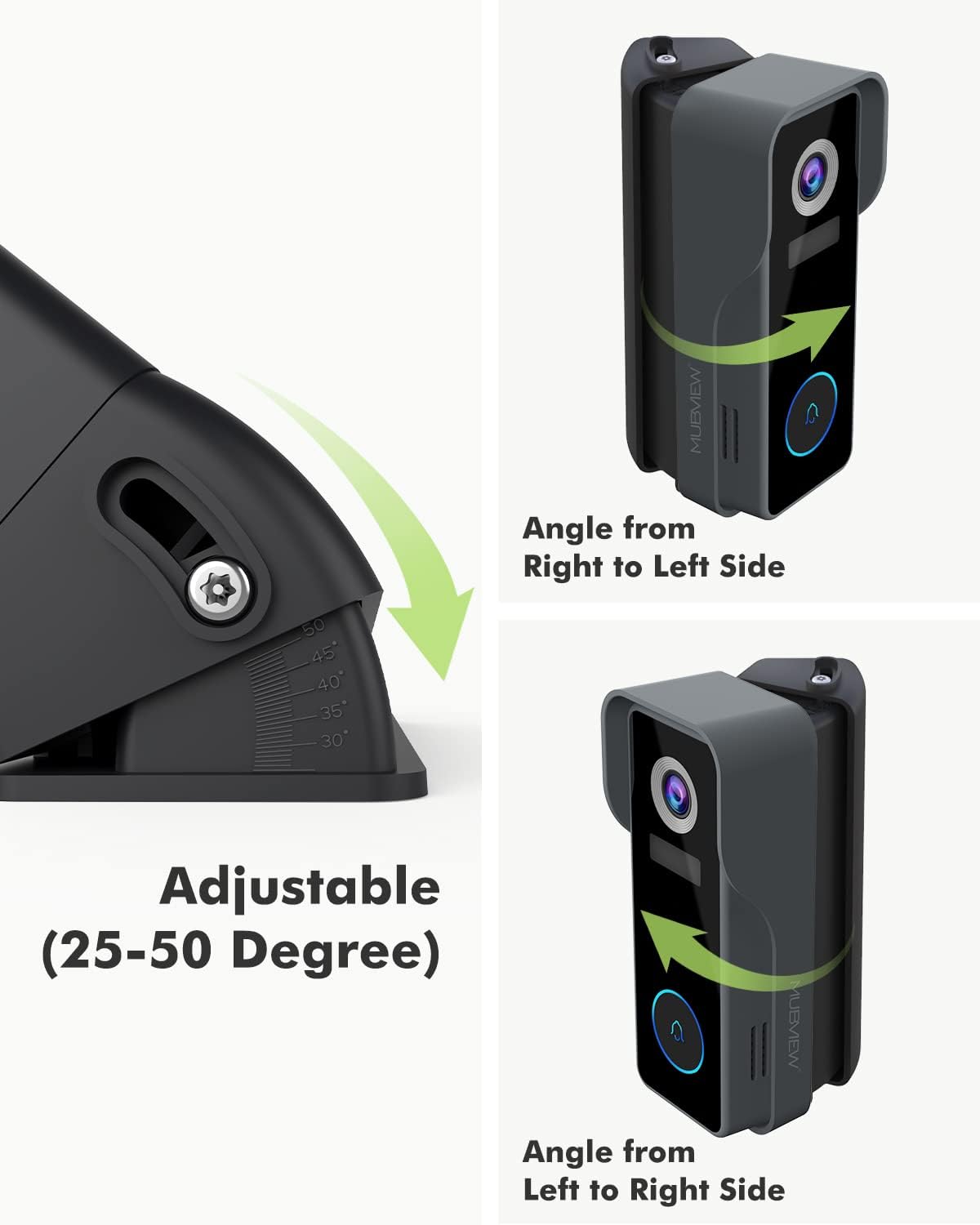
Figure 3: Illustration of the adjustable angle mechanism, allowing rotation from 25 to 50 degrees.

Зураг 4: Жишээ ньample of the MUBVIEW Adjustable Angle Mount with doorbell securely installed on a wall.

Figure 5: Comparison demonstrating the expanded visible area achieved with the angle mount versus without it.
6. Үйл ажиллагаа
The primary function of the MUBVIEW Adjustable Angle Mount is to provide flexible positioning for your doorbell camera. Once installed, you can fine-tune the horizontal viewоруулах өнцөг:
- To adjust the angle, gently loosen the adjustment screw located on the side of the mount.
- Carefully rotate the doorbell and mount assembly to the left or right until the desired field of view is achieved. The mount allows for adjustments between 25 and 50 degrees.
- Once the optimal angle is found, securely tighten the adjustment screw to lock the position. This ensures the doorbell remains stable and maintains its set viewөнцөг.
7. Засвар үйлчилгээ
НЗДТГVIEW Adjustable Angle Mount is constructed from durable, weather-resistant materials designed for outdoor use. Minimal maintenance is required:
- Цэвэрлэгээ: Periodically wipe the mount with a soft, damp cloth to remove dust, dirt, or debris. Avoid using harsh chemicals or abrasive cleaners, as these may damage the finish.
- Шалгалт: Occasionally check the mounting screws to ensure they remain tight and secure. Re-tighten if necessary.
8. Алдаа засах
If you encounter issues with your MUBVIEW Adjustable Angle Mount, consider the following:
- Уул нь сул байна: Ensure all mounting screws are securely tightened. If installed with wall anchors, verify they are properly seated in the wall.
- Өнцгийг тохируулахад бэрхшээлтэй байдал: Check that the adjustment screw is sufficiently loosened before attempting to rotate the mount. Do not force the rotation.
- Хөөрхий viewing angle after adjustment: Re-adjust the angle as described in the "Operation" section. Use your doorbell's live view feature to confirm the optimal field of view.
9. Техникийн үзүүлэлтүүд
| Брэнд | НЗДТГVIEW |
| Загвар | Тохируулах өнцөгтэй холбох хэрэгсэл |
| Суурилуулах төрөл | Ханын бэхэлгээ |
| Adjustable Angle Range | 25 to 50 degrees (horizontal) |
| Материал | Stainless Steel (screws), Rugged Composite (mount) |
| Зүйлийн жин | 3.52 унц |
| Багцын хэмжээ | 5.12 x 3.19 x 1.73 инч |
| Үйлдвэрлэгч | НЗДТГVIEW |
| Эхний боломжтой огноо | 22 оны хоёрдугаар сарын 2022 |
10. Баталгаат хугацаа ба дэмжлэг
НЗДТГVIEW products are designed for reliability and performance. For specific warranty information or technical support, please refer to the documentation included with your original MUBVIEW doorbell or visit the official MUBVIEW webсайт. Баталгаат зардлаа авахын тулд худалдан авалтын баримтаа хадгална уу.


