Танилцуулга
This manual provides essential information for setting up, operating, maintaining, and troubleshooting your Acer Veriton X4680G Desktop Computer. Please read this document thoroughly before using the product to ensure proper function and longevity. Keep this manual for future reference.
Багцын агуулга
Бүх зүйл багцад байгаа эсэхийг шалгана уу:
- Acer Veriton X4680G Desktop PC
- USB гар
- USB хулгана
- Цахилгааны утас
- Баримт бичиг (хурдан эхлүүлэх гарын авлага, баталгаат карт)
Бүтээгдэхүүн дууссанview
Familiarize yourself with the physical components of your desktop computer.
Урд View
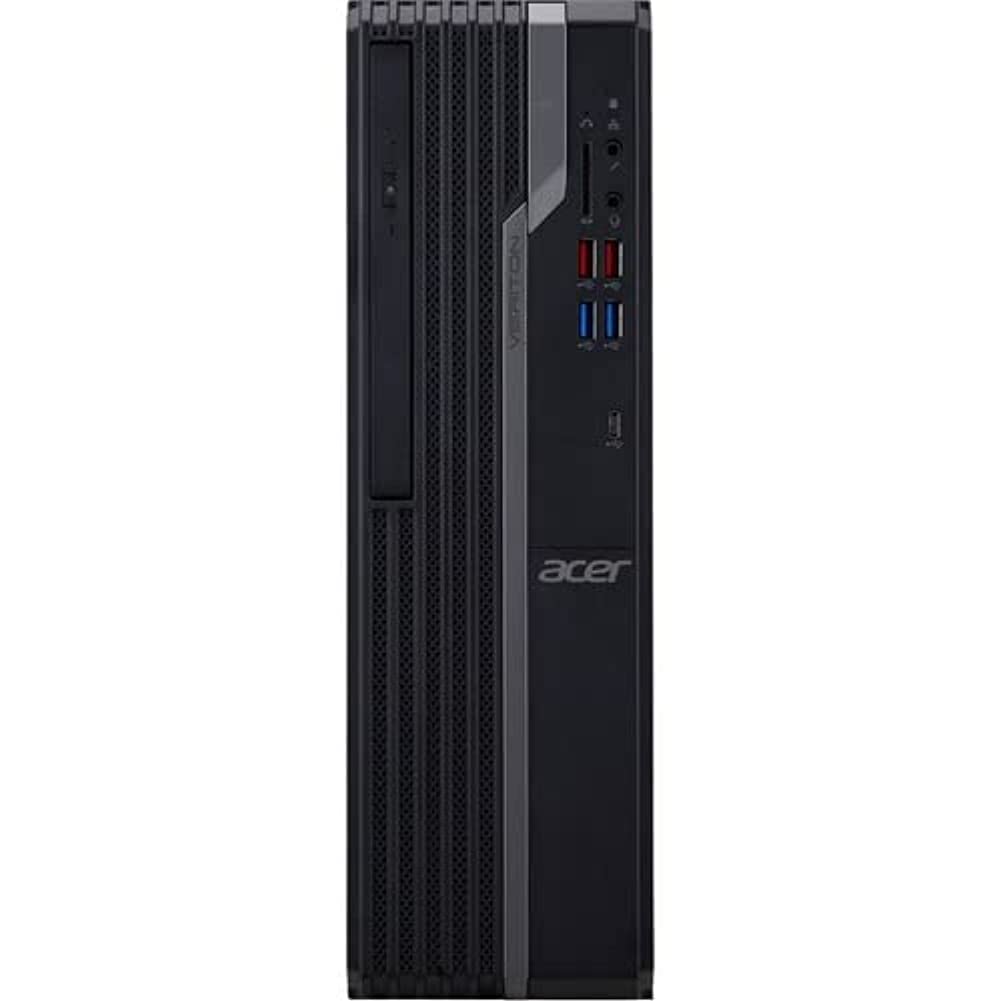
This image displays the front of the Acer Veriton X4680G desktop computer, highlighting the optical drive, front USB ports (including USB 3.2 and USB 2.0), audio jacks, and the power button. The 'Veriton' branding and Acer logo are visible on the chassis.
Арын View

This image shows the rear panel of the Acer Veriton X4680G, detailing the various input/output ports. These include multiple USB ports, Ethernet port, audio jacks, video output ports (VGA, DisplayPort), and the power input connector. Expansion slots are also visible.
Тохиргоо
Follow these steps to set up your new desktop computer.
1. Захын төхөөрөмжүүдийг холбох
- Монитор: Connect your monitor to one of the video output ports (VGA or DisplayPort) on the rear of the computer using the appropriate cable.
- Гар ба хулгана: Connect the USB keyboard and mouse to any available USB ports on the front or rear of the computer.
- Сүлжээ: For a wired internet connection, connect an Ethernet cable from your router or modem to the Ethernet port on the rear of the computer. For wireless, ensure your system has Wi-Fi enabled.
- Аудио: Connect speakers or headphones to the audio output jack on the front or rear panel.
2. Эрчим хүчний холболт
- Connect the power cord to the power input on the rear of the computer.
- Цахилгааны утасны нөгөө үзүүрийг газардуулсан цахилгааны залгуурт холбоно.
3. Анхдагч асаалттай
- Press the power button located on the front panel of the computer.
- The computer will boot up, and the Windows 10 Pro operating system will load. Follow any on-screen instructions for initial setup, such as language selection and user account creation.
Ашиглалтын заавар
Guidance for basic operation of your Acer Veriton X4680G.
Windows 10 Pro
Your computer comes pre-installed with Windows 10 Pro. This operating system provides a familiar interface for managing files, running applications, and browsing the internet. Utilize the Start Menu for quick access to programs and settings.
Using the Optical Drive (DVD-Writer)
The integrated DVD-Writer allows you to read and write CDs and DVDs.
- To open the tray, press the eject button on the drive face.
- Place a disc onto the tray with the label side facing up.
- Тавиурыг компьютер руу буцааж зөөлөн түлхэж, товших чимээ гартал нь дарна уу.
- The operating system will typically prompt you for action or automatically play media.
USB портууд
The computer features multiple USB 2.0 and USB 3.2 ports for connecting external devices such as external hard drives, printers, and other peripherals. USB 3.2 ports offer faster data transfer speeds.
Засвар үйлчилгээ
Regular maintenance helps ensure optimal performance and extends the lifespan of your computer.
Цэвэрлэгээ
- Гадна: Зөөлөн ашиглах, damp cloth to wipe the exterior surfaces. Avoid harsh chemicals.
- Агааржуулалт: Periodically use compressed air to clear dust from the ventilation grilles to prevent overheating.
- Дэлгэц: For monitors, use a specialized screen cleaner and a microfiber cloth.
Програм хангамжийн шинэчлэлтүүд
Аюулгүй байдал болон гүйцэтгэлийг хангахын тулд үйлдлийн систем болон драйверуудаа шинэчилж байгаарай.
- Windows шинэчлэлтүүд: Regularly check for and install Windows updates via the Settings app.
- Драйверын шинэчлэлтүүд: Visit the Acer support website for the latest drivers for your specific model.
Өгөгдлийн нөөцлөлт
Чухал зүйлээ байнга нөөцөлж аваарай fileМэдээллийн алдагдлаас урьдчилан сэргийлэхийн тулд гадаад диск эсвэл үүл хадгалах сан руу шилжүүлээрэй.
Алдааг олж засварлах
Энэ хэсэгт танд тулгарч болох нийтлэг асуудлуудыг авч үзэх болно.
Хүч чадалгүй
- Ensure the power cord is securely connected to both the computer and the electrical outlet.
- Өөр төхөөрөмжийг залгах замаар цахилгааны залгуур ажиллаж байгаа эсэхийг шалгана уу.
- Check the power supply unit (PSU) switch on the rear of the computer, if present, to ensure it is in the 'On' position.
Дэлгэц дээр дэлгэц байхгүй
- Confirm the monitor's power cable is connected and the monitor is turned on.
- Check that the video cable (VGA or DisplayPort) is securely connected to both the computer and the monitor.
- Ensure the monitor's input source is set correctly (e.g., VGA, DisplayPort).
Системийн удаашрал
- Ар талд ажиллаж байгаа шаардлагагүй програмуудыг хаа.
- Check disk space; a full drive can impact performance.
- Хортой програм байгаа эсэхийг шалгахын тулд вирусын хайлтыг ажиллуул.
- Windows болон драйверууд шинэчлэгдсэн эсэхийг шалгаарай.
Үзүүлэлтүүд
Detailed technical specifications for the Acer Veriton X4680G Desktop Computer.
| Онцлог | Тодорхойлолт |
|---|---|
| Процессор | Intel Core i7-11700 Octa-core (8 Core) 2.50 GHz |
| RAM | 8 ГБ DDR4 SDRAM |
| Хадгалах | 256 GB PCI Express SSD |
| Үйлдлийн систем | Windows 10 Pro |
| График карт | Intel Iris Xe график |
| Оптик хөтөч | DVD бичигч |
| Утасгүй холболт | 802.11ax, Bluetooth |
| USB 2.0 портууд | 4 |
| Хэмжээ (LxWxH) | 16.34 x 19.49 x 6.69 инч |
| Зүйлийн жин | 14.52 фунт |
| Өнгө | Хар |
Баталгаат болон дэмжлэг
Your Acer Veriton X4680G Desktop Computer is covered by a limited warranty. Please refer to the warranty card included in your package for specific terms and conditions, including warranty period and coverage details.
Техникийн дэмжлэг, драйвер татаж авах эсвэл нэмэлт тусламж авахыг хүсвэл Acer албан ёсны дэмжлэгт зочилно уу website or contact Acer customer service. Have your product model number (DT.VWEAA.003) and serial number ready when seeking support.
Тэмдэглэл: Баталгаат хугацаа нь бүс нутгаас хамаарч өөр өөр байж болно.


