1. Танилцуулга
This manual provides detailed instructions for the LFF DAB Plus Digital FM Radio. It covers setup, operation, maintenance, and troubleshooting to ensure optimal performance and user experience. Please read this manual thoroughly before using the device.

Урд view of the LFF DAB Plus Digital FM Radio, showing the speaker grille, color display, and extended antenna.
2. Багцын агуулга
Дараах зүйлсийн багцад байгаа эсэхийг шалгана уу.
- 1 x LFF DAB Plus Digital FM Radio
- 1 x AC цахилгаан адаптер
- 1 x хурдан эхлүүлэх гарын авлага
3. Бүтээгдэхүүн дууссанview
Радиогийн бүрэлдэхүүн хэсэг болон удирдлагуудтай танилцаарай.
3.1 Гол онцлогууд

This diagram illustrates the radio's key functions: DAB+ radio, 60 station presets, FM radio, sleep timer, headphone jack, Bluetooth connectivity, full-color screen, and dual alarm capability.
3.2 Удирдлага ба портууд

Дээд ба хажуу view of the radio, showing control buttons and knobs on the top panel, and the 3.5mm headphone jack located on the side.
Refer to the diagram above for the location of the following:
- Цахилгаан товч: Радиог асаах/унтраах.
- Горимын товчлуур: DAB+, FM болон Bluetooth горимуудын хооронд шилждэг.
- Тохируулах/сонгох товчлуур: Rotates to tune stations or navigate menus, press to select.
- Эзлэхүүний товчлуур: Аудио дууны хэмжээг тохируулна.
- Урьдчилан тохируулсан товчлуурууд: For saving and recalling favorite stations.
- Alarm/Sleep Timer Button: Сэрүүлэг болон унтах цагийн тохиргоонд ханддаг.
- Өнгөт дэлгэц: Станцын мэдээлэл, цаг, цэсийн сонголтыг харуулна.
- Чихэвчний залгуур (3.5 мм): Хувийн сонсох зориулалттай.
- DC IN порт: Хувьсах гүйдлийн тэжээлийн адаптерийг холбоход зориулагдсан.
- Телескоп антен: Радио хүлээн авалтыг сайжруулах зорилгоор.
4. Тохиргоо
4.1 Асаах
The radio can be powered by the included AC adapter or by batteries.
- Хувьсах гүйдлийн хүч: Connect the AC power adapter to the DC IN port on the back of the radio and plug it into a wall outlet.
- Зайны хүч: Open the battery compartment on the back of the radio and insert 4 x 1.5V AA (LR6) batteries, ensuring correct polarity.
Буцах view of the radio, detailing the battery compartment for 4x AA batteries, the AC adapter input (5V/1000mA), and the 360° rotatable antenna. Product dimensions are also indicated.
4.2 Антенны тохируулга
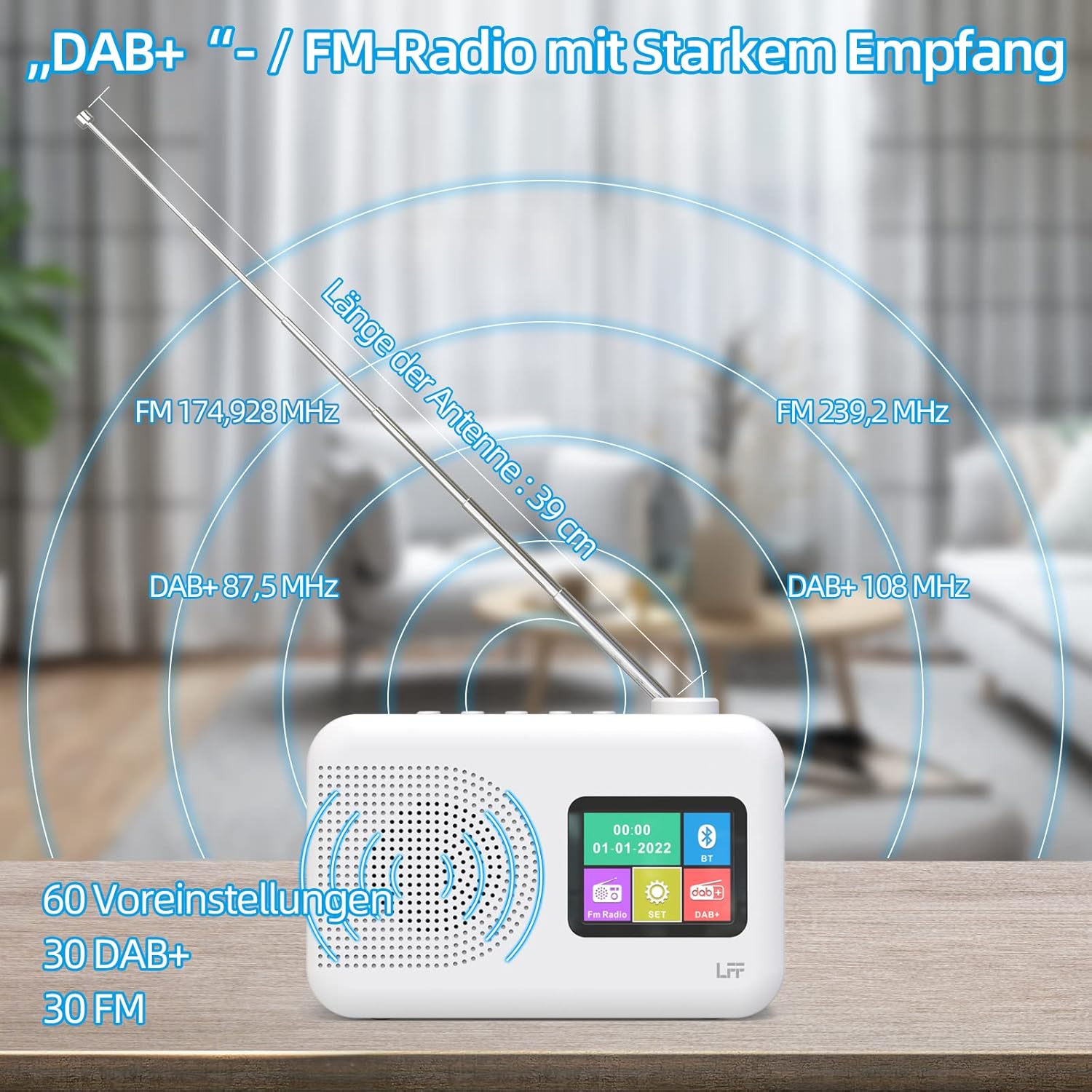
Extend the telescopic antenna fully (approximately 39 cm) and adjust its angle for optimal reception, especially for DAB+ and FM stations.

This diagram illustrates the radio's strong DAB+ and FM reception capabilities with the fully extended 39cm antenna, showing frequency ranges and the capacity for 60 total presets (30 DAB+, 30 FM).
4.3 Анхны хайлт (DAB+)
- Радиог асаана уу.
- Ensure the mode is set to DAB+. If not, press the Горим сэлгэх товч.
- The radio will automatically perform a full scan for available DAB+ stations. This may take a few minutes.
- Once the scan is complete, the radio will display a list of found stations.
5. Ашиглалтын заавар
5.1 DAB+ радио горим
- дээр дарна уу Горим товчийг дарж DAB+ горимыг сонгоно.
- -г эргүүл Тааруулах/Сонгох knob to browse through the available stations.
- дээр дарна уу Тааруулах/Сонгох станц сонгохын тулд товчлуурыг дарна уу.
- Урьдчилсан тохиргоог хадгалах: To save a station, press and hold a Урьдчилан тохируулсан button until the display confirms. To recall, briefly press the corresponding Урьдчилан тохируулсан button. Up to 30 DAB+ stations can be saved.
5.2 FM радио горим
- дээр дарна уу Горим товчийг дарж FM горимыг сонгоно.
- -г эргүүл Тааруулах/Сонгох Давтамжийг гараар тохируулах товчлуур.
- -г удаан дар Тааруулах/Сонгох knob for a few seconds to auto-scan for the next available station.
- Урьдчилсан тохиргоог хадгалах: Similar to DAB+ mode, press and hold a Урьдчилан тохируулсан button to save, and briefly press to recall. Up to 30 FM stations can be saved.
5.3 Bluetooth горим

This diagram illustrates the three primary playback options for the radio: through its internal speaker, via Bluetooth connection to an external device, or using headphones connected to the headphone jack.
- дээр дарна уу Горим button to select Bluetooth mode. The display will show "Bluetooth Pairing" or similar.
- Гадаад төхөөрөмж дээрээ (жишээ нь, ухаалаг утас) Bluetooth-г асаагаад боломжтой төхөөрөмжүүдийг хайгаарай.
- Select "LFF Radio" (or similar name) from the list to pair.
- Once paired, you can play audio from your device through the radio's speaker.
- Жич: This radio acts as a Bluetooth receiver. It does not support connecting to Bluetooth headphones or other Bluetooth speakers.
5.4 Унтах цаг хэмжигч
Унтах таймер нь радиог тогтоосон хугацааны дараа автоматаар унтрах боломжийг олгодог.

This image depicts the sleep timer function, offering selectable durations of 15, 30, 45, 60, 90, and 120 minutes before the radio automatically powers off.
- дээр дарна уу Alarm/Sleep Timer button repeatedly to cycle through sleep timer options (15 min, 30 min, 45 min, 60 min, 90 min, 120 min, OFF).
- Select your desired duration. The radio will turn off automatically after this time.
5.5 сэрүүлэгтэй цаг
The radio features a dual alarm function.
- -г удаан дар Alarm/Sleep Timer дохиоллын тохиргоог оруулах товчийг дарна уу.
- -г ашиглана уу Тааруулах/Сонгох knob to set the alarm time, alarm source (DAB+, FM, or buzzer), and volume.
- дээр дарна уу Тааруулах/Сонгох knob to confirm each setting.
- Repeat the process for the second alarm if needed.
5.6 Чихэвчний хэрэглээ
Plug 3.5mm headphones into the headphone jack on the side of the radio for private listening. The internal speaker will automatically mute.
6. Засвар үйлчилгээ
6.1 Цэвэрлэгээ
- Wipe the radio's surface with a soft, dry cloth.
- Өнгөлгөөг гэмтээж болзошгүй тул зүлгүүрийн цэвэрлэгч, лав, уусгагчийг бүү ашигла.
6.2 Батерейг солих
When using battery power, replace all four AA batteries when the low battery indicator appears on the display or when performance degrades.
- Ensure the radio is turned off and disconnected from AC power.
- Ар талд байгаа зайны тасалгааны тагийг нээнэ үү.
- Хуучин батерейг салгаж, зохих ёсоор устгана уу.
- Insert new 4 x 1.5V AA (LR6) batteries, observing correct polarity (+/-).
- Зайны тасалгааны тагийг сайтар хаа.
6.3 Дэлгэц хамгаалах хальс
The radio's display comes with a transparent protective film. For optimal clarity, gently peel off this film before first use.
7. Алдаа засах
Хэрэв танд асуудал тулгарвал дараах нийтлэг асуудал, шийдлүүдийг үзнэ үү.
| Асуудал | Боломжит шалтгаан | Шийдэл |
|---|---|---|
| Хүч чадалгүй | AC adapter not connected, batteries depleted or incorrectly inserted. | АС адаптерийн холболтыг шалгана уу. Батерейг солих эсвэл зөв туйлшралыг баталгаажуулна уу. |
| Радио хүлээн авалт муу | Antenna not extended, weak signal area, interference. | Fully extend and adjust the telescopic antenna. Move the radio to a different location. Avoid sources of interference. |
| Bluetooth холбогдоогүй байна | Radio not in Bluetooth mode, device too far, already paired with another device. | Ensure radio is in Bluetooth mode. Keep devices within range. Disconnect from other devices. |
| Дуу алга | Volume too low, headphones connected, mute activated. | Дууг нь нэмэгдүүл. Чихэвчийг салга. Дууг нь хаасан эсэхийг шалга. |
8. Техникийн үзүүлэлтүүд
- Брэнд: LFF өргөтгөл
- Загвар: DAB Plus Digital FM Radio
- Өнгө: Цагаан
- Холболтын технологи: Bluetooth
- Хэмжээ (L x W x H): 16.1 см х 5.9 см х 10.9 см
- Тохируулгын технологи: DAB
- Эрчим хүчний эх үүсвэр: AC Adapter (5V/1000mA) or 4 x 1.5V AA (LR6) Batteries
- Дэмжигдсэн радио хамтлагууд: DAB+, FM
- DAB+ давтамжийн хүрээ: 174.928 - 239.2 МГц
- FM давтамж: 87.5 - 108 МГц
- Урьдчилан тохируулсан зүйлс: 30 DAB+, 30 FM
- Антенны урт: 39 cm (extendable)
- Онцлог шинж чанарууд: DAB Plus Radio, Sleep Timer, Dual Alarm, Headphone Jack, Color Display
- Оруулсан бүрэлдэхүүн хэсгүүд: DAB Digital Radio, AC Power Adapter, Quick Start Guide
9. Баталгаат хугацаа ба дэмжлэг
For any quality-related issues or technical support, please contact the seller directly. We are committed to resolving any problems you may encounter with your LFF DAB Plus Digital FM Radio.


