Танилцуулга
The Korg Minilogue is a 37-key polyphonic analog synthesizer designed for musicians seeking powerful analog sound and versatile features. This manual provides essential information for setup, operation, and maintenance of your Minilogue.

Image: The Korg Minilogue synthesizer, showcasing нь авсаархан дизайн болон удирдлагын зохион байгуулалттай.
Багцын агуулга
Үргэлжлүүлэхийн өмнө багцад бүх зүйл байгаа эсэхийг шалгаарай:
- Korg Minilogue Polyphonic Analog Synthesizer
- Хувьсах гүйдлийн адаптер
- MIDI кабель
- Чихэвч
- Өнгөлгөөний даавуу
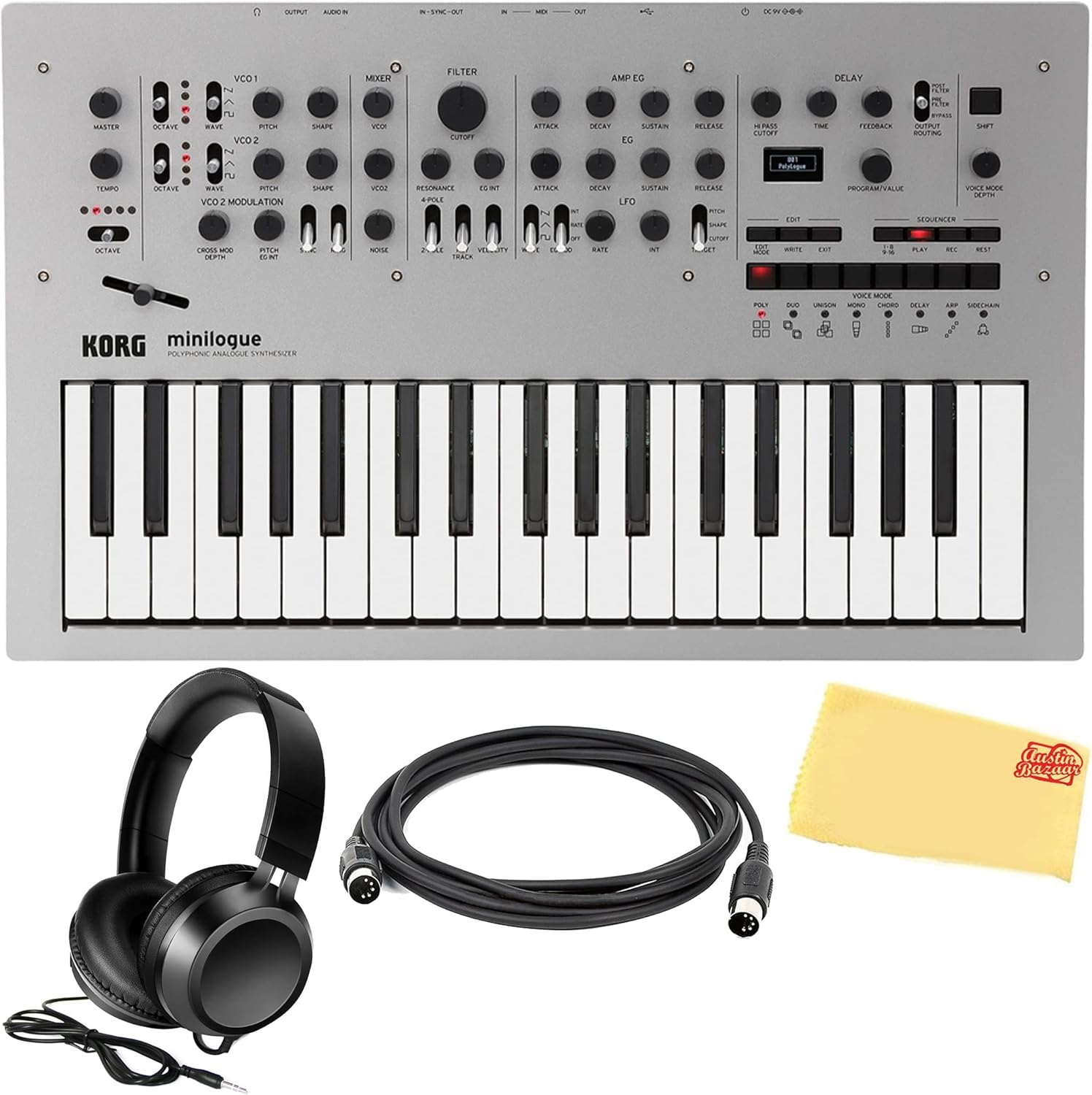
Image: The complete Korg Minilogue bundle, including the synthesizer and accessories.
Тохиргоо
1. Эрчим хүчний холболт
- Connect the included AC adapter to the DC IN jack on the rear panel of the Minilogue.
- Хувьсах гүйдлийн адаптерийг ердийн цахилгаан залгуурт холбоно уу.
- Press the power button located on the rear panel to turn on the unit.
2. Аудио холболт
- Чихэвч: Connect the included headphones to the HEADPHONE jack on the rear panel for private monitoring.
- Аудио гаралт: Connect the AUDIO OUT jack to an amplifier, mixer, or audio interface using a standard 1/4-inch audio cable.
3. MIDI холболтууд
- MIDI ОРОЛТ/ГАРАЛТ: Use the included MIDI cable to connect the Minilogue to other MIDI devices (e.g., MIDI controller, computer interface) for control or synchronization.
- USB MIDI: Connect a USB cable (not included) from the Minilogue's USB port to a computer for MIDI communication.
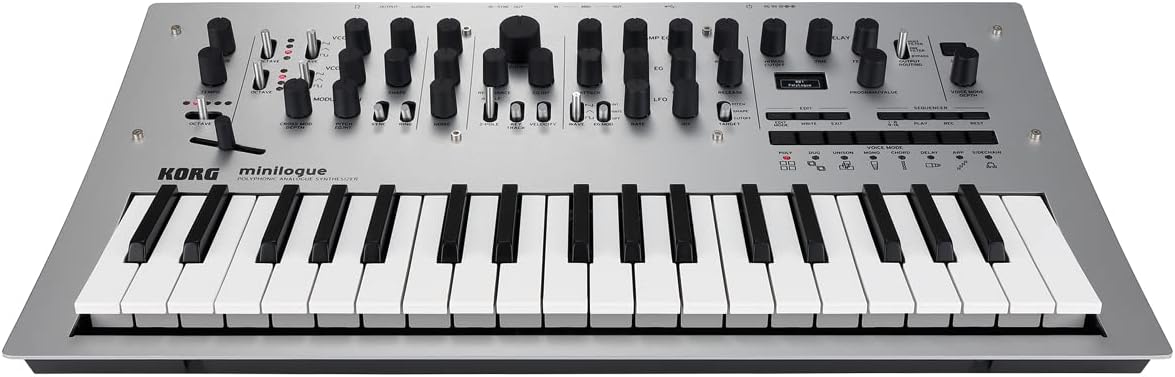
Image: The rear panel of the Korg Minilogue, highlighting the various input and output ports.
Ашиглалтын заавар
Хяналтын самбар дууссанview
The Minilogue's front panel is intuitively laid out for direct control over its sound engine. It features dedicated knobs and switches for each parameter, along with an OLED display.

Зураг: Нарийвчилсан view of the Korg Minilogue's control panel, illustrating the layout of sound shaping parameters.
Sound Generation Parameters
- VCO1 & VCO2: Control Octave, Waveform (Saw, Triangle, Square), Pitch, and Shape. VCO2 also includes Cross Mod Depth, Pitch EG Int, Sync, and Ring modulation options.
- холигч: Adjust the levels of VCO1, VCO2, and Noise.
- ШҮҮЛГҮҮР: Shape the tone with Cutoff, Resonance, EG Int, Filter Type (2-Pole, 4-Pole), Keytrack, and Velocity controls.
- AMP Ж.нь: -ийг хянах amplitude envelope with Attack, Decay, Sustain, and Release parameters.
Voice Modes
The Minilogue offers 8 voice modes, each altering how the four voices interact:
- Poly: Standard 4-voice polyphony.
- Duo: 2-voice unison polyphony.
- Юнисон: All four voices stacked for a thick monophonic sound.
- Мон: Monophonic operation.
- Аккорд: Plays a chord with a single key press.
- Саатал: Creates a delay effect.
- Арп: Арпегжиаторын функц.
- Side Chain: Applies a side-chain effect.
16-Алхам дараалал
The built-in 16-step sequencer allows for real-time recording with overdubbing and step recording. Motion sequencing records knob movements, adding dynamic changes to your sequences.
Onboard Delay
The Minilogue includes a tape-style delay effect. Adjust parameters like Time and Feedback to create various delay textures.
Oscilloscope Display
The OLED display features an oscilloscope function, visually representing the waveform as you sculpt your sound. This provides real-time visual feedback on your sound design.
Synchronization with External Devices
The Minilogue can synchronize with Korg's groove machines (e.g., Volca series, Electribe, SQ-1) via its sync connector, allowing for integrated sequencer playback across multiple devices.
Засвар үйлчилгээ
- Цэвэрлэгээ: Use the included polishing cloth to gently clean the surface of the synthesizer. Avoid abrasive cleaners or solvents.
- Хадгалах: Store the Minilogue in a dry, dust-free environment away from direct sunlight and extreme temperatures.
- Тээвэр: When transporting, use a protective case to prevent damage to the keys and controls.
Алдааг олж засварлах
Дууны гаралт байхгүй
- Цахилгаан адаптер найдвартай холбогдсон бөгөөд төхөөрөмж асаалттай байгаа эсэхийг шалгаарай.
- Check that headphones or external speakers are properly connected and their volume is turned up.
- Verify that the master volume knob on the Minilogue is not set to minimum.
- Confirm that the program selected is not muted or set to a very low volume.
MIDI хариу өгөхгүй байна
- Check MIDI cable connections (IN to OUT, OUT to IN).
- Ensure MIDI settings on both the Minilogue and the connected device are correctly configured (e.g., MIDI channel, clock source).
- If using USB MIDI, verify that the necessary drivers are installed on your computer.
Үзүүлэлтүүд
| Онцлог | Дэлгэрэнгүй |
|---|---|
| Гар | 37-keys (Slim-key, velocity sensitive) |
| Дууны үе | Analog synthesis |
| Хамгийн их полифони | 4 дуу хоолой |
| Програмууд | 200 (100 Presets / 100 Users) |
| Voice Modes | 8 modes (Poly, Duo, Unison, Mono, Chord, Delay, Arp, Side Chain) |
| Дараалал | 16-step polyphonic step and motion sequencer |
| Дэлгэц | OLED oscilloscope display |
| Холбогч | Headphone, Audio Out, Sync In/Out, MIDI In/Out, USB Type B |
| Эрчим хүчний хангамж | Хувьсах гүйдлийн адаптер (DC9V) |
| Хэмжээ (L x W x H) | 24.4 x 6.2 x 16.3 инч |
| Жин | 9.38 фунт |
| Биеийн материал | Aluminum, Metal, Wood |
Баталгаат болон дэмжлэг
Баталгаат хугацаа болон техникийн дэмжлэг авахыг хүсвэл албан ёсны Korg-оос лавлана уу website or contact your authorized Korg dealer. Keep your purchase receipt as proof of purchase.


