1. Танилцуулга
Худалдан авалт хийсэнд баярлалааasing the EZVALO Multifunctional Digital Alarm Clock. This device combines an alarm clock, FM radio, Bluetooth speaker, wireless phone charger, night light, and USB-C PD fast charger into one compact unit. This manual provides detailed instructions for setup, operation, and maintenance to ensure optimal performance and longevity of your product.
2. Аюулгүй байдлын мэдээлэл
- Хэрэглэхийн өмнө бүх зааврыг анхааралтай уншина уу.
- Төхөөрөмжийг ус, чийг, өндөр температураас хол байлга.
- Төхөөрөмжийг өөрөө задлах эсвэл засах гэж бүү оролдоорой. Тусламж авахын тулд хэрэглэгчийн дэмжлэгтэй холбоо барина уу.
- Цахилгаан адаптер нь таны орон нутгийн цахилгаан хангамжтай нийцэж байгаа эсэхийг шалгаарай.
- Avoid placing metal objects, pop sockets, or credit cards on the wireless charging pad to prevent interference or damage.
- Зөвхөн өгсөн тэжээлийн адаптерийг ашиглана уу.
3. Багцын агуулга
- EZVALO Digital Alarm Clock
- Эрчим хүчний адаптер
- Хэрэглэгчийн гарын авлага
4. Бүтээгдэхүүн дууссанview
The EZVALO Digital Alarm Clock features a sleek design with intuitive controls for its various functions. Below is an illustration of the device and its key components.

Зураг 1: Дээд тал view of the EZVALO Digital Alarm Clock, highlighting the wireless charging pad and control buttons.
Хяналтын самбар:
- Гүйлгэх дугуй: Дууг тохируулна.
- Alarm Setting Button: Сэрүүлгийн тохиргооны горимд орно.
- Цаг тохируулах товч: Press once to enter time setting mode. Press and hold to switch between 12-hour and 24-hour format.
- Түр хойшлуулах товч: Press to snooze; press and hold to turn off the alarm.
- Гэрэлтүүлгийг тохируулах товчлуур: Cycles through the brightness settings of the display. Press and hold to turn on and off the halo light.
- Горим солих: Cycles through speaker modes: Bluetooth mode / FM Radio Mode / Speaker off.
- Эрхий хүрд солих: In Bluetooth mode, go to the previous or next song. Press for play/pause. In FM Radio mode, go to the previous or next channel. Hold down for channel auto-scan. In Time setting mode, set the clock.

Зураг 2: Урд view of the EZVALO Digital Alarm Clock showing the time display and fabric finish.

Зураг 3: Ар талд view of the EZVALO Digital Alarm Clock, illustrating the USB-C and USB-A charging ports.
5. Тохиргоо
5.1 Эрчим хүчний холболт
Өгөгдсөн тэжээлийн адаптерийг сэрүүлэгтэй цагийн ар талд байрлах DC IN портод холбоод, ханын залгуурт залгаарай. Дэлгэц асах болно.
5.2 Цагийг тохируулах
- дээр дарна уу Цаг тохируулах товч once to enter time setting mode. The hour digits will flash.
- -г ашиглана уу Эрхий хүрд солих цагийг тохируулах.
- дээр дарна уу Цаг тохируулах товч Минутын тохиргоо руу шилжихийн тулд дахин дарна уу. Минутын цифрүүд анивчих болно.
- -г ашиглана уу Эрхий хүрд солих минут тохируулах.
- дээр дарна уу Цаг тохируулах товч цаг тохируулах горимыг баталгаажуулж, гарахын тулд гурав дахь удаагаа хийнэ үү.
- To switch between 12-hour and 24-hour format, press and hold the Цаг тохируулах товч.
5.3 Сэрүүлгийг тохируулах
The device supports two independent alarm settings.
- дээр дарна уу Сэрүүлэг тохируулах товчлуур once to enter Alarm 1 setting mode. The alarm hour digits will flash.
- -г ашиглана уу Эрхий хүрд солих сэрүүлгийн цагийг тохируулахын тулд.
- дээр дарна уу Сэрүүлэг тохируулах товчлуур Сэрүүлгийн минутын тохиргоо руу шилжихийн тулд дахин дарна уу. Минутын цифрүүд анивчих болно.
- -г ашиглана уу Эрхий хүрд солих сэрүүлгийн минутыг тохируулахын тулд.
- дээр дарна уу Сэрүүлэг тохируулах товчлуур a third time to select the alarm sound (e.g., FM radio, buzzer).
- дээр дарна уу Сэрүүлэг тохируулах товчлуур a fourth time to confirm and activate Alarm 1. An alarm icon will appear on the display.
- Repeat steps 1-6 for Alarm 2 by pressing the Сэрүүлэг тохируулах товчлуур twice initially.
5.4 Bluetooth холболт
- дээр дарна уу Горим солих until 'BT' appears on the display, indicating Bluetooth mode. The 'BT' icon will flash, signifying pairing mode.
- On your mobile device, enable Bluetooth and search for 'EZVALO Clock'.
- Select 'EZVALO Clock' to pair. Once connected, the 'BT' icon will stop flashing.
5.5 FM радио тааруулах
- дээр дарна уу Горим солих until 'FM' appears on the display, indicating FM Radio mode.
- Боломжтой станцуудыг автоматаар сканнердаж, хадгалахын тулд товчийг дараад барина уу Эрхий хүрд солих.
- To manually tune or switch between saved stations, rotate the Эрхий хүрд солих.
5.6 Утасгүй цэнэглэх
Place your Qi-compatible device (e.g., smartphone, earbuds) on the wireless charging pad located on top of the alarm clock. Ensure the device is centered on the charging symbol. The charging indicator on the clock display will illuminate to confirm charging. Note: Remove any metal objects, pop sockets, or thick cases that may interfere with charging.
5.7 USB цэнэглэх
The device includes a USB-C PD fast charging port and a standard USB-A port on the back. Connect your devices using appropriate USB cables to these ports for charging.
Video 1: Demonstrates using the alarm clock as a Bluetooth speaker and charging multiple devices simultaneously.
Видео 2: дахинview of the LED Digital Alarm Clock, showcasing түүний онцлог, функциональ байдал.
6. Ашиглалтын заавар
6.1 Дэлгэцийн гэрэлтүүлгийг тохируулах
дээр дарна уу Гэрэлтүүлгийг тохируулах товчлуур to cycle through 5 brightness levels for the LED display, including an OFF setting for undisturbed sleep.
6.2 Шөнийн гэрлийг ашиглах нь
-г удаан дар Гэрэлтүүлгийг тохируулах товчлуур to turn the warm halo night light on or off. This light is located at the bottom of the clock and can provide a soothing ambiance.
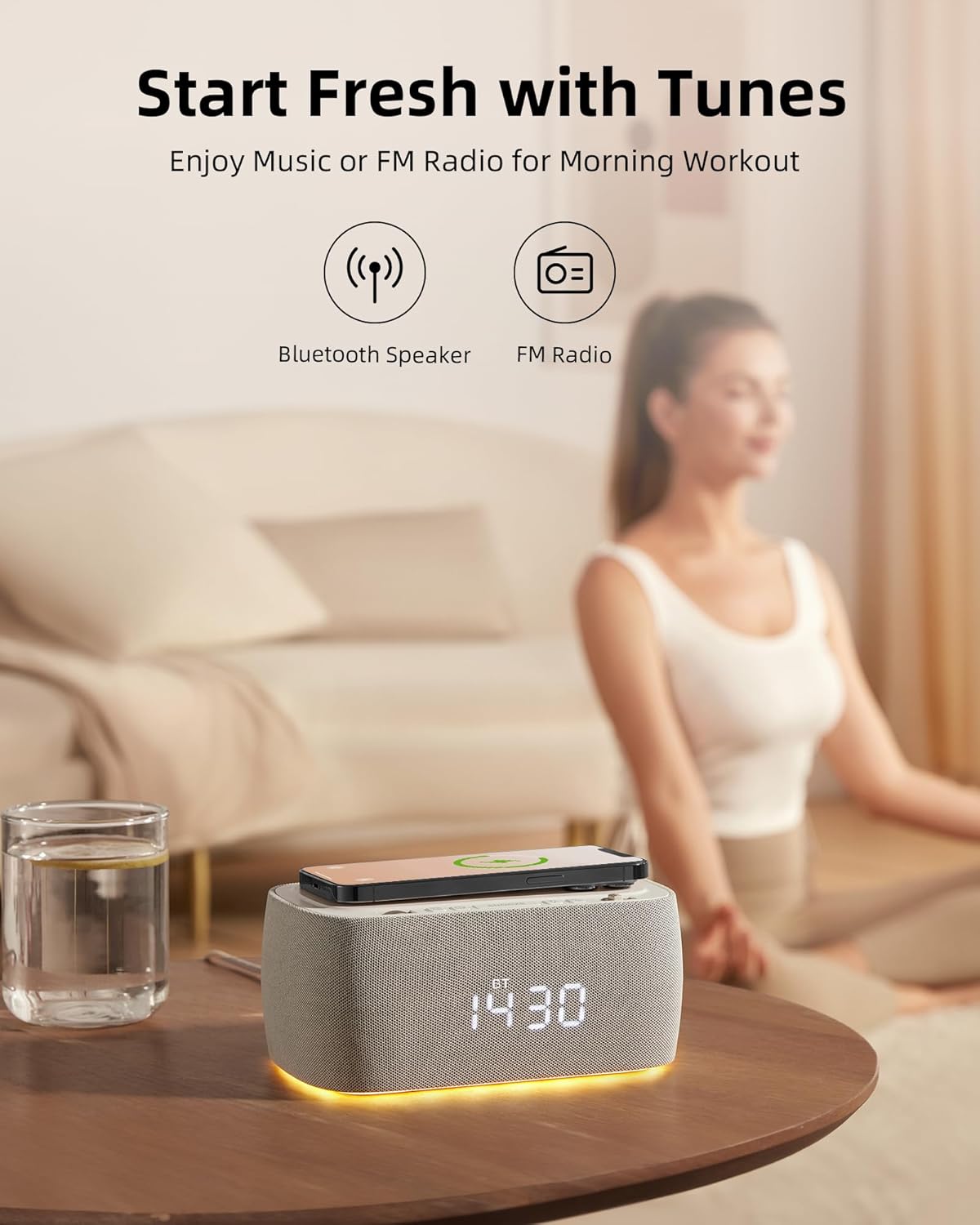
Figure 4: The EZVALO Digital Alarm Clock with its warm halo night light illuminated.
6.3 Playing Music via Bluetooth
Once paired (refer to section 5.4), you can play music from your connected device. Use the Эрхий хүрд солих to skip tracks (rotate) or play/pause (press).
6.4 Using FM Radio
In FM Radio mode (refer to section 5.5), use the Эрхий хүрд солих to navigate between saved stations or manually tune. Adjust the volume using the Гүйлгэх дугуй.
6.5 Түр хойшлуулах функц
Сэрүүлэг дуугарах үед товчийг дарна уу Зүүрмэглэх товч to temporarily silence the alarm for a set period (typically 9 minutes). To turn off the alarm completely, press and hold the Зүүрмэглэх товч.
Видео 3: Бүрэн гүйцэдview of the alarm clock's features and benefits for a bedroom setup.
7. Онцлогууд
The EZVALO Digital Alarm Clock is designed with multiple functionalities to enhance your daily routine:
- 6-ын-1 функциональ байдал: Large clock display, Bluetooth speaker, FM radio, Wireless Phone Charger, Night light, USB-C PD Fast Charger.
- Digital FM Radio: Features digital tuning from 87.5MHz to 108.0MHz with 30 levels of volume adjustment.
- Хос дохиоллын тохиргоо: Conveniently set two separate alarms for different schedules.
- Stereo Speaker with Bluetooth 5.0: Dual speaker design for rich stereo sound, offering faster speed and greater range (10m distance) for music and audiobooks.
- Багасгах LED дэлгэц: 5 brightness levels, including an OFF setting, to suit your preference and ensure undisturbed sleep.
- Halo Night Light: Emits a warm light from the bottom, ideal for a gentle sleep aid or low-light navigation.
- Утасгүй цэнэглэгч дэвсгэр: Provides up to 7.5W for iOS and 10W for Android devices.
- Additional USB-C Fast Charging Port: Boost charges PD-enabled phones from 0 to 50% in approximately 30 minutes.
- USB-A цэнэглэх порт: Offers an additional charging option for other devices.

Figure 5: Visual representation of the 6-in-1 features of the EZVALO Digital Alarm Clock.
Video 4: Highlights how the 7-in-1 alarm clock can simplify your routine and reduce screen time.
8. Засвар үйлчилгээ
8.1 Цэвэрлэгээ
To clean the device, gently wipe the surfaces with a soft, dry cloth. Do not use abrasive cleaners, solvents, or harsh chemicals, as these may damage the finish or internal components.
8.2 Хадгалалт
When not in use for extended periods, unplug the device and store it in a cool, dry place away from direct sunlight and extreme temperatures.
9. Алдаа засах
If you encounter any issues with your EZVALO Digital Alarm Clock, please refer to the following common problems and solutions:
- Төхөөрөмж асахгүй байна: Цахилгаан адаптер нь төхөөрөмж болон ажиллаж байгаа цахилгаан залгуурт найдвартай холбогдсон эсэхийг шалгаарай.
- Утасгүй цэнэглэлт ажиллахгүй байна: Check that your device is Qi-compatible and properly centered on the charging pad. Remove any thick cases, metal objects, or magnetic attachments that may interfere with charging.
- Сэрүүлэг дуугарахгүй байна: Verify that the alarm is set correctly and activated (alarm icon visible on display). Check the alarm volume.
- Bluetooth холболттой холбоотой асуудлууд: Ensure the clock is in Bluetooth pairing mode ('BT' flashing) and your device's Bluetooth is enabled and searching. Try unpairing and re-pairing if issues persist.
- FM радио хүлээн авах чадвар муу: Extend the FM antenna (if applicable) and try repositioning the device for better signal. Perform an auto-scan to find stronger stations.
- Display too bright/dim: -г ашиглана уу Гэрэлтүүлгийг тохируулах товчлуур to cycle through the desired brightness levels.
Хэрэв эдгээр шийдлүүдийг туршиж үзсэний дараа асуудал хэвээр байвал хэрэглэгчийн дэмжлэгтэй холбогдоно уу.
10. Техникийн үзүүлэлтүүд
| Онцлог | Тодорхойлолт |
|---|---|
| Брэнд | ЭЗВАЛО |
| Загварын дугаар | PEG_WOMENMOBILEPURCHASE-609312726093-6 |
| Өнгө | Саарал |
| Дэлгэцийн төрөл | Дижитал LED |
| Эрчим хүчний эх үүсвэр | Утастай цахилгаан |
| Бүтээгдэхүүний хэмжээс | 7.08"W x 3.14"H |
| Зүйлийн жин | 2.16 фунт |
| Материал | Акрилонитрил бутадиен стирол (ABS) |
| Холболтын технологи | USB-C, Bluetooth 5.0 |
| Утасгүй цэнэглэх гаралт | Up to 10W (Android), 7.5W (iOS) |
| USB-C PD хурдан цэнэглэлт | Тиймээ |
| FM радиогийн давтамж | 87.5 МГц-ээс 108.0 МГц хүртэл |
11. Баталгаат хугацаа ба дэмжлэг
EZVALO products are designed and manufactured to the highest quality standards. For warranty information or technical support, please refer to the contact details provided with your purchase or visit the official EZVALO webсайт. Дэмжлэг үзүүлэх үйлчилгээтэй холбогдохдоо загварын дугаар болон худалдан авсан огноог бэлэн байлгана уу.


