1. Танилцуулга
This manual provides comprehensive instructions for the setup, operation, and maintenance of your Cherry MW 9100 Wireless Rechargeable Mouse. The MW 9100 is a compact, versatile mouse offering dual connectivity options (Bluetooth or 2.4 GHz USB receiver) and a convenient rechargeable battery.
Гол онцлогууд нь:
- Compact design with charging functionality.
- Flexible operation: use while charging via USB-C cable.
- Dual connectivity: Bluetooth or 2.4 GHz USB receiver.
- Magnetic storage for the USB receiver, ideal for travel.
- Adjustable DPI settings for varied usage.
2. Багцын агуулга
Бүх зүйл багцад байгаа эсэхийг шалгана уу:
- Cherry MW 9100 Wireless Rechargeable Mouse
- USB-C цэнэглэгч кабель
- 2.4 GHz USB хүлээн авагч
- Хамгаалалтын уут
- Хэрэглэх заавар (энэ баримт бичиг)
3. Тохиргоо
3.1 Хулгана цэнэглэх
The Cherry MW 9100 mouse features a built-in rechargeable battery. Before initial use, or when the battery is low, connect the included USB-C cable to the mouse and to a USB power source (e.g., computer USB port, USB wall adapter). The mouse can be used normally while charging.

Зураг 3.1: Топ view of the Cherry MW 9100 mouse, showing the charging indicator light.
3.2 Хулгана холбох
The MW 9100 offers two connection methods: 2.4 GHz wireless via USB receiver or Bluetooth.
3.2.1 2.4 GHz утасгүй холболт
- Locate the USB receiver. It is magnetically stored in a compartment on the underside of the mouse.
- USB хүлээн авагчийг компьютер дээрээ байгаа USB порт руу оруулна уу.
- On the underside of the mouse, slide the switch to the "RF" position.
- Хулгана таны компьютерт автоматаар холбогдох ёстой.
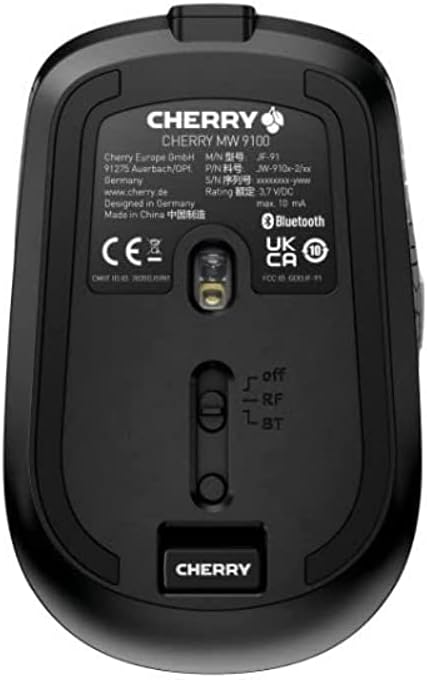
Зураг 3.2: Underside of the Cherry MW 9100 mouse, highlighting the USB receiver storage and the connection mode switch.
3.2.2 Bluetooth холболт
- On the underside of the mouse, slide the switch to the "BT" (Bluetooth) position.
- Press and hold the small pairing button located near the connection switch on the underside of the mouse until the LED indicator on the mouse starts blinking, indicating pairing mode.
- Компьютер эсвэл төхөөрөмж дээрээ Bluetooth тохиргоог нээгээд шинэ төхөөрөмжүүдийг хайгаарай.
- Select "Cherry MW 9100" from the list of available devices to complete the pairing process.
4. Ашиглалтын заавар
4.1 Үндсэн функцууд
The Cherry MW 9100 mouse features standard left and right click buttons, a scroll wheel (which also functions as a middle click button), and two side buttons for navigation (typically forward/back).
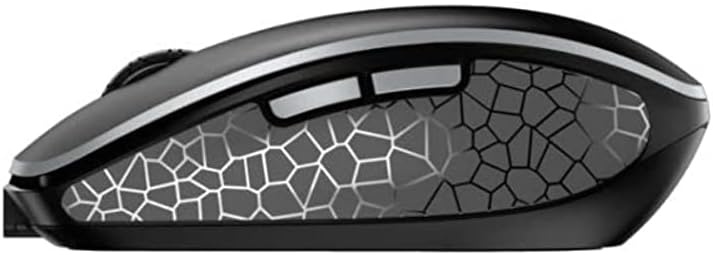
Зураг 4.1: Хажуу тал view of the Cherry MW 9100 mouse, illustrating the ergonomic design and side buttons.
4.2 DPI тохируулга
The mouse includes a DPI (Dots Per Inch) button, usually located near the scroll wheel, allowing you to adjust the cursor sensitivity. Press this button to cycle through different DPI settings to match your preference or task requirements.

Зураг 4.2: A hand demonstrating the comfortable grip on the Cherry MW 9100 mouse during use.
5. Засвар үйлчилгээ
To ensure optimal performance and longevity of your Cherry MW 9100 mouse:
- Цэвэрлэгээ: Хулганы гадаргууг цэвэрлэхийн тулд зөөлөн, хуурай даавуу ашиглаарай. Зөрүүд бохирдлыг бага зэрэг арчина.amp cloth can be used, but ensure no moisture enters the device. Avoid harsh chemicals or abrasive materials.
- Хадгалах: When not in use, especially during travel, store the mouse in the provided protective pouch to prevent scratches and damage.
- Батерейны арчилгаа: Avoid fully discharging the battery frequently. Recharge the mouse when the low battery indicator appears.
6. Алдаа засах
| Асуудал | Боломжит шалтгаан | Шийдэл |
|---|---|---|
| Хулгана хариу өгөхгүй байна | Low battery, incorrect connection mode, USB receiver not connected, Bluetooth not paired. |
|
| Intermittent connection (Bluetooth) | Interference, device driver issues, distance from device. |
|
| Курсорын хөдөлгөөн тогтворгүй эсвэл удаан байна | Dirty optical sensor, low battery, incorrect DPI setting. |
|
7. Техникийн үзүүлэлтүүд
| Онцлог | Дэлгэрэнгүй |
|---|---|
| Брэнд | Интоор |
| Загварын дугаар | JW-9100US-2 |
| Холболтын технологи | Bluetooth, 2.4 GHz USB Wireless |
| Хөдөлгөөнийг илрүүлэх | Оптик |
| Онцлог шинж чанарууд | Хөнгөн, зөөврийн, цэнэглэдэг |
| Бүтээгдэхүүний хэмжээс | 4 x 3 x 2 инч |
| Зүйлийн жин | 6.4 унц |
| Өнгө | Хар |
8. Баталгаат хугацаа ба дэмжлэг
Баталгаат хугацаа болон техникийн дэмжлэг авахыг хүсвэл албан ёсны Cherry-ээс лавлана уу website or contact Cherry customer service directly. Keep your proof of purchase for warranty claims.
Үйлдвэрлэгч: ИНТОР
Webсайт: www.cherry.de